Free Affiliate Link Checker
Paste an affiliate link and we follow every redirect from a server, then tell you whether your affiliate tag or click id is still on the final URL. Broken tracking is invisible until payday, so test it first.
Checking UTM parameters instead of an affiliate tag? Use the UTM Redirect Preservation Checker.
We follow every redirect from a server, then compare the affiliate parameters on your link against the ones still present on the final URL. Nothing is stored on our side. Some large merchants treat automated requests differently from a real browser, so if a destination canonicalises or blocks our request, check that link with a real click too.
Shorten a link for free while you are here
Flyn short links forward your full query string, so the affiliate tag you just verified stays intact. Free accounts get 25 new links a month, and every link gets a click count that already has bots and crawlers filtered out, so your numbers mean something.
How to Check an Affiliate Link in 3 Steps
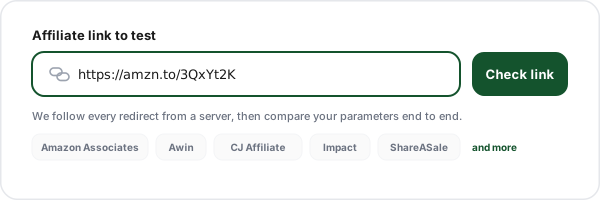
Paste your affiliate link
Drop in the URL you want to test. Short links, cloaked links and network deep links all work, because we resolve the chain from a server instead of in your browser. That is the reason a client-side affiliate link validator can never tell you whether a link is actually live.
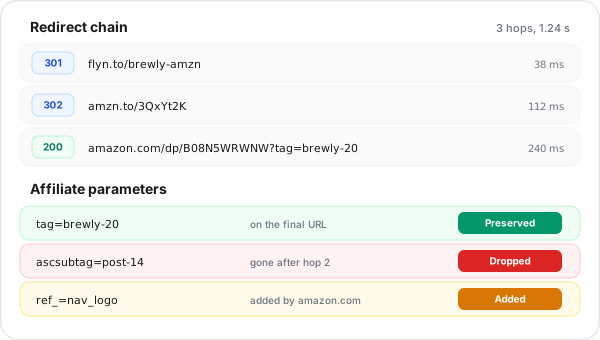
Read the parameter verdicts
Every affiliate parameter we recognise is labelled preserved, dropped, changed or added by the network, with the value on your link shown next to the value on the final URL. Commission-critical parameters are marked so you know which failures actually cost money.
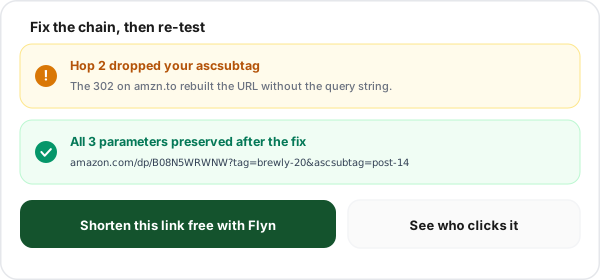
Fix the chain and re-test
Remove the hop that strips your query string, replace the id that got overwritten, or swap the dead destination, then run the check again. The full redirect chain with status codes and timings is right there, so you know exactly which hop to blame.
What an Affiliate Link Checker Actually Tests
Most tools that call themselves an affiliate link tester do one of two things. Either they parse the URL in your browser and tell you the syntax looks fine, which cannot prove the link is live because browsers block cross-origin requests, or they draw the redirect chain and stop there. Neither answers the question that actually matters to a publisher: after all those hops, is my affiliate tag still attached to the page the visitor lands on?
This checker answers that directly. We resolve the chain server side, collect the query parameters from the link you pasted, collect the query parameters from the final URL, and diff them. Recognised affiliate keys get named with their network and a plain-English note about whether losing them costs a commission or only costs reporting detail. Everything we do not recognise still appears with the same verdict, so a custom parameter your own program uses is never silently ignored.
The redirect chain is still there, hop by hop, with status codes and response times, because you need it to work out which hop to blame. If you only want the chain itself, the redirect checker and the URL expander are lighter tools for the same job. For the theory behind all of it, our affiliate link tracking guide covers how attribution works end to end.
Affiliate Parameters by Network: What Has to Survive
Not every parameter is worth the same. These are the keys we recognise, and the one that usually carries the attribution. Ambiguous keys such as sid, aid, u, m and tag are only attributed to a network when a hostname in the chain matches that network on a registrable-domain boundary, so a stray parameter on a blog is never mislabelled.
| Network | Parameters we detect | Usually attributes on | Note |
|---|---|---|---|
| Amazon Associates | tag, ascsubtag, linkCode, linkId | tag | Amazon help tells Associates to click the link and look for the Store or Tracking ID in the URL, usually as &tag=. The rest is reporting detail. |
| Awin | awc, awinmid, awinaffid, clickref | awc | Awin documentation calls awc the click identifier it needs to attribute a click and transaction to a partner. clickref2 to clickref6 are documented as non-public and never reach the advertiser page, so we never fail a link for losing them. |
| CJ Affiliate | PID, AID, SID, cjevent | cjevent | cjevent is generated at redirect time and CJ advertisers are asked to store it and return it on conversion. PID and AID identify you and the advertiser on the click URL. |
| Impact | irclickid, irgwc, irmp, sharedid, SubId1 | irclickid | Impact appends irclickid to the landing page URL when it redirects through its tracking domains, and the stored click id is what a conversion is matched against. SubId1 is case sensitive. |
| ShareASale | u, m, afftrack, sscid | sscid, or u plus m on classic links | sscid is the click id the network appends for cookieless matching. u and m are your affiliate id and the merchant id on a classic ShareASale click URL. |
| Rakuten Advertising | ranMID, ranEAID, ranSiteID | ranMID plus ranEAID | ranEAID is the publisher id and ranMID the merchant. ranSiteID only splits your own reporting. |
| ClickBank | affiliate, vendor, extclid, tid, hop | affiliate nickname on the hoplink | extclid is the external click id ClickBank added on 4 June 2024 for third-party trackers, up to 256 characters. tid still works but ClickBank now recommends the newer parameters. hop has been hidden by default since affiliate id encryption in March 2023. |
| Digistore24 | aff, cid, campaignkey | aff | cid carries a click id for a third-party tracker. campaignkey is a reporting split you control. |
| PartnerStack | ps_partner_key, ps_xid | ps_partner_key | The vendor site reads the partner key to open a tracked session. ps_xid ties the visit to one specific click. |
| eBay Partner Network | campid, mkcid, mkrid, mkevt, customid | campid | campid is your EPN campaign id. mkcid and mkrid flag the traffic as partner traffic, customid is your own sub-id. |
| Booking.com | aid, label | aid | aid identifies your partner account on the link. label is a free-text reporting split, not an account identifier. |
| Post Affiliate Pro | a_aid, a_bid | a_aid | The merchant tracking script reads a_aid on the landing page. a_bid names the creative. |
| Refersion, Skimlinks, FlexOffers | rfsn, skimlinks_id, xcust, fobs | rfsn, skimlinks_id | Refersion reads rfsn on the landing page and sets its own cookie. xcust and fobs are sub-ids. |
| Generic and in-house programs | ref, aff, aff_id, affiliate, partner, subid, click_id | varies | Shopify apps, SaaS partner programs and self-hosted scripts all use these. Bare ref and partner are also common non-affiliate source tags, so we report them without assuming they drive a payout. |
Last reviewed 1 August 2026. The Amazon, Awin, ClickBank and Impact rows were checked against those networks' own published documentation: Amazon Associates help on checking that links are tagging, Awin's click appends and dynamic parameters reference, ClickBank's affiliate tracking parameters guide and its hop parameter notice, and Impact's click id integration docs. The other rows describe the pattern we see on live links rather than a payout promise. Networks change tracking keys without telling publishers, so confirm against your own network documentation and click log before you rewrite links.
Building the links in the first place? The UTM builder and UTM parser handle the analytics half of the same URL, and URL cleaner strips the junk parameters that pile up when a link passes through several platforms.
Worked Example: An Amazon Link That Loses Its Tag
Here is the exact failure that costs Amazon Associates the most money, traced end to end. The link looks perfect. It resolves. It returns a 200. And it pays nobody.
What you published
https://links.example.com/go/headphonesThe chain
- 301links.example.com/go/headphones
- 302amzn.to/3xAbCdE
- 200amazon.com/dp/B08N5WRWNW
The verdict
tag is Dropped. The cloaking redirect at hop one was configured with a bare destination, so it forwarded the path and threw away the query string. Amazon returns a healthy 200 for the product page whether or not a tag is attached, which is why this failure is invisible until a payout report comes back empty.
The fix is to make the first hop forward the full query string, or to point the cloaked link at the tagged Amazon URL directly. Re-run the check and tag should come back Preserved. If you cloak links for readability, our guide on how to cloak affiliate links covers the redirect settings that keep parameters intact.
Why Affiliate Links Stop Working: 6 Common Causes
If your affiliate link is not working, it is almost always one of these. The checker distinguishes between them so you are not guessing.
A redirect drops the query string
The most common killer. A hop redirects to the bare path instead of forwarding ?tag=, so everything after the question mark vanishes. Server rules written as a plain destination rather than a pass-through cause this on nearly every platform.
A plugin rewrites your id
Link monetisation plugins and some themes swap affiliate ids on outbound links. You see the parameter arrive, but the value belongs to somebody else. This shows up as Changed in the report and is the most expensive failure because everything looks fine on the surface.
The offer is paused or geo-blocked
The chain stops on a network redirector instead of a merchant page. That normally means the merchant paused the offer, the offer is not available in the location the request came from, or a required parameter is missing from the deep link.
The merchant moved the landing page
Deep links rot. Product pages get retired, category URLs get restructured, and the chain ends on a 404 or a soft redirect to the homepage. Homepage redirects are the sneaky version: the status looks healthy but conversion collapses.
An insecure hop in the middle
A plain HTTP hop can have parameters rewritten by proxies or carrier gateways, and browsers drop the referrer across the downgrade. Any chain with an http:// hop deserves a second look even when the parameters survive our trace.
A meta refresh or JavaScript jump at the end
Some landing pages move the visitor again after the HTML loads. That final jump happens after a server-side trace ends, so parameters can still be lost there. We flag both patterns when we spot them on the final page.
Redirect type matters too. Our explainer on 301 versus 302 redirects covers which one to use for affiliate hops, and what smart links are explains the conditional routing that makes some offers resolve differently for different visitors.
Preserved, Dropped, Changed, Added: Reading Each Verdict
Five possible outcomes per parameter, and what each one should make you do next.
| Verdict | What it means | What to do |
|---|---|---|
| Preserved | The parameter is on your link and on the final URL with exactly the same value. | Nothing to do. This is the outcome you want for every payout parameter. |
| Dropped | The parameter was on your link but is gone by the time the chain finishes. | Find the hop that strips the query string. If the network is cookie based, confirm with a real click before rewriting anything. |
| Changed | The parameter exists on both ends but the value is different. | Something in the chain is overwriting your id. Audit link plugins, monetisation scripts and any second affiliate tool on the page. |
| Added by network | The parameter only appears on the final URL, added somewhere in the chain. | Healthy. Networks like CJ, ShareASale and Impact mint a click id at redirect time, so an added parameter never counts against the overall verdict. |
| Dropped by design | The parameter is gone, and the network documents that it is never passed to the advertiser landing page. | Nothing to do. Awin clickref2 to clickref6 and ClickBank hop behave this way, and they never count towards a failure. |
When a Dropped Parameter Still Pays You
This is the part most affiliate link checkers leave out, and leaving it out makes them wrong. A redirect chain can drop your parameter and the commission can still land, because a large share of affiliate networks attribute with a cookie set at an intermediate hop rather than with a value on the final URL. The network redirector receives the click, writes its own cookie, and forwards the visitor to a clean merchant URL on purpose. Nothing is broken. The tag was never supposed to arrive.
So treat a Dropped verdict as a strong lead, not a verdict on your income. The parameters that genuinely have to arrive are the ones the merchant page itself reads: Impact's irclickid, Refersion's rfsn, PartnerStack's ps_partner_key, Amazon's tag, and any parameter your own postback integration depends on. We mark those Commission critical in the results. Everything else deserves a confirming test click and a look at your network click log before you rewrite anything.
If you run your own program rather than promoting somebody else's, the reliable answer is a server-to-server postback instead of a parameter that has to survive a browser journey. Our postback URL tracking guide explains the pattern, the postback URL tester lets you fire a test call against your endpoint, and tracking which posts drive sales shows how to attribute revenue back to a specific placement.
What This Affiliate Link Tester Cannot Do
It cannot test by country
We check from one server in one location. A geo-targeted offer can resolve to a different page for your audience than it does for us. We do not route through proxies or multiple regions and will not claim otherwise.
It cannot test by device
We send one desktop-class user agent. A smartlink that routes iOS traffic to the App Store and desktop traffic to a landing page will only show you one of those branches here.
It cannot see cookies the network sets
We report what is in the URL. A cookie written at an intermediate hop is invisible to a redirect trace, which is exactly why a Dropped verdict is a lead rather than a conclusion.
It cannot confirm a payout
Only your network dashboard can. Use this to catch broken chains fast, then confirm the important ones with a real click and the network click log.
Need device-specific behaviour tested? The deep link tester is built for app URL schemes, and the deep links documentation covers how Flyn routes iOS and Android traffic on Pro.
Free Forever, and What Pro Adds
This checker is free with no account. Flyn short links are the other half of the job: a link you control, that forwards your query string, and that counts every click. Here is the honest split.
Free: 25 links a month
Create 25 new short links every month on the free plan, edit any of them at any time, and keep them for as long as your account is open. No card, no trial clock.
Free: real click counts
Every link gets a click count that already has bots and crawlers filtered out, and your analytics page shows the account-wide human versus bot split, so an affiliate post that looks busy is not just crawlers. Breakdowns by country, device and referrer are Pro.
Pro: routing that fits offers
Per-country geo routing (country level), iOS and Android device routing with deep links, A/B split testing, click limits with a fallback URL, and password protection. Pro starts at 9 dollars a month billed annually, or 12 dollars month to month.
Pro: revenue attribution
Conversion tracking with server-to-server postbacks and a 30-day attribution window, retargeting pixels on your links, custom branded domains, and full analytics breakdowns.
Read the detail on conversion tracking, geo targeting and custom domains, or the setup steps in the conversion tracking docs.
Frequently Asked Questions
How do I check if my affiliate link is working?
Why is my affiliate link not tracking?
How do I check if my Amazon Associates tag is working?
Does a short link break my affiliate tag?
My affiliate parameter was dropped. Did I lose the commission?
What does it mean when the checker says a parameter was changed?
Why did a parameter get added that I never put in the link?
Can this tool test affiliate links by country or device?
Which affiliate networks does this affiliate link validator recognise?
How often should I test my affiliate links?
Can I check someone else's affiliate link with this tool?
Does the affiliate link checker store the links I test?
Still stuck? The Flyn help center has step-by-step walkthroughs, including connecting a custom domain.
More Free Link Tools
The rest of the link diagnostics set. All free, all instant, no sign-up.
Link Inspector
Full technical breakdown of any URL: headers, status, canonical and metadata.
Postback URL Tester
Fire a test server-to-server postback and see exactly what your endpoint receives.
Redirect Map Generator
Turn an old-to-new URL list into a clean redirect map before a migration.
Branded Domain Finder
Find a short branded domain for your links, with availability at a glance.
URL Expander
Reveal where any short link really goes before you click it.
Redirect Checker
Trace 301 and 302 chains hop by hop and catch loops.
Short Link Safety Checker
Score a short link for risk before you put it in front of an audience.
Campaign URL QA Checker
Catch broken UTM tagging before a campaign goes live.
Stop finding out at payday
Verify the tag survives, then publish the link on a domain you control. Free accounts get 25 new links a month with a bot-filtered click count on every one, and Pro adds branded domains, country routing and conversion tracking with server-to-server postbacks.
No card on the free plan. Pro is 9 dollars a month billed annually, or 12 dollars month to month, or 249 dollars once for lifetime access.