Free Deep Link Tester
Validate iOS Universal Links and Android App Links for any domain. Check your AASA and assetlinks.json configuration in seconds.
We'll check /.well-known/apple-app-site-association and /.well-known/assetlinks.json
Need deep links without the setup hassle?
Flyn short links automatically deep link into 18 apps including YouTube, Spotify, TikTok, Instagram, and more. Every click is counted free; Pro adds device and country breakdowns.
How to Test Deep Links in 3 Steps
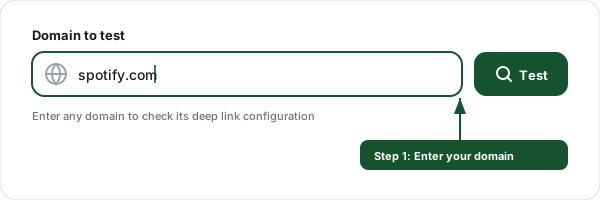
Enter your domain
Type the domain you want to test, for example, spotify.com or yourdomain.com.
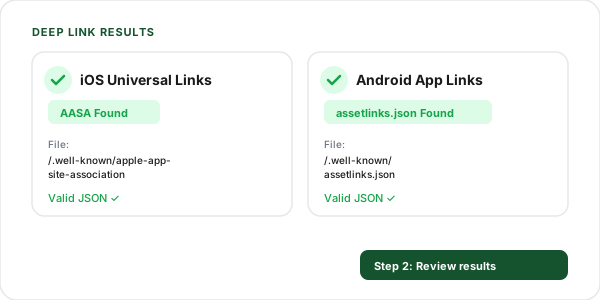
Review the results
See validation results for both iOS Universal Links (AASA) and Android App Links (assetlinks.json) side by side.
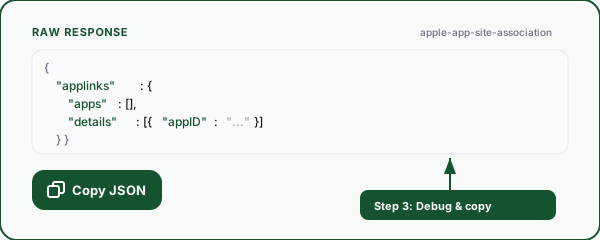
Debug and copy
View the raw JSON response, copy it for debugging, and verify your deep link configuration is correct.
What This Tool Checks
A comprehensive validation of your deep link configuration across both mobile platforms.
iOS Universal Links
Validates your apple-app-site-association file including app IDs, associated paths, and JSON structure.
Android App Links
Checks your assetlinks.json for package names, SHA256 fingerprints, and Digital Asset Links compliance.
Validation Checks
Verifies HTTPS, file existence, JSON format, Content-Type headers, and required fields in one scan.
Raw JSON Viewer
View and copy the raw JSON response from both configuration files with syntax formatting.
Instant Results
Get results in seconds. No sign-up, no API key, no limits on the number of domains you can test.
Detailed Diagnostics
Color-coded results show exactly what passed, what failed, and what needs attention with clear messages.
How Deep Links Work: AASA and AssetLinks Explained
Deep links allow mobile apps to claim ownership of specific web domains. When a user taps a link to your website on their mobile device, the operating system checks whether an installed app has registered to handle that domain. If it has, the link opens directly in the app instead of the browser.
For iOS, Apple uses the apple-app-site-association (AASA) file. Your server hosts this JSON file at /.well-known/apple-app-site-association, and it contains your app's Team ID, Bundle ID, and the URL paths the app handles. Apple's CDN fetches this file when a user installs or updates your app.
For Android, Google uses the assetlinks.json file at /.well-known/assetlinks.json. It contains Digital Asset Links statements that map your domain to your app's package name and signing certificate SHA256 fingerprint. Android verifies this file at install time to enable automatic link handling.
AASA example (iOS):
{
  "applinks": {
    "details": [{
      "appID": "ABCDE12345.com.example.app",
      "paths": ["/products/*", "/blog/*"]
    }]
  }
}
assetlinks.json example (Android):
[{
  "relation": [
    "delegate_permission/common.handle_all_urls"
  ],
  "target": {
    "namespace": "android_app",
    "package_name": "com.example.app",
    "sha256_cert_fingerprints": [
      "AB:CD:EF:..."
    ]
  }
}]
Deep Links + Short Links: Better Together
Flyn short links handle deep linking automatically for 18 popular apps, no AASA or assetlinks.json configuration needed.
Auto deep linking
Flyn detects the destination app and deep links automatically on mobile. YouTube, Spotify, TikTok, Instagram, and more.
Web fallback
If the app isn't installed, users land on the web page. No dead ends, no broken experiences.
One link, all platforms
A single Flyn short link works on iOS, Android, and desktop, each gets the optimal experience.
Click analytics
Track every click in real time; Pro adds device, location, and referrer breakdowns to show exactly how your deep links perform.
Frequently Asked Questions
What are deep links?
What is the apple-app-site-association (AASA) file?
What is the assetlinks.json file?
What is the difference between Universal Links and App Links?
How do I set up iOS Universal Links?
How do I set up Android App Links?
Why are my deep links not working?
Does this tool check if the app is actually installed?
How often should I test my deep link configuration?
Can Flyn short links support deep links?
If your links need different destinations per device, start with the best link shorteners with device-based routing and come back here to test the result.
Explore More Free Tools
More developer and SEO tools to complement your deep link testing.
Apple App Site Association Generator
Build the apple-app-site-association JSON that iOS reads for Universal Links, with app IDs and path matching rules.
In-App Browser Detector
Deep link not opening? Check whether the tap is trapped in the Instagram or Facebook in-app browser.
Tel / Click-to-Call Link
Build tel: click-to-call links with E.164 phone formatting and extension support.
SMS Link Generator
Build sms: click-to-text links with pre-filled message and international phone numbers.
URL Expander
Reveal the full destination of any shortened URL before clicking it.
App Store Link Generator
One smart link that routes iOS to the App Store, Android to Google Play, and desktop to your site.
Skip the setup. Let Flyn handle deep links.
Flyn automatically deep links into 18 apps with branded short links, real-time analytics, QR codes, and A/B testing, all in one platform.