Free URL Expander
Unshorten any link safely. Reveal the full destination of bit.ly, t.co, tinyurl, and other short URLs before you click.
Expanding lots of links? Shorten and track your own.
Flyn gives you short links with built-in click analytics: every click counted free, and Pro adds device and location breakdowns plus your own custom domain. Clean one-hop redirects on every link.
Why Use a URL Expander?
Short links are convenient but hide where they lead. Expand them first to stay safe. Curious what actually happens under the hood? The URL redirect glossary entry explains the mechanics in a couple of minutes.
Reveal hidden destinations
See where any short link really goes before you click. Works with Bitly, TinyURL, t.co, and every other shortener.
HTTPS safety check
Instantly see whether the destination uses secure HTTPS or insecure HTTP with a clear visual indicator.
Full redirect chain
View every hop from start to finish with status codes (301, 302, 307) and response times per hop.
Private and server-side
Expansion happens on our server, your browser never touches the destination, keeping your IP private.
No sign-up required
Expand unlimited URLs for free. No account, no email, no limits. Just paste and expand.
Local history
Your recent expansions are saved locally in your browser so you can quickly reference past lookups.
How to Expand a Short URL in 3 Steps
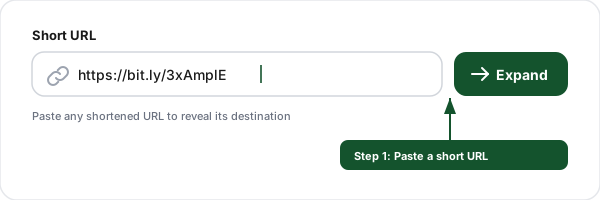
Paste the short URL
Enter any shortened URL from Bitly, TinyURL, t.co, or any other shortener into the input field.
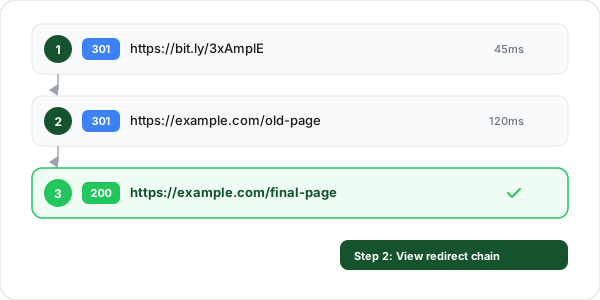
View the redirect chain
The tool follows every redirect hop server-side and reveals the full chain with status codes and timing per hop.
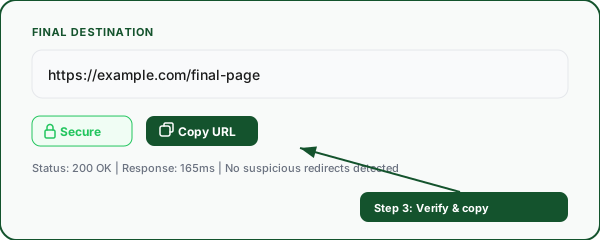
Verify and copy
Check the final destination URL, verify it uses HTTPS, and copy the expanded URL if it looks safe.
Frequently Asked Questions
What is a URL expander?
Why should I expand short links before clicking them?
Which URL shorteners does this tool support?
How does the URL expander work?
What do the redirect status codes (301, 302, 307) mean?
What does the HTTPS safety indicator mean?
Can a short URL have multiple redirects?
Is this URL expander free?
What if the short URL is expired or broken?
Does expanding a URL notify the link owner?
More Free Marketing Tools
Explore other free tools from Flyn to grow your campaigns and track performance. Checking a suspicious link? Our guide on whether short links are safe covers the full verification routine, and the anatomy of a URL explains every part of what the expanded address is telling you. For a single view with the destination, every hop, and a safety read together, use the link inspector.
Redirect Checker
Trace full redirect chains, detect loops, and check 301/302 status codes.
UTM Builder
Build campaign tracking URLs with UTM parameters for Google Analytics.
Google Drive Direct Link Generator
Rebuild a Drive share URL as the direct download address that serves the file instead of the preview page.
Link Rotator
Split one link across multiple destination URLs with weighted rotation, for A/B tests and ad rotation.
Ready to create your own short links?
Build short links with click analytics and A/B testing, plus deeper breakdowns and custom domains on Pro. One platform for shortening, tracking, and optimizing every link.