Free UTM Builder
Build campaign tracking URLs with UTM parameters in seconds. Works with Google Analytics 4, LinkedIn, Facebook, and every analytics platform.
Quick presets
Where the traffic comes from
Marketing channel type
Identifies the specific campaign
Enter a URL to generate your campaign link.
UTM URL too long?
Shorten your campaign URL with Flyn to get a clean, branded link with built-in click analytics, QR codes, and A/B testing.
How to Build a UTM URL in 3 Steps
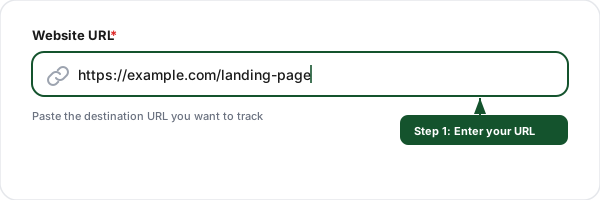
Enter your URL
Paste the destination URL you want to track. This is the landing page visitors will reach when they click your campaign link.
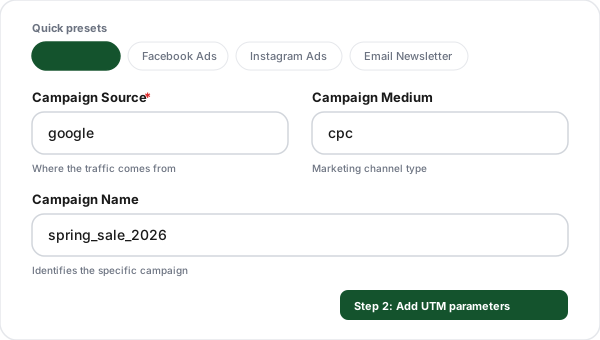
Add UTM parameters
Fill in the source, medium, and campaign name. Use our quick presets for popular platforms like Google Ads, Facebook, or Email, or enter custom values.
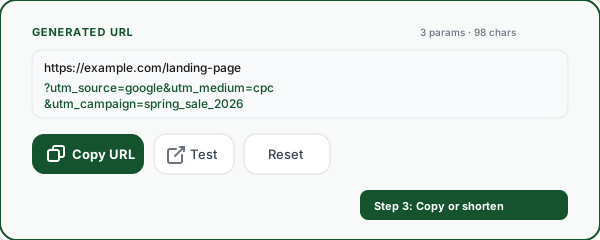
Copy or shorten your URL
Copy the generated UTM URL to use in your campaigns. For a cleaner link, shorten it with Flyn to get branded short links with click analytics and QR codes.
What Are UTM Parameters?
UTM parameters (also called UTM tags or UTM codes) are short text tags that you add to the end of a URL to track where your website traffic comes from. When someone clicks a link with UTM parameters, those tags are sent to your analytics platform (like Google Analytics 4), giving you precise data about which campaigns, channels, and content drive the most traffic and conversions. A UTM tag generator like this one creates the correctly formatted tracking URL for you.
Without UTM parameters, your analytics will show generic traffic sources like "direct" or "referral", making it impossible to know which specific email, social post, or ad drove a visit. With a UTM link builder, you can create campaign tracking URLs that attribute every click to the exact campaign and channel that generated it. To complement that parameter-level tracking with link-level attribution, you can give each placement its own short link.
Example UTM-tagged URL:
https://example.com/pricing?utm_source=google&utm_medium=cpc&utm_campaign=spring_saleAnatomy of a UTM URL
A UTM-tagged URL is just a normal URL with tracking parameters added to the end. Understanding each part makes it obvious why the format matters, and where things break.
https://example.com/pricing?utm_source=google&utm_medium=cpc&utm_campaign=spring_salehttps://Protocol
How the browser connects. Always use https for campaign links, http destinations can trigger security warnings.
example.comHost (domain)
The website the link points to, including any subdomain like www or shop.
/pricingPath
The specific page on the site. UTM parameters never change which page loads.
?Query start
The first question mark marks where the query string begins, everything after it is parameters.
utm_source=googleParameter (name=value)
Each UTM tag is a name and a value joined by =. This one says the traffic came from google.
&Separator
Ampersands join multiple parameters. The order of parameters does not matter to analytics.
One more part you may see is the fragment, anything after a #. It is handled by the browser, not the server, so always place UTM parameters before any # fragment, or they may be ignored.
Why UTM Parameters Exist: The Referrer Problem
Analytics tools try to figure out where a visitor came from using the browser's referrer, a header that says which page the user clicked from. The problem: the referrer is missing or unreliable a huge amount of the time.
When there's no referrer, the visit gets dumped into direct traffic and you lose all attribution. The referrer commonly disappears when someone:
- •Types your URL directly or clicks a bookmark
- •Clicks a link inside a mobile app (Instagram, TikTok, LinkedIn, etc.)
- •Opens a link from an email client like Outlook or Apple Mail
- •Arrives from a messaging app like WhatsApp, Telegram, or Slack
- •Moves from an HTTPS site to an HTTP destination
- •Uses a privacy browser or extension that strips the referrer
UTM parameters solve this by writing the source into the URL itself. No matter how the visitor arrives, the campaign data travels with the link, so a newsletter click is always attributed to your newsletter, not lumped into "direct." That's the entire reason UTMs exist, and why every serious marketer tags their campaign links.
All 9 UTM Parameters Explained
utm_sourceRequiredIdentifies the traffic source, the specific website, platform, or tool sending visitors to your site.
Examples
google, facebook, twitter, newsletter, linkedin, partner_site
Pro tip
Always use lowercase. Be specific: use "google" not "search engine".
utm_mediumIdentifies the marketing channel or type of link. This groups sources into categories for high-level reporting.
Examples
cpc, email, social, paid_social, referral, banner, video
Pro tip
Use GA4's default channel grouping terms (cpc, organic, email, social) for automatic categorization in reports.
utm_campaignIdentifies the specific campaign, promotion, or strategic initiative that the link is part of.
Examples
spring_sale, product_launch, black_friday_2026, weekly_digest
Pro tip
Use descriptive names with dates or identifiers. Avoid generic names like "campaign1".
utm_termIdentifies paid search keywords. Primarily used for Google Ads manual tagging when auto-tagging is not enabled.
Examples
running+shoes, best+crm+software, url+shortener
Pro tip
For Google Ads, auto-tagging (gclid) is preferred. Use utm_term for Bing, Yahoo, or other paid search platforms.
utm_contentDifferentiates similar content or links within the same campaign. Useful for A/B testing ad creatives or tracking specific link placements.
Examples
header_cta, sidebar_banner, blue_button, version_a
Pro tip
Great for A/B testing. Use it to compare which CTA placement or creative drives more conversions.
utm_idA unique campaign identifier used by GA4 for data imports and deduplication. Helps connect campaign cost data with analytics.
Examples
abc.123, spring2026_001, fb_retarget_q1
Pro tip
Required for GA4 data import. Use a unique ID per campaign for cost-per-click analysis.
utm_source_platformIdentifies the marketing platform used. Distinguishes between sub-platforms within the same source (e.g., Google Search vs Google Display).
Examples
Google Search, Meta Business, Google Display
Pro tip
New in GA4. Use when a single source has multiple ad platforms you want to distinguish.
utm_creative_formatSpecifies the type of ad creative used in the campaign. Helps analyze which creative formats perform best.
Examples
video, carousel, banner, native, text_ad
Pro tip
New in GA4. Useful for comparing video vs. static ad performance across campaigns.
utm_marketing_tacticDescribes the targeting strategy or tactic applied to the campaign. Helps segment performance by approach.
Examples
remarketing, prospecting, lookalike, brand_awareness
Pro tip
New in GA4. Use to compare retargeting vs. prospecting performance.
UTM Naming Best Practices
Do
Don't
Use lowercase for all parameters
Mix cases: Google, google, GOOGLE
Use underscores or dashes: spring_sale
Use spaces: spring sale
Be consistent: always "facebook"
Alternate: "facebook", "fb", "Facebook"
Use UTMs on external links only
Tag internal site links with UTMs
Document conventions in a shared doc
Let each team member invent their own
Keep names descriptive: q4_product_launch
Use vague names: campaign1, test
Shorten long UTM URLs before sharing
Share raw 200-character UTM URLs in tweets
Test UTM links before launching
Launch campaigns without verifying tracking
UTM Builder + Link Shortener: Why You Need Both
UTM-tagged URLs are long, ugly, and expose your tracking strategy. Combining UTM building with link shortening gives you the best of both worlds.
Clean, branded links
Turn 200-character UTM URLs into short, memorable branded links that people trust and click.
Double analytics
Get click data from both Flyn and Google Analytics. Compare and cross-reference for deeper insights.
QR code support
Generate QR codes for your shortened UTM links. Perfect for print materials, events, and packaging.
A/B test destinations
Split one short link across up to 12 destinations by weight, then compare the clicks each one earned.
Retargeting pixels
Fire Meta, Google, TikTok, and 10 more ad pixels on the shortened UTM link, so every click you tag also grows your retargeting audience.
UTM Builder vs Spreadsheet vs Link Platform: Which Do You Need?
How you build UTM links should match how many you create. Here's when each approach makes sense.
Free UTM builder
A few links per month
A tool like the one above. Fast, free, zero setup.
- ✓Instant and free
- ✓No account needed
- ✓Perfect for one-off links
- ✕No history or organization
- ✕Easy to break naming consistency
- ✕No analytics on the link itself
UTM spreadsheet
5-20 links per month
A shared Google Sheet or Excel file with formulas.
- ✓Keeps a record of past links
- ✓Shareable with a small team
- ✓Free
- ✕Fragile formulas break easily
- ✕Messy URL encoding
- ✕No shortening or click data
- ✕Hard to scale
Link platform (Flyn)
20+ links, or a team
Build, shorten, organize, and track every UTM link in one place.
- ✓Branded short links + QR codes
- ✓Click analytics on every link
- ✓Consistent naming across the team
- ✓Search, tag, and reuse links
- ✕Best value on a paid plan for teams
How to Track UTM Parameters in Google Analytics 4
Google Analytics 4 automatically captures UTM parameters as session-scoped dimensions. Once visitors click your UTM-tagged links, the data flows into GA4 without any additional configuration. Here is how to access your UTM campaign data:
Open Traffic Acquisition Report
In GA4, go to Reports, then Acquisition, then Traffic Acquisition. This report breaks down sessions by source, medium, and campaign.
Filter by campaign
Use the search bar or add a filter for "Session campaign" to isolate a specific campaign. You can also switch the primary dimension to "Session source / medium" for channel-level analysis.
Build custom explorations
For advanced analysis, create an Exploration using dimensions like Session source, Session medium, Session campaign, and Session manual term (utm_term). Combine with metrics like conversions and revenue for full ROI analysis.
GA4 dimension mapping
Common UTM Mistakes to Avoid
Inconsistent naming
Using "Google" in one campaign and "google" in another creates separate entries in your analytics. Always lowercase everything and stick to one naming convention. Our UTM builder auto-lowercases by default.
Tagging internal links
Adding UTM parameters to links within your own site resets the visitor session in Google Analytics, overwriting the original traffic source. This makes it look like your homepage is a major traffic source instead of the actual campaigns.
Using spaces in parameter values
Spaces get encoded as %20 in URLs, making them harder to read in reports and prone to breaking. Use underscores (spring_sale) or dashes (spring-sale) instead. Our builder converts spaces automatically.
Forgetting to document conventions
Without a shared naming guide, team members will invent their own conventions. One person uses "fb" while another uses "facebook". Create a shared spreadsheet or wiki with approved source, medium, and campaign naming rules.
Not testing links before launching
A typo in your URL or UTM parameter can lead to broken links or misattributed data. Always click your UTM links before launching a campaign to verify the destination loads correctly and parameters appear in your real-time analytics.
UTM Parameters by Channel: Real-World Examples
Google Ads
?utm_source=google&utm_medium=cpc&utm_campaign=spring_sale&utm_term=running+shoes&utm_content=headline_v2For Google Ads, consider using auto-tagging (gclid) instead of manual UTMs. Use manual UTMs for Bing, Yahoo, or when you need cross-platform consistency.
Email Newsletter
?utm_source=mailchimp&utm_medium=email&utm_campaign=weekly_digest_mar26&utm_content=hero_ctaUse utm_content to track which link in the email gets the most clicks (hero image, inline link, footer CTA).
Social Media (Organic)
?utm_source=linkedin&utm_medium=social&utm_campaign=thought_leadership&utm_content=carousel_postUse "social" for organic posts and "paid_social" for ads to keep them separate in GA4 channel groupings.
Facebook / Instagram Ads
?utm_source=facebook&utm_medium=paid_social&utm_campaign=retargeting_q1&utm_content=video_ad_15sFacebook Ads Manager can auto-populate UTM values using dynamic parameters like {{campaign.name}}.
QR Code on Print Material
?utm_source=flyer&utm_medium=qr_code&utm_campaign=store_opening_nyc&utm_content=front_pageShorten the UTM URL with Flyn, then generate a QR code. Use utm_content to differentiate placement on the printed piece.
Frequently Asked Questions
What is a UTM builder?
What does UTM stand for?
What are the 5 UTM parameters?
Are UTM parameters case-sensitive?
Do UTM parameters affect SEO?
Should I use UTM parameters on internal links?
What is the difference between utm_source and utm_medium?
How do I track UTM parameters in Google Analytics 4?
What are UTM naming conventions?
Can I use UTM parameters for email campaigns?
Does the order of UTM parameters in the URL matter?
Why should I shorten UTM-tagged URLs?
Is this UTM builder free? Do I need to sign up?
Does this UTM builder work with Google Analytics 4 (GA4)?
If analytics already tracks referrers, why do I need UTM parameters?
Which analytics tools read UTM parameters?
How do I create UTM links in bulk?
More Free Marketing Tools
Explore other free tools from Flyn to grow your campaigns and track performance.
Expiring Link Generator
Build a campaign link that auto-expires after a set time or date, ideal for time-boxed promos.
UTM Parser
Paste any URL to extract UTM parameters, the reverse of this builder. Validation included.
Mailto Link Generator
Build click-to-email links with pre-filled subject, body, CC, and BCC for email campaigns.
URL Cleaner
The reverse of UTM Builder, strip UTM, fbclid, gclid, and tracking parameters from any URL.
Ready to level up your campaign tracking?
Combine UTM parameters with Flyn's link shortener for branded short links, real-time click analytics, QR codes, and A/B testing, all in one platform.