Free Expiring Link Generator
Build a link that works until a deadline you choose, then stops and shows your message. Generated as a self-hosted HTML file, no sign-up required.
Enter a URL and an expiry, then generate your self-expiring link.
Need expiry you can trust?
Flyn hosts a managed expiring link with server-enforced expiry, click-limit expiry, password protection, and analytics, the destination is never exposed in page source.
How to Create an Expiring Link in 3 Steps
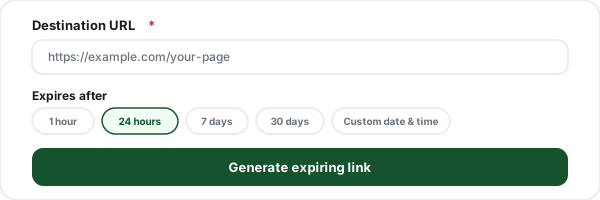
Enter your destination URL
Paste the URL the link should open while it is still valid, your landing page, offer, or document.
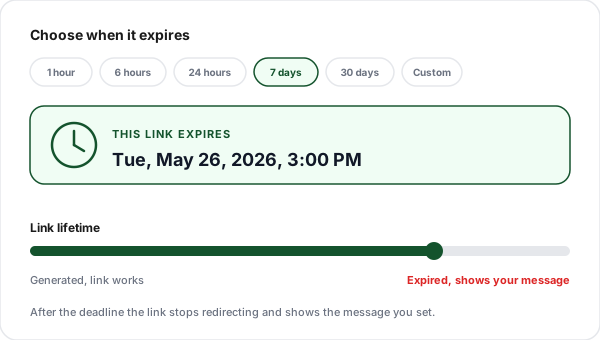
Choose when it expires
Pick a preset duration or a custom date and time. The tool shows the exact deadline and lets you set the message visitors see after expiry.
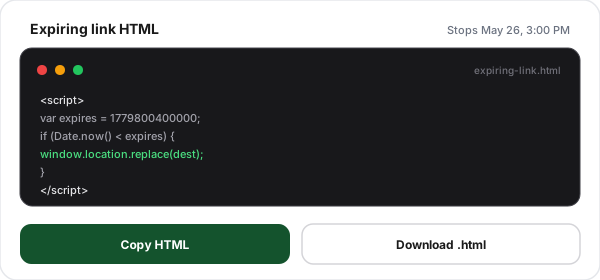
Copy or download the HTML
Generate the expiring link, then copy the HTML or download the ready-to-host file. Upload it anywhere and share its URL.
What Is an Expiring Link?
An expiring link is a URL with a built-in end date. Before its deadline it behaves like any normal link and redirects visitors to your destination. After the deadline it stops redirecting and shows a message instead, the link is, in effect, switched off. It is the cleanest way to make sure a promotion, an event page, or a shared document does not stay reachable long after it should. The exception is any link the law expects to keep working, such as an unsubscribe link in an email or text; How Long Must a Link Keep Working? lists the minimum lifetimes before you put an expiry on anything.
This tool builds the expiring link as a small, self-contained HTML file. An expiry timestamp is baked into the file, and a short script compares it to the current time the instant the page loads. You host the file anywhere static pages are served and share its URL. There is no server to run and nothing to install, which keeps it simple, but also sets the limits described below.
This tool expires links on a date. If you instead want a link that stops after a set number of clicks (a "first 50 people" drop, a one-per-lead coupon), read our guide on links that expire after a number of clicks, which Flyn enforces on the short link itself.
How Client-Side Expiry Works, And Its Limits
The generated file is honest about what it is: a soft expiring link. The deadline lives in the HTML, and the visitor's browser enforces it. That works well for the common case, retiring an old offer, closing an event page, or sharing something with a sensible shelf life.
But it is worth knowing two things. First, the destination URL sits in the page source, so anyone who opens View Source can read it even after expiry. Second, the deadline is checked against the visitor's own clock, so a determined person could change their device time to bypass it. For low-stakes links that is fine. For anything sensitive, a private document, a paid resource, a confidential proposal, you want server-enforced expiry, where the destination is never sent to the browser until the server confirms the link is still valid. That is what Flyn's managed expiring links provide.
What People Use Expiring Links For
Any link with a clear end date is a candidate, here are the most common ones.
Limited-time offers
Flash sales and discount links that retire themselves the moment the promotion ends, no stale deals left live.
Event & RSVP links
Registration or RSVP pages that close automatically once the event date has passed.
Proposals & quotes
Share a proposal or price quote that is only valid for a set window, then expires on schedule.
Beta & early access
Early-access or invite links that stop working once the sign-up window closes.
Temporary file shares
Share a document or download link that is not meant to stay reachable forever.
Time-boxed campaigns
Campaign URLs that should not be reachable once the campaign is over, tidy by default.
Client-Side vs. Managed Expiry
This free tool covers everyday expiring links. A managed Flyn link adds the security and control a static file cannot.
Capability
This free tool
Flyn managed
Expire on a set date or time
Preset and custom expiry windows
Destination hidden from page source
Tamper-proof (clock-change resistant)
Expire after a number of clicks
Password + expiry combined
Click analytics
Hosting included
Extend or remove expiry later
Expiry You Can Actually Rely On
Generate a free expiring link here, or let Flyn host one with server-enforced expiry that cannot be tampered with.
Tamper-proof expiry
Server-enforced, the destination never appears in page source and the deadline cannot be gamed.
Click-limit expiry
Expire a link after a set number of opens, not just a date, perfect for one-time shares.
Password + expiry
Combine an expiry deadline with a password gate for links that carry sensitive content.
Click analytics
See how many people opened the link, and from where, before it expired.
Frequently Asked Questions
What is an expiring link?
How does an expiring link work?
When does the timer start, at generation or first visit?
What expiry options does this tool support?
Can someone still see the destination after the link expires?
Can I expire a link after a number of clicks instead of a time?
Do I need to host the HTML file myself?
Is an expiring link secure enough for sensitive content?
What happens when someone opens an expired link?
Can I change or extend the expiry after generating?
What are expiring links good for?
Is this expiring link generator free? Do I need an account?
More Free Link Tools
Explore more free link tools from Flyn, instant, no sign-up required.
Link Rotator
Split one link across multiple destination URLs with weighted rotation.
App Store Link Generator
One link that routes iOS to the App Store and Android to Google Play.
Link Cloaker
Cloak affiliate links with clean branded URLs to increase trust and CTR.
Short Link Safety Checker
Expand a short link and inspect its destination before you click.
Ready for links that expire properly?
Generate a free expiring link above, or create a Flyn account for server-enforced expiry and basic click analytics; click limits and password protection are on Pro.