Is This Link Safe?
Paste any link, short or suspicious, to reveal the final destination, trace every redirect, verify HTTPS, and get a practical safety score before anyone clicks.
Want safer branded short links?
Create Flyn links with click counts, QR codes, and clean one-hop redirect control; custom domains, passwords, and full analytics are on Pro.
How to Use Link Safety Checker in 3 Steps
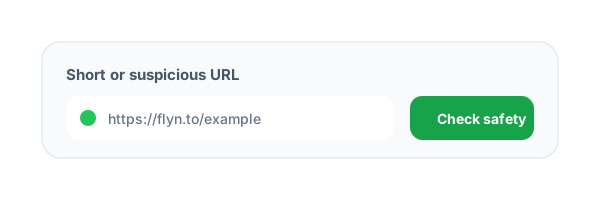
Paste the short URL
Enter a shortened, branded, or suspicious URL. The checker normalizes the URL and blocks private or internal destinations.
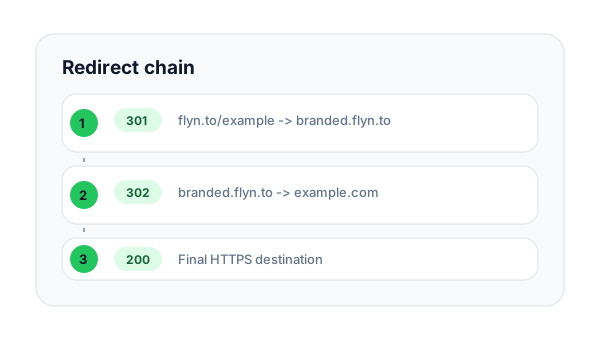
Trace every redirect
Flyn follows the redirect chain server-side, captures HTTP status codes, and checks whether the destination stays on HTTPS.
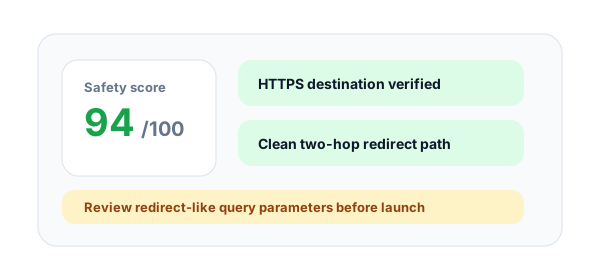
Review the safety score
Use the risk score and findings to decide whether the link is safe to share, pause, or rebuild as a branded Flyn link.
What is a short link safety checker?
A short link safety checker expands a shortened URL and reviews the destination before a person clicks it. It helps marketers, support teams, and security reviewers spot broken redirects, insecure HTTP pages, suspicious domains, and overly long redirect chains.
Why hidden destinations hurt trust
Short links are useful, but they hide the final domain. That makes them harder to trust in email, ads, QR codes, and social posts. A quick safety scan gives teams a cleaner review workflow before campaigns go live.
What the Flyn check looks for
The checker follows redirects with a public URL guard, verifies the final HTTPS state, flags error statuses, detects raw IP destinations, highlights punycode domains, and calls out redirect-like query parameters that deserve manual review.
How to check a link before you open it
Paste the link here instead of clicking it. Flyn requests it from its own servers, so your browser does not load the page during the check, and shows the final destination, every redirect hop with its status code, whether the page ends on HTTPS, and findings such as raw IP hosts, punycode domains, or credentials hidden in the URL. If you only need to see where a short link leads, the free Flyn URL Expander reveals the destination and redirect chain; this checker adds a risk score and findings on top. Open the link only when the final domain is one you recognize and expected to visit.
Example short link to scan:
https://flyn.to/example-campaignShort Link Safety Signals Explained
final_destinationRequiredReveals where the short link actually lands after redirects are followed.
Examples
https://yourdomain.com/pricing, https://flyn.to/demo
Pro tip
Users should be able to recognize and trust the final domain before you share the link widely.
redirect_chainShows every hop, status code, and redirect target between the short link and landing page.
Examples
301 to campaign page, 302 to regional page
Pro tip
Long or confusing chains make links slower and harder to audit.
https_stateChecks whether the final destination is protected by HTTPS.
Examples
HTTPS safe, HTTP review
Pro tip
Use HTTPS destinations for ads, email, QR codes, forms, and any public campaign traffic.
suspicious_patternsFlags URL patterns that deserve manual review, such as raw IPs or redirect-like query values.
Examples
raw IP host, punycode domain, nested redirect URL
Pro tip
A warning does not always mean abuse, but it should be reviewed before distribution.
Short Link Safety Best Practices
Do
Do not
Scan unknown short links before sharing
Forward hidden destinations blindly
Check the final destination domain
Trust the visible short domain alone
Prefer HTTPS landing pages
Send users to HTTP destinations
Keep redirect chains short
Stack unnecessary wrappers and redirects
Review raw IP and punycode domains
Assume unusual domains are safe
Use branded Flyn short links for campaigns
Share generic short links that reduce trust
Retest old campaign links periodically
Assume old destinations still work
Document risky findings before launch
Leave link decisions undocumented
Why Flyn
Built around link workflows, not generic page checks.
Redirect chain visibility
See every hop, status code, redirect target, and timing in one audit.
HTTPS and status checks
Catch insecure final pages, broken destinations, and slow chains before users do.
Risk scoring
Use a clear score and severity-ranked findings instead of reading raw headers only.
Private URL blocking
Server-side checks reject internal IPs and private redirect targets before fetching.
How Teams Should Review Short Links
Use a short link safety review before sending traffic from email, ads, social posts, QR codes, support messages, or partner placements.
Scan the public short link
Use the exact link that users will click, not a draft destination from an internal document.
Review destination and redirects
Check the final domain, HTTPS state, response status, redirect count, and any suspicious findings.
Approve, fix, or rebuild
Share clean links, fix risky destinations, or rebuild them as branded Flyn links with analytics.
Safety review rule
If the final destination is not recognizable, secure, and reachable, do not use the short link in public campaigns.
Common Short Link Safety Mistakes to Avoid
Judging only by the short domain
A familiar short domain can still redirect to an unexpected or broken destination.
Ignoring long redirect chains
Many hops add latency and create more places where tracking, HTTPS, or destinations can fail.
Sharing links that end on HTTP
Insecure final pages reduce trust and can trigger warnings in modern browsers.
Not reviewing old campaign links
Expired landing pages and moved domains can turn old short links into bad user experiences.
Skipping manual review on warnings
Automated checks help triage risk, but unusual domain patterns still need human judgment.
Short Link Safety Checker Examples
Email campaign
https://flyn.to/newsletter-offerScan the short link before sending so subscribers do not hit broken or insecure pages.
Support reply
https://flyn.to/help-docCheck links before sending them to customers in high-trust support conversations.
Social bio link
https://flyn.to/profileBio links get repeated clicks, so the destination should stay clean and recognizable.
QR handout
https://flyn.to/event-qrPrinted QR links should be checked before files are finalized.
Partner placement
https://flyn.to/partner-offerReview partner links before sending traffic to a third-party destination.
Frequently Asked Questions
Is the Short Link Safety Checker free?
Can I use this as a safe link opener?
Does this tool replace a malware scanner?
Will expanding a short link count as a click?
Why does HTTPS matter for short links?
What makes a redirect chain risky?
Can I check branded short links?
Why did the checker block my URL?
What is a good safety score?
Can I copy the final destination?
How should Flyn users use this with short links?
More Free Link Tools
Explore other free tools from Flyn to audit, clean, and improve your links.
URL Expander
Reveal the final destination and redirect chain for any shortened URL.
Redirect Checker
Audit redirect status codes, loops, and destination behavior.
UTM Redirect Preservation Checker
Confirm campaign parameters survive every redirect hop.
Short Link Bulk Health Checker
Check many short links for broken or risky destinations.
Build safer link campaigns with Flyn
Use free link QA tools first, then create branded short links with analytics, QR codes, and redirect controls.