Free UTM Redirect Preservation Checker
Paste a campaign URL or short link and confirm your UTMs survive the full redirect chain before paid, email, social, or QR traffic goes live.
Checking an affiliate tag instead of UTM parameters? Use the Affiliate Link Checker.
Want safer branded short links?
Create Flyn links with click counts, QR codes, and clean one-hop redirect control; custom domains, passwords, and full analytics are on Pro.
How to Use UTM Redirect Preservation Checker in 3 Steps
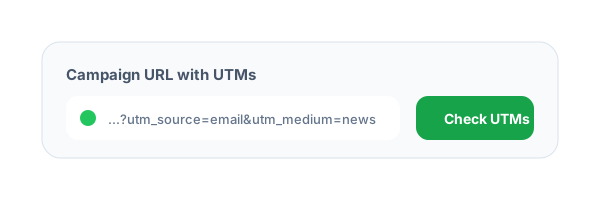
Paste the campaign URL
Enter the exact URL you plan to share, including UTM parameters, click IDs, and short link redirects.
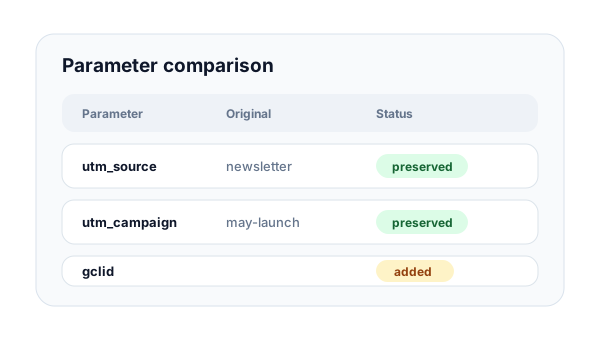
Follow the redirect chain
Flyn resolves each public redirect hop and compares the original query parameters with the final landing page.
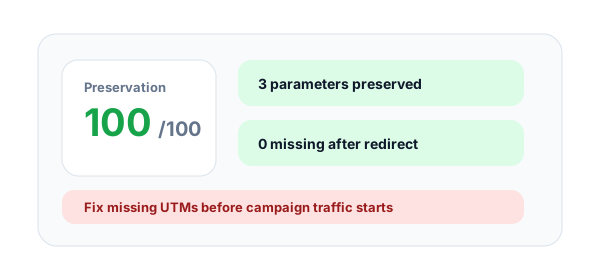
Fix missing tracking
Review preserved, missing, changed, and added parameters so attribution is clean before launch.
What is UTM redirect preservation?
UTM redirect preservation means campaign parameters stay attached when a link moves through shorteners, tracking domains, app links, or landing-page redirects. If a redirect drops or rewrites these values, analytics tools can misclassify the traffic.
Why UTMs get lost
UTMs can disappear when redirect rules rebuild URLs without query strings, when marketing platforms wrap links, or when landing pages canonicalize paths. The loss is easy to miss because the link may still load successfully.
What this checker compares
The tool compares utm_source, utm_medium, utm_campaign, utm_term, utm_content, utm_id, and common click IDs such as gclid, fbclid, msclkid, ttclid, and li_fat_id between the original and final URL.
Example tracked short link to test:
https://flyn.to/sale?utm_source=newsletter&utm_medium=email&utm_campaign=may_launchTracking Parameters This Checker Compares
utm_sourceRequiredIdentifies the platform, partner, publication, or sender that generated the campaign visit.
Examples
google, newsletter, linkedin, partner_portal
Pro tip
Use one lowercase source name across every campaign so analytics reports do not split traffic.
utm_mediumRequiredIdentifies the channel type, such as paid search, email, organic social, affiliate, or QR.
Examples
cpc, email, paid_social, referral, qr_code
Pro tip
Keep medium values aligned with your GA4 channel grouping rules before traffic launches.
utm_campaignRequiredIdentifies the specific launch, offer, product push, or seasonal campaign attached to the link.
Examples
may_launch, q2_demo_push, founder_offer
Pro tip
Include a stable campaign name instead of ad hoc labels that change between teams.
click_idCaptures paid platform IDs that may be added automatically by ad networks and redirect wrappers.
Examples
gclid, fbclid, msclkid, ttclid, li_fat_id
Pro tip
Click IDs can matter as much as UTMs for paid attribution, so do not drop them in redirects.
UTM Redirect Preservation Best Practices
Do
Do not
Test the final short link users will click
Only test the raw landing-page URL
Preserve query strings through every redirect
Rebuild redirect URLs without original parameters
Keep UTM names lowercase and consistent
Mix Newsletter, newsletter, and email_newsletter
Check paid click IDs before ads go live
Assume wrappers keep gclid or fbclid automatically
Use HTTPS final destinations
Send paid traffic to HTTP landing pages
Retest after changing landing-page rules
Trust old redirect behavior after a site release
Document intentional parameter rewrites
Let teams guess whether a change is expected
Shorten clean tracking URLs with Flyn
Share raw 200-character campaign URLs everywhere
Why Flyn
Built around link workflows, not generic page checks.
Parameter comparison
See preserved, missing, changed, and added tracking parameters in one table.
Redirect-aware checks
Trace the real public redirect path before comparing original and final URLs.
Paid traffic protection
Catch attribution breaks before budgets move through broken campaign links.
Short link compatible
Works with branded short links, generic shorteners, and platform redirect wrappers.
How Teams Should Test UTM Redirects
Run this checker after the link is shortened, wrapped, or added to a QR code. The tested URL should be the exact URL users will click.
Build the campaign URL
Create the URL with source, medium, campaign, and any paid click IDs or platform-specific tags.
Shorten or wrap the link
Apply the same shortener, ad wrapper, email platform, or QR destination that production traffic will use.
Compare original and final parameters
Fix missing, changed, or unexpected parameters before the campaign starts collecting data.
Launch QA rule
If the checker shows missing UTMs, fix the redirect rule first. A working page is not enough if attribution is broken.
Common UTM Redirect Mistakes to Avoid
Dropping query strings in redirect rules
A redirect can load the correct page while silently removing source, medium, campaign, or click ID values.
Testing only the landing page
The final landing page may be correct, but the share URL can lose tracking before visitors arrive.
Mixing URL shorteners and ad wrappers without QA
Each redirect layer adds another place where attribution can be rewritten or removed.
Changing campaigns after QA
Small naming changes after approval can split reports or make old screenshots misleading.
Ignoring added parameters
Unexpected parameters can overwrite attribution rules or create duplicate reporting dimensions.
Where UTM Redirect Preservation Matters
Email newsletter
https://flyn.to/newsletter-offer?utm_source=newsletter&utm_medium=email&utm_campaign=may_launchEmail platforms often rewrite links for tracking, so test the final wrapped link before sending.
Paid search
https://flyn.to/demo?utm_source=google&utm_medium=cpc&utm_campaign=q2_demo&gclid=testPaid traffic needs both manual UTMs and click IDs preserved for accurate campaign and cost reporting.
Paid social
https://flyn.to/social-ad?utm_source=facebook&utm_medium=paid_social&utm_campaign=retargetingSocial ad platforms can add wrappers, so the final short link should be checked after publishing setup.
Affiliate links
https://flyn.to/partner?utm_source=partner_portal&utm_medium=referral&utm_campaign=affiliate_q2Affiliate traffic depends on clean attribution so partners and campaigns are credited correctly.
QR campaign
https://flyn.to/store-qr?utm_source=flyer&utm_medium=qr_code&utm_campaign=store_launchPrinted QR links are hard to fix, so check preservation before files go to print.
Frequently Asked Questions
What does the UTM Redirect Preservation Checker do?
Which parameters are checked?
Why are missing UTMs a problem?
Can redirects intentionally change UTMs?
Does this work with short links?
Will this tool modify my URL?
Should every campaign URL have UTMs?
What score should I expect?
Can the checker inspect private staging URLs?
How should teams use this before launch?
More Free Link Tools
Explore other free tools from Flyn to audit, clean, and improve your links.
Campaign URL QA Checker
Validate naming, required UTMs, duplicates, and launch readiness.
Short Link Safety Checker
Score redirect risk and inspect hidden destinations.
UTM Builder
Build clean campaign URLs for email, paid, social, and partner links.
UTM Parser
Extract and decode UTM parameters from any URL.
Build safer link campaigns with Flyn
Use free link QA tools first, then create branded short links with analytics, QR codes, and redirect controls.