Dynamic QR codes for every short link
Every short link comes with a QR code you can print today and repoint tomorrow. Scans are tracked as clicks, your logo sits in the center free, and PNG export is one tap. Pro adds your exact brand colors, SVG export inside the dashboard, and vCard, email, call and SMS codes. SVG is also free from the standalone generators, no account needed.
- Free plan, no card required
- Set up in minutes
- GDPR-ready analytics
- No ad interstitials
- Cancel anytime
A Flyn QR code encodes your short link, not the raw destination, so you can change where it points after it is printed and every code keeps working. Scans are counted as clicks you can track. On every plan, including Free, each link gets a QR code with a center logo, size and margin controls, WiFi and text codes, and clean PNG export. There is no separate QR product, no scan cap, and no monthly allowance of codes. Pro unlocks your exact brand colors, SVG export for packaging and signage, and the business code types: vCard, email, call and SMS.
How it works
Up and running in minutes
Shorten a link
Paste any URL and Flyn creates a short link. This is what the QR code will encode, so the code stays fixed while the destination behind it can change later.
Open the QR builder
Open QR Codes in the dashboard, or the QR panel on any link, and pick a content type. Link, text and WiFi are free; Pro adds vCard, email, call and SMS. A live preview updates as you go.
Make it yours
Drop your logo in the center on any plan; its size is capped automatically against the code's real capacity, so a big logo cannot quietly break scanning. The Flyn green look is free, and Pro matches your exact brand colors.
Export and share
Download a PNG on any plan, or use Web Share to send the code straight to a phone or teammate. Pro adds SVG, the vector format print shops ask for.
Why it matters
What you get
Change the destination, keep the code
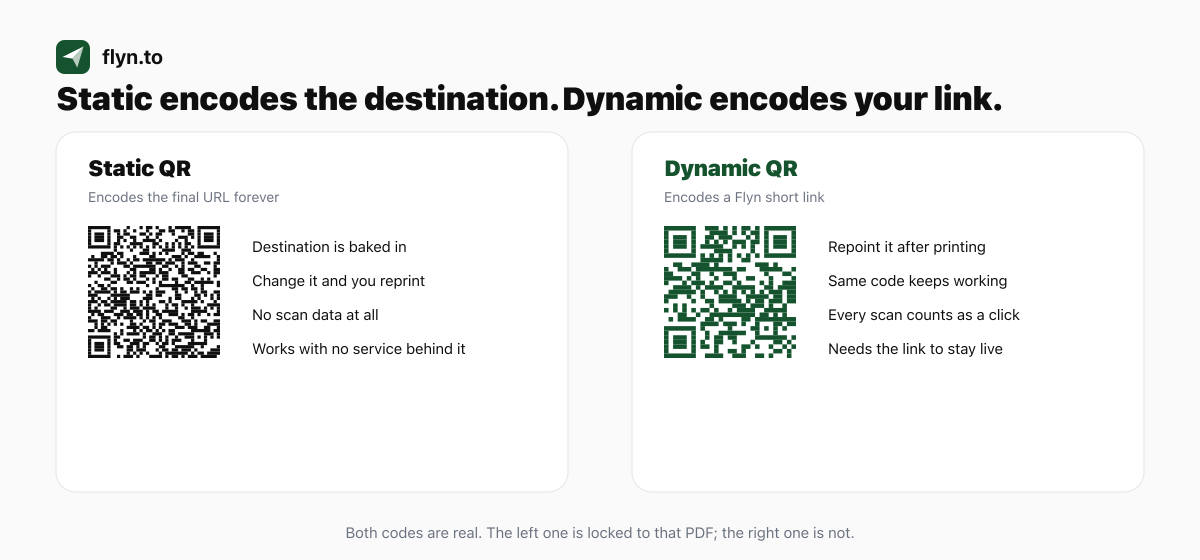
The QR encodes your short link, so you can repoint that link to a new page anytime and every printed code updates instantly. Fix a typo, swap a landing page, or rotate a seasonal offer without reprinting a single flyer.
Every scan is a tracked click
A scan is a click, so it lands in your analytics like any other. Every plan counts scans; Pro breaks them down by city, device, OS and browser, so you know whether the poster, the packaging, or the table tent actually worked.
Your logo in the center, free
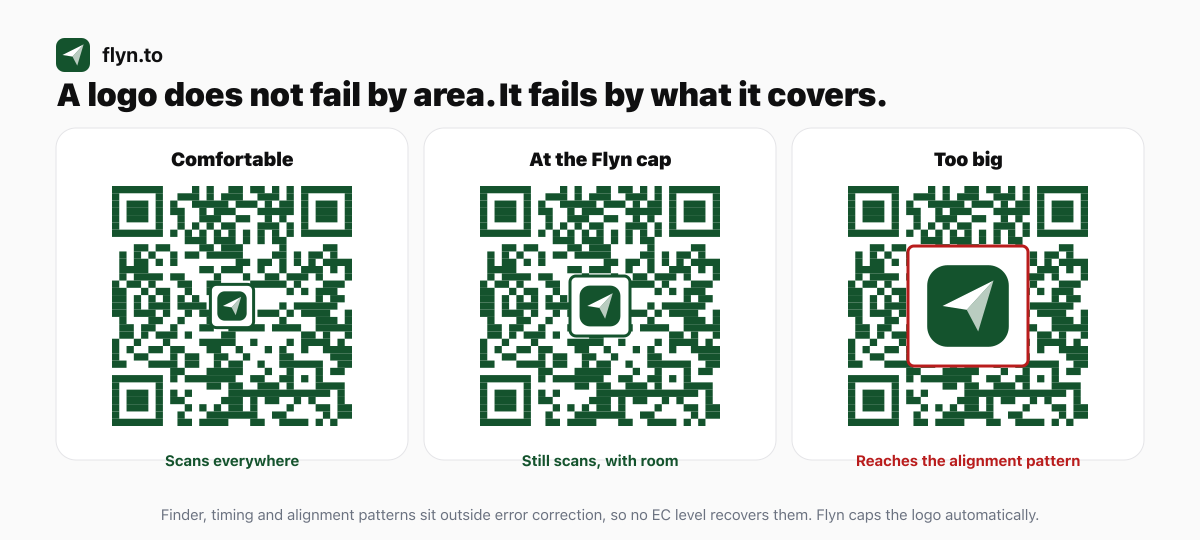
Add a logo to the middle of any code on any plan. Flyn caps its size automatically against the code's real capacity, because an oversized logo is the most common reason a printed QR code stops scanning. Exact brand colors are part of Pro.
More than links
Encode a WiFi network or plain text free, so guests join your network with one scan and no typed password. Pro adds the business types: vCard digital cards that save to the phone, pre-filled email, one-tap call, and SMS codes for lead capture.
Print-ready exports
PNG export and Web Share are on every plan, ready for slides, menus and everyday print. SVG export comes with Pro and stays razor-sharp at any size, which is what packaging, signage and large-format work need.
A QR code for every link, free
There is no separate QR product, no scan cap, and no allowance of two codes a month. Every short link you create, on any plan, has a QR code the moment it exists. Pro adds the styling: brand colors, SVG, and the business code types.
Every variant
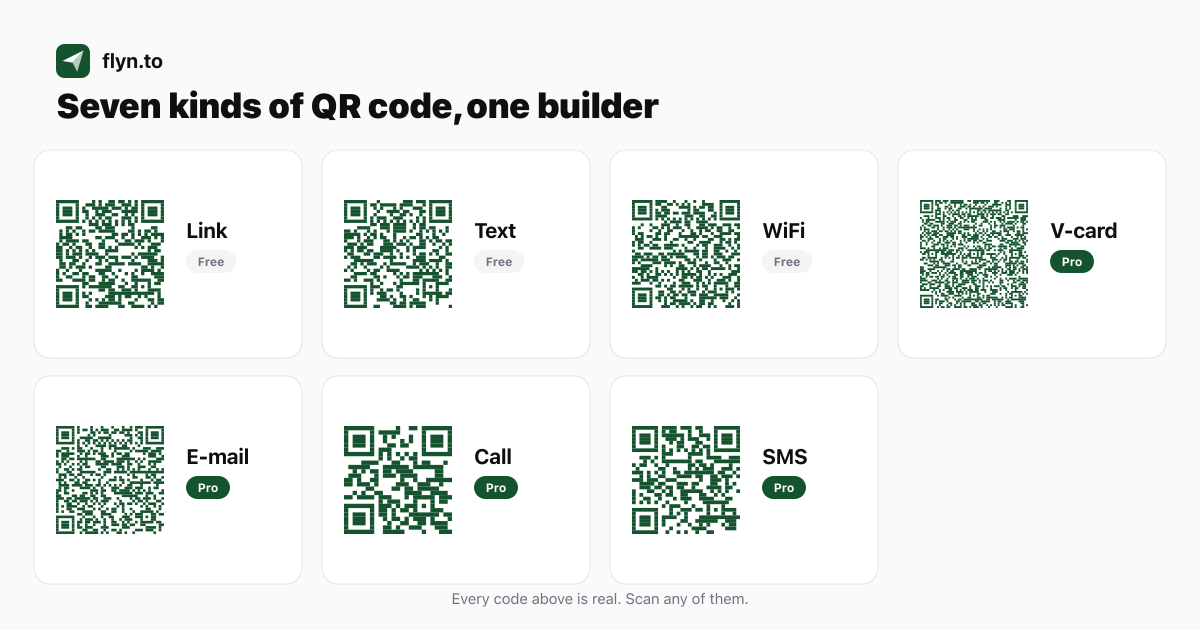
Fourteen ways to make a QR code with Flyn
Link QR code
Freehttps://flyn.to/your-slug
The default. Encodes your short link rather than the destination, so you can repoint it after printing and every scan is counted as a click. This is what most people mean by a dynamic QR code.
Text QR code
Freeany plain text
Shows words on the phone instead of opening anything: a table number, a serial number, a short instruction, a door code. Nothing is fetched, so it works with no signal at all.
WiFi QR code
FreeWIFI:T:WPA;S:name;P:pass;;
A guest scans and joins your network without typing the password. Pick WPA, which is the catch-all that WPA2 and WPA3 networks also use, or WEP for legacy routers, or open for no password, and tick hidden if the network does not broadcast its name. Special characters in the password are escaped for you, which is the usual reason a hand-built WiFi code joins the wrong network.
BEGIN:VCARD ... END:VCARD
A digital business card. One scan saves your name, company, phone, email and website straight into the phone's contacts, with no app and no typing. Pro covers it in the dashboard, where the code is also trackable; the standalone vCard generator is free and needs no account.
E-mail QR code
Promailto:[email protected]?subject=
Opens a pre-filled email with the recipient, subject and body already written. Useful for feedback slips and support requests, where you want the message to arrive already labelled. Pro in the dashboard; free with no account from the standalone generator.
Call QR code
Protel:+15551234567
Opens the dialler with your number ready. Put it on a vehicle, a for-sale board or a service sticker. Include the country code, or it only works for people dialling from your own country. Pro in the dashboard; free with no account from the standalone generator.
SMS QR code
Prosms:+1555...?body=BOOK
Opens the messaging app with your number and a pre-written message. The sender still presses send, which is what makes it work for opt-in keywords and lead capture. Pro in the dashboard; free with no account from the standalone generator.
QR code generator
Free toolstatic, no account
The general-purpose generator. Encodes your content directly, so the code never expires, and it cannot be repointed later. Good for one-off codes you will not need to change.
Dynamic QR code generator
Free toola short link, no account
Mints a real short link and encodes that, so the code is repointable and countable without signing up. The catch worth knowing: the anonymous link behind it lasts 24 hours unless you claim it into an account, so do not print one you have not claimed.
QR code with logo
Free toolstatic, with a centre image
Drops your logo into the middle of a code without an account. Uses the highest error-correction level and caps the logo automatically, which is the difference between a branded code and an unscannable one.
QR code reader
Free tooldecodes an image
Upload a QR image and read back exactly what it encodes, in your browser. The fastest way to check what a printed code actually points at before you trust it, or to recover the destination of a code whose source you lost.
QR destination audit
Free toolchecks where a code leads
Paste the URL a code points at and it checks the things that ruin a printed campaign: HTTPS, the final status, how many redirect hops, whether the page is mobile-ready, whether it is slow, and whether the URL is long enough to make the symbol dense. Pair it with the reader, which is the part that turns an image into a URL.
Per-link QR code
Freeyour existing short link
Every link in your dashboard already has a QR code waiting on it. No separate step, no allowance, no counting against anything. Open the link and download it.
https://go.yourco.com/...
Because the code encodes the short link, a custom domain shows up inside the QR itself. It matters when someone decodes the code before tapping, which security-conscious scanners now do by default.
| Type | Encodes | Plan | What it is for |
|---|---|---|---|
| Link QR code | https://flyn.to/your-slug | Free | The default. Encodes your short link rather than the destination, so you can repoint it after printing and every scan is counted as a click. This is what most people mean by a dynamic QR code. |
| Text QR code | any plain text | Free | Shows words on the phone instead of opening anything: a table number, a serial number, a short instruction, a door code. Nothing is fetched, so it works with no signal at all. |
| WiFi QR code | WIFI:T:WPA;S:name;P:pass;; | Free | A guest scans and joins your network without typing the password. Pick WPA, which is the catch-all that WPA2 and WPA3 networks also use, or WEP for legacy routers, or open for no password, and tick hidden if the network does not broadcast its name. Special characters in the password are escaped for you, which is the usual reason a hand-built WiFi code joins the wrong network. |
| V-card QR code | BEGIN:VCARD ... END:VCARD | Pro | A digital business card. One scan saves your name, company, phone, email and website straight into the phone's contacts, with no app and no typing. Pro covers it in the dashboard, where the code is also trackable; the standalone vCard generator is free and needs no account. |
| E-mail QR code | mailto:[email protected]?subject= | Pro | Opens a pre-filled email with the recipient, subject and body already written. Useful for feedback slips and support requests, where you want the message to arrive already labelled. Pro in the dashboard; free with no account from the standalone generator. |
| Call QR code | tel:+15551234567 | Pro | Opens the dialler with your number ready. Put it on a vehicle, a for-sale board or a service sticker. Include the country code, or it only works for people dialling from your own country. Pro in the dashboard; free with no account from the standalone generator. |
| SMS QR code | sms:+1555...?body=BOOK | Pro | Opens the messaging app with your number and a pre-written message. The sender still presses send, which is what makes it work for opt-in keywords and lead capture. Pro in the dashboard; free with no account from the standalone generator. |
| QR code generator | static, no account | Free tool | The general-purpose generator. Encodes your content directly, so the code never expires, and it cannot be repointed later. Good for one-off codes you will not need to change. |
| Dynamic QR code generator | a short link, no account | Free tool | Mints a real short link and encodes that, so the code is repointable and countable without signing up. The catch worth knowing: the anonymous link behind it lasts 24 hours unless you claim it into an account, so do not print one you have not claimed. |
| QR code with logo | static, with a centre image | Free tool | Drops your logo into the middle of a code without an account. Uses the highest error-correction level and caps the logo automatically, which is the difference between a branded code and an unscannable one. |
| QR code reader | decodes an image | Free tool | Upload a QR image and read back exactly what it encodes, in your browser. The fastest way to check what a printed code actually points at before you trust it, or to recover the destination of a code whose source you lost. |
| QR destination audit | checks where a code leads | Free tool | Paste the URL a code points at and it checks the things that ruin a printed campaign: HTTPS, the final status, how many redirect hops, whether the page is mobile-ready, whether it is slow, and whether the URL is long enough to make the symbol dense. Pair it with the reader, which is the part that turns an image into a URL. |
| Per-link QR code | your existing short link | Free | Every link in your dashboard already has a QR code waiting on it. No separate step, no allowance, no counting against anything. Open the link and download it. |
| Branded-domain QR code | https://go.yourco.com/... | Pro | Because the code encodes the short link, a custom domain shows up inside the QR itself. It matters when someone decodes the code before tapping, which security-conscious scanners now do by default. |
Who it's for
Made for how you work
Related features
Pairs well with
Free tools and guides
Try it and learn more
Frequently asked questions
Can I generate QR codes through an API, or from an AI assistant?
Both. Every link has a QR endpoint at GET /api/links/:id/qr, and POST /api/qr renders any of the seven content types directly, including WiFi and v-card. You can set the format (PNG or SVG), the size, the error-correction level, the quiet zone and the colours, and the response tells you the settings that were actually applied. The same two endpoints are exposed to AI assistants as the MCP tools get_link_qr_code and create_qr_code, so you can ask Claude or Cursor for a QR code in plain language and get back an image you can look at. The full reference is in the <a href="/docs/qr-codes">QR codes API documentation</a>. Plan rules are identical to the dashboard: link, text and WiFi on any plan, the business content types plus custom colours and SVG on Pro.
Why is my QR code not scanning?
Work through it in this order, because the causes are not equally likely. First, the quiet zone: a QR needs 4 clear modules of margin on all four sides, and a code butted against artwork is the most common print failure. Second, size: below roughly 2 x 2 cm a phone struggles at normal distance. Third, the logo: if it covers a finder, timing or alignment pattern, no error-correction level recovers it. Fourth, contrast: the modules must be clearly darker than the background, and red modules in particular read as white to some 660 nm scanners. Fifth, inversion: light-on-dark is optional in the standard, so some scanners will not read it. Flyn removes the first, third and fourth from the list for you: the quiet zone is a toggle, the logo is capped automatically, and you get a warning when two colours sit too close.
What happens to my QR codes if I stop paying?
They keep working. Links in your account are never deactivated over plans or billing, so a printed code does not die with a subscription change. You lose access to Pro features for making NEW codes, such as brand colours and the business content types, but every code already printed keeps resolving. This is worth checking before you commit to any QR vendor: several deactivate dynamic codes when a trial ends or a plan lapses, which turns your printed material into dead paper.
Do Flyn QR codes expire, or have a scan limit?
No expiry and no scan cap. There is no monthly allowance of codes and no ceiling on how many times one can be scanned. A code stops working only if you delete the short link behind it, if an expiry date or click limit you set on that link runs out, or if the safety system disables a link pointing somewhere unsafe. The one case to watch is a code made anonymously at the dynamic generator without an account: that link lasts 24 hours unless you claim it, so never print one you have not claimed.
How small can a printed QR code be?
Around 2 x 2 cm is the practical floor for close-range scanning, and that is the figure Canva and Adobe Express both publish. For scanning at a distance, size up: a common rule of thumb is that the code should be about a tenth of the scanning distance, though that ratio is folklore rather than anything in the standard, so treat it as a starting point and test. Flyn exports from 128 to 512 pixels, and for anything printed larger than a flyer use SVG so there is no resolution ceiling at all.
What is a QR code quiet zone, and do I need it?
The quiet zone is the empty margin around the symbol, and ISO/IEC 18004 requires 4 modules on all four sides. It is not decoration: scanners use it to find where the code begins, so a code pressed against a border or a photo can fail even though it looks perfect. Flyn includes it by default and warns you if you switch it off. If you have ever had a code that scanned on screen but not in print, this is the first thing to check.
What error correction level does Flyn use?
It depends on where you build it, and the difference is deliberate. Anywhere a logo can be added, the dashboard builder and the with-logo generator, Flyn pins level H, the highest, because that is what makes a centre logo survivable. The general generator lets you choose L, M, Q or H yourself, since raising correction also raises density and a denser code needs more print size. The WiFi generator picks M or Q automatically based on how long your network details are. Note that the widely quoted 30 percent for level H is a fraction of the code's data codewords, not of its area, and it does not cover the finder, timing and alignment patterns at all, because those sit outside error correction entirely.
How much of a QR code can a logo cover?
Less than the internet tells you, and the honest answer is that coverage is the wrong way to think about it. Position matters more than area: a small logo that clips a corner pattern kills the code, while a larger one in clear space survives. Flyn caps the logo at 25 percent of the symbol width and measures that against the symbol's REAL size, which changes with how much data the code carries. Our own decode testing found the failure point moves with version, from about 37 percent of symbol width on a short link up to 47 percent on a data-heavy code, so a fixed percentage is not safe. The cap is applied for you, and it tightens automatically when the code has less room to spare.
Why does my QR code show fewer scans than I expected?
Probably because Flyn is not counting the fake ones. When a short link is pasted into Slack, iMessage, WhatsApp or an email client, those apps fetch it to build a preview, and most platforms count each of those as a scan. Flyn separates verified human clicks from bot traffic and shows you both, so the number you see is closer to the number of people who actually scanned. A lower honest count is more useful than an inflated one when you are deciding whether a poster earned its print run.
How do I test a QR code before I print it?
Three checks, all free. Scan it with more than one phone, ideally one iPhone and one Android, because their decoders differ. Then upload the image to the QR code reader to see exactly what it encodes, which catches a wrong or truncated payload before it reaches a printer. Then run the destination through the QR destination audit, which follows the redirect chain and flags anything unsafe or slow. Print one at final size on the actual material before committing to a run: paper, gloss and fabric all behave differently.
What makes a Flyn QR code dynamic?
The code encodes your Flyn short link rather than the final URL. Because the short link is what the QR points to, you can change where that link goes at any time and every printed or shared code follows the new destination. A static QR that encodes a raw URL is locked to that URL forever, so any change means generating and reprinting a new code.
Can I track how many people scan a QR code?
Yes. A scan opens your short link, which registers as a click, so scans appear in your analytics alongside every other click. Free plans show basic click counts, and Pro adds deeper breakdowns like city, device, OS, browser, and referrer so you can compare how each placement performs.
Can I add my logo?
Yes, on every plan including Free. Upload any image and it sits in the center of the code. Flyn caps the logo's size automatically against the code's actual capacity, because an oversized logo is the single most common reason a printed QR code stops scanning.
Can I use my brand colors?
Inside the dashboard, the Flyn green on white look is free and picking custom foreground and background colors is part of Pro. The standalone generator has free colour pickers with no account, so if you only need a one-off branded code you do not need a plan at all. The dashboard builder and the with-logo generator both warn you when two colours sit too close together for scanners to read reliably.
What kinds of QR codes can I create?
Link, plain text and WiFi codes are free in the dashboard. Pro adds vCard contact cards that save straight to the phone, pre-filled email, one-tap call, and SMS codes. There are also free standalone generators, like the WiFi and vCard QR tools, that work without an account.
What file formats can I download?
PNG on every plan, which suits slides, emails and standard printing. For vector, there are two honest paths: the free standalone generators at /qr-code-generator and /qr-code-generator-with-logo export SVG with no account at all, and SVG export inside the dashboard, where the code is also trackable and editable, is part of Pro. There is no EPS export; convert an SVG if a print shop insists.
Do QR codes cost extra or count against my link limit?
QR codes are free on every plan, and generating one does not consume anything separately. A QR code is tied to a short link, and short links count toward your monthly limit (25 per month on Free, unlimited on Pro). Brand colors, SVG export and the business code types are the parts that come with Pro.
Will my printed QR code still work if I edit the link later?
Yes. Since the QR encodes your short link, editing that link's destination updates every code that points to it, including ones already printed and distributed. The one thing to avoid is deleting the short link, because the code has nothing to resolve to after that.
Why teams choose Flyn
Built to trust, priced to keep
Flat, honest pricing
Pro is $9/mo billed annually (about 8 EUR / 7 GBP), or $12 month to month. No per-link fees, no metered "tracked clicks", no surprise tier jumps.
GDPR-safe by design
No raw IP addresses stored, plus one-click data export and deletion. Built to fit EU and UK privacy rules.
No ad interstitials
Clean redirects on your own branded domain. Your audience never lands on a preview or ad page first.
Numbers you can trust
Click and scan analytics are bot-filtered, so you measure real people, not crawlers padding your stats.
Coming from another shortener? See how Flyn compares or bring your links with you: upload your export and preview the import free.
QR codes starts free on Flyn
Create your first link free, no card required. Upgrade to Pro for unlimited links and the full toolkit.