Free vCard QR Code Generator
Turn your contact info into a digital business card QR code people scan to save your contact. Static and free forever, or an editable Smart QR you can re-point after printing, with scan counts.
Classic vCard: your contact details are frozen into the pixels forever. Works offline, free, never expires.
Smart QR: the code points at a Flyn link you can re-point after printing, with scan counts.
Fill in at least a first or last name to generate your vCard QR code.
Your QR image itself never expires, it is baked into the pixels. Anonymous Smart QR trial links last 24 hours; links in a free Flyn account stay live, we never deactivate them over plans or billing. Sign up free to keep yours.
Want to track where your links travel?
Create Flyn short links and see total clicks free. Pro unlocks full country, device, and referrer breakdowns. Every link becomes a data point you control.
How to Make a vCard QR Code in 3 Steps
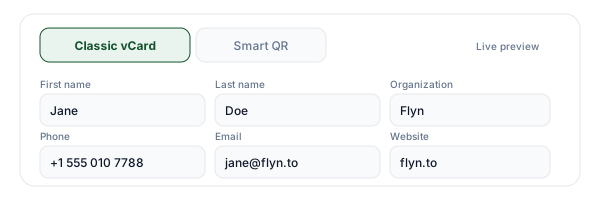
Fill in your contact details
Enter your name, organization, job title, phone, email, and website. Open More fields for a full mailing address. The QR preview updates live as you type, no generate button needed.
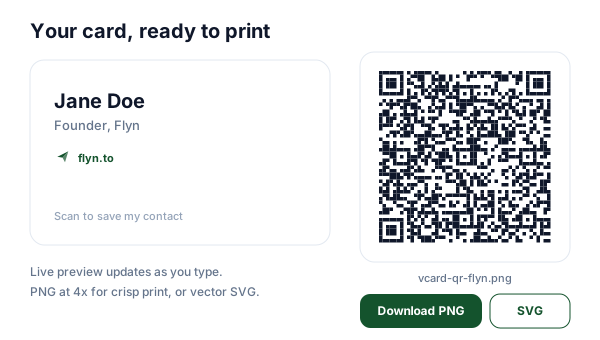
Download your QR code
Grab a print-ready PNG (rendered at 4x for crisp printing) or a vector SVG your designer can drop into any card layout. Prefer a code you can edit later? Switch to Smart QR and get a re-pointable short link instead.
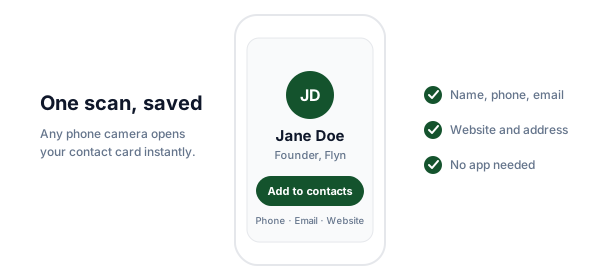
Print it and get scanned
Place the code on your business card, conference badge, or email signature. Anyone pointing a phone camera at it sees your contact card instantly and saves you with one tap.
What Is a vCard QR Code?
A vCard QR code is a QR code for contact details: it packs a complete contact card into a single scannable square. The vCard format (the same .vcf standard email clients use for contact attachments) describes your name, phone, email, company, title, website, and address in a structure every modern phone parses natively. Point an iPhone or Android camera at the code and the phone shows an "Add to contacts" prompt with everything pre-filled.
That is why a business card with a QR code beats a plain one. Instead of hoping people type your email correctly from a 9pt line of print, they scan your contact QR code once and you land in their address book, spelled right, with every field in the right slot. This tool builds the payload in your browser, so in classic mode your details never touch a server.
Anatomy of the vCard Format
This is exactly what the tool encodes into the pixels. Each line is a field your phone understands.
BEGIN:VCARD
VERSION:3.0
N:Doe;Jane
FN:Jane Doe
ORG:Flyn
TITLE:Founder
TEL;TYPE=CELL:+1 555 010 7788
EMAIL:[email protected]
URL:https://www.flyn.to
ADR;TYPE=WORK:;;12 Harbor Lane;Portland;;97209;USA
END:VCARDBEGINOpens the card. Scanners ignore everything before it.VERSIONThe most widely supported vCard version across iPhone and Android.NStructured name: last name, then first name, separated by a semicolon.FNThe display name shown on the contact preview.ORGCompany or organization.TITLEJob title, shown under the name in most address books.TEL;TYPE=CELLPhone number, typed as CELL so phones offer to call or message.EMAILEmail address, tappable after saving.URLWebsite, LinkedIn, or portfolio.ADR;TYPE=WORKWork address: street, city, ZIP, country in fixed slots.ENDCloses the card.Commas, semicolons, and backslashes inside your values are escaped automatically, so a company name like "Acme, Inc." will not break the card structure. Lines are joined with CRLF line endings per the vCard 3.0 specification.
Static vs Smart QR: Which Should You Print?
Both are free here. The honest answer is that each one wins at something different.
| Feature | Classic vCard (static) | Smart QR |
|---|---|---|
| Editable after printing | No, fixed forever | Yes, re-point anytime |
| Scan counts | No | Yes, every scan counted |
| Works with zero network | Yes, fully offline | Needs internet for the redirect |
| Expires | Never | Never once claimed (anonymous test links last 24 hours) |
| What is encoded | All your contact fields | One short link |
| Best for | Contact saving that must always work | Cards that outlive job changes |
If your details will never change and people might scan you in a basement conference hall, static is genuinely the better pick: it works with zero network and depends on nobody's servers, including ours. If your card should survive a job change, a rebrand, or a new phone number, Smart QR means the paper never goes stale, and you get to see how often it is scanned. Weighing vCard vs dynamic QR for posters or packaging rather than contact cards? Our dynamic QR code generator covers that use case.
Where to Put Your vCard QR Code
The three placements that actually get scanned.
Business card, back side
The classic QR code business card. Keep the front clean for your name and role, give the back to a large, comfortable code with a short "Scan to save my contact" caption.
Badge or lanyard
At events, a conference badge QR code turns every hallway chat into a saved contact. Static mode shines here: convention centers are famous for dead zones.
Email signature
People increasingly meet your signature on a laptop while holding a phone. A small email signature QR code under your sign-off bridges the two devices in one scan.
For a deeper walkthrough of card layouts, print prep, and what to say next to the code, read our guide to putting a vCard QR code on your business card.
Print Size and Contrast
On a business card, give the code at least 2 x 2 cm (about 0.8 inches) plus a quiet zone of clear space around it, roughly four modules wide. Dark modules on a light background scan best; keep strong contrast and avoid printing the code over photos or gradients. Glossy finishes can throw glare at the camera, so matte or soft-touch stock is the safer choice for the QR side of the card.
Density matters as much as size. A vCard with every field filled produces a much finer pattern than one with name, phone, and email, and fine patterns need more print area to stay readable. If your design demands a small code, trim fields or use Smart QR mode, which encodes one short link regardless of how much you want to share. For the full math on scan distance and module size, see our QR code size guide.
When the Code Will Not Scan
The four failure modes we see on printed vCard codes, in order of frequency.
Too dense for its size
A fully loaded vCard printed at stamp size is the number one failure. Cut optional fields, print larger, or switch to Smart QR so the pattern stays sparse.
Low contrast or inverted colors
Light-on-dark codes and brand-tinted backgrounds confuse many scanners. Keep dark modules on a light background, ideally near-black on white.
Missing quiet zone
Text or borders hugging the code edge break detection. Leave clear space around all four sides, about four modules wide.
Glare and paper texture
Glossy lamination and heavily textured stock scatter light across the modules. Use a matte finish, or test-scan a proof before the full print run.
Still stuck? Our QR code troubleshooting guide walks through every diagnosis step with examples.
Why Make Your QR Code with Flyn?
The generator is free either way. Flyn is what makes the Smart option worth printing.
Re-pointable codes
Smart codes encode a Flyn short link. Change the destination any time without touching the printed card.
Scan analytics
Every scan of a Smart code is counted free. Pro adds country, device, and referrer breakdowns in your dashboard.
No deactivation, ever
Flyn never kills a code or link when a plan changes. What you print keeps working.
Free plan included
25 links a month with QR codes and scan totals, no card required. Pro adds 3 custom domains and full analytics from $9/mo.
Frequently Asked Questions
What is a vCard QR code?
Is a vCard QR code the same as a VCF QR code?
What happens when someone scans it?
Does a vCard QR code work without internet?
Does a vCard QR code expire or get deactivated?
What is the difference between static and Smart QR?
vCard vs dynamic QR code: which should I choose?
Can I edit a vCard QR code after printing it?
What size should the QR be on a business card?
Which fields should I include?
Why does my vCard code look so dense?
Can I track how many times my card is scanned?
Can I use this as a virtual business card at networking events?
Can I add a logo to the middle of the code?
Is this tool really free, and where does my data go?
More Free QR Tools
Explore more free QR code tools from Flyn, instant, no sign-up required.
WiFi QR Code Generator
Let guests join your network with one scan, no password typing.
QR Code Generator with Logo
Put your brand mark in the center without breaking the scan.
Dynamic QR Code Generator
A re-pointable QR for posters, packaging, and campaigns.
QR Code Generator
URL, WiFi, email, phone, and SMS codes with custom colors.
Your card, always current
Print a code once and keep control of where it points forever. Free plan includes 25 links a month with QR codes and basic analytics, no credit card required.