Free QR Code Generator
Create custom QR codes for a URL, WiFi, vCard, email, phone, SMS, or plain text. Pick your colors, then download a crisp PNG or scalable SVG, no signup, no watermark, no expiry. Or switch to Bulk list and make a code for every row of a list or CSV at once.
What should the QR code contain?
Customize
Fill in the url field to generate your QR code.
Want to know how many times it gets scanned?
Point your QR code at a Flyn short link to count scans and see when they happen, with location and device on Pro, and re-target the destination after it's printed.
How to Make a QR Code in 3 Steps
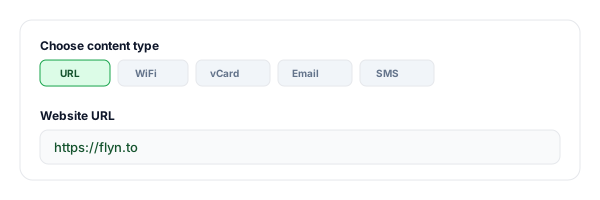
Choose content and enter your data
Pick URL, text, email, phone, SMS, WiFi, or vCard, then fill in the fields. The QR code updates live as you type.
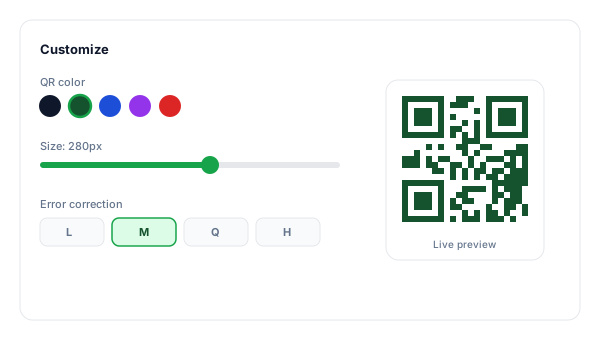
Customize the design
Set the QR and background colors, drag the size slider, and choose an error-correction level for logos or rough print surfaces.
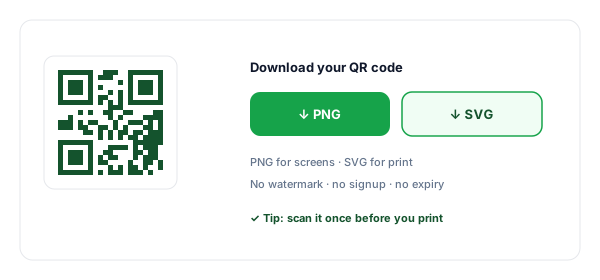
Download PNG or SVG
Grab a high-resolution PNG for screens or a scalable SVG for print, then scan it with your phone to confirm before you share.
What Is a QR Code?
A QR code ("Quick Response" code) is a square barcode that stores data, most often a website URL, as a pattern of black and white modules. Point a modern phone camera at it and the phone decodes the pattern and offers to open the link, join the WiFi, or save the contact instantly.
This generator creates static QR codes: the data is baked into the pattern itself, so the code never expires and works offline forever. You can encode seven content types, restyle the colors, and export to PNG or SVG, all in your browser, with nothing uploaded to a server.
Bulk QR Code Generator: One Code per Row
Need a code for every row of a list? Switch the tool to Bulk list and paste the list, one row per line, or rows copied from Excel or Google Sheets. You can also add a CSV, TSV, or TXT file of up to 20 MB; an .xlsx file is not read, so save it as CSV first. Each row becomes one QR code that holds a link or any text. When the list has several columns, you pick the content column and, optionally, a file name column, and a review step shows what each code will hold before anything is made.
You get one ZIP with a PNG or SVG file per code, plus manifest.csv, which lists every row and its file name. PNG files are up to 512 or 1024 px wide, each at the largest whole-pixel size that fits. The colors and error-correction level you choose apply to every code in the run, and Bulk list does not add a logo.
One run makes up to 10,000 codes. A longer list makes the first 10,000 and gives the remaining rows back as a CSV for the next run. In a browser that cannot run the work in the background the limit is 2,000 per run, and on a phone or an older computer a long list may need smaller runs. Bulk list is free and needs no account, and the codes are made in your browser, so making them uploads nothing. They are static codes: they never expire and can never be changed.
To change where printed codes go, the codes have to hold Flyn short links. After a bulk run of links, the result screen offers "Make these codes editable", which carries your list into the link importer in the Flyn dashboard, with sign-up on the way. Previewing the import is free; importing needs Flyn Pro, Lifetime or Team. After the import, "Make QR codes for N links" on its results screen reopens the list in Bulk list with the new short links. You can then change the destination of any of those codes without reprinting, and Flyn counts their scans: scan counts and timing on every plan, location and device breakdowns on Pro. For a single editable code, use the Dynamic QR Code Generator.
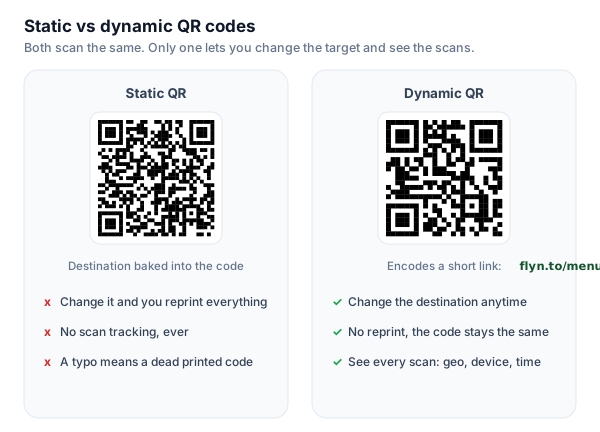
Static vs Dynamic QR Codes
Short answer: a static QR bakes the destination straight into the code, so changing it means reprinting, and you get no scan data. A dynamic QR encodes a short link instead, so you can change the destination anytime without reprinting and see every scan.
7 Types of QR Code You Can Create
One tool, many payloads, pick the tab that matches what you want people to do when they scan.
Website URL
Send scanners straight to any web page, landing page, or link-in-bio.
WiFi network
Let guests join your WiFi by scanning, no password typing. Great for cafes & rentals.
vCard contact
Save a full contact (name, phone, email, company) in one tap, perfect for business cards.
Phone, SMS & email
Pre-fill a call, a text message, or an email with subject and body, ready to send.
Static vs Dynamic QR Codes
This free tool makes static codes. If you need to edit the destination after printing or count scans, make the QR point to a Flyn short link, that turns any static code into an editable, trackable one. New to QR codes? See our guides to WiFi QR codes, vCard business-card QRs, why a QR won't scan, and what size to print it.
| Feature | Static QR (this tool) | Dynamic QR (QR → Flyn link) |
|---|---|---|
| Expires? | Never | Never (link stays live) |
| Edit destination after print | No | Yes, re-point any time |
| Scan analytics | None | Scan counts and timing free, location and device on Pro |
| Needs an account | No | Free Flyn account |
| Best for | Codes that never change: labels, WiFi, vCards | Campaigns, packaging, print runs |
Popular Ways to Use QR Codes
Restaurant & cafe menus
Link a table-tent QR code to your digital menu so you can update prices without reprinting.
Business cards & badges
A vCard QR lets new contacts save your details instantly at events and meetings.
Packaging & product inserts
Drive buyers to setup guides, reviews, or registration from the box.
Posters, flyers & signage
Turn offline foot traffic into web visits, use the SVG export so it stays sharp at any size.
WiFi for guests
Stick a WiFi QR on the wall of your rental, office, or shop so visitors connect in seconds.
Event check-in & RSVPs
Point a QR at your registration page, calendar invite, or ticket link.
QR Code Best Practices
Do
Don't
Keep a dark code on a light background
Invert to light-on-dark (many scanners fail)
Leave the quiet-zone margin on
Crop the white border to save space
Use SVG for anything printed
Stretch a small PNG up to poster size
Raise error correction when adding a logo
Cover the centre on a level-L code
Test with 2-3 phones before printing
Send to print without a single scan test
Point it at a short link to track scans
Hard-code a long URL you can never change
Why Use Flyn's QR Code Generator?
7 content types
URL, text, email, phone, SMS, WiFi, and vCard, one tool covers every QR job.
Full customization
Custom colors, size, error-correction level, and an optional quiet-zone margin.
PNG + SVG export
High-res PNG for screens, scalable SVG for print that stays sharp at any size.
Optional tracking
Point it at a Flyn link for scan analytics and an editable destination.
Frequently Asked Questions
Is this QR code generator really free?
Do the QR codes ever expire?
What is the difference between a static and a dynamic QR code?
How do I create a QR code for a website URL?
Can I make QR codes in bulk from a CSV or spreadsheet?
How many QR codes can I make at once?
Can I edit bulk QR codes after printing?
How do I make a WiFi QR code?
Can I create a vCard (contact) QR code?
Can I change the color of the QR code?
Should I download the QR code as PNG or SVG?
What is error correction and which level should I pick?
Can I add a logo to the QR code?
Why is my QR code not scanning?
How small can I print a QR code?
Do you track or store the QR codes I create?
How can I track how many times my QR code is scanned?
More Free Link Tools
Build, brand, and check your links with the rest of Flyn's free toolkit.
Pix QR Code Generator
Build a Brazilian Pix BR Code payment QR from a Pix key, with a valid CRC16 checksum.
QR Code with Logo
Put your logo in the center of a branded QR code that still scans reliably.
WiFi QR Code Generator
Let guests join your WiFi with one scan, no password typing.
vCard QR Code Generator
Turn your contact card into a scan-to-save QR for business cards and badges.
Turn scans into insights
A static QR code opens a link, a Flyn link counts each scan, with location and device on Pro, and lets you change the destination after it's printed.