Free Pix QR Code Generator
Build a static Pix BR Code the way Banco Central specifies it. Enter a chave, a name, and a city, and get both a scannable QR code and the Pix copia e cola string, assembled in your browser.
Need a plain QR for a link instead? Use the QR Code Generator. Collecting payments in India? Try the UPI Payment Link Generator.
Field 59, 25 characters max
Field 60, 15 characters max
Field 54 is left out entirely, so the payer types any value. That is the right choice for a tip jar or a counter sticker.
Letters and digits only, 25 max. Left blank we write the spec placeholder ***, which means "no reference". Fill it in and the reference comes back on your Pix statement.
Fill in the chave, the recipient name, and the city, then generate. The code below is a real BR Code, scan it with your own bank app before you print anything.
A static QR tells you nothing about who scanned it
The payload goes straight to a bank app, so no counter, sticker, or invoice can report back. Put a Flyn short link next to it for the parts of the funnel that can be measured, and see which placement people actually reach.
How to Make a Pix QR Code in 3 Steps
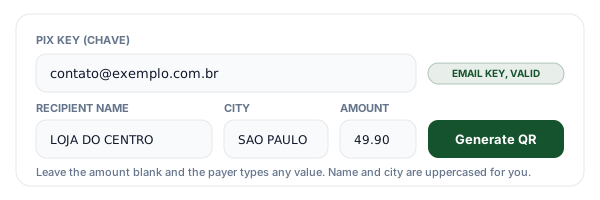
Enter the Pix key, name, and city
Paste any of the five chave types: CPF, CNPJ, email, a phone number, or the random EVP key. The tool detects which one it is, strips punctuation from documents, and adds +55 to a bare phone number. Name and city are uppercased and stripped of accents, because that is the form every bank app renders cleanly.
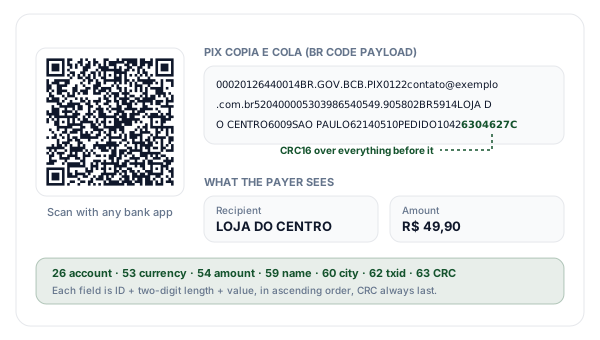
Generate the BR Code and copia e cola
The fields are written in ascending ID order, each one as an ID plus a two-digit length plus a value, with currency 986 and country BR. The payload closes with field 63, a CRC16 over everything before it including the literal 6304. You get the QR code and the identical payload as pasteable text.
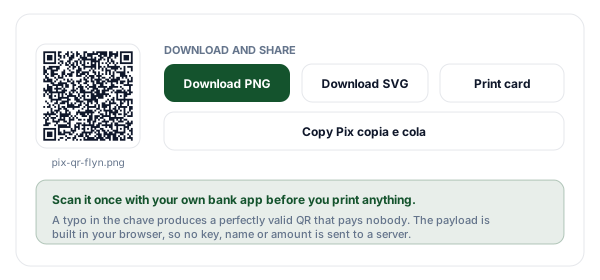
Test it, then download or print
Scan your own code with your own bank app first. A typo in the chave still produces a structurally valid, perfectly scannable QR, because the checksum protects the string and not the account behind it. Then download the PNG or SVG, copy the copia e cola string, or print a counter card.
What a Pix QR Code Actually Contains
A Pix QR code is not a link and it is not an account lookup. It is a single line of text called a BR Code, defined by Banco Central do Brasil on top of the EMV QRCPS merchant presented mode standard. The whole string is a chain of data objects, and every object has the same shape: a two-digit ID, a two-digit length, then that many characters of value. Once you see the pattern you can read a Pix payload by eye. 5303986 is field 53, three characters long, value 986, the ISO code for the Brazilian real.
Two of those objects nest. Field 26, merchant account information, contains its own little TLV chain: subfield 00 holds the arrangement identifier BR.GOV.BCB.PIX, and subfield 01 holds your chave. Field 62 nests the same way, with subfield 05 holding the txid. That nesting is why the length byte on field 26 is larger than you expect, and why a hand-edited payload usually breaks: change the key and you have to recount two lengths, not one.
The payload always ends with field 63, the checksum. The rule that catches almost every home-made generator is that the CRC is calculated over the payload including the characters 6304, the ID and length of the checksum field itself, and excluding only the four hex digits that follow. The algorithm is CRC-16/CCITT-FALSE: polynomial 0x1021, initial value 0xFFFF, no input or output reflection, no final XOR, printed as four uppercase hex digits. Compute it before appending 6304 and you get a code that scans perfectly in a QR reader and is rejected by every bank app that checks it.
Every Field in a Static Pix BR Code
The exact objects this generator writes, in the order it writes them. Ascending ID order is part of the specification, and field 63 is always last.
| ID | Field | What we write | Required | Notes |
|---|---|---|---|---|
| 00 | Payload format indicator | 01 | Always | Version of the EMV QR specification. It is the first data object in every BR Code. |
| 26 | Merchant account information | 00 = BR.GOV.BCB.PIX, 01 = your chave | Always | A nested TLV. Subfield 00 is the arrangement identifier; a dynamic code puts an HTTPS URL in subfield 25 instead of a key in 01. |
| 52 | Merchant category code | 0000 | Always | The ISO 18245 code for the business type. 0000 means unspecified, which is what a static personal or small-shop code uses. |
| 53 | Transaction currency | 986 | Always | ISO 4217 numeric code for the Brazilian real. Pix settles only in BRL, so this value never changes. |
| 54 | Transaction amount | 49.90, or omitted | Optional | Dot decimal separator, two places. Leave the field out entirely for an open amount; writing 0.00 is not the same thing. |
| 58 | Country code | BR | Always | Two-letter ISO 3166-1 country of the receiving account. |
| 59 | Merchant name | LOJA DO CENTRO | Always | Up to 25 characters, shown on the payer confirmation screen. Uppercase unaccented ASCII is the safest form. |
| 60 | Merchant city | SAO PAULO | Always | Up to 15 characters. Several bank apps reject a BR Code that omits it, so it is not really optional in practice. |
| 62 | Additional data field | 05 = PEDIDO1042, or *** | Practically | Nested TLV holding the txid in subfield 05, up to 25 alphanumeric characters. *** is the spec placeholder for no reference. |
| 63 | CRC16 | 627C | Always, last | Four uppercase hex digits over the whole payload including the literal 6304 that introduces this field. |
The Five Pix Key Types, and How Each One Is Written
Whatever you paste, the generator normalises it to the exact string that belongs in field 26, subfield 01. Punctuation in a document number is for humans, not for the payload.
| Key type | What it is | Sent as | Example |
|---|---|---|---|
| CPF | An individual taxpayer number | 11 digits, punctuation removed | 12345678909 |
| CNPJ | A company registration number | 14 digits, punctuation removed | 12345678000195 |
| Any address you registered as a chave | Lowercased, up to 77 characters | [email protected] | |
| Phone | A Brazilian mobile registered as a chave | +55, area code, then 8 or 9 digits | +5561912345678 |
| Random (EVP) | A key your bank generates, tied to no personal data | The 36-character UUID, dashes included | 123e4567-e12b-12d1-a456-426655440000 |
The one case a generator cannot resolve on its own is eleven digits, which is a valid CPF and also a Brazilian mobile written without the country code. This tool defaults to CPF and says so in the field, and the key type selector lets you override it. Getting this wrong is expensive in a quiet way: the QR still scans, the checksum is still correct, and the money simply goes somewhere else or nowhere at all.
Static vs Dynamic Pix QR Codes
This tool makes static codes. Here is exactly what you give up, and what you would need to build the other kind.
| Aspect | Static BR Code | Dynamic BR Code |
|---|---|---|
| Where the payment data lives | Inside the QR code itself | Behind an HTTPS URL the bank fetches at scan time |
| Field 26 subfield used | 01, your Pix key | 25, the payload URL at your payment provider |
| What you need to make one | A registered Pix key, nothing else | An account with a Pix PSP plus API credentials |
| Amount and reference | Fixed at generation, or open; one txid for everyone | Per-charge amount, due date, and a unique txid |
A dynamic code is not a different QR technology, it is the same BR Code with a different field 26. Instead of your chave in subfield 01, it carries an HTTPS URL in subfield 25 pointing at your payment provider, and the paying bank fetches the live charge from that URL at scan time. That is where per-invoice amounts, due dates, and a unique txid per payment come from. It also means you need a relationship with a Pix PSP and working API credentials, which is why static codes remain the right answer for a market stall, a tip jar, or a one-off invoice.
Names, Accents, and Two Tight Character Ceilings
Field 59 and field 60 are the only human-readable parts of the payload. Whatever you put there is what the payer sees on the confirmation screen before they approve the transfer, which makes them a trust signal, not a formality. They are also short: 25 characters for the name and 15 for the city. A full legal name like "Padaria e Confeitaria Sao Joao Ltda" does not fit, so decide yourself what gets trimmed rather than letting a silent truncation decide.
This generator normalises both fields to unaccented uppercase ASCII, so "Padaria São João" is written as PADARIA SAO JOAO. The specification permits a wider character set, but uppercase ASCII is the intersection that renders identically across bank apps, older card terminals, and thermal receipt printers, and the cost of being wrong is a confirmation screen full of replacement characters at the exact moment a customer decides whether to trust you. The tool shows the transformed string under the input, so you always see what is really going into the code.
One Honest Caveat About This Page
Pix is a Brazilian payment system and almost everyone searching for a gerador de QR Code Pix is searching in Portuguese. This page is in English, because Flyn does not have a Portuguese version of the site and we would rather say so than machine-translate a page about money and hope for the best.
What that means in practice: the generator is exactly as correct as a Portuguese one, since the output is a standards-defined payload rather than translated copy, and the same string works in every Brazilian bank app. But the explanations around it are aimed at two specific audiences: developers implementing BR Code who want the field map and the CRC rule written down plainly, and sellers outside Brazil who hold a Brazilian account and need to accept Pix from Brazilian customers. If you want instructions in Portuguese, a local tool will serve you better, and the payload it produces should be byte-identical to this one.
Where Static Pix Codes Fit
No terminal, no provider account, no monthly fee. The trade is that one code cannot know which order it is being paid for.
Counter and market stall payments
Print one code with an open amount and take payment without a card terminal. It works offline for you and never expires, so the same laminated card lasts all year.
Invoices and order confirmations
Put a fixed-amount code plus the copia e cola string on the invoice PDF. Paying from a phone means scanning; paying from a desktop means pasting, and you cover both.
International sellers billing Brazilian customers
If you hold a Brazilian account, a Pix code settles in seconds and costs the buyer nothing, which beats asking a Brazilian customer to pay an international card fee.
Creators and service providers
A tip or booking-deposit code in a bio link or a story sticker. Keep the amount open for tips, fixed for a deposit, and the payer never leaves their bank app.
Pix Codes Plus Flyn: Measure Everything Around the Payment
The BR Code itself goes straight into a bank app and reports nothing back. Every other step on the way to it can be measured.
Scan counts on a link QR
A Flyn QR points at a short link, so scans are counted. Use one beside the Pix code to learn which placement people find.
Editable destinations
Re-point a short link anytime. A printed static Pix code cannot change; the link on the same flyer can.
Nothing leaves your browser here
This generator has no backend. Your chave, name, and amount are assembled and rendered client-side.
A free plan that lasts
25 links a month with total click counts and QR codes. No trial countdown. Custom domains come with Pro.
Frequently Asked Questions
How do I create a Pix QR code?
What is a BR Code, and how is it different from an ordinary QR code?
What is Pix copia e cola, and why does this tool give me both?
Which Pix key types can I put in a QR code?
Can I generate a Pix QR code with no fixed amount?
What is the txid field, and what does *** mean?
Why does the generator uppercase the name and strip accents?
Why must the CRC include the 6304 at the end?
What is the difference between a static and a dynamic Pix QR code?
Does a static Pix QR code expire, and can I reuse it?
Is my Pix key sent to a server?
This page is in English. Can I still use it if I am in Brazil?
More Free Tools
More free QR and link tools from Flyn, instant, no sign-up required.
QR Code Generator
QR codes for a URL, text, email, phone, SMS, WiFi, or vCard.
UPI Payment Link Generator
The same idea for India: a upi:// link and QR for any amount.
vCard QR Code Generator
A digital business card that saves to contacts in one scan.
Dynamic QR Code Generator
An editable, trackable QR you can repoint after printing.
Ready to get paid, and to see what led people there?
Generate Pix codes here for free, forever. When you want to know which flyer, bio link, or invoice actually brought someone to the payment, put a Flyn short link in front of it.