Free Meta Tag Generator
Generate SEO-optimized meta tags, Open Graph tags, and Twitter Cards in seconds. Preview how your page looks in Google and copy the HTML code.
Page type presets
The title tag shown in search results and browser tabs
The description shown in search engine results under the title
Preferred URL for this page, prevents duplicate content issues
Generated Meta Tags
4 tagsAdd a title and description to generate your meta tags.
<meta charset="UTF-8">
<meta name="viewport" content="width=device-width, initial-scale=1">
<meta name="robots" content="index, follow">
<meta http-equiv="content-language" content="en">
Want more clicks from your links?
Shorten your page URLs with Flyn to get branded short links with built-in click analytics, QR codes, and A/B testing.
How to Generate Meta Tags in 3 Steps
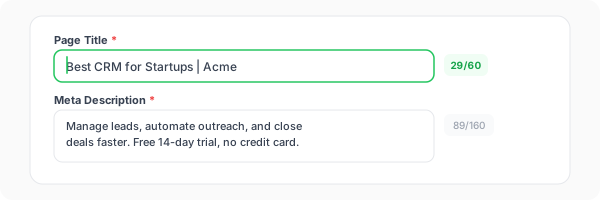
Enter your title and description
Add your page title (50-60 characters) and meta description (150-160 characters). Use your target keyword naturally in both fields. Our tool shows character counts and a live Google preview.
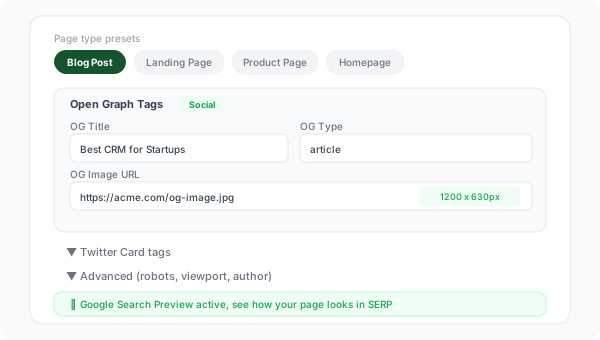
Configure social and advanced tags
Expand the Open Graph and Twitter Card sections to set your social preview image, site name, and handles. Use presets for common page types like Blog Post, Landing Page, or Product Page.
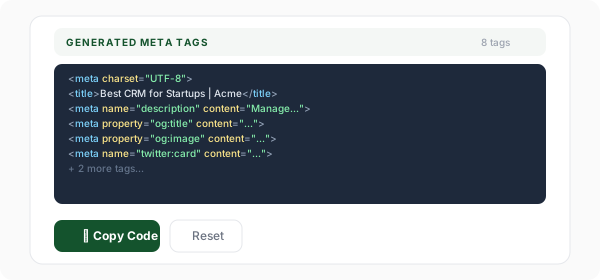
Copy and paste into your HTML
Copy the generated meta tag code and paste it into the <head> section of your HTML. The tags are formatted and ready to use, just paste and publish.
What Are Meta Tags and Why Do They Matter for SEO?
Meta tags are snippets of HTML code that describe a page's content to search engines and social media platforms. They live in the <head> section of your HTML and are not visible to users on the page itself. Despite being invisible, they are one of the most important factors in how your page ranks in search results and how it appears when shared on social media.
The title tag and meta description are what users see in Google search results. They are your page's first impression. A well-crafted title with the right keywords can improve your ranking, while a compelling description with a clear call-to-action can dramatically increase your click-through rate. Open Graph and Twitter Card tags control the social media preview, which determines whether people click when your content is shared.
The canonical tag is the quiet workhorse of the set: it decides which URL those ranking signals accrue to when the same page is reachable at more than one address. After your tags go live, run the page through our free Canonical URL Checker to confirm the canonical and og:url tags agree instead of splitting equity across duplicates.
Example meta tags in HTML:
<title>Best CRM for Startups | Acme</title>
<meta name="description" content="Free CRM...">
<meta property="og:image" content="https://...">
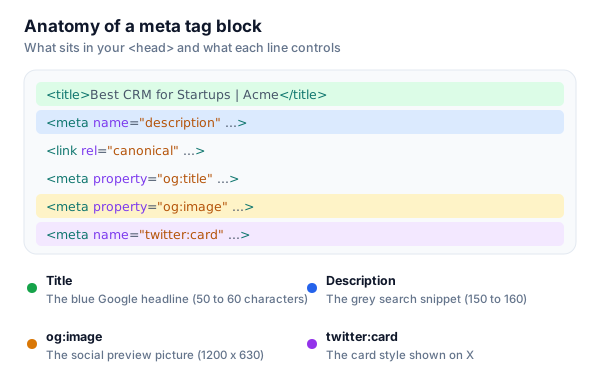
The Anatomy of a Meta Tag Block
Every line in your <head> has a specific job. Here is what each essential tag controls, and the length or size that keeps it from being cut off.
Essential Meta Tags Explained
<title>EssentialThe title tag is the most important on-page SEO element. It appears as the clickable headline in search engine results and in the browser tab.
Examples
Best CRM for Startups, Free Plan | Acme
Pro tip
Put your primary keyword near the beginning. Include your brand name at the end, separated by a pipe (|) or dash (, ).
meta descriptionEssentialA brief summary of the page content that appears below the title in search results. Not a direct ranking factor but strongly impacts click-through rates.
Examples
Manage leads, automate outreach, and close deals faster with Acme CRM. Free forever for teams up to 5. No credit card required.
Pro tip
Include a call-to-action (CTA) and your primary keyword. Make it compelling enough to click.
canonical URLTells search engines which URL is the preferred version of this page. Prevents duplicate content issues when the same page is accessible at multiple URLs.
Examples
<link rel="canonical" href="https://example.com/pricing">
Pro tip
Always use the absolute URL with https://. Self-referencing canonicals (pointing to the current page) are a best practice.
robotsControls how search engine crawlers handle the page, whether to index it and whether to follow its links.
Examples
index, follow | noindex, nofollow | noarchive | nosnippet
Pro tip
Use "noindex" for login pages, staging sites, and thank-you pages. Default is "index, follow" if omitted.
og:titleThe title that appears in the social media preview card when your page is shared on Facebook, LinkedIn, Discord, Slack, and WhatsApp.
Examples
Acme CRM, The Best Free CRM for Startups
Pro tip
Can be different from your <title> tag. Social titles can be more conversational or eye-catching.
og:descriptionThe description that appears in the social media preview card. Usually a shorter, punchier version of your meta description.
Examples
The free CRM that startup teams actually love. Try Acme today.
Pro tip
Keep it under 100 characters for best results across all platforms.
og:imageThe image that appears in the social media preview card. This is the single most impactful element for social sharing engagement.
Examples
https://example.com/og-image.jpg (1200x630px)
Pro tip
Use 1200x630px, under 5MB, JPG or PNG. Include your brand logo and a clear value proposition in the image.
twitter:cardControls the type of Twitter/X card preview. summary_large_image shows a large image above the text; summary shows a small square image.
Examples
summary_large_image | summary | app | player
Pro tip
Use "summary_large_image" for content pages and "summary" for profile or utility pages.
viewportEssentialControls how the page is displayed on mobile devices. Essential for responsive design and mobile SEO.
Examples
width=device-width, initial-scale=1
Pro tip
Never omit this tag. Without it, mobile devices render at desktop width and shrink the page.
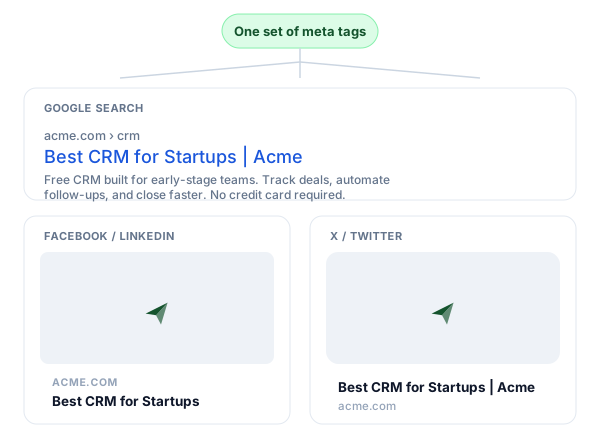
One Set of Tags, Three Places It Shows Up
You write the tags once. The same title, description, and image render as your Google result, your Facebook and LinkedIn card, and your X card.
Meta Tag Best Practices
Do
Don't
Keep title tags under 60 characters
Stuff keywords: "Best CRM CRM Software CRM Tool"
Write unique meta descriptions per page
Copy the same description across all pages
Use absolute URLs for OG images
Use relative paths: /images/og.jpg
Set canonical URLs on every page
Leave duplicate pages without canonical tags
Include a call-to-action in descriptions
Write vague descriptions with no CTA
Test social previews before publishing
Publish without checking how links look on social
Use noindex for internal/staging pages
Let staging or login pages get indexed
Place primary keyword early in the title
Bury your keyword at the end of a long title
Meta Tags + Link Shortener: The Full SEO Stack
Great meta tags bring traffic from search and social. A link shortener helps you track and optimize every click.
Better SERP presence
Optimized title tags and meta descriptions improve your visibility and click-through rate in Google search results.
Social media previews
Open Graph and Twitter Cards make your shared links look professional and increase engagement on every platform.
Click analytics
Shorten your page URLs with Flyn to track clicks, referrers, devices, and locations in real time.
A/B test everything
Test different landing pages with the same short link. Find which version converts better and optimize.
How to Add Meta Tags in Popular Frameworks
Plain HTML
<head>
  <title>Your Page Title</title>
  <meta name="description" content="...">
  <meta property="og:title" content="...">
</head>
Paste the generated meta tags directly into the <head> section of your HTML file. Make sure they appear before any CSS or JavaScript links.
Next.js (App Router)
export const metadata: Metadata = {
  title: "Your Page Title",
  description: "...",
  openGraph: { title: "...", images: ["..."] },
}
Use the Metadata export in your page.tsx or layout.tsx file. Next.js automatically generates the meta tags for you.
WordPress
Use Yoast SEO or RankMath plugin to set title, description, and OG tags from the post editor.Both plugins add a meta box below the editor where you can set all meta tags without touching HTML. They also provide SEO analysis and readability scores.
React (Create React App)
import { Helmet } from "react-helmet";

<Helmet>
  <title>Your Page Title</title>
  <meta name="description" content="..." />
</Helmet>
Use react-helmet or react-helmet-async to manage meta tags in single-page React apps. Place the Helmet component in your page components.
Shopify
Products → Edit → Search engine listing preview → EditShopify lets you edit title and meta description from the product/page editor. For OG tags, edit your theme.liquid file or use a meta tags app from the Shopify App Store.
Common Meta Tag Mistakes to Avoid
Duplicate title tags across pages
Every page on your site should have a unique title tag. Duplicate titles confuse search engines about which page to rank and make your site look unprofessional in search results. Use our meta tag generator to create unique titles for each page.
Missing or too-long meta descriptions
Pages without meta descriptions let Google auto-generate a snippet, which is often irrelevant or cut mid-sentence. Descriptions over 160 characters get truncated with "...", keep them concise and compelling with a clear CTA.
Using relative URLs for OG images
Open Graph images must use absolute URLs starting with https://. Relative paths like /images/og.jpg will not work on Facebook, LinkedIn, or Twitter. Always include the full domain in your og:image tag.
Forgetting mobile viewport tag
Without the viewport meta tag, your page renders at desktop width on mobile devices, creating a terrible user experience. Google uses mobile-first indexing, so this directly affects your rankings. Always include width=device-width, initial-scale=1.
Not setting canonical URLs
Without canonical tags, search engines may index multiple versions of the same page (with/without www, http/https, with query parameters). This splits your ranking signals across duplicates. Set a self-referencing canonical on every page.
Frequently Asked Questions
What are meta tags?
What is the ideal length for a title tag?
What is the ideal length for a meta description?
What is the difference between meta tags and Open Graph tags?
Do meta tags affect SEO?
What is a canonical URL and why does it matter?
What does the robots meta tag do?
What is the recommended Open Graph image size?
Should I use keywords meta tag in 2026?
How do I check if my meta tags are working?
What is the viewport meta tag?
Is this meta tag generator free? Do I need to sign up?
More Free SEO Tools
Explore other free tools from Flyn to optimize your website and track performance.
Open Graph Checker
Check OG tags and preview how your links appear on social media platforms.
UTM Builder
Build campaign tracking URLs with UTM parameters for Google Analytics.
Schema Markup Generator
Build JSON-LD structured data, pairs with meta tags for rich Google snippets.
SERP Snippet Preview
See how your title and description render in Google, with live pixel-width truncation warnings.
Ready to optimize your entire link strategy?
Combine perfect meta tags with Flyn's link shortener for branded short links, real-time click analytics, QR codes, and A/B testing, all in one platform.