SERP Snippet Preview
See exactly how your title tag and meta description appear in Google, on desktop and mobile, with live pixel-width measurement that catches truncation before you publish. Free, no signup.
Live Google preview
Approximation of a Google result. Actual rendering varies by query, date, and rich features.
Perfect snippet, now control the click.
A branded Flyn short link in your post and bio earns more clicks than a bare URL, and shows you exactly which titles convert.
How to Preview Your Google Snippet
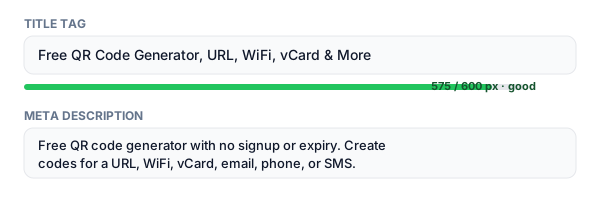
Enter your title, URL, and description
Type or paste your page title tag, the URL, and the meta description. The preview updates as you type.
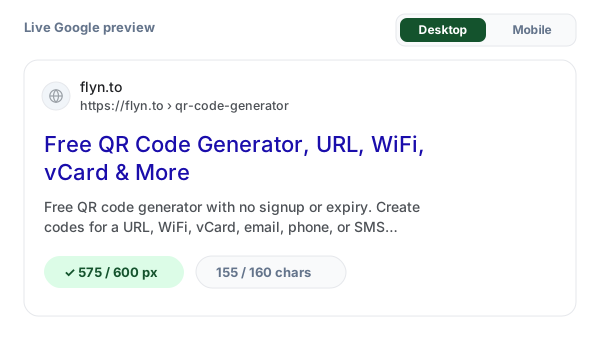
Check the desktop and mobile preview
See your snippet as a live Google result, with the exact pixel width measured and graded for each device.
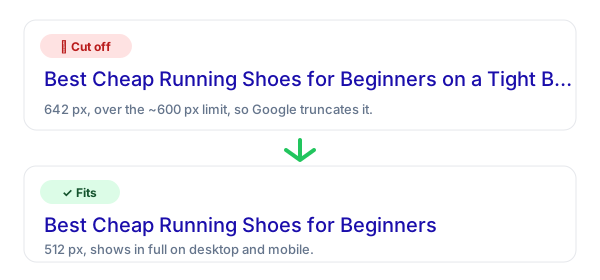
Fix truncation and optimise for clicks
Trim anything that gets cut off, then sharpen the wording so it reads like ad copy and earns the click.
What Is a SERP Snippet?
A SERP snippet is the listing Google shows for your page in search results: the clickable blue title, the URL breadcrumb, and the grey description beneath it. It is, in effect, a free ad, and how it reads decides whether a searcher picks your result or a competitor's.
The catch is that Google truncates titles and descriptions by pixel width, which a character counter cannot predict. This tool renders the real thing using Google's font metrics, so you see the exact cut-off live and can write a snippet that shows in full and earns the click. To generate the underlying tags, pair it with our Meta Tag Generator, and to preview the social card use the Open Graph Checker.
Title & Description Length Limits
Approximate limits Google uses today. Pixels are what matter, characters are only a rough guide.
| Element | Pixel limit | ≈ Characters | Note |
|---|---|---|---|
| Title tag (desktop) | ~600 px | ≈ 50-60 characters | Truncated with “…” past the limit |
| Title tag (mobile) | ~920 px | Wraps to ~2 lines | More room, but wrapping can look messy |
| Meta description (desktop) | ~920-960 px | ≈ 150-160 characters | Front-load the value |
| Meta description (mobile) | ~840 px | ≈ 120-130 characters | Tighter, keep it punchy |
Your Snippet Is Free Ad Space
Ranking is only half the battle, you still have to win the click. Two results in positions one and two can see wildly different click-through rates purely because one wrote a sharper title and description. And because Google rewards results that earn more clicks than expected for their position, a better snippet can quietly lift your ranking too.
Treat every title and description like ad copy: lead with the benefit, match the searcher's intent, and make sure nothing important gets cut off. Then carry that same discipline into the links you share off-search.
Win the click everywhere, not just in search.
Flyn turns long URLs into branded short links for your posts, bio, and emails, and shows you which ones actually get clicked, so you can optimise every channel like you just optimised your snippet.
Snippet Best Practices
Do
Don't
Measure titles in pixels, not characters
Trust a 60-character “rule” blindly
Put the keyword and value near the front
Bury the point after your brand name
Write a unique title for every page
Reuse the same title across the site
Match the description to search intent
Keyword-stuff or pad to fill space
Check mobile and desktop separately
Optimise for desktop only
Treat the snippet as ad copy
Leave Google to auto-generate it
Why Use Flyn's SERP Preview?
Real pixel width
Measured with Google's font metrics, the only number that predicts truncation accurately.
Desktop + mobile
Toggle devices to catch a title that fits on one and wraps badly on the other.
Click-focused tips
Live length grading and guidance to turn your snippet into compelling ad copy.
Optimise off-search too
Pair it with Flyn links to win clicks in posts, bios, and email, and measure each one.
Frequently Asked Questions
What is a SERP snippet preview?
How long should a title tag be?
How long should a meta description be?
Why does Google measure titles in pixels instead of characters?
Why is my title showing with "..." at the end?
Does Google always use the title and description I set?
Why does the mobile preview look different from desktop?
Will a longer meta description help me rank higher?
Do title tags and meta descriptions affect SEO at all?
Is this preview exactly what Google will show?
Does this tool store the titles and descriptions I enter?
How do I actually add the title and description to my page?
More Free SEO Tools
Generate, preview, and audit everything that decides how your pages show up.
Meta Tag Generator
Generate the title, description, Open Graph, and Twitter Card tags to paste into your page.
Open Graph Checker
Preview how your link looks on Twitter, Facebook, LinkedIn, and Discord.
Schema Markup Generator
Build JSON-LD structured data to unlock rich results like FAQs, reviews, and breadcrumbs.
Canonical URL Checker
Verify rel=canonical tags and catch duplicate-content signals that split your rankings.
Optimise the click, then track it
You just tuned your search snippet for clicks. Flyn does the same for every link you share off Google, branded, short, and measured, so you can see what actually converts.