Free Schema Markup Generator
Build JSON-LD structured data for Article, Product, FAQ, Breadcrumb, Organization, LocalBusiness, HowTo, Event, Review, Person, and WebPage. Live preview, copy-paste HTML.
Try a preset
The article's main title (max 110 chars per Google)
Short summary for SERPs and social
Required for Article rich results
Author's profile or bio page
Use 1200x630 absolute HTTPS URL
ISO 8601 format
Defaults to date published
600x60 minimum
Fill in the fields above (or pick a preset) to generate your JSON-LD.
Want every shared link to look this good?
Pair your schema markup with Flyn short links, branded URLs with click analytics, QR codes, and A/B testing baked in.
How to Generate Schema Markup in 3 Steps
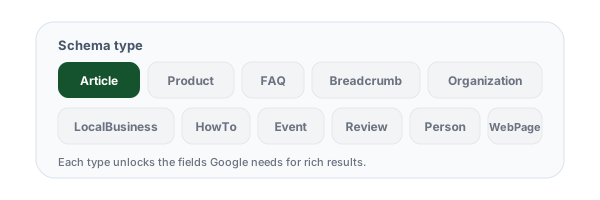
Pick a schema type
Choose from 11 schema types, Article, Product, FAQ, Breadcrumb, Organization, LocalBusiness, HowTo, Event, Review, Person, or WebPage. Each shows only the fields that matter for that type.
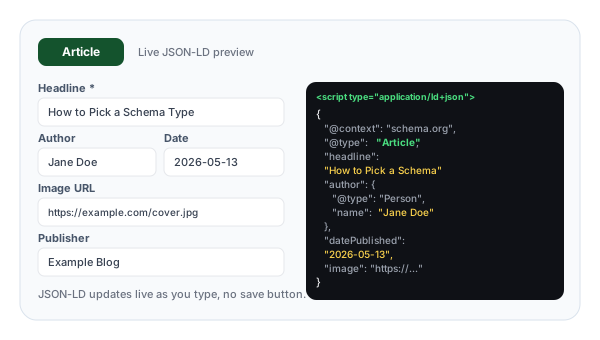
Fill in the fields
Enter your content details, headline, author, price, FAQs, address. Watch the JSON-LD update live as you type. Load a preset (e.g., Recipe Article, Software Product) to see a complete example.
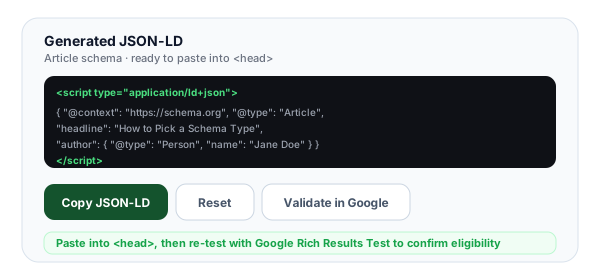
Copy into your <head>
Grab the full <script type="application/ld+json"> block. Paste into the <head> of your HTML, validate with Google's Rich Results Test, and your structured data is live.
What Is Schema Markup and Why Does It Power Rich Results?
Schema markup is structured data, a shared vocabulary (defined at schema.org) that you embed in your HTML to tell search engines exactly what each page contains. Instead of relying on Google to guess that a page about "the new MacBook Pro M5" is a product review or an editorial article, you state it explicitly with a single JSON-LD block in your <head>. Google, Bing, Yandex, and AI assistants all consume this data to power richer, more confident search results.
The biggest payoff is rich results, the visual enhancements that turn plain blue links into stars, prices, FAQ accordions, recipe images, event cards, and breadcrumb trails. Rich results consume far more SERP real estate, push competitors below the fold, and drive 20-30% higher click-through rates than unenhanced listings. Schema is also how Google builds its Knowledge Graph and how AI assistants like Gemini and ChatGPT extract structured answers from your pages. In 2026, schema is no longer optional for competitive SEO, it is table stakes.
Example JSON-LD block in <head>:
<script type="application/ld+json">
{
  "@context": "https://schema.org",
  "@type": "Article",
  "headline": "...",
  "author": { "@type": "Person", "name": "..." }
}
</script>
The 11 Schema Types We Generate
Pick the type that matches your page. Each unlocks specific rich result features in Google.
ArticleBlog posts, news articles, editorial contentTells Google your page is a structured article with an author, publish date, and headline. Required for Top Stories carousels and article rich results in mobile search.
ProductE-commerce product pages, software listingsPowers price snippets, star ratings, stock status, and shopping graph entries. Combine with Offer for pricing and AggregateRating for reviews. The single highest-ROI schema for retailers.
FAQPageFAQ sections, support pages, help docsGenerates collapsible FAQ rich results directly in SERPs. The FAQs must be visible on the page (not hidden behind tabs). Boosts SERP real estate by 2-3x and pushes competitors below the fold.
BreadcrumbListAny page with hierarchical navigationReplaces the raw URL in search results with a clean breadcrumb trail (Home > Category > Product). Improves both perceived authority and click-through rate. Trivial to add, always worth it.
OrganizationHomepage, About pageEstablishes your brand entity in Google's Knowledge Graph. Required for sitelinks, brand panels, and the corporate contact box on the right side of search results. Include logo, sameAs (social), and contactPoint.
LocalBusinessRestaurants, stores, service providers with physical locationsPowers local pack listings, Google Maps integration, opening hours snippets, and "near me" results. Critical for any business with a physical address. Include geo coordinates, address, hours, and phone.
HowToStep-by-step tutorials, recipes, guidesMarks up sequential instructions with steps, tools, and supply requirements. Google deprecated most HowTo rich results in 2023 but still uses the data for context and voice search.
EventConcerts, webinars, conferences, classesGenerates event rich results with date, location, ticket prices, and venue. Required for events to appear in Google's event search and Maps. Update eventStatus to EventCancelled or EventPostponed when needed.
ReviewIndividual review pages, critic reviewsMarks up a single review of a product, movie, book, or business. Combine with itemReviewed and a numeric reviewRating. Different from AggregateRating, which summarizes multiple reviews.
PersonAuthor bio pages, leadership profiles, personal portfoliosEstablishes a person entity with name, job title, employer, and social profiles. Important for E-E-A-T signals, Google uses Person schema to verify content authority and authorship.
WebPageGeneric pages, landing pages, content types not covered aboveThe fallback type for any web page. Useful for setting primary entity, language, and breadcrumb references when no more-specific type fits. Often used with @graph to link multiple schemas.
JSON-LD vs Microdata vs RDFa: Why JSON-LD Wins
All three formats, JSON-LD, microdata, and RDFa, communicate the same schema.org vocabulary to search engines. The difference is where and how the data lives. Microdata and RDFa embed itemprop, itemtype, property, and typeof attributes directly into your visible HTML, scattering metadata across dozens or hundreds of tags. JSON-LD lives in a single <script> block in your <head>, completely separate from your visible content.
JSON-LD wins for three practical reasons. First, maintenance: one block per page is far easier to keep in sync than attributes scattered across a template. Second, resilience: if your designer changes the HTML structure, your schema does not break. Third, Google’s preference: Google’s documentation universally uses JSON-LD in examples, and they have repeatedly recommended it as the format of choice. New schema types ship with JSON-LD examples first. Unless you have a legacy reason to use microdata or RDFa (e.g., an old CMS that generates them automatically), use JSON-LD.
Schema Markup Best Practices
Hard-earned lessons from shipping schema on production sites.
Match schema to what the page actually is
Do not use Product schema on a blog post or Article schema on a category page. Google may flag mismatched schema as spam, suppressing rich results across your whole domain. Be honest about content type.
Only mark up content visible on the page
Google requires that schema content (FAQs, reviews, product specs) is actually visible to users. Hiding FAQs in collapsed tabs that lazy-load via JavaScript can disqualify rich results. Keep schema in sync with rendered HTML.
Use absolute URLs for images and links
All URLs in schema (image, url, sameAs, logo) must be absolute https:// URLs. Relative paths like /images/logo.png will be ignored or trigger validation errors. Always include the full domain.
Keep schema close to your CMS data
Generate schema from the same source as your visible content (product database, CMS fields, author table). If your visible price says $29 but schema says $19, Google penalizes the mismatch. Single source of truth prevents drift.
Validate before every deploy
Run Google's Rich Results Test on a staging URL or by pasting raw HTML. Watch for errors AND warnings, warnings indicate optional fields that, while not blocking, are required for full rich result eligibility on some queries.
Re-validate after content updates
Templates change, plugins update, CMS migrations break things. Add schema validation to your CI/CD pipeline or set a monthly audit reminder. Search Console "Enhancements" surfaces errors at scale across your domain.
Schema Markup + Branded Short Links: Full SERP Domination
Great schema wins the SERP click. Flyn short links capture every click that follows, analytics, retargeting, and A/B tests built in.
Rich result eligibility
Valid JSON-LD unlocks stars, prices, FAQs, and breadcrumbs in SERPs, 20-30% higher CTR on the same ranking.
Knowledge Graph entry
Organization and Person schema feed Google’s Knowledge Graph and trigger brand panels in search.
Live JSON-LD preview
See your structured data update as you type. Copy a ready-to-paste <script> tag, no manual JSON formatting required.
AI assistant ready
Gemini, ChatGPT, and Perplexity parse JSON-LD to extract structured answers. Schema is now table stakes for AI search visibility.
Frequently Asked Questions
What is schema markup and why does it matter for SEO?
Do I really need schema markup on every page?
Does schema markup actually boost rankings?
What schema types do I need for my site?
How do I validate that my schema markup is correct?
What is JSON-LD and how is it different from microdata or RDFa?
Can I have multiple schema blocks on the same page?
What is the difference between FAQPage and HowTo schema?
Can I fake reviews or aggregateRating in my schema?
What image dimensions should I use in schema markup?
What is the difference between dateModified and datePublished?
Why is my schema valid but not showing rich snippets in Google?
More Free SEO Tools
Explore more technical SEO tools from Flyn, free, instant, no sign-up required.
Meta Tag Generator
Generate SEO title, description, and Open Graph tags with live Google preview.
Open Graph Checker
Check OG tags and preview how your links appear on Facebook, LinkedIn, and Discord.
Canonical URL Checker
Audit canonical tags to prevent duplicate content and consolidate ranking signals.
XML Sitemap Validator
Validate sitemap.xml structure, URLs, and lastmod fields before submitting to Google.
Ready to win rich results across your site?
Generate every schema type in seconds, then track every click with Flyn, branded short links, analytics, and A/B testing in one platform.