Free XML Sitemap Validator
Validate any site's sitemap.xml in seconds. Check URLs, lastmod dates, priority values, and sitemap index structure. Auto-discovers sitemaps via robots.txt and common paths.
We auto-detect your sitemap from robots.txt and common paths (/sitemap.xml, /sitemap_index.xml).
Want to track every link you share?
Create Flyn short links and count every click at no cost; Pro shows where clicks come from and on what device. Every link becomes a data point.
How to Validate a Sitemap in 3 Steps
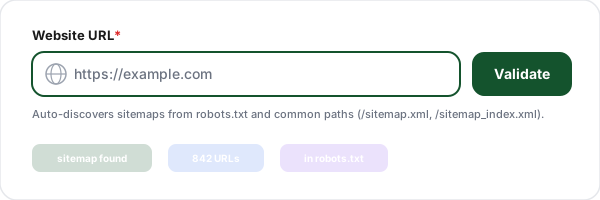
Enter a website URL
Paste any website URL, you do not need to know the exact sitemap path. The tool checks robots.txt first, then falls back to /sitemap.xml, /sitemap_index.xml, and /sitemap/ automatically.
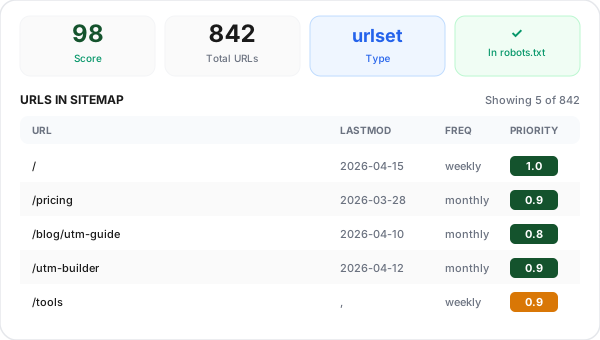
Review parsed URLs
See every URL in the sitemap with its lastmod, changefreq, and priority values. The tool flags malformed dates, invalid URLs, missing required tags, and child sitemap count for sitemap indexes.
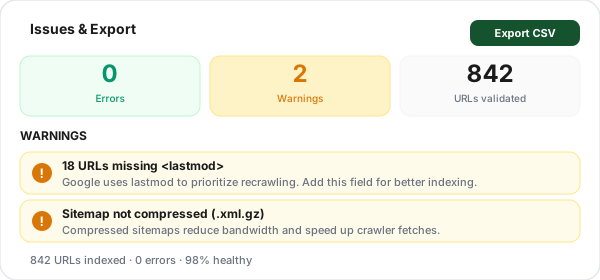
Fix issues and export
Filter URLs by missing fields (no lastmod, no priority) or by high-priority pages. Copy individual URLs, open them in a new tab, or export the full list as CSV for a deeper audit.
What Is an XML Sitemap and Why Does It Matter?
An XML sitemap is a structured list of every URL on your site that you want search engines to know about. Each entry can carry metadata, the URL itself (loc), the last time it was modified (lastmod), how often it changes (changefreq), and a relative priority (priority). Sitemaps are the primary way Google, Bing, and other crawlers discover pages that are hard to reach through normal internal link crawling.
For large sites, new sites, or sites with lots of archival content, a sitemap is the difference between pages getting indexed in days vs. months. It closes three common gaps: orphan pages (no internal links), deep pages (many clicks from the homepage), and newly updated pages that crawlers would otherwise find slowly. A clean sitemap is also a signal of technical quality, Google Search Console uses it as the reference list for what you intend to have indexed.
Sitemap Structure: Required vs Optional Tags
Tag
Required?
Purpose
<loc>
Required
Absolute URL, must start with https:// and match the domain
<lastmod>
Recommended
ISO 8601 date the URL was last modified. Google uses this heavily
<changefreq>
Optional
Hint at how often the page changes. Largely ignored by Google
<priority>
Optional
Relative priority 0.0-1.0. Ignored by Google, used by Bing
<xhtml:link>
Optional
Alternate language versions (hreflang) for international SEO
<image:image>
Optional
Image sitemap extension, tells search engines about image content
urlset vs sitemapindex: When to Use Each
urlset (standard sitemap)
Contains up to 50,000 <url> entries. Use this for small to medium sites where a single file can hold every page.
- Max 50,000 URLs
- Max 50 MB uncompressed
- Root tag: <urlset>
sitemapindex
A parent file that lists other sitemap files. Required when you exceed 50K URLs. Also useful for logical separation by content type.
- Up to 50,000 child sitemaps
- Each child has its own 50K/50MB limit
- Root tag: <sitemapindex>
XML Sitemap Best Practices
Keep lastmod accurate
Only update lastmod when the page's content actually changes. Falsely updating it on every build teaches Google to ignore your lastmod values, which is worse than not having them.
Only include indexable URLs
URLs in your sitemap should return HTTP 200, not be blocked by robots.txt, and not have noindex. Sitemaps with 404s, redirects, or noindexed pages waste crawl budget and hurt trust.
Use absolute URLs
Every <loc> must be a fully-qualified URL (https://www.example.com/page), not a relative path. The URL must also match the canonical version (www vs non-www, trailing slash, etc.) that your site serves.
Reference the sitemap in robots.txt
Add "Sitemap: https://www.example.com/sitemap.xml" to robots.txt. This makes your sitemap discoverable by any crawler (not just search engines you manually submit to) and is a strong discoverability signal.
Submit via Search Console
Submit your sitemap to Google Search Console AND Bing Webmaster Tools for per-sitemap indexing status, error reports, and last-read timestamps. Doing both (robots.txt + Search Console) is the belt-and-braces approach.
Regenerate on every deploy
Automate sitemap generation as part of your build/deploy pipeline. Never hand-edit production sitemaps. Use frameworks with built-in sitemap generation (Next.js, Hugo, Gatsby) or plugins (Yoast, RankMath) to stay synced with content.
Sitemap Validator + Link Shortener: Better Together
Validate your sitemap with this tool, then track every link you share with Flyn: free click counts and QR codes, with analytics breakdowns and branded domains on Pro, all in one platform.
Track every click
Every Flyn short link counts every click for free; Pro layers on device, country, referrer, and time-series breakdowns.
Branded links
Put short links on your own domain with Pro. Build trust and increase CTR with branded URLs.
Editable destinations
Change where your short links point anytime. No more broken links when URLs change.
Instant redirects
Flyn redirects complete in under 50ms globally. Your users never notice the redirect.
Frequently Asked Questions
What is an XML sitemap?
Why do I need a sitemap?
How often should I update my sitemap?
What is the 50,000 URL / 50 MB limit?
Should mobile URLs be in a separate sitemap?
Does being in a sitemap guarantee indexing?
What's a sitemapindex and when should I use one?
Should draft or unpublished pages be in the sitemap?
How do I submit my sitemap to Google?
Do priority and changefreq actually matter?
Does a sitemap affect my search rankings?
Can I have multiple sitemaps?
More Free SEO Tools
Explore other free tools from Flyn to audit and improve your site.
Robots.txt Tester
Test crawler rules and check if a URL is blocked for Googlebot.
Schema Markup Generator
Build JSON-LD for Article, Product, FAQ, HowTo, Breadcrumb, 11 schema types.
Canonical URL Checker
Verify canonical tags and detect duplicate content issues.
Hreflang Tag Generator
Build international hreflang tags for multi-language sites, embed in sitemap or HTML head.
Ready to take control of your links?
Validate your sitemap for free, then create trackable short links with Flyn: QR codes and click counts free, analytics breakdowns and branded domains on Pro, all in one platform.