Free Hreflang Tag Generator
Build international SEO link tags for multilingual sites. Validate ISO 639-1 language and ISO 3166-1 region codes, add x-default, and copy HTML or XML sitemap markup.
Language
Region
URL
Output format:
Add language rows with valid URLs to generate hreflang tags.
Routing users to the right locale?
Shorten campaign URLs with Flyn to track which locale your audiences click, built-in click analytics by country, device, and referrer.
How to Generate Hreflang Tags in 3 Steps
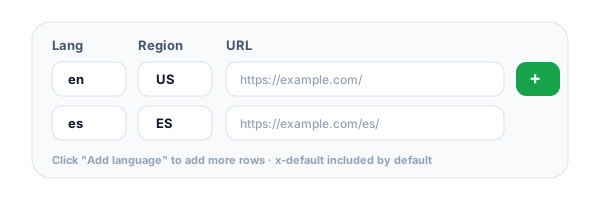
Add a row per language and region
Enter the ISO 639-1 language code (e.g. en, es, fr), the optional ISO 3166-1 region (US, GB, ES, MX), and the URL of that page version. Use the "Add common languages" quick button to scaffold six popular locales in one click.
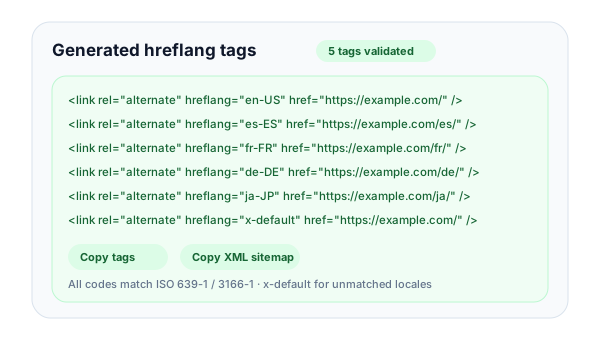
Review validated tags and warnings
The tool builds <link rel="alternate" hreflang="..." href="..."> tags, validates every code against ISO standards, flags duplicate or malformed entries, and automatically includes an x-default row for unmatched locales.
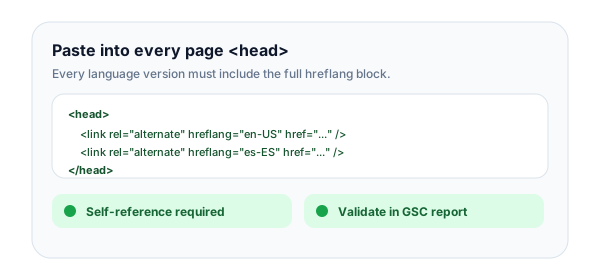
Paste into <head> or your XML sitemap
Copy the generated HTML and paste it into the <head> of every language version of your page, or switch to XML sitemap output and paste the markup into your sitemap. Verify in Google Search Console.
What Is Hreflang and Why Does International SEO Need It?
Hreflang is an HTML attribute that tells search engines which language and regional version of a page should be served to which audience. It lives inside a <link rel="alternate"> tag in the <head> of every page. When Google sees a properly tagged set of alternates, it picks the right URL based on the searcher's language preferences and country, so a German searcher gets the de-DE page and a Mexican searcher gets the es-MX page, even if they search for the same term.
The tag itself does not boost rankings. What it does is prevent two common SEO problems on multilingual sites: duplicate content (when the same text is published at multiple URLs) and locale mismatch (when Google shows the wrong country's version in search results). Without hreflang, your localized pages can cannibalize each other or be filtered out as duplicates.
A complete hreflang set in HTML:
<link rel="alternate" hreflang="en-US" href="https://example.com/" />
<link rel="alternate" hreflang="es-ES" href="https://example.com/es/" />
<link rel="alternate" hreflang="fr-FR" href="https://example.com/fr/" />
<link rel="alternate" hreflang="x-default" href="https://example.com/" />
Common Language & Country Codes for Hreflang
Hreflang uses ISO 639-1 (lowercase, two letters) for language and ISO 3166-1 alpha-2 (uppercase, two letters) for region. Below are the most common combinations, copy a row into the generator above.
Language
Region
Locale
hreflang
en
US
English (United States)
en-US
en
GB
English (United Kingdom)
en-GB
en
CA
English (Canada)
en-CA
en
AU
English (Australia)
en-AU
en
IN
English (India)
en-IN
es
ES
Spanish (Spain)
es-ES
es
MX
Spanish (Mexico)
es-MX
es
AR
Spanish (Argentina)
es-AR
fr
FR
French (France)
fr-FR
fr
CA
French (Canada)
fr-CA
de
DE
German (Germany)
de-DE
de
AT
German (Austria)
de-AT
de
CH
German (Switzerland)
de-CH
it
IT
Italian (Italy)
it-IT
pt
PT
Portuguese (Portugal)
pt-PT
pt
BR
Portuguese (Brazil)
pt-BR
nl
NL
Dutch (Netherlands)
nl-NL
sv
SE
Swedish (Sweden)
sv-SE
da
DK
Danish (Denmark)
da-DK
no
NO
Norwegian (Norway)
no-NO
fi
FI
Finnish (Finland)
fi-FI
pl
PL
Polish (Poland)
pl-PL
cs
CZ
Czech (Czech Republic)
cs-CZ
ru
RU
Russian (Russia)
ru-RU
tr
TR
Turkish (Turkey)
tr-TR
ar
SA
Arabic (Saudi Arabia)
ar-SA
ar
AE
Arabic (UAE)
ar-AE
he
IL
Hebrew (Israel)
he-IL
ja
JP
Japanese (Japan)
ja-JP
ko
KR
Korean (South Korea)
ko-KR
zh
CN
Chinese Simplified (China)
zh-CN
zh
TW
Chinese Traditional (Taiwan)
zh-TW
zh
HK
Chinese Traditional (Hong Kong)
zh-HK
hi
IN
Hindi (India)
hi-IN
th
TH
Thai (Thailand)
th-TH
vi
VN
Vietnamese (Vietnam)
vi-VN
id
ID
Indonesian (Indonesia)
id-ID
ms
MY
Malay (Malaysia)
ms-MY
x-default
-
Default / fallback for unmatched locales
x-default
Common Hreflang Mistakes to Avoid
Using country codes as language codes
A common error is writing hreflang="uk" for a UK English page, but "uk" is the language code for Ukrainian. The language code for the UK is "en"; the country code is "GB". The full correct value is hreflang="en-GB".
Missing return links between versions
Every page in your hreflang cluster must reference every other page, including itself. If your English page lists Spanish but the Spanish page does not list English, Google discards the entire cluster's hreflang signals. Audit return links in Search Console.
Pointing to redirecting or 404 URLs
Hreflang URLs must resolve to a 200 OK response. If the URL 301-redirects or 404s, Google treats the entire alternate as broken. Re-check your URLs after site migrations, locale renames, or theme changes.
Forgetting x-default for the fallback locale
Without x-default, Google has to guess which URL to show when a searcher's locale does not match any of your declared versions. Add an x-default entry pointing to your language selector page or main global version.
Mixing HTML, HTTP header, and sitemap hreflang
Pick one delivery method per page and stick with it. If you set hreflang in both the HTML head and the XML sitemap, Google may see the values as conflicting signals and may end up ignoring both. Use the method that fits your CMS.
Hreflang Best Practices
Do
Don't
Use lowercase language and uppercase region codes
Mix case like en-us, EN-GB, or En-Us
Include x-default for unmatched locales
Skip x-default and let Google guess your fallback
Add return links so every version references every other
List Spanish on the English page but not the reverse
Point hreflang URLs at 200 OK pages only
Point at pages that 301-redirect or 404
Self-canonical each locale to its own URL
Canonicalize every locale to the English version
Validate codes against ISO 639-1 and ISO 3166-1
Invent locale codes like en-uk, es-latam, or zh-zh
Three Ways to Implement Hreflang
Google supports three delivery methods. Pick the one that fits your stack, never mix on the same page.
HTML <link> tags in the <head>
Pros
Easiest to inspect, debug, and validate per page. Works with any static or server-rendered site.
Cons
Adds bytes to every page, heavy for sites with 20+ locales. Has to be present in the initial HTML, not injected by JavaScript.
<link rel="alternate" hreflang="en-US" href="https://example.com/" />
<link rel="alternate" hreflang="es-ES" href="https://example.com/es/" />
<link rel="alternate" hreflang="x-default" href="https://example.com/" />
HTTP Link headers
Pros
Works for non-HTML files like PDFs, downloadable manuals, or API responses. No need to modify the document body.
Cons
Harder to inspect, requires curl or browser dev tools. Less common, so harder for SEO collaborators to audit.
Link: <https://example.com/file.pdf>; rel="alternate"; hreflang="en-US",
      <https://example.com/es/file.pdf>; rel="alternate"; hreflang="es-ES"
XML sitemap with xhtml:link entries
Pros
Scales best for large multilingual sites, centralizes all mappings in one place. Easy to regenerate programmatically.
Cons
Requires submitting the sitemap to Search Console. Errors are not visible in page-level audits.
<url>
  <loc>https://example.com/</loc>
  <xhtml:link rel="alternate" hreflang="en-US" href="https://example.com/" />
  <xhtml:link rel="alternate" hreflang="es-ES" href="https://example.com/es/" />
</url>
Hreflang + Link Shortener: Track Your International Audience
Hreflang sends search traffic to the right locale. Flyn short links tell you where your campaign clicks actually come from, so you know which markets are pulling weight.
Per-country click analytics
See which countries open each campaign link in real time. Validate that your localized landing pages match where traffic actually comes from.
Locale-aware short links
Create per-language short links and pass UTM parameters so analytics shows each locale's performance separately.
International SEO toolkit
Combine the hreflang generator with our canonical, sitemap, and redirect tools for a complete international SEO audit workflow.
Free, no sign-up needed
Generate as many hreflang sets as you want. Save your history in your browser, your data never leaves your device.
Frequently Asked Questions
What is hreflang and what does it do?
When should I add hreflang tags to my site?
What format do hreflang values use?
What is x-default and when should I use it?
Should I put hreflang in HTML, HTTP headers, or my XML sitemap?
What are the most common hreflang mistakes?
Why do I need a self-referencing hreflang tag?
Where can I find Google's official hreflang documentation?
Can hreflang hurt my SEO if I get it wrong?
How is hreflang different from canonical tags?
How do I monitor hreflang health after deployment?
Does hreflang work for subdomains, subdirectories, and ccTLDs?
Hreflang tells search engines about your locale versions. If you are also weighing automatic country redirects for campaign traffic, read geo-targeted links vs standard redirects first, because Google warns against IP-based redirects on indexed pages, and then Are Geo-Redirects Legal in the EU? for the consumer-law rules on country redirects.
More Free SEO Tools
Build a complete international SEO toolkit with these complementary free tools from Flyn.
Canonical URL Checker
Inspect canonical tags and ensure each locale self-canonicals correctly alongside hreflang.
Sitemap Validator
Validate XML sitemaps including xhtml:link hreflang entries for multilingual sites.
Meta Tag Generator
Generate SEO meta tags, Open Graph, and Twitter Cards with live Google preview.
Redirect Checker
Trace redirect chains to confirm hreflang URLs resolve directly to 200 OK responses.
Ready to scale your international link strategy?
Combine valid hreflang tags with Flyn's link shortener for branded short links, real-time click analytics by country, QR codes, and per-locale A/B testing, all on one platform.