Geo-Targeted Links vs Standard Redirects: Which to Use
A geo-targeted link reads each visitor's IP and routes the click to a country-specific page; a standard redirect sends everyone to the same URL. Here is how the routing decision actually works, when the simple option wins, and how to measure either one honestly.

One Campaign, Two Kinds of Traffic: The Real Question
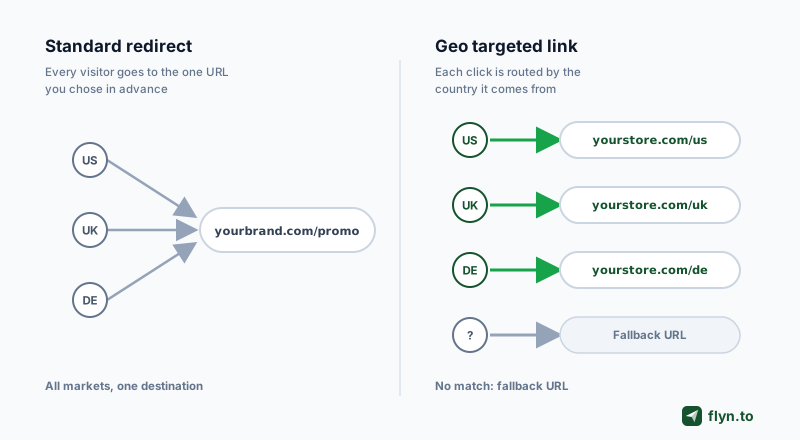
You run campaigns that pull both US traffic and international traffic, and every link you ship faces the same fork: send everyone to one URL, or route each click to a country-specific destination. The first option is a standard redirect: one source, one target, decided in advance. The second is a geo-targeted link: one short URL that reads each visitor's IP at click time and picks a destination per country. It is not the automatic upgrade vendor marketing suggests: routing you do not need adds cost, complexity, and failure modes for nothing.
This guide draws the line honestly:
- How IP-based routing decides, step by step
- When a plain redirect is genuinely the better tool
- The accuracy numbers geo vendors publish about their own databases
- The GDPR and SEO caveats that never make the pricing page
 Tap to enlarge
One disclosure up front: Flyn, whose blog this is, sells country-level geo routing as part of Pro. The advice below still draws the line the same way, because routing you do not need adds cost and failure modes no matter who sells it.
What a Standard Redirect Actually Does
A standard redirect is the boring backbone of the web: a visitor requests URL A, the server answers with a status code and a Location header, and the browser moves on to URL B. Every visitor, every country, same destination. The URL redirect glossary entry has the mechanics.
One destination, decided in advance
The routing decision happens when you create the redirect, not when someone clicks it. That is a strength:
- Predictable: test the path once with the free redirect checker and it stays tested.
- Fast: no database lookup, no rule evaluation, one hop.
- Free: your own server does it; generate the rules with the htaccess or nginx redirect generators.
301 or 302: the one real decision
The only choice it asks is permanence. A 301 is forever: signals consolidate to the new URL and browsers cache the hop aggressively. A 302 is temporary: nothing sticks. The full decision tree is in our 301 vs 302 guide; hold onto the caching detail, it decides how geo redirects must behave.
How a Geo-Targeted Link Decides: IP Routing in 4 Steps
A geo-targeted link moves that decision from creation time to click time: the URL stays constant, the destination is computed per visitor.
From click to country in milliseconds
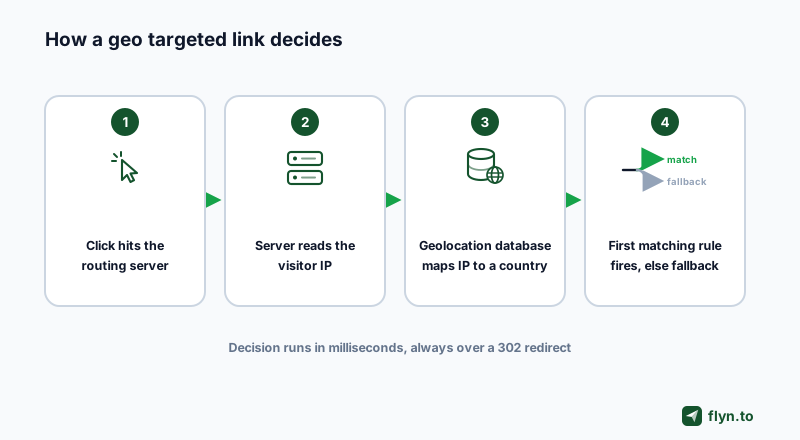
- The click hits the routing server, exactly like any short link.
- The server reads the visitor's IP address from the request. No permission prompt, no GPS: every website already sees this address.
- The IP is looked up in a geolocation database (MaxMind's GeoIP is the best-known) mapping address ranges to countries, regions, and cities.
- The first matching rule fires. US visitors hit the US rule, UK visitors the UK rule, and anyone unmatched gets the default fallback URL.
 Tap to enlarge
First-match-plus-fallback is the same rulebook behind every smart link, with country as the signal instead of device or time.
Why every geo redirect should be a 302
A geo link points different visitors at different places, so its destination is temporary by definition. Serve it as a 301 and browsers cache the hop: whoever clicked once from a hotel in Berlin keeps landing on the German page at home, while search engines consolidate signals into one arbitrary country's URL. Serious geo tools serve 302 redirects.
When a Standard Redirect Is Enough
For a large share of links, the standard redirect is the correct choice, not the compromise. Signs you are in that group:
- One destination serves everyone: a blog post, a video, a signup page with one language and one currency.
- You sell in one market: if 95 percent of revenue is US, engineering routes for the rest is optimization theater.
- The destination localizes itself: big marketplaces, app stores, and streaming services already detect locale on arrival.
- It is a migration or rebrand: moved pages want a permanent, page-to-page 301 migration map, never per-visitor routing.
If one destination serves everyone and you do not need click data, you need neither a geo platform nor Flyn: a plain redirect on your own domain does the job free. Add a tracked link when you want click data, and a geo tool only when destinations differ by country.
The decision table
| Your situation | Right tool |
|---|---|
| Same page for every visitor | Standard redirect (301 if permanent, 302 if temporary) |
| Separate storefronts, currencies, or pricing per country | Geo-targeted link with a fallback URL |
| iOS and Android need different destinations | Device routing, not geo |
| You want to know which markets click and convert | Tracked short links, one per market |
| Site move or rebrand | Permanent 301s, mapped page to page |
When Geo-Targeted Links Earn Their Keep
Four jobs one URL cannot do
- Marketplace routing. An affiliate promoting Amazon products loses the commission when a UK buyer lands on the US store; each marketplace needs its own destination behind one shared link.
- Currency and tax. EU buyers on a dollar-priced page with no VAT line convert worse than on the local storefront.
- Licensing. Sports, music, and publishing content licensed per territory must send each country to its own legal destination.
- Regulated offers. Finance, gambling, and pharma campaigns may only show certain pages in certain countries.
The manual country-page alternative leaks traffic
The old alternative is the manual chooser: a landing page with flags, or a separate link per market in every campaign. Both leak. An interstitial adds a click, and on mobile a meaningful share bounce rather than choose. Per-country links fragment one campaign into parallel URLs, and your metrics with them. And someone always shares the wrong country's link into a global channel.
Manual choice has one virtue: the visitor is never wrong about where they are. So combine them: geo-route by default, keep a visible country switcher on the destination so misrouted visitors fix themselves in one click. Geotargetly, the category incumbent, even ships an ask-before-redirecting popup that remembers the answer, in line with Google's preference for user choice. For campaign strategy, see geo-targeting links by country.
Accuracy, VPNs, and the Fallback Rule
Geo routing is probabilistic, and the honest vendors say so in their own documentation.
The accuracy ladder, published by the vendors themselves
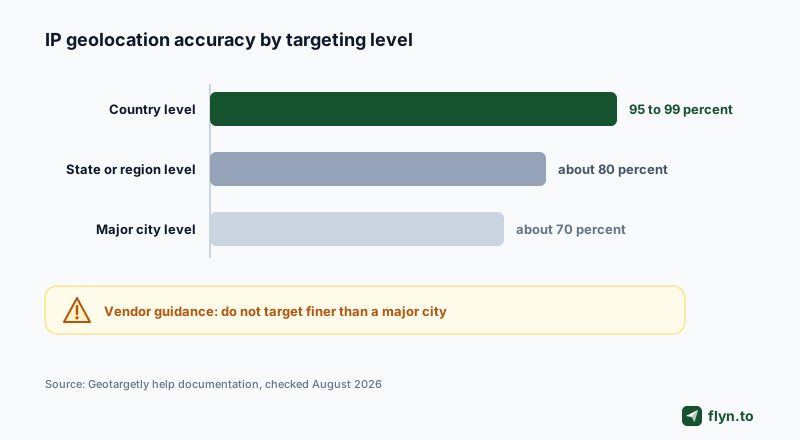
Homepages advertise 99.9 percent accuracy; help centers are more honest. Geotargetly's own accuracy documentation puts IP geolocation at roughly 95 to 99 percent at country level, about 80 percent at state level, and about 70 percent at major-city level, and recommends against targeting finer than a major city (checked August 2026). The vendor with the most to gain from exaggerating published those numbers, which is what makes them credible.
 Tap to enlarge
Who lands in the wrong country
- VPN and proxy users, who appear wherever their exit node lives
- Corporate networks routing branch-office traffic through another country
- Mobile carrier IPs, which sometimes resolve to the wrong region entirely
The problem is real enough that Geotargetly sells VPN and proxy detection as a separate product. You cannot eliminate misrouting, only make it cheap to survive.
Never ship a geo link without a default fallback URL, and never point it at an error page. A few percent of clicks will match no rule or match wrongly; they should land on a sensible universal page, not a dead end.
The SEO Question: Your Site Is Not Your Short Link
Search is where geo routing earned its bad reputation, and where the website versus short link distinction matters most.
What Google actually says
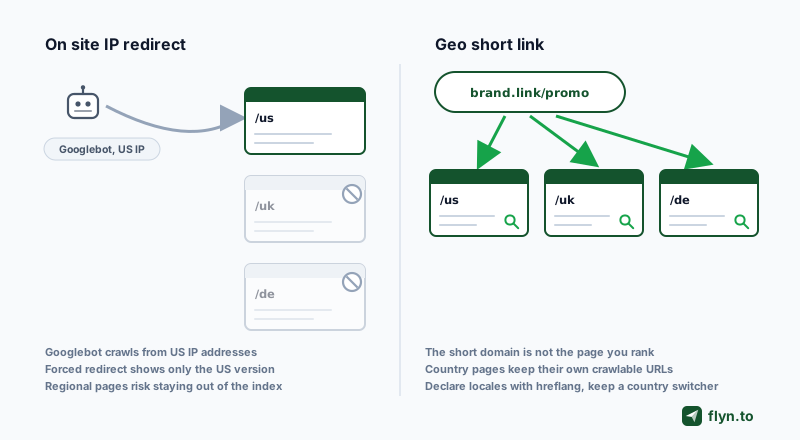
Google's multi-regional site guidance (updated December 2025) warns against automatic redirects based on what you infer about the visitor, because they can stop users and crawlers from ever seeing your other versions.
Google's international documentation is blunt: "Don't use IP analysis to adapt content." The recommended pattern is separate URLs per locale, hreflang annotations, and a visible switcher.
The mechanical reason: Googlebot crawls mostly from US IP addresses. Force-redirect by IP and the crawler sees only your US version, which can keep regional pages out of the index. Declare localized pages with hreflang tags and verify them with the canonical URL checker instead of steering crawlers by IP.
Why a geo short link sidesteps most of the risk
Notice what that guidance targets: your website, the pages you want indexed. A geo-targeted short link is a different animal: the short domain is not a page you rank, and your destination pages keep their own crawlable URLs, hreflang, and internal links. The campaign layer routes by country; the site layer stays clean. On-site geo scripts inherit the full weight of Google's warning. It is the most useful SEO fact in the geo debate, and almost nobody states it.
 Tap to enlarge
One line you must not cross in either layer: deceiving crawlers with content humans never see is cloaking and violates search and ads policies. Honest routing with a representative fallback is fine.
The GDPR Note: An IP Address Is Personal Data
In the EU an IP address is not anonymous plumbing. GDPR Recital 30 lists online identifiers, including IP addresses, as personal data, and the Court of Justice held in Breyer (C-582/14, 2016) that even a dynamic IP can qualify. That does not make geo routing illegal. It makes it processing, with three practical duties:
- Transient use is the defensible pattern: read the IP, resolve a country, redirect, discard. That is generally argued as legitimate interest.
- Storage is where questions start: raw IPs tied to location history in analytics raise consent and anonymization issues a pure redirect does not.
- Disclose it: your privacy policy should say you use IP-based location to route visitors.
Prefer vendors that drop raw IPs after the lookup. Flyn's approach is on the GDPR page and the GDPR-compliant links writeup. None of this is legal advice: at EU scale, spend an hour with counsel.
How to Measure Geo-Targeted Link Performance
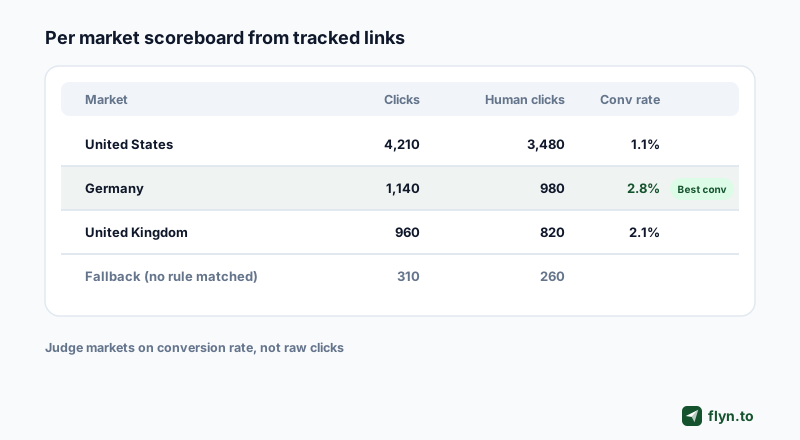
Routing without measurement is a hunch with better tooling. The question that pays is the same either way: which markets click, and which markets convert?
The four numbers per market
- Clicks by country: is there enough international volume to justify routing at all?
- Conversion rate per market: does the localized destination out-convert the generic page it replaced? This number justifies the tool.
- Fallback rate: the share of clicks landing on your default URL; high means missing rules or misrouted traffic.
- Human vs bot share: preview bots inflate click counts and dilute every rate computed from them.
The tracked-link pattern
Give each market or placement its own tracked short link, and tag destinations with UTM parameters from the free UTM builder so your click tracking and site analytics agree on names. Judge markets on conversion rate, not raw clicks, and only after a few hundred human clicks each: small samples flatter whichever market got lucky first.
Use one slug per market even when destinations are identical (promo-us, promo-de, promo-jp). Per-market click curves with zero routing infrastructure are the cheapest test of whether country-specific destinations are worth building.
 Tap to enlarge
Where Flyn fits: the routing and the measurement in one link
Flyn covers the country-level case directly: geo rules on the Routing tab send each market to its own destination with a default fallback, part of Pro Smart Routing alongside device rules and A/B splits. The measurement layer comes with it: click counts free on every link, country, device, and referrer breakdowns on Pro, conversion tracking on Pro so sales land on the exact link that earned them, and destination editing on every plan. If your campaign needs state, city, or radius targeting, or an ask-before-redirect popup, that is where the dedicated platforms in the geo redirect tools comparison earn their keep.
Flyn geo rules resolve the country from the visitor IP, and unmatched visitors take the default destination, so the fallback advice above applies to Flyn links too. Device rules win when both match; test them with the free deep link tester, and see the device routing comparison for that axis.
Which to Use: The Short Answer
If every visitor should see the same page, use a standard redirect and stop reading vendor pricing pages. If destinations genuinely differ by country, use a geo-routed link with a fallback URL and 302s: Flyn Pro covers country-level rules, and dedicated geo routers add state, city, and radius targeting. Either way, measure with tracked links before and after: the only honest justification for routing is a conversion lift you can see per market.
Where to get the routing, checked against vendor pages in August 2026:
| Tool | Geo granularity | Free tier | Entry price with geo |
|---|---|---|---|
| Flyn | Country, plus device rules and A/B split | 25 links/mo, no geo on free | Pro, $9/mo |
| Geotargetly | Country, state, city, radius | None (14-day trial) | $12/mo ($9/mo annual) |
| GeoSwap | Country, state, city | Everything free | $0 |
| Geo Smart Links | Country | 5 links, 500 clicks/mo | Paid tiers above that |
| GeoRedir | Country, plus device rules | 3 links, 1,000 clicks/mo | $19/mo |
| Linkly | Country | No geo on free | Pro, $32/mo annual |
| Bitly | Country (region on Premium) | No geo on free | Growth, $29/mo annual |
| Dub | Country | No geo on free | Pro, about $24/mo (third-party capture) |
The full head-to-head is in the best geo redirect tools comparison, and Linkly, Bitly, and Dub each have an honest Flyn comparison page. When you are ready to measure whatever you pick, create a tracked short link free and put a number on every market before you pay for routing.
Frequently Asked Questions
What is the difference between a geo-targeted link and a standard redirect?
Should I use geo-targeted links or separate country pages with a manual chooser?
How accurate is IP-based geo targeting?
Do geo-targeted links hurt SEO?
How do I measure the performance of geo-targeted links?
Does Flyn route links by country?
Free tools for this
Three Flyn tools that pair well with the strategy in this article, all free, no signup needed.
UTM Builder
Build campaign-tracked URLs in seconds.
Broken Link Checker
Scan any page for dead links and 404s.
Open Graph Checker
Preview how URLs unfurl on social.
Keep reading
Three related deep-dives from the Flyn blog.

How to Track Which Posts Drive Sales, Not Just Clicks
19 min read

Email Newsletter Click Tracking: Measure Your Real CTR
12 min read

How to Choose a Branded Short Domain for Your Links
13 min read
Ready to try Flyn?
Free plan includes 25 links/month, full analytics, and access to all 30+ free tools above. No credit card required.
Already a member? Log in
Karan Bhakuni is the founder of Flyn. He writes about branded links, click analytics, and the link-management tooling growth teams and creators actually need, drawn from building Flyn and reading a lot of user feedback.
Find these guides useful? Add Flyn as a preferred source so more of them show up in your Google results.