How to Choose a Branded Short Domain for Your Links
The short domain you put on your links is the part everyone sees, and once it is printed and shared it is hard to change. Here is how to choose one that is short, memorable, and safe, before you buy.


The Domain Is the Part Everyone Actually Sees
You have decided you want branded short links, links that read like go.yourbrand.com/sale instead of bit.ly/3xKq9Z. Good. The single decision that makes or breaks that is the one most people rush: which domain do you put on the link?
This is not a throwaway choice. The short domain is the visible half of every link you will ever share. It goes on printed flyers, in podcast read-outs, in your email signature, in ad copy, on the side of a van. Once it is out in the world you cannot quietly swap it without breaking links or reprinting things. So it is worth ten minutes of thought before you spend ten dollars on a registrar. This guide walks the whole decision: subdomain or new domain, which extension, how short, and how to avoid the traps that get links blocked. If you are new to all this, our primers on how to shorten a URL and what a vanity URL is cover the basics first.
Why this choice sticks
Unlike a slug or a destination, both of which you can edit anytime, the domain is baked into every link you have already shared. Change it later and you either break those links or reprint everything, so it pays to get it right the first time.
 Tap to enlarge
One honest note up front: a custom domain is a paid feature on almost every shortener, Flyn included (it is part of Pro). The free plan puts links on the shared flyn.to domain, which is fine to start. This guide is for when you are ready to put links on a domain that is yours.
Subdomain vs. a Dedicated Short Domain
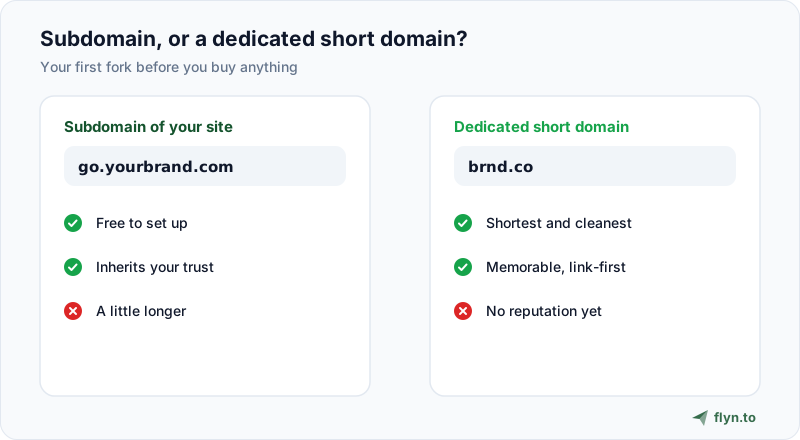
The first fork is whether to use a subdomain of a domain you already own, or buy a brand-new short one.
Subdomain of your main site (go.yourbrand.com)
This is the pragmatic default. You already own yourbrand.com, so you just point a subdomain like go., link., or l. at your shortener. It costs nothing extra, it takes two minutes, and crucially it inherits the reputation of your main domain. If your website is trusted, your short links start trusted too, which helps both deliverability and click-through. The only downside is length: go.yourbrand.com is not as tight as a five-letter domain.
A dedicated short domain (brnd.co)
Big brands buy a separate, very short domain purely for links (think t.co, nyti.ms, amzn.to). It is shorter, it is memorable, and it signals that you take links seriously. The catch is that a brand-new domain has zero reputation, so it needs a little time and clean use before inbox filters and social platforms fully trust it, and you are now maintaining a second domain's renewal and DNS.
For most creators and small businesses, a subdomain of your existing site is the right call: free, instant, and it borrows your existing trust. Buy a dedicated short domain when the extra few characters genuinely matter (high-volume print or broadcast) or when you do not have a strong main domain to lean on.
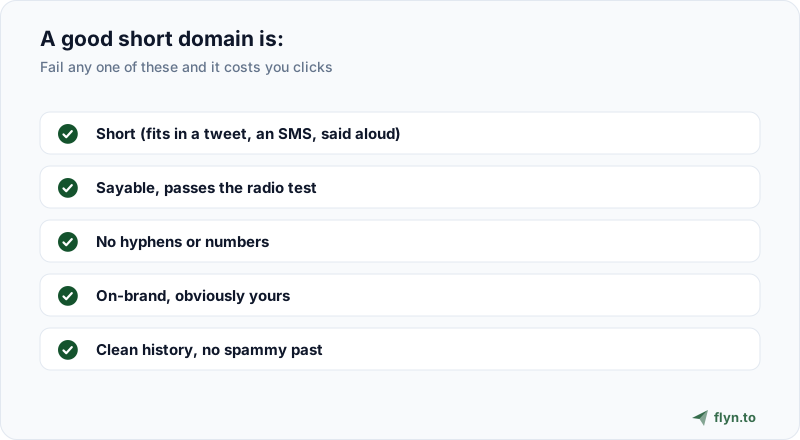
The Five Rules of a Good Short Domain
Whichever path you pick, the name itself should pass a few tests. A short domain that is clever but unspellable is worse than a plain one.
What makes a name work
- Short. The entire point is brevity. Aim for a domain that, with a slug, still fits comfortably in a tweet, an SMS, or spoken aloud. Every character you add is one the reader has to type correctly.
- Sayable. Run the radio test: if you said it once on a podcast, could a listener type it correctly? That rules out silent letters, easily-confused spellings, and anything that needs "that is with a zero, not an O."
- No hyphens or numbers.
go-brand.comandgo4brand.comboth invite typos and look a little spammy. People forget the hyphen and forget whether it was "4" or "for." - On-brand. It should obviously belong to you. A slice of your name (
brnd.co), your initials, or your product name reads as legitimate. A random string does not. - Clean history. Covered in its own section below, but it belongs on the list: the domain must not carry a spammy past.
 Tap to enlarge
The best short domain is the one your audience can type from memory after seeing it once. Clever spellings win no awards and lose real clicks.
Choosing the Extension (TLD)
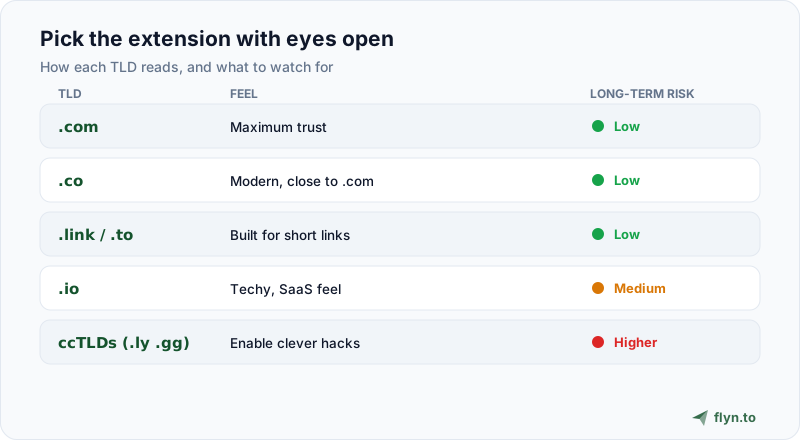
The part after the dot carries more weight than people expect. It shapes how trustworthy the link looks and, in a couple of cases, how safe the domain actually is over the long run.
 Tap to enlarge
| TLD | Feel | Watch for | Good for |
|---|---|---|---|
| .com | Maximum trust, familiar | Short ones are taken or pricey | Anyone who can get a short one |
| .co | Modern, close to .com | People sometimes type .com by habit | Startups, creators |
| .link / .to | Purpose-built for short links | Slightly less familiar to non-tech users | Link-first brands |
| .io | Techy, popular with SaaS | It is a country-code TLD with an uncertain long-term future | Developer and tech audiences |
| ccTLDs (.ly, .gg, .me) | Enable clever hacks (bit.ly) | A country or registry can change the rules; some sit on spam radars | Only with eyes open |
The domain-hack temptation
It is tempting to spell a word across the dot, like Flyn's own flyn.to, bit.ly and youtu.be. These are memorable and fun. Just know that many of them rely on country-code TLDs (.to is Tonga, .ly is Libya, .be is Belgium), and a ccTLD is ultimately governed by that country's registry. Rules, prices, and eligibility can change with little notice. It is a small risk, but for a domain you are printing on everything, weigh it before you commit.
Do not choose a TLD that a specific country or a single registry can pull out from under you unless the brand payoff is worth it. And check current pricing on renewals, some novelty TLDs are cheap for year one and expensive forever after.
How Short Is Short Enough?
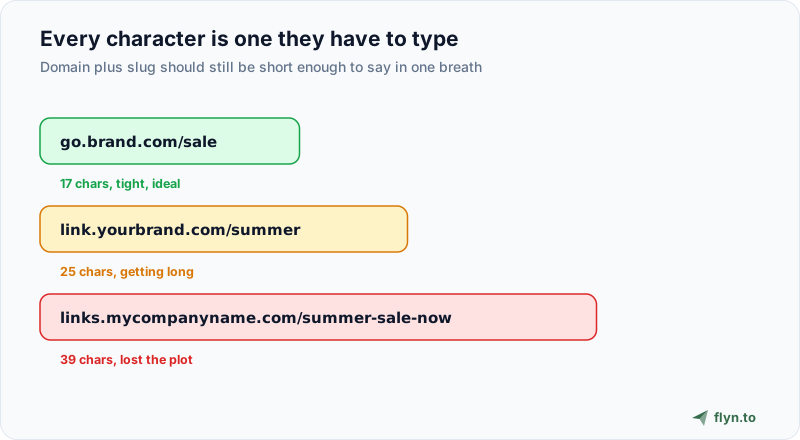
There is a real difference between "shorter than the original URL" and "actually short." Compare what your audience sees:
The one-breath test
 Tap to enlarge
A useful mental budget: the domain plus a short readable slug should still be comfortable to say in one breath and to fit on one line of a slide. go.brand.com/sale is great. links.mycompanyname.com/summer-sale-2026 is technically a short link but has lost the plot. If you are choosing a dedicated domain, five to seven characters before the dot is the sweet spot. If you are using a subdomain, keep the prefix to one short word (go, link, l) so the whole thing stays lean.
Leave room for the slug
Remember that the domain is only half the link. You still want a readable custom slug after it (/sale, /menu, /join). A long domain plus a long slug defeats the purpose. Budget for both.
Reputation: Check the Domain's Past Before You Buy
This is the step almost everyone skips, and it is the one that can get your links blocked on day one. A domain is not a blank slate just because it is available. Expired domains get re-registered all the time, and plenty of them were previously used for spam, malware, or scams. If you buy one of those, you inherit its bad reputation, and inbox filters and platforms may flag your perfectly honest links.
Before you buy any domain, especially a cheap or previously-registered one, do a quick background check.
How to check a domain's history
- Run the domain through a link safety checker and your email provider's tools to see if it is flagged.
- Look it up on the Wayback Machine to see what it used to host. A wall of pharma or casino pages is a hard no.
- Prefer never-registered domains, or ones with a clean, boring history.
Reputation is also why a subdomain of your established site is such a safe default: it borrows years of your existing trust instead of starting from zero. If you do go with a fresh domain, warm it up gently and keep it clean, and read why short links get flagged as spam so you do not undo your careful choice with sloppy use.
Where to Buy It and How to Connect It
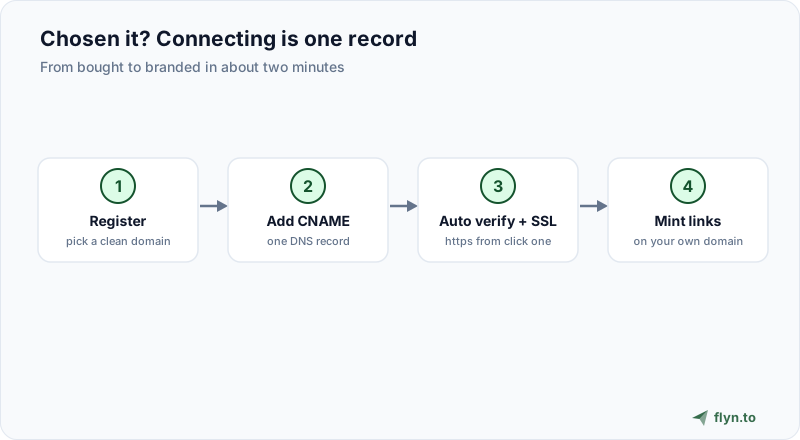
Once you have a name in mind, the mechanics are simple.
 Tap to enlarge
1. Register the domain
Buy it at any mainstream registrar. Compare the renewal price, not just the first-year promo, and turn on auto-renew so you never lose the domain your links depend on. Add registrar privacy while you are there.
2. Point it at your shortener with a CNAME
Connecting a custom domain is one DNS record. In your shortener you add the domain, and at your registrar you add a CNAME (for a subdomain) or the records the tool gives you (for a root domain), and it verifies automatically. On Flyn this takes about two minutes and SSL is handled for you, so your links are https from the first click. The custom domains docs walk through each record.
3. Start minting links
From then on, every link you create uses your domain instead of the shared one. You can even move existing links over. Because custom domains are a Pro feature on Flyn (up to 3), you have room for a couple of separate brands or campaigns, so choose your primary one first and add others as you need them.
Buy the domain and connect it before you print or schedule anything. Test a real link end to end first: create it, click it on mobile and desktop, and confirm the redirect and SSL work. Discovering a DNS typo after the flyers are printed is an expensive way to learn.
Common Mistakes to Avoid
A few patterns show up again and again. Sidestep these and you are ahead of most.
The five that cost the most
- Chasing maximum shortness over clarity. A two-letter domain nobody can spell is worse than a six-letter one they can. Sayable beats tiny.
- Ignoring renewal cost. Novelty TLDs love a cheap first year. Check what year two costs before you build a brand on it.
- Skipping the history check. The single most damaging shortcut. A domain with a spammy past can get you blocked immediately.
- Using a domain you might lose. Free subdomains from a third-party host, or a ccTLD with shaky governance, are risky foundations for links you print permanently.
- Forgetting the slug. The domain is half the link. Keep the whole thing, domain plus slug, short and readable.
Get the domain right and the rest of branded linking is easy: connect it once, and every link you share from then on carries your name instead of a generic shortener, builds a little trust, and (branded links tend to earn measurably more clicks) works a bit harder for you. When you are ready, connect your domain to Flyn or start free on flyn.to and upgrade when your brand is ready for its own. To shortlist names, the free branded domain finder generates short candidates and checks availability where the registry publishes it.
Frequently Asked Questions
What is the best domain extension for short links?
Should I use a subdomain or buy a new short domain?
How short should a branded short domain be?
Are .ly and other country-code domains safe to use?
Can I use my main website domain for short links?
How many custom domains can I use on Flyn?
Does the short domain actually affect click-through rate?
How do I connect the domain once I have bought it?
Free tools for this
Three Flyn tools that pair well with the strategy in this article, all free, no signup needed.
UTM Builder
Build campaign-tracked URLs in seconds.
Broken Link Checker
Scan any page for dead links and 404s.
Open Graph Checker
Preview how URLs unfurl on social.
Keep reading
Three related deep-dives from the Flyn blog.

How to Track Which Posts Drive Sales, Not Just Clicks
19 min read

Email Newsletter Click Tracking: Measure Your Real CTR
12 min read
Free URL Shorteners Without Ads or Interstitial Pages
15 min read
Ready to try Flyn?
Free plan includes 25 links/month, full analytics, and access to all 30+ free tools above. No credit card required.
Already a member? Log in
Karan Bhakuni is the founder of Flyn. He writes about branded links, click analytics, and the link-management tooling growth teams and creators actually need, drawn from building Flyn and reading a lot of user feedback.
Find these guides useful? Add Flyn as a preferred source so more of them show up in your Google results.