What Is a Vanity URL? Examples + Free Builder
A vanity URL turns an ugly, forgettable link into a short branded one people actually trust and click. Here is exactly what a vanity URL is, how it works, and how to make your own.


What Is a Vanity URL?
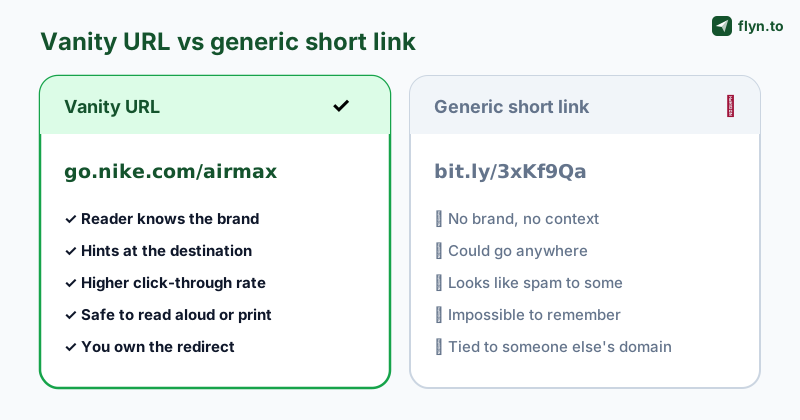
You have seen two kinds of links in your life. One looks like go.nike.com/airmax: short, on brand, obvious. The other looks like bit.ly/3xKf9Qa or a 90-character monster trailing tracking codes. The first is a vanity URL, and the difference between them is the difference between a link people click and a link people ignore.
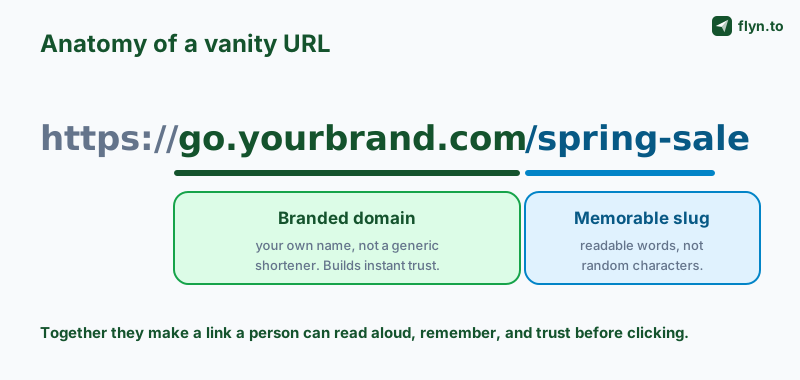
A vanity URL (also called a branded link, custom short URL, or vanity link) is a deliberately short, readable web address built on a domain you control, created to point at a longer destination. Instead of exposing a messy path full of IDs and parameters, you publish something a person can read aloud, remember, and type from memory. The "vanity" part is the point: the link is dressed up to represent your brand rather than a third party's.
Vanity URL meaning, in one sentence
A vanity URL is a memorable, branded link that redirects to a longer or uglier destination, so the address people see reflects your name instead of a random shortener or a raw query string. That is the whole concept. Everything else in this guide is about how it works and how to make a good one.
 Tap to enlarge
Why "vanity" is not a vanity feature
The name undersells it. A vanity URL is not decoration: it is a trust signal. When the visible address carries a name the reader knows, the link feels safe, and a link that feels safe gets clicked. We dug into the numbers in our guide on custom domains and branded link trust, but the short version is that the address bar is part of your marketing, not a technical afterthought.
How a Vanity URL Actually Works
A vanity URL is not magic and it is not a special kind of web page. It is a redirect: a short branded address that, when clicked, tells the browser to go somewhere else. Understand that one mechanic and the rest of this guide clicks into place.
The redirect behind the curtain
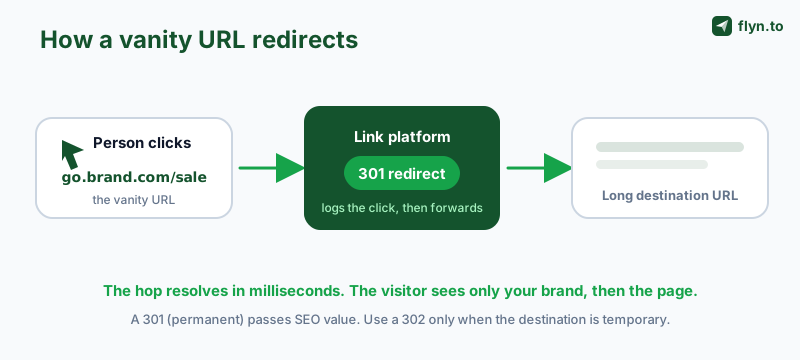
When someone opens go.brand.com/sale, their browser asks your link platform what to do. The platform answers with an HTTP redirect status, usually a 301 (permanent) or 302 (temporary), plus the real destination address. The browser follows that instruction and lands on the long URL, all in a few milliseconds. The visitor sees your branded link, then the destination page. They never see the messy middle.
 Tap to enlarge
301 vs 302: which redirect should a vanity URL use?
For most permanent vanity links, a 301 is correct. It tells search engines the move is permanent and passes the bulk of the link's SEO value to the destination. Reach for a 302 only when the destination is genuinely temporary (a seasonal page you will repoint later), because a 302 keeps the original address as the canonical one. If you want the deeper mechanics, our guide to shortening a URL walks through the redirect types in detail.
Why the redirect is the whole advantage
Because your platform owns that redirect, a vanity URL can do things a hard-coded link never could:
- Change the destination after you publish. Repoint
go.brand.com/salefrom last month's offer to this month's without reprinting a single flyer. - Track every click. The redirect logs each visit, so you can track clicks on the link with country, device, and referrer data.
- Stay consistent forever. The public address never changes even when the underlying page does.
Vanity URL vs Short Link vs Custom Domain
These three terms get used interchangeably, and that confusion costs people money on the wrong tool. They are related but not identical. Here is the clean distinction.
Short link
A short link is any shortened redirect, branded or not. bit.ly/3xKf9Qa is a short link. So is go.brand.com/sale. "Short link" describes the length, not the ownership. Every vanity URL is a short link, but not every short link is a vanity URL.
Vanity URL
A vanity URL is a short link whose visible address is readable and branded. The slug uses real words (/sale, not /3xKf9Qa) and, ideally, the domain is yours. The "vanity" is in the human-friendly, on-brand appearance.
Custom domain (vanity domain)
A custom domain, sometimes called a vanity domain, is the branded address part itself: go.brand.com or brnd.co. It is the foundation a vanity URL is built on. You can have a readable slug on a generic domain (still a vanity-style link), but a true branded vanity URL needs your own custom domain. Connecting one is a Pro feature on Flyn and most serious platforms.
 Tap to enlarge
The quick reference
| Term | What it is | Example | Branded? |
|---|---|---|---|
| Short link | Any shortened redirect | bit.ly/3xKf9Qa | Not necessarily |
| Vanity URL | A readable, branded short link | go.brand.com/sale | Yes |
| Custom / vanity domain | The branded address it lives on | go.brand.com | Yes (it is the brand) |
If you only remember one thing: the domain is the brand, the slug is the memorable bit, and a vanity URL is both done well.
Vanity URL Examples That Work
The theory is simple; good execution is what separates a link people click from one they squint at. Here are the patterns that work, grouped by job.
Campaign and promo links
Short, punchy, and tied to the offer. These are made to be said on a podcast or printed on a poster:
go.brand.com/salefor a seasonal promotiongo.brand.com/bogofor a buy-one-get-one dealgo.brand.com/launchfor a product drop
Profile and bio links
One link per channel so you know which platform sent the traffic. Keep the slug to the platform name:
go.brand.com/igon your Instagram biogo.brand.com/ytin your YouTube descriptiongo.brand.com/lifor LinkedIn
Personal and recruiting links
Vanity URLs are not only for companies. A clean personal link is a quiet flex on a resume or business card:
go.brand.com/resumepointing at a hosted PDFgo.brand.com/bookpointing at your Calendly pagego.brand.com/pressfor a media kit
The best vanity URL is one you can say out loud on a phone call and the other person types it correctly the first time. If a link fails that test, it is too long, too clever, or too random.
Notice what every good example shares: a brand in the domain, a real word in the slug (the link alias), and not a single random character. That is the recipe, and the next section turns it into steps.
Why Vanity URLs Lift Trust and Click-Through
A vanity URL is not a cosmetic upgrade. It changes behaviour, and the behaviour it changes is the only one that matters: whether people click. Here is why a branded address out-pulls a generic one on the exact same offer.
Recognition reduces hesitation
Every click is a tiny risk assessment. A reader sees the address and decides, in a fraction of a second, whether it looks safe. A name they recognise removes the doubt; a random shortener adds it. That hesitation is where clicks leak, and a vanity URL plugs the leak. We broke down the mechanism in why branded short links increase CTR.
Context tells people where they are going
A slug like /pricing or /demo previews the destination. The reader knows what they are getting before they click, so the people who do click are more qualified and less likely to bounce. A generic code reveals nothing, so it attracts both fewer clicks and worse ones.
Put a vanity URL on a custom domain you own (like go.yourbrand.com) rather than a shared generic one. Branded links earn measurably higher click-through because people trust a name they recognise, so you generate more clicks to begin with, not just nicer-looking ones.
Vanity URLs survive screenshots and the spoken word
Marketing happens off-screen too: on stage, in a podcast ad, on a billboard, in a photo someone shares. A vanity URL works in all of those because it is short and sayable. A 90-character tracking URL is useless the moment it leaves a clickable surface. If deliverability is a worry, note that branded domains also help you avoid the spam-filter problems covered in why short links get flagged as spam.
How to Create a Vanity URL (Step by Step)
Making a vanity URL takes three ingredients: a domain, DNS pointed at a link platform, and a clean slug. Here is the full process, whether you want a fully branded link or a quick readable one.
Step 1: Choose your branded domain
Decide what the address should be. Two common approaches: a subdomain of your main site (go.brand.com or link.brand.com) or a dedicated short domain (brnd.co). A subdomain costs nothing extra if you already own the domain; a short domain costs a registration fee but reads even cleaner. Either is a real vanity domain.
Step 2: Point DNS at your link platform
Connect the domain to the service that will host your redirects. In practice that means adding a CNAME record (for a subdomain) or an A record at your DNS provider that points the address at the platform, then confirming it inside the platform's dashboard. On Flyn this is a guided step; on most tools it is a copy-paste of one DNS record. Custom domains are a Pro feature on Flyn and the major alternatives.
Step 3: Write a clean slug
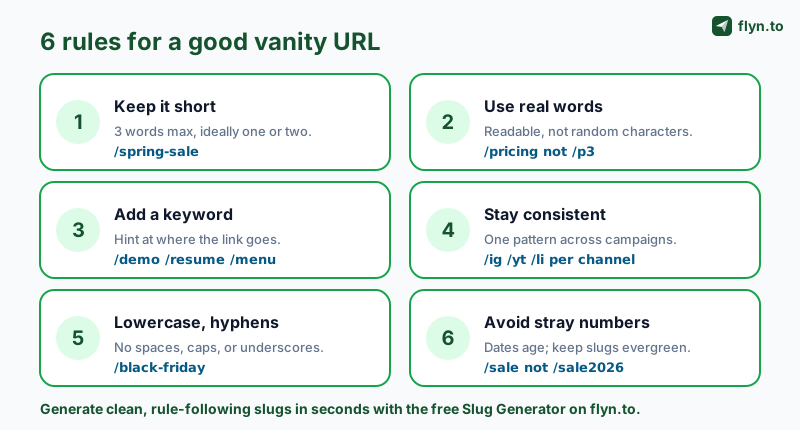
This is where most vanity URLs are won or lost. Pick short, real words. If you are unsure, the free Slug Generator turns any title into a clean, URL-safe slug in a click, and the URL Cleaner strips junk parameters off the destination before you point your link at it.
 Tap to enlarge
Step 4: Create the link and share it
Paste your long destination, attach your branded domain, set the slug, and publish. You now have a vanity URL. Share it anywhere: bio, email, ad, business card, or a QR code. You can create your first link free in under a minute, no credit card needed.
No domain yet, or just need one quick readable link? You can still make a vanity-style link on a shared short domain with a custom slug (for example a memorable keyword instead of random characters). It is not fully branded, but it is far more clickable than a random code, and you can upgrade to your own custom domain later without losing the slug.
Best Practices for a Good Vanity URL
A vanity URL is only as good as its slug. Follow these rules and your links will be memorable, durable, and safe to print. Break them and you ship links that age badly or confuse people.
Keep it short and readable
Aim for one to three words. /spring-sale beats /spring-sale-2026-final-v2 every time. Short links are easier to remember, type, and say out loud, which is the entire point of going vanity.
Use lowercase and hyphens
Stick to lowercase letters, numbers only when meaningful, and hyphens to separate words (/black-friday). Avoid spaces, underscores, and capital letters: they cause typos and, on some systems, broken links. Consistency here also keeps your click data clean.
Add a keyword, skip the noise
A slug that hints at the destination (/demo, /menu, /pricing) helps both humans and search engines. Drop filler words and never bury tracking parameters in the slug itself: keep UTMs on the destination, where the URL Cleaner can manage them.
Stay consistent and evergreen
Use one naming pattern across campaigns (/ig, /yt, /li per channel) so your links are predictable. And keep slugs evergreen: avoid baking a year or date into the slug, because /sale2026 looks stale in January and /sale never does.
Do not change or delete a vanity URL's slug once it is live in the wild. Repointing the destination is fine and is the whole advantage of a redirect, but changing the slug breaks every place the old link was shared or printed. Pick the slug carefully the first time, then only ever update where it points, never the address itself.
Build your vanity URL
Type what the link is for and your vanity URL appears here.
A vanity URL needs a domain you own pointed at a link platform.
Common Vanity URL Mistakes (and Fixes)
Most vanity URL problems are self-inflicted and easy to avoid once you know them. Here are the ones I see most often, with the fix for each.
Mistake: building on a free shortener's domain and calling it branded
A custom slug on a generic domain is more readable, but it is still their brand, not yours, and it can disappear if the service does. The fix: own the domain. A real vanity URL lives on a custom domain you control, so the brand and the asset are both yours.
Mistake: cramming tracking codes into the slug
Slugs like /sale-utm-fb-2026-q2 defeat the purpose: nobody can remember them. Keep the slug clean and human, and let the platform attach analytics behind the scenes so you can still track every click without an ugly address.
Mistake: one link reused everywhere
Sharing a single vanity URL across email, Instagram, and a podcast means you cannot tell which channel drove results. The fix: a separate vanity link per channel (or per campaign), each with its own slug, so the analytics attribute traffic correctly.
Mistake: pointing at a dirty destination
If the long URL behind your tidy vanity link is full of stray parameters and session IDs, you can carry problems downstream. Run the destination through the URL Cleaner first, then point your clean vanity URL at the clean target. Browse the full kit of free tools on the tools page if you want to audit more than the slug.
Tools to Build and Manage Vanity URLs
You can hand-roll a vanity URL with a domain and a redirect rule, but for anything beyond one link, a dedicated platform saves hours and gives you data a raw redirect never could.
What a link platform adds
Stitching a registrar, a DNS panel, and a spreadsheet together works until you have twenty links and no idea which is which. A link platform gives you branded short links, a real-time click dashboard, editable destinations, QR codes, and slug management in one workflow. The Slug Generator and URL Cleaner handle the cleanup; the platform handles the redirect and the reporting.
Choosing the right platform
If you are weighing options, compare the popular ones honestly. We maintain detailed breakdowns of the Bitly alternative and the Rebrandly alternative so you can see where each fits, and a full alternatives hub if you want the wider field. The non-negotiables for vanity URLs: support for your own custom domain, clean slug control, and click analytics that filter bots.
Already have links elsewhere? Move them
Switching platforms does not mean losing your existing vanity URLs. If your links live on your own domain at another service, you can migrate them across with the same back-halves, where Flyn allows them, then verify the domain in Flyn and point its DNS to Flyn, so what you have printed or shared keeps working. Links on the other service's own domain stay with that service, and each one gets a new Flyn link.
Start free
You can create a vanity-style link and track its total clicks with a free Flyn account in under a minute. When you are ready to attach your own custom domain, unlock branded vanity URLs, and see full geo and device click analytics, Pro starts at $9/mo (or $249 lifetime). Read more about the strategy on the Flyn blog, or start at the homepage and shorten your first link now.
Frequently Asked Questions
What is a vanity URL in simple terms?
Is a vanity URL the same as a short URL?
Are vanity URLs good for SEO?
How do I create a vanity URL?
What are some good vanity URL examples?
Do vanity URLs cost money?
Can I change where a vanity URL points after I share it?
Free tools for this
Three Flyn tools that pair well with the strategy in this article, all free, no signup needed.
UTM Builder
Build campaign-tracked URLs in seconds.
Broken Link Checker
Scan any page for dead links and 404s.
Open Graph Checker
Preview how URLs unfurl on social.
Keep reading
Three related deep-dives from the Flyn blog.

How to Track Which Posts Drive Sales, Not Just Clicks
19 min read

Email Newsletter Click Tracking: Measure Your Real CTR
12 min read

How to Choose a Branded Short Domain for Your Links
13 min read
Ready to try Flyn?
Free plan includes 25 links/month, full analytics, and access to all 30+ free tools above. No credit card required.
Already a member? Log in
Karan Bhakuni is the founder of Flyn. He writes about branded links, click analytics, and the link-management tooling growth teams and creators actually need, drawn from building Flyn and reading a lot of user feedback.
Find these guides useful? Add Flyn as a preferred source so more of them show up in your Google results.