Why Short Links Get Flagged as Spam (and Fixes)
Your short link works fine when you click it, but half your audience never sees it because a spam filter ate it first. This is the diagnosis, and the fix.


Your Short Link Works Fine, So Why Is It in Spam?
Here is the frustrating part: you paste your shortened link into a browser and it works perfectly. It redirects, the page loads, everything is fine. So when a colleague says your campaign email "went to spam" or your Reddit post vanished, it feels like a mystery. It isn't. The link working when you click it tells you almost nothing about whether a spam filter will let it through.
Spam filters, social platforms, and chat apps don't evaluate links the way a human does. They don't click and see if the page loads. They evaluate the domain, bit.ly, tinyurl.com, t.co, against a reputation score built from billions of other links on that same domain. If that score is poor, your link gets filtered, downranked, or blocked outright, and the destination never matters.
This guide is a clear diagnosis plus a fix. We'll cover why shared-domain reputation is the root cause, how six different platforms treat shortener domains, why redirect chains and link cloaking trip evasion detectors, and the one structural change that solves all of it. To be fair upfront:
- Generic shorteners are not "bad."
bit.lyworks fine in plenty of contexts, internal docs, a tweet to an engaged audience, a link you control end to end. - The problem is specifically shared-domain reputation in deliverability-sensitive contexts: cold email, a new subreddit, a Discord server with strict AutoMod, a Facebook page you're trying to grow.
- The fix is not "stop shortening links." Short links are too useful, for tracking, for QR codes, for clean sharing. The fix is changing which domain they live on.
Deliverability is invisible until it isn't
The reason this problem festers is that it produces no error. Nobody bounces you a message saying "your link was filtered." Your email lands in spam silently. Your Reddit submission is removed by AutoMod and only you can still see it. Your Slack message posts without a preview and just looks a little off. You see the symptom, flat click numbers, a dead campaign, long before you connect it to the link. The first job is to make the invisible visible.
If you've ever wondered why a branded URL outperforms a generic one, the deliverability angle is half the answer. The other half is trust and click-through rate, which we cover in why branded short links increase CTR. The two effects compound: branded links both arrive more often and get clicked more often.
Shared-Domain Reputation: The Root Cause
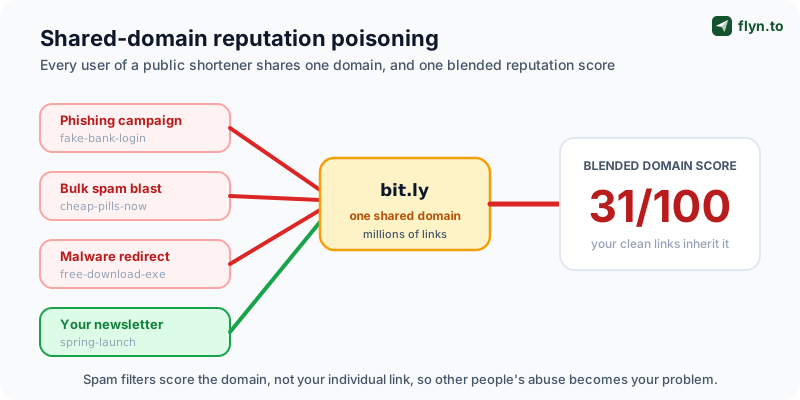
Every public URL shortener works on a shared domain model. When you create a bit.ly link, your link lives on the exact same domain as everyone else's, a marketing team's campaign, a Discord scammer's phishing page, a malware operator's payload, a legitimate blogger's article. Hundreds of millions of links, one domain name.
Spam filters and security systems cannot realistically score every individual short link in real time. So they score the domain. They ask: across all the traffic we've ever seen from bit.ly, what fraction was spam, phishing, malware, or abuse? That blended number becomes the reputation score applied to your link. You did nothing wrong, but you inherit the domain's rap sheet.
Why one bad actor poisons the well for everyone
Shorteners are a magnet for abuse precisely because they obscure the destination. A phisher doesn't want you to see account-verify-secure-login.ru, a bit.ly link hides it behind six neutral characters. Spam filters know this, so a shortener domain starts at a trust deficit. Then volume makes it worse:
- Spam blasts, millions of shortened links in junk email, each reported, each dragging the domain score down.
- Phishing kits, automated tools that mint thousands of shortener links pointing at credential-harvesting pages.
- Malware distribution, short links in comment spam and hacked accounts pointing at drive-by-download pages.
- Your clean newsletter link, sitting in the exact same reputation bucket as all three of the above.
 Tap to enlarge
The numbers behind the trust deficit
You don't need exact figures to grasp the dynamic, but the scale matters. Major shorteners process billions of redirects a month. Security vendors and email providers consistently report that a meaningful slice of shortener traffic is malicious or unwanted, enough that several anti-abuse systems treat "URL contains a known public shortener" as a standalone risk signal, independent of anything else in the message. That is the entire problem in one sentence: the shortener domain itself is a flag.
A generic short link is a loan against a credit score you didn't build and can't fix. A branded domain is a credit score with your name on it, and the only behaviour on the file is yours.
This reframes the whole issue. The question is not "is bit.ly trustworthy?" It is "do I want my deliverability tied to the worst behaviour of millions of strangers?" For anything that matters, campaigns, outreach, launches, the answer is no. We dig into the trust mechanics further in custom domains and branded-link trust.
How Each Platform Treats Shortener Links
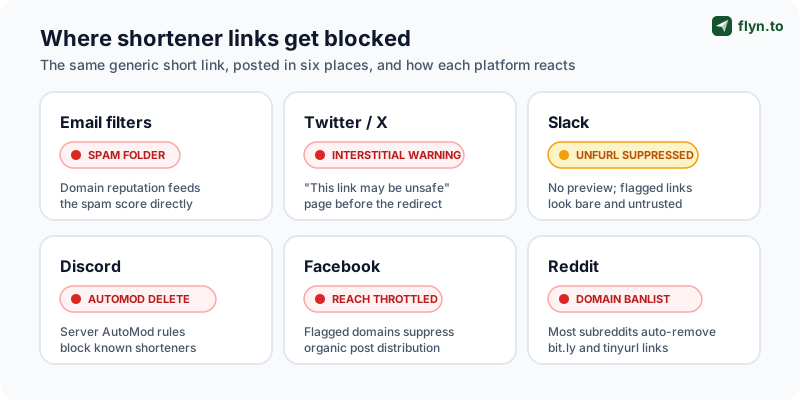
"Flagged as spam" is shorthand for a handful of distinct behaviours across different platforms. Each one inspects links its own way, and a shortener domain trips a different wire on each. Knowing which platform does what tells you exactly where your links are dying.
One cross-platform constant before the specifics: every link you post on these platforms is nofollowed by default, so none of them passes SEO equity in the first place (our nofollow vs dofollow guide has the full platform table). The stakes here are pure deliverability and reach.
 Tap to enlarge
Email spam filters
Email is the harshest environment. Gmail, Outlook, and corporate gateways (Proofpoint, Mimecast, Barracuda) feed sender reputation, content, and link-domain reputation into one spam score. A shortener domain with a poor score pushes you toward the junk folder. Worse, filters dislike a mismatch between your friendly sending domain and an unrelated redirect domain, it pattern-matches to phishing, where the sender looks legitimate but the link goes somewhere else. Cold outreach is where this bites hardest.
Twitter / X
X runs link safety checks and shows an interstitial warning page ("the link you are trying to access has been identified as potentially harmful") before some redirects. Shortener domains with abuse history are prime candidates. Even when there's no warning, wrapping your link in a third-party shortener on a platform that already auto-wraps everything in t.co just adds a hop with no benefit.
Slack and Discord
Slack fetches a preview ("unfurl") for links. Flagged or low-reputation domains get suppressed unfurls, your message posts as a bare URL with no title or image, which reads as untrustworthy in a professional channel. Discord is stricter: server AutoMod rules and community bots routinely block known shortener domains entirely, deleting the message on post. Many servers ban shorteners by policy because they're the standard vector for scam links.
Facebook and Reddit
Facebook factors link reputation into organic reach, posts with flagged domains get distribution throttled, and in bad cases the link is blocked with a "couldn't be shared" error. Reddit is the most explicit: a large share of subreddits keep domain banlists, and the major public shorteners are near-universally on them. Your submission is auto-removed by AutoModerator, often invisibly. We cover surviving Reddit's filters in depth in posting links on Reddit without a shadowban.
| Platform | What happens to a flagged shortener link | Visible to you? |
|---|---|---|
| Email filters | Routed to spam / junk folder | No, silent |
| Twitter / X | Interstitial "potentially harmful" warning | Sometimes |
| Slack | Link preview (unfurl) suppressed | Partially |
| Discord | AutoMod deletes the message on post | Sometimes |
| Organic reach throttled or share blocked | Rarely | |
| Auto-removed by subreddit domain banlist | No, shadow-removed |
The pattern is consistent: most of these penalties are silent. You won't get an error. That is exactly why teams run flagged links for months without realising it.
How to Diagnose Whether Your Links Are Flagged
Because the penalties are silent, you have to go looking. The good news: you can confirm a link-reputation problem in about ten minutes with free tools and a couple of test accounts, no guessing required. (Worth knowing as you test: your recipients are increasingly running their own checks too, and how they verify short links is exactly the inspection your links need to pass.)
The four-minute diagnostic checklist
Run this on any link you suspect, before you ship it at scale:
- Expand it. Paste the link into the URL Expander to reveal the true final destination. Confirm it's exactly where you intend recipients to land, no surprise domain.
- Trace the chain. Run it through the Redirect Checker to see every hop, the HTTP status at each step, and any HTTPS-to-HTTP downgrade. More than two hops or any
http://hop is a problem. - Check reputation. Put the link through the Short Link Safety Checker to surface known reputation flags on the domain.
- Send a real test. Email the link to a Gmail address and an Outlook address on accounts unrelated to your work domain. If it lands in spam for you, it lands in spam for your list.
Reading the symptoms in your analytics
Your existing data is also a diagnostic instrument once you know the tells. Watch for:
- Healthy open rate, near-zero clicks, the link is being stripped or filtered inside the inbox.
- A Reddit or forum post with no views at all, classic silent AutoMod removal; check whether the post is visible when logged out.
- A sudden CTR collapse on one channel with nothing else changed, that platform likely started flagging your link domain.
- A Slack message that posts with no preview, a suppressed unfurl, the visible sign of a low-reputation domain.
If you manage many links, pull every URL out of a page or document at once with the Link Extractor and batch-check them rather than auditing one at a time. The diagnosis is quick, and it tells you precisely whether the fix in the next section is the one you need, every tool above is free under flyn.to/tools.
Don't confuse a flagged link with a low-converting one. If the Redirect Checker and Safety Checker both come back clean and your test email lands in the inbox, your link isn't the problem, your copy, offer, or audience is. Diagnosis first stops you from "fixing" the wrong thing.
Link Cloaking and Redirect Chains: The Other Red Flags
Shared-domain reputation is the biggest cause, but two technical patterns trip spam and security systems independently, even on a clean domain. If you fix your domain but ignore these, you'll still have problems.
What link cloaking is, and when it looks suspicious
Link cloaking means showing one URL to the user or platform crawler while the real destination is something else. There are legitimate uses, tidying an ugly affiliate URL, masking a long tracking string behind a clean branded link. Our own Link Cloaker tool exists for exactly that. But cloaking becomes a red flag when the visible preview and the true destination diverge in ways that look deceptive:
- A preview / unfurl showing one brand while the redirect lands on a totally unrelated domain.
- Serving a benign page to crawlers (Googlebot, the Slack unfurl bot) and a different page to real users, classic phishing behaviour.
- Open redirects, a link that passes the destination as an unvalidated parameter, letting anyone append their own payload.
The rule of thumb: cloaking for tidiness is fine; cloaking for deception gets you flagged. If a reasonable person seeing both the link and the destination would feel misled, a spam filter will reach the same conclusion. When in doubt, run the link through the URL Expander and check that the destination is exactly what a recipient would expect.
Why redirect chains read as evasion
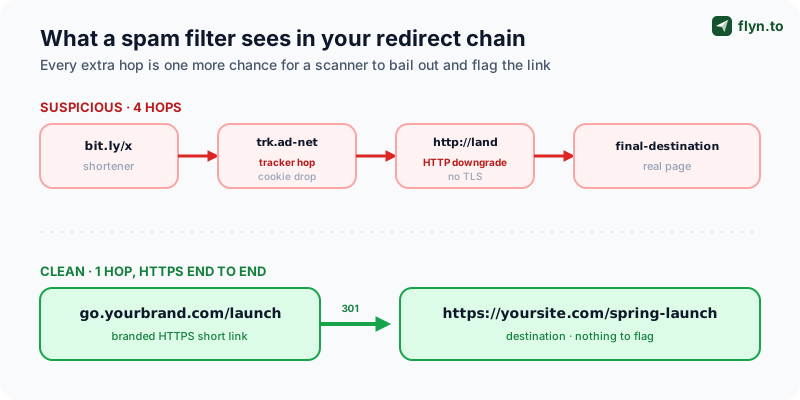
A redirect chain is a link that bounces through multiple hops before reaching the destination: shortener → tracker → another redirect → final page. Each hop is a place a security scanner has to follow, and a long chain looks like deliberate obfuscation, because that's precisely what malware and phishing operators do to shake off automated scanners.
 Tap to enlarge
Chains accumulate without anyone deciding to build one. You shorten a URL that was already a redirect. Your email platform wraps every link in its click-tracker. An ad network adds another hop. Suddenly a "short link" is a four-stop tour. Specific things that make a chain look worse:
- An HTTP hop in the middle, any downgrade from HTTPS to plain HTTP screams "insecure" to a scanner.
- Cross-domain hops through unfamiliar tracker domains with their own poor reputation.
- Meta-refresh or JavaScript redirects instead of clean HTTP 301/302, these are harder to inspect and more associated with cloaking.
- Loops or near-loops where the chain revisits a domain.
Before any campaign ships, run every link through the Redirect Checker to see the full hop-by-hop chain, the HTTP status at each step, and any HTTPS downgrade. If you see more than one or two hops, or any http:// hop, flatten the chain before you send. A scanner counts the same hops you do, and draws the obvious conclusion.
The Real Fix: A Branded Domain You Control
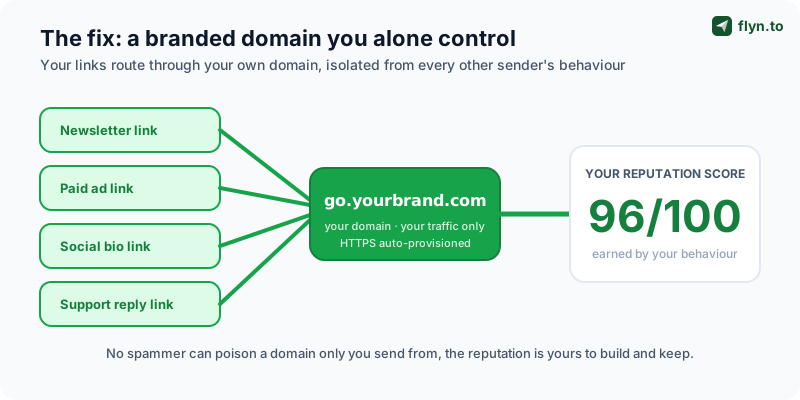
Everything above points to one structural fix. You cannot repair bit.ly's reputation, millions of strangers control it. What you can do is stop borrowing it. Move your links onto a custom branded domain like go.yourbrand.com, and you get a reputation that is private to you and shaped only by your own traffic.
 Tap to enlarge
Why a branded domain solves the reputation problem at the root
When go.yourbrand.com is yours, the math inverts completely:
- No shared poisoning. Spammers can't mint links on a domain they don't control. The only behaviour on your reputation file is yours.
- Sender / link domain alignment. Your email comes from
yourbrand.comand the link isgo.yourbrand.com, the same root domain. That alignment is a positive signal to filters; the phishing-style mismatch is gone. - You're not on the shortener banlists. Reddit's and Discord's blocklists target
bit.ly,tinyurl.com,t.co, notgo.yourbrand.com, which they've never seen. - Recognition and trust. A recipient who sees your brand in the URL knows where the link goes before clicking, the trust mechanics of branded links and CTR in action.
Setting it up is genuinely fast
A branded domain sounds like infrastructure work. It isn't. On Flyn it's a few minutes:
- Pick a subdomain of a domain you already own,
go.,links., orl.are the common choices. No new domain purchase needed. - Add one CNAME record at your DNS provider, pointing the subdomain at Flyn.
- Flyn auto-provisions an SSL certificate, every branded link is HTTPS end to end, with zero certificate management on your side.
- Set the branded domain as your workspace default. New links use it automatically.
Custom domains are a Flyn Pro feature, the standard Pro plan includes multiple custom domains, so you can separate marketing, sales, and support traffic if you want. For the full walkthrough, the deep dive lives in the custom-domains guide. The point for this article: this is the change that fixes spam-flagging at the root, and it's an afternoon of work at most.
Don't retire your old generic links the day you switch, that breaks anything already in market. Instead, create all new links on the branded domain, and migrate high-traffic existing links over a few weeks. You can audit your current link portfolio first with Flyn's bulk tools so you know which links are worth migrating and which are dead weight. New domain for new work; graceful migration for the old.
Hygiene Habits That Keep Links Out of Spam
A branded domain is the foundation, but reputation is something you maintain, not something you set once. Three habits keep your link program clean after the move, and none of them takes real effort once they're routine.
Always use HTTPS, end to end
Every link in the chain, the short link and the final destination, must be HTTPS. A single http:// hop is a guaranteed flag for modern scanners and triggers browser "Not Secure" warnings that kill clicks. Flyn serves every branded link over HTTPS automatically, but you still need to confirm the destination page is HTTPS too. One insecure endpoint poisons the whole journey, no matter how clean the short link is.
Keep redirect chains short
Aim for one hop: short link straight to destination. If your email platform adds its own click-tracker, that's two, acceptable. Beyond that, you're accumulating evasion signals for no benefit. The two rules that prevent chains:
- Never shorten a URL that's already a redirect. Shortening an affiliate link or another short link just stacks hops, link to the true destination instead.
- Pick one tracking layer, not three. If your email tool wraps links, don't also wrap them in a separate shortener and an ad-network redirect. Decide where tracking happens and stop there.
Keep your link domain consistent
Reputation compounds when recipients and filters see the same branded domain repeatedly. Bouncing between go.yourbrand.com one week and a generic shortener the next splits the trust signal and slows the warm-up. Pick one branded domain, route everything through it, and let recognition build. Consistency is also why teams that run a single domain for years end up with the cleanest deliverability, covered more in the custom-domains guide.
Send yourself a test before every email campaign, to a Gmail address and an Outlook address, on a different account from your work one. If it lands in spam for you, it'll land in spam for your list. Pair that with a quick scan of inbound links via the Short Link Safety Checker and you'll catch link-reputation problems while you can still fix them, instead of after the send.
Warming a New Branded Domain (and Other Edge Cases)
A new branded domain starts with a neutral reputation, not bad, but not yet trusted. That's a far better starting point than bit.ly's deficit, but if you blast a brand-new domain with ten thousand cold emails on day one, filters get suspicious of the sudden volume. The fix is domain warming: ramp up gradually so the domain builds a positive track record.
How to warm a new short-link domain
The principle is the same as warming an email-sending domain, start small, grow steadily, keep engagement high:
- Week 1, use the branded domain for low-volume, high-trust links: your email signature, internal team links, links shared with your most engaged audience.
- Weeks 2-3, expand to organic social and your newsletter, where recipients already know you and engagement is strong.
- Week 4+, scale into paid campaigns and broader distribution once the domain has a steady history of real, engaged clicks.
- Throughout, keep destinations genuinely good. Reputation is built on engagement, not just volume; links people actually click and don't bounce off build trust fastest.
For most teams the domain feels fully "warm" within a few weeks. The single biggest mistake is treating day one like day ninety.
Edge cases worth knowing
- You inherited a domain with history. If your branded subdomain's root domain previously sent spam, that history carries, check it before relying on it, and switch to a different root domain if it's damaged.
- A platform false-positives your clean domain. It happens. Most platforms and blocklist services have a review or delisting process, submit your domain with evidence it's legitimate.
- You genuinely need cloaking. For affiliate links, cloaking is fine, keep it honest and on your branded domain. See the affiliate link tracking guide for doing it without tripping filters.
- Scanner traffic inflates new-domain clicks. Security gateways pre-fetch links, so early click counts can look noisy. The click fraud prevention guide covers separating real clicks from bot traffic.
Put it all together and the priority order is simple. If you do one thing: move your links to a branded domain. If you do three: branded domain, HTTPS-only with short redirect chains, and a pre-send check on every link. That combination takes a flagged, spam-foldered link program and turns it into one that reliably reaches inboxes, survives Reddit and Discord, and earns the click, one of the highest-ROI fixes in marketing, and a permanent one. Planning a launch? Bake this into the prep with the Product Hunt launch playbook, then create your first branded link on Flyn.
Frequently Asked Questions
Why do bit.ly links go to spam?
Are shortened URLs considered spam by email providers?
How do I stop my links from being flagged as spam?
go.yourbrand.com, a private reputation only your traffic shapes, instead of a shared one poisoned by strangers. Beyond that: use HTTPS end to end with no http:// hops; keep redirect chains to one hop by not shortening URLs that are already redirects; and pre-check every link before sending. Run inbound links through the Short Link Safety Checker and your own through the Redirect Checker and URL Expander. Finally, warm a new domain gradually rather than blasting it on day one. Branded domain plus link hygiene fixes the problem at the root.Why does Reddit remove posts with shortened links?
Do redirect chains hurt deliverability?
http:// hop in the middle (an HTTPS downgrade), cross-domain hops through unfamiliar tracker domains, or JavaScript and meta-refresh redirects instead of clean HTTP 301/302. Aim for one hop, two at most. Audit every chain with the Redirect Checker before you ship a campaign, and flatten anything longer.Is link cloaking against the rules?
How long does it take to warm a new branded short-link domain?
Can I keep using bit.ly for some links and a branded domain for others?
Free tools for this
Three Flyn tools that pair well with the strategy in this article, all free, no signup needed.
UTM Builder
Build campaign-tracked URLs in seconds.
Open Graph Checker
Preview how URLs unfurl on social.
Broken Link Checker
Scan any page for dead links and 404s.
Keep reading
Three related deep-dives from the Flyn blog.

Short Links in SMS Marketing: The Complete Guide
11 min read

Geo-Targeting Links by Country: One URL, Every Market
11 min read

Link-in-Bio Strategy for Creators: Beyond Linktree
13 min read
Ready to try Flyn?
Free plan includes 25 links/month, full analytics, and access to all 30+ free tools above. No credit card required.
Already a member? Log in
Karan Bhakuni is the founder of Flyn. He writes about branded links, click analytics, and the link-management tooling growth teams and creators actually need, drawn from building Flyn and reading a lot of user feedback.
Find these guides useful? Add Flyn as a preferred source so more of them show up in your Google results.