Free Redirect Checker
Trace the full redirect chain for any URL. Check 301/302 status codes, detect loops, measure response time per hop, and get a chain health score.
Skip the redirect chain entirely?
Create a clean Flyn short link that goes straight to the final destination, one fast redirect, zero chains, with built-in click analytics.
How to Check Redirect Chains in 3 Steps
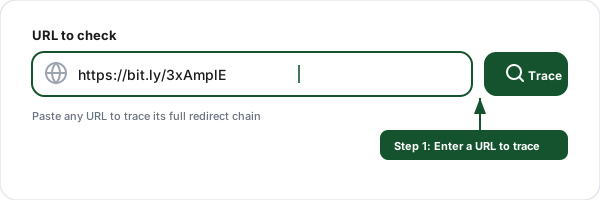
Enter a URL
Paste any URL you want to trace, a short link, an old page, or any URL you suspect has redirects. Our tool follows every hop from start to final destination.
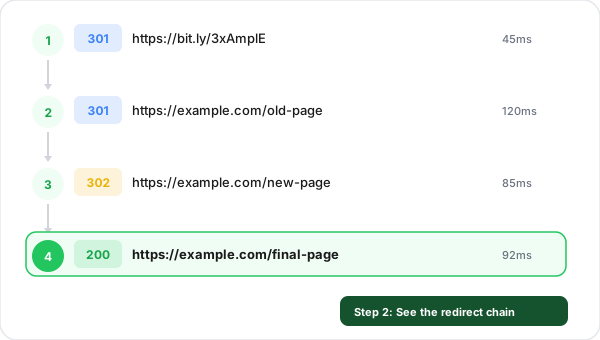
See the redirect chain
View every hop in the chain with color-coded status codes (301, 302, 307), response times per hop, server headers, and the final destination URL.
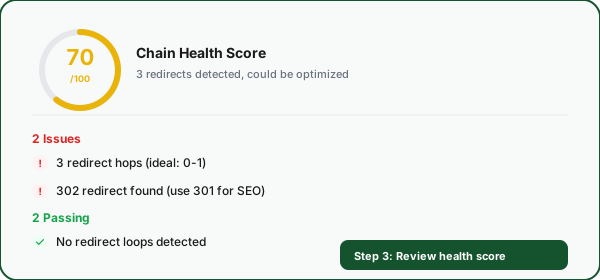
Review health score
Get a chain health score from 0 to 100 with a clear breakdown of issues to fix (too many hops, wrong status codes) and what is configured correctly.
What Are Redirect Chains and Why Do They Matter?
A redirect chain is a series of HTTP redirects that a browser must follow before reaching the final destination page. When you visit a URL, the server may respond with a 301 or 302 status code pointing to a different URL. If that second URL also redirects, you have a chain. Each link in the chain is called a "hop." A redirect checker like this tool traces every hop so you can see exactly what happens between the initial click and the final page load. If redirects themselves are new territory, the URL redirect glossary entry covers the basics before you dive into chains.
Redirect chains are a common SEO problem because they dilute link equity (the ranking power passed through links), waste search engine crawl budget, and slow down page load times. Google recommends eliminating redirect chains wherever possible and ensuring every redirect points directly to the final URL. Even a two-hop chain can measurably impact your page performance and rankings.
Example redirect chain:
http://example.com/old-page → 301 → https://example.com/old-page → 301 → https://example.com/new-page → 200 ✓This 2-hop chain should be flattened to a single redirect from the old URL directly to the new page.
Redirect Status Codes Explained
301Moved PermanentlyThe URL has permanently moved to a new location. Search engines transfer full link equity to the new URL and update their index.
SEO impact
Best for permanent URL changes. Use for domain migrations, slug changes, and HTTP-to-HTTPS redirects.
302Found (Temporary)The URL has temporarily moved. Search engines may not transfer link equity and will continue indexing the original URL.
SEO impact
Use only for truly temporary moves (A/B tests, maintenance pages). Often misused when 301 is intended.
303See OtherUsed after a POST request to redirect the client to a different URL using GET. Common in form submissions.
SEO impact
Rarely relevant for SEO. Primarily used in web applications after form submissions.
307Temporary RedirectLike 302 but guarantees the request method (POST, PUT) is preserved. The browser must use the same method for the redirected request.
SEO impact
Same SEO impact as 302, temporary, may not pass link equity. Used for HSTS redirects.
308Permanent RedirectLike 301 but guarantees the request method is preserved. Permanent move with full link equity transfer.
SEO impact
Same SEO impact as 301, permanent, passes full link equity. Less commonly used but equally effective.
301 vs 302 Redirects: Which Should You Use?
The choice between 301 and 302 redirects has significant SEO implications. A 301 (Moved Permanently) tells search engines to transfer all link equity from the old URL to the new one and to update their index accordingly. This is what you want for permanent URL changes like domain migrations, slug updates, or consolidating duplicate content.
A 302 (Found / Temporary) tells search engines the move is temporary and they should keep the old URL in their index. This is appropriate for A/B tests, geo-redirects, or maintenance pages where you intend to restore the original URL. Using a 302 when you mean 301 is one of the most common technical SEO mistakes. It can prevent your new URL from ranking and cause the old URL to remain in search results indefinitely.
Feature
301 Permanent
302 Temporary
Link equity transfer
Yes, full transfer
Partial or none
Search index update
New URL replaces old
Old URL stays indexed
Browser caching
Cached permanently
Not cached
Use for site migrations
✓ Recommended
✗ Not recommended
Use for A/B tests
✗ Not recommended
✓ Recommended
Use for HTTPS upgrade
✓ Recommended
✗ Not recommended
Common Redirect Mistakes to Avoid
Using 302 instead of 301
The most common redirect mistake. When a URL change is permanent (which it usually is), use 301, not 302. A 302 tells search engines the move is temporary, so they may not transfer ranking power to the new URL. Many CMS platforms and plugins default to 302, always verify.
Leaving old redirect chains in place
After a site migration or URL restructure, old redirects stack up. Page A redirects to B, which was later redirected to C. Instead of a direct A-to-C redirect, you now have a chain. Audit your redirects regularly and flatten chains to single hops.
Redirect loops from conflicting rules
A common cause: your server forces HTTPS, but your CMS forces HTTP. Or www redirects to non-www at the server level, but the CMS redirects back to www. These conflicting rules create infinite loops. Always check for rule conflicts after adding new redirects.
Not redirecting all URL variations
When moving a page, you need to redirect all variations: with and without trailing slash, with and without www, HTTP and HTTPS versions. Missing any variation means some links will 404 instead of reaching the new page.
Redirecting to a page that also redirects
Before setting up a redirect, check that the target URL is the final destination. If you redirect to a URL that itself redirects, you create an unnecessary chain. Use this redirect checker to verify the target URL before configuring your redirect.
Not updating internal links after redirect
After setting up a redirect, update all internal links on your site to point directly to the new URL. Leaving old internal links means every internal click goes through a redirect, wasting server resources and adding latency for your users.
Redirect Checker + Link Shortener: Why You Need Both
Identify redirect chains with the checker, then eliminate them with Flyn short links that go straight to the final destination.
Single-hop redirects
Flyn short links use one fast redirect to the final URL. No chains, no wasted hops, no lost link equity.
SEO-safe 301 redirects
Choose 301 or 302 per link. Flyn defaults to the SEO-friendly option so you never accidentally use the wrong one.
Sub-50ms redirects
Flyn redirects complete in under 50ms globally. Compare that to multi-second redirect chains.
Click analytics included
Every redirect through Flyn is tracked with device, location, referrer, and time-series analytics.
Frequently Asked Questions
What is a redirect chain?
What is the difference between a 301 and 302 redirect?
How do redirect chains affect SEO?
What is a redirect loop?
How do I fix a redirect chain?
How many redirects are too many?
What HTTP status codes indicate a redirect?
Do redirects affect page load speed?
How do I check redirects for an entire website?
Can a short URL cause redirect chains?
Is this redirect checker free?
More Free Marketing Tools
Explore other free tools from Flyn to grow your campaigns and track performance. No server access? Generate one with the meta refresh redirect generator. Mid-migration? Follow the website migration redirect checklist. Unsure which status code to serve? Read 301 vs 302 redirects. Migrating a whole site? The redirect map generator turns your old and new URL lists into a complete 301 map, and the link inspector shows a destination and safety read in one pass. Deciding between one fixed redirect and per-country routing? Geo-targeted links vs standard redirects covers when each wins and why geo redirects must be 302s.
Outbound Link Checker
Audit external links on any page, rel attributes, tabnabbing risks, unique domains, CSV export.
HTAccess Redirect Generator
Build Apache 301/302 redirect rules, test them here after deploy.
NGINX Redirect Generator
Build nginx server-block redirect config, return 301 vs rewrite.
WordPress Redirect Generator
Redirection plugin JSON imports + PHP for functions.php / mu-plugins, verify with the checker above.
Shopify Redirect Generator
Bulk URL Redirects CSV for Shopify, run the checker after import to confirm one-hop resolution.
Webflow Redirect Generator
Webflow Old Path → Redirect to Path 301 rules with wildcards.
Squarespace Redirect Generator
Squarespace URL Mappings 301/302 rules (/old -> /new 301) with [slug] capture.
Internal Link Checker
Audit internal link structure on any page, path depth, duplicates, nofollow audits.
Ready to eliminate redirect chains?
Create clean, fast Flyn short links that skip redirect chains entirely. One redirect, full analytics, branded domains, all in one platform.