Free Tool
4.9/5

Meta Refresh Redirect Generator

Build a no-server redirect page for static hosts like GitHub Pages and S3. Meta refresh, JavaScript fallback, and canonical tag in one copy-paste HTML snippet.

Want a redirect you can edit and track?

A static HTML redirect can never change without re-uploading. A Flyn short link is an editable 301 with click analytics and QR codes.

Try Flyn free

How to Make an HTML Redirect in 3 Steps
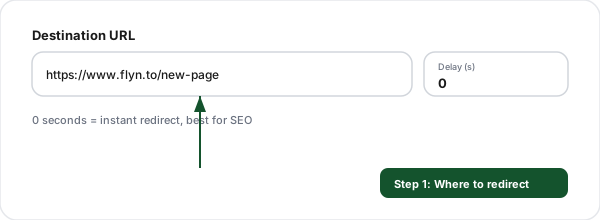
Step 1: Enter the destination (Meta Refresh Redirect Generator)
1

Enter the destination

Type the URL to redirect to and optionally a delay. Everything is built locally in your browser.
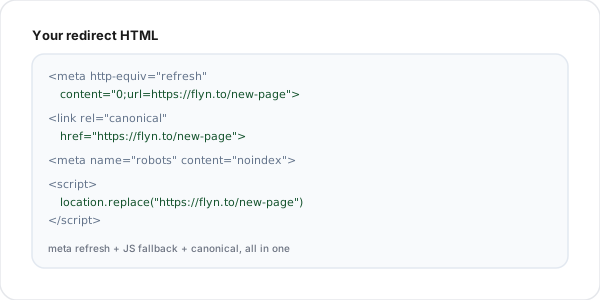
Step 2: Get the HTML snippet (Meta Refresh Redirect Generator)
2

Get the HTML snippet

A complete page with meta refresh, a JavaScript fallback, a canonical tag, and a visible link.
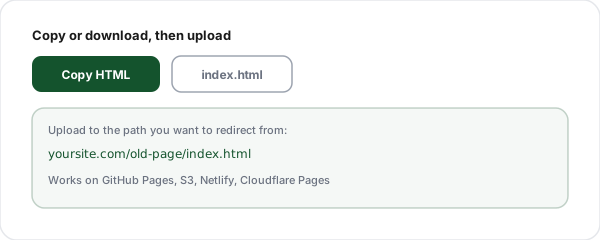
Step 3: Copy or download (Meta Refresh Redirect Generator)
3

Copy or download

Grab the snippet or download index.html, then upload it at the path you want to redirect from.

Why Use Our Redirect Generator?

No server needed

Works on GitHub Pages, S3, Netlify, Cloudflare Pages, any static host.

Meta + JS + canonical

Three layers in one snippet so the redirect fires reliably.

Visible fallback link

Visitors are never stranded if the auto-redirect is blocked.

Copy or download

Grab the snippet or download a ready-to-upload index.html.

100% client-side

The HTML is built in your browser. Nothing is sent to a server.

Cross-domain ready

Redirect to any URL, including a different domain, with no CORS setup.

Meta Refresh vs the Other Redirect Methods

Method

Needs a server?

Best for

Meta refresh (this tool)

No, just an HTML file

Static hosts: GitHub Pages, S3, Netlify

Server 301 (.htaccess / nginx)

Yes

Apache or nginx you control

Platform redirect rule

Platform config

WordPress, Shopify, Webflow, Squarespace

Short link (Flyn)

No, managed for you

Trackable, editable, branded links

If you do control a server, a real 301 is better for SEO. Use the htaccess or nginx generators for that, or a platform generator for WordPress, Shopify, Webflow, or Squarespace.

Frequently Asked Questions

What is a meta refresh redirect?
A meta refresh redirect is a line of HTML placed in a page's head section, <meta http-equiv="refresh" content="0;url=https://destination.com">, that tells the browser to load a different URL after a set number of seconds. With a delay of 0 it redirects immediately. Because it lives inside an ordinary HTML file, it works on any host that can serve static files, with no server configuration, .htaccess, or backend code required.
When should I use this instead of a 301 redirect?
Use a meta refresh when you cannot set a real server-side 301, which is common on static hosts like GitHub Pages, Amazon S3, Netlify static deploys, Cloudflare Pages, Notion-hosted pages, and many shared hosts. If you do control the server, a 301 is better for SEO and speed. This generator is the fallback for the very common situation where all you can publish is an HTML file. The snippet it builds also includes a canonical tag and a visible link so it behaves as well as a client-side redirect can.
Is a meta refresh bad for SEO?
An instant meta refresh (delay 0) to a single fixed destination is treated by Google much like a 301 and passes most ranking signal, but it is still second best to a real server 301 because the browser has to download the intermediate page first. A delayed meta refresh (more than 0 seconds) is NOT a clean redirect signal and can look manipulative, so use delay 0 for genuine redirects. This tool adds a rel=canonical pointing at the destination, which reinforces to search engines which URL is authoritative.
Why does the generated page include JavaScript too?
Belt and suspenders. The meta refresh handles browsers and crawlers that honor it, and the small window.location.replace script catches the rare cases where meta refresh is disabled or slow. Using location.replace (rather than location.href) means the redirect page does not get added to the browser history, so the back button takes the visitor to where they came from instead of bouncing them back into the redirect. Both methods point to the same destination, so they never conflict.
What is the canonical tag for?
The rel=canonical link tag tells search engines that the real, authoritative version of this content lives at the destination URL. On a redirect page that is exactly the message you want to send: do not index this stub, credit the destination. It is a safety net that helps consolidate ranking signals on the right URL even if a crawler indexes the redirect file before following it.
Can I add a delay before the redirect?
Yes, you can set the delay in seconds. A delay is useful for a courtesy "you are being redirected, click here if it does not happen" page, which some teams use for legal or UX reasons. For pure SEO redirects, keep the delay at 0 so search engines treat it as a direct redirect. The generated page always includes a visible fallback link so visitors are never stranded if the automatic redirect fails.
How do I use the generated HTML?
Copy the snippet, save it as an index.html file (or any filename you like), and upload it to the path you want to redirect from. For example, to redirect yoursite.com/old-page, put the file at /old-page/index.html in your static host. When someone visits that path, the host serves your HTML file, which immediately forwards them to the destination. You can download the file directly from the tool too.
Does this work on GitHub Pages?
Yes, this is one of the most common uses. GitHub Pages serves static files and offers no server-side redirect configuration, so a meta refresh HTML file is the standard way to redirect an old path to a new URL or an external site. Commit the generated index.html at the path you want to redirect from and GitHub Pages serves it. The same approach works on GitLab Pages, Cloudflare Pages, and S3 static website hosting.
Will the redirect be instant for users?
With delay 0 it is effectively instant: the browser loads your tiny HTML file (a few hundred bytes) and immediately navigates to the destination, usually faster than the eye can follow. It is marginally slower than a true server 301 because there is one extra round trip to fetch the HTML stub, but on a static host where a 301 is not available, it is the fastest option you have.
Is the destination URL sent to your servers?
No. The entire snippet is built in your browser with client-side JavaScript. Nothing you type is sent to or stored on our servers, so you can safely generate redirects for private or unreleased URLs. The optional history feature keeps your recent destinations in your browser localStorage only, and you can clear it any time.
Can I redirect to an external domain?
Yes. The destination can be any valid URL, including a different domain. This is handy when you are sunsetting a site and want every old path to forward to a new domain, or when you are pointing a static landing page at a campaign URL. Because it is a client-side redirect, cross-domain works without any CORS or server configuration.
What is the difference between this and a Flyn short link?
A meta refresh page is a static file you host and maintain yourself, with no analytics and no way to change the destination without editing and re-uploading the file. A Flyn short link is a managed 301 redirect with real-time click analytics, an editable destination you can change without touching anything you have shared, branded domains, and QR codes. Use this generator when you specifically need a self-hosted HTML file; use Flyn when you want a trackable, editable link.
Why use location.replace instead of location.href in the script?
location.href adds the redirect page to the browser history, so after the redirect a visitor who hits the back button lands back on the redirect stub, which immediately forwards them again, trapping them. location.replace swaps the current history entry instead of adding one, so the back button skips the stub entirely and returns the visitor to wherever they came from. It is the correct choice for any redirect page, and this generator uses it by default.

A redirect you can change without re-uploading

Static HTML redirects are fixed once you upload them. Flyn short links are editable 301s with real-time click analytics, QR codes, and branded domains.