Free NGINX Redirect Generator
Build production-ready nginx server-block config from a friendly form. 301/302/307/308 rules, regex rewrites, HTTPS blocks, and www / trailing-slash policy, copy in one click.
Quick presets
Server settings
Redirect rules (1)
Generated nginx config
# ─── Redirect HTTP to HTTPS ───
server {
    listen 80;
    listen [::]:80;
    server_name example.com www.example.com;
    return 301 https://example.com$request_uri;
}

# ─── Redirect www to bare over HTTPS ───
server {
    listen 443 ssl http2;
    listen [::]:443 ssl http2;
    server_name www.example.com;
    ssl_certificate     /etc/letsencrypt/live/example.com/fullchain.pem;
    ssl_certificate_key /etc/letsencrypt/live/example.com/privkey.pem;
    return 301 https://example.com$request_uri;
}

# ─── Main HTTPS server with redirects ───
server {
    listen 443 ssl http2;
    listen [::]:443 ssl http2;
    server_name example.com;
    ssl_certificate     /etc/letsencrypt/live/example.com/fullchain.pem;
    ssl_certificate_key /etc/letsencrypt/live/example.com/privkey.pem;

    location = /old-page {
        return 301 /new-page;
    }

    # Your application proxy goes below:
    # location / { proxy_pass http://localhost:3000; }
}Drop this into your /etc/nginx/sites-available/ or wherever your server blocks live. Validate with sudo nginx -t and reload with sudo systemctl reload nginx.
Tired of editing nginx for every redirect?
Use Flyn branded short links instead, editable, trackable, no server access needed. Change destinations in seconds without touching config.
How to Generate NGINX Redirect Config in 3 Steps
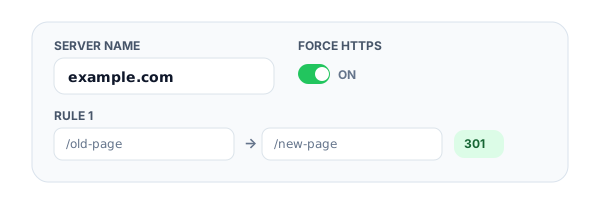
Enter your domain and rules
Type your server_name (domain), pick global options like force HTTPS, www / non-www, trailing slash handling, and add redirect rules with source path, destination, and status code.
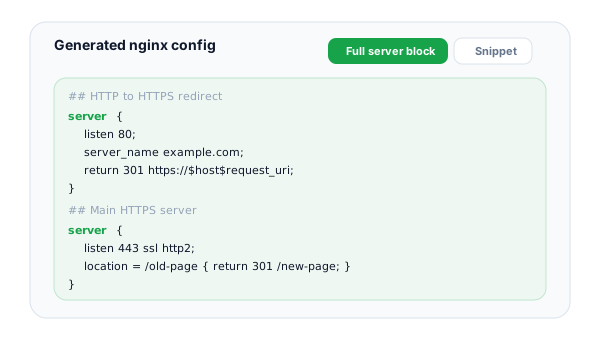
Switch between snippet and full server block
Toggle between two output modes, a paste-into-existing-server-block snippet, or a complete server { } block with listen directives, SSL placeholders, and HTTP-to-HTTPS redirect logic.
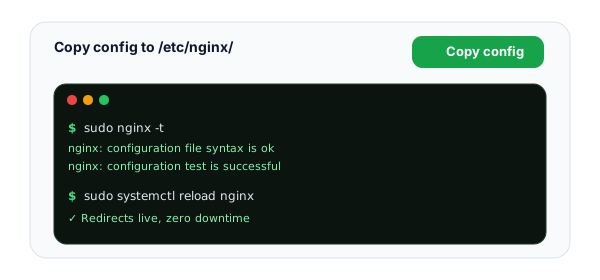
Copy, validate, and reload
Copy the config into /etc/nginx/sites-available/ or your conf.d/ directory. Run sudo nginx -t to validate, then sudo systemctl reload nginx to apply with zero downtime.
What Is an NGINX Redirect?
An nginx redirect is a server-side instruction that tells the client (browser, search-engine crawler, or other HTTP client) to fetch a different URL. Unlike client-side redirects from JavaScript or HTML meta-refresh, nginx redirects happen at the edge, before any application code runs, so they are faster, more reliable, and visible to crawlers that may not execute JavaScript. If you have no server access at all, the meta refresh redirect generator builds that client-side fallback for you.
In nginx, redirects are built from three directives: return for fixed source paths, rewrite for regex patterns, and location blocks to scope them. Each lives inside a server { ... } block. This generator builds that config from a form, so you do not have to remember the order of arguments or the difference between permanent and redirect flags.
NGINX Redirect Directives Reference
The directives this generator produces and what each one does.
return 301
The simplest, fastest redirect. Use for fixed source paths that do not need URL parts captured. Syntax: return 301 https://new.example.com$request_uri;. Nginx stops processing the location block immediately on a return, no further rewrites run.
rewrite ... permanent
For regex-based redirects with capture groups. Use when you need to extract path segments. The permanent flag emits a 301; redirect emits a 302. Always anchor patterns with ^ and $ to prevent partial or recursive matches.
location = /path
Exact-match location block, highest priority, fastest lookup. Perfect for a handful of fixed-source redirects. Nginx hashes these at config-load time so they cost O(1) at request time, even with hundreds of them.
location ~ /regex
Regex location block, case-sensitive. Use ~* for case-insensitive. Regex locations are checked in file order, first match wins. Place specific patterns before catch-alls to avoid surprises.
add_header
Add response headers like Strict-Transport-Security, X-Frame-Options, and X-Content-Type-Options. Use the always parameter so headers apply to error responses (4xx, 5xx) too, without it, nginx skips add_header on errors.
server_name
Defines which Host header(s) this server block matches. Supports exact names, wildcards (*.example.com), and regex (~^www\d+\.example\.com$). The default_server flag on listen overrides server_name when no match found.
NGINX Redirect Best Practices
Lessons learned from running nginx at scale.
Always use 301 for permanent moves
Browsers cache 301s aggressively. If you ship a 301 by mistake, fixing it later can take days to propagate as users' browsers re-validate. Use 302 for anything experimental, then promote to 301 once you are confident the redirect is permanent.
Anchor every regex pattern
A rewrite like rewrite /old /new permanent; will match /old, /something/old, /old/anything, probably not what you want. Always use ^ at the start and $ at the end: rewrite ^/old$ /new permanent;. This single habit prevents most redirect loops.
Prefer return over rewrite when possible
return is faster (no regex evaluation), clearer (no capture group ambiguity), and stops processing immediately. Reach for rewrite only when you actually need to extract URL parts. For static one-off redirects, location = / { return 301 ...; } is the gold standard.
Validate before every reload
sudo nginx -t parses your full config (every include) and reports syntax errors with file and line numbers. Make it a habit: edit, nginx -t, then reload. The 30 seconds you spend testing prevents a misplaced semicolon from taking down your site.
Reload, do not restart
sudo systemctl reload nginx (or nginx -s reload) replaces workers without dropping connections. systemctl restart fully tears down the master process and kills active TCP connections, only restart when upgrading the nginx binary itself.
Keep redirects in a dedicated server block
Put your HTTP-to-HTTPS redirect in a tiny server block of its own, and your www/non-www enforcement in another. This keeps each block focused on one job, makes the main HTTPS block easier to read, and lets you change redirect logic without touching application config.
Skip the Server Edit, Use Flyn Branded Short Links
Editing nginx config every time a marketing URL changes? There is a better way. Flyn short links are editable, trackable, and live outside your server.
Editable destinations
Change where a link points in seconds. No SSH, no nginx -t, no reload. Marketing owns the redirect.
Click analytics
Every redirect is counted in real time, and Pro logs device, country, and referrer detail. See exactly how each link is used.
Branded domains
On Pro, use your own domain with automatic TLS, the link still looks like yours, but you never touch nginx.
Sub-50ms redirects
Global edge delivery means redirects feel instant. Faster than most self-hosted nginx setups.
Frequently Asked Questions
Where does the nginx config live on my server?
What is a server block and how does it work?
When should I use return 301 vs rewrite ... permanent?
What do the location modifiers =, ~, ~*, and ^~ mean?
How does regex work in nginx redirects?
How do I test my nginx config before reloading?
Should I reload or restart nginx after changes?
What are the most common nginx redirect errors?
When should I use 301 vs 302 redirects?
How do I add HSTS and other security headers to my nginx config?
How does nginx compare to Apache (.htaccess) for redirects?
Do nginx redirects affect performance?
More Free Developer Tools
Free tools that pair with your nginx work, generators, checkers, and validators. For a full migration, the redirect map generator exports every rule as an nginx block in one go.
HTAccess Redirect Generator
The Apache equivalent, build .htaccess rewrite rules from a form.
Redirect Checker
Trace 301/302 redirect chains, detect loops, and verify your nginx rules work.
WordPress Redirect Generator
For managed WP hosting where nginx config isn't accessible, Redirection plugin or PHP.
Shopify Redirect Generator
Shopify URL Redirects CSV for bulk migration imports.
Webflow Redirect Generator
Webflow Old Path → Redirect to Path 301 with wildcard support.
Squarespace Redirect Generator
Squarespace URL Mappings 301/302 rules with [slug] capture.
URL Cleaner
Strip tracking params and normalize URLs before redirecting.
Canonical URL Checker
Verify your redirects line up with the canonical URLs search engines see.
Ready to skip the server edit?
Generate your nginx config here, then use Flyn for everything else: short links you can edit without server access, click counts on every link, QR codes, and analytics breakdowns plus custom domains on Pro.