Free Tool
4.9/5

Free URL Cleaner

Strip UTM parameters, click IDs, and tracking tags from any URL. Paste one or many URLs and get clean, shareable links instantly.

Parameters to remove

/

Need short, branded links?

Clean your URLs, then shorten them with Flyn for branded short links with click analytics, QR codes, and A/B testing built in.

Shorten for free

How to Clean Tracking Parameters in 3 Steps
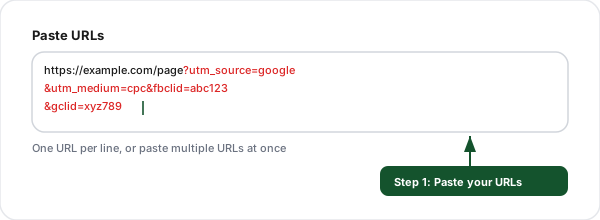
Step 1: Paste your URLs, URL Cleaner screenshot
1

Paste your URLs

Enter one or more URLs with tracking parameters. Supports bulk cleaning of multiple URLs at once.
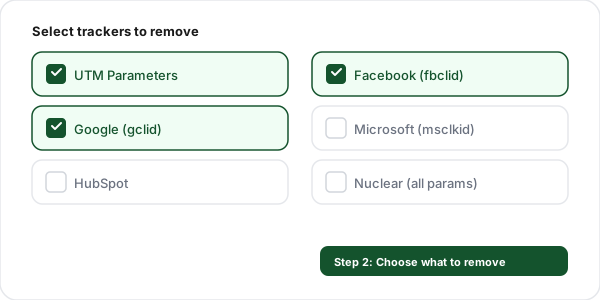
Step 2: Select trackers to remove, URL Cleaner screenshot
2

Select trackers to remove

Pick which categories to strip, UTM, Facebook, Google, Microsoft, HubSpot, or go nuclear and remove everything.
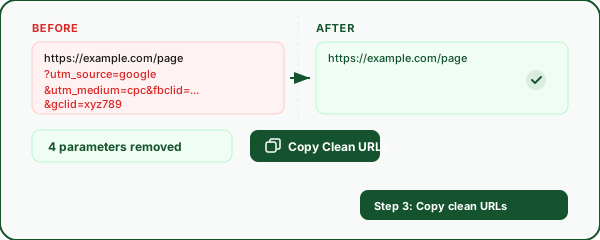
Step 3: Copy clean URLs, URL Cleaner screenshot
3

Copy clean URLs

See the before/after diff showing exactly what was removed, then copy your clean URLs.

Why Use Our URL Cleaner?

100% client-side

All cleaning happens in your browser. No URLs are ever sent to a server.

Bulk mode

Paste multiple URLs, one per line, and clean them all at once.

Before / after diff

See exactly which tracking parameters were removed from each URL.

7 param categories

UTM, Facebook, Google, Microsoft, HubSpot, general tracking, or remove all.

Privacy-first

No sign-up, no cookies, no analytics on this tool. Your URLs stay yours.

Smart defaults

Common tracking params are pre-selected. Toggle categories on or off as needed.

What Tracking Parameters Does This Tool Remove?

UTM Parameters

utm_source, utm_medium, utm_campaign, utm_term, utm_content, utm_id

Used by Google Analytics and most analytics platforms to attribute traffic to marketing campaigns.

Facebook / Meta

fbclid, fb_action_ids, fb_action_types, fb_ref, fb_source

Added automatically by Facebook to every outbound link. Used for cross-site tracking and ad attribution.

Google Ads

gclid, gclsrc, dclid, gbraid, wbraid, gad_source

Auto-tagging parameters from Google Ads, DoubleClick, and iOS/web attribution.

Microsoft Ads

msclkid

Microsoft Advertising click identifier, similar to Google's gclid.

HubSpot

_hsenc, _hsmi, __hstc, __hsfp, __hssc, hsa_*

HubSpot email tracking, session tracking, and ads attribution parameters.

General Tracking

ref, source, mc_eid, mc_cid, _ga, _gl, yclid, wickedid, twclid

Miscellaneous tracking from Mailchimp, Yandex, Twitter/X, Wicked Reports, and cross-domain GA linkers.

Frequently Asked Questions

What are UTM parameters?
UTM (Urchin Tracking Module) parameters are tags added to URLs to track where traffic comes from. They include utm_source (which site sent the traffic), utm_medium (the marketing channel like email or CPC), utm_campaign (the specific campaign name), utm_term (paid search keywords), utm_content (which ad or link variation was clicked), and utm_id (a unique campaign identifier). Google Analytics and other analytics tools use these parameters to attribute traffic to the correct marketing campaigns.
Why should I clean tracking parameters from URLs?
Cleaning tracking parameters from URLs has several benefits. First, it improves privacy by removing identifiers that platforms like Facebook (fbclid) and Google (gclid) use to track you across the web. Second, clean URLs are shorter, easier to share, and look more professional. Third, removing tracking clutter from bookmarked URLs prevents confusion when you revisit them. Fourth, pasting clean URLs into documents and messages avoids sharing your tracking data with others.
Which tracking parameters are safe to remove?
UTM parameters (utm_source, utm_medium, utm_campaign, utm_term, utm_content, utm_id) are always safe to remove because they are only used for analytics tracking and never affect page content. Platform click IDs like fbclid, gclid, msclkid, and twclid are also safe to remove because they are added automatically by ad platforms and are not needed to load the page. HubSpot tracking parameters (_hsenc, _hsmi, __hstc) can also be safely removed. Only use the "nuclear" option (remove all params) with caution, as some query parameters like search queries (?q=) or pagination (?page=2) are functional.
What is fbclid and why does Facebook add it to URLs?
fbclid (Facebook Click ID) is a unique tracking parameter that Facebook automatically appends to every outbound link clicked on its platform. It allows Facebook to track which users clicked which links, measure ad performance, and build cross-site browsing profiles. The fbclid parameter is not needed to load the destination page and can always be safely removed. Removing it helps protect your privacy by breaking Facebook's ability to track your click behavior across the web.
What is gclid and how does Google use it?
gclid (Google Click ID) is a tracking parameter that Google Ads automatically appends to destination URLs when auto-tagging is enabled. It connects a Google Ads click to website activity in Google Analytics, allowing advertisers to see which keywords and ads drove conversions. Like fbclid, the gclid parameter is not needed to load the destination page. Related parameters include gclsrc (click source), dclid (DoubleClick ID), gbraid (iOS attribution), and wbraid (web-to-app attribution).
Does removing tracking parameters break the destination page?
No, removing tracking parameters does not break the destination page in the vast majority of cases. UTM parameters, click IDs (fbclid, gclid, msclkid), and analytics tokens are read by JavaScript tracking scripts but are not required to load page content. The only time removing parameters could cause issues is if a site uses query parameters for functional purposes, like ?id=123 for a product ID or ?q=search for search queries. Our tool only removes known tracking parameters by default and leaves functional parameters untouched.
Can I clean multiple URLs at once?
Yes, our URL cleaner supports bulk mode. Paste multiple URLs into the input field, one per line, and all of them will be cleaned simultaneously. The tool shows a before/after comparison for each URL, highlights which parameters were removed, and gives you a total count of removed parameters. You can copy all cleaned URLs at once with a single click.
Is this URL cleaner private? Do you store my URLs?
Yes, this tool is completely private. All URL cleaning happens in your browser using client-side JavaScript. No URLs are sent to our servers. The optional history feature stores your last 20 cleaned URLs in your browser's localStorage only, which you can clear at any time. We do not log, track, or store any URLs you paste into this tool.
What is the difference between UTM parameters and click IDs?
UTM parameters are manually added by marketers to track campaigns in analytics tools. They are human-readable (e.g., utm_source=newsletter) and consistent across clicks. Click IDs like fbclid, gclid, and msclkid are automatically generated by advertising platforms and are unique to each individual click. Click IDs are long, random strings used for conversion tracking and cross-site attribution. Both types are safe to remove for privacy purposes, but click IDs are more privacy-invasive because they uniquely identify individual users.
What about the HubSpot tracking parameters?
HubSpot adds several tracking parameters to URLs: _hsenc (encrypted tracking token), _hsmi (email message ID), __hstc (main tracking cookie value), __hsfp (browser fingerprint hash), and __hssc (session counter). Parameters starting with hsa_ are used by HubSpot Ads tracking. All of these are analytics-only parameters used to attribute website visits to HubSpot contacts and campaigns. They are safe to remove and do not affect page functionality.

Clean URLs deserve a great link shortener

After cleaning your URLs, shorten them with Flyn for branded short links, real-time click analytics, QR codes, and A/B testing, all in one platform.