Free UTM Parser
Paste any URL to decode utm_source, utm_medium, utm_campaign, utm_term, utm_content, and all GA4 parameters, with naming validation and one-click clean URL.
Need to build UTM URLs instead?
Use Flyn's UTM Builder to generate campaign URLs with presets for Google Ads, Facebook, Email, and 13+ platforms, then shorten them with click analytics.
How to Parse UTMs in 3 Steps
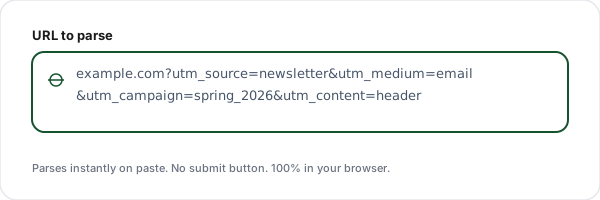
Paste your URL
Paste any URL containing UTM parameters into the input field. Parsing happens instantly, no submit button needed. Works with percent-encoded values and Unicode.
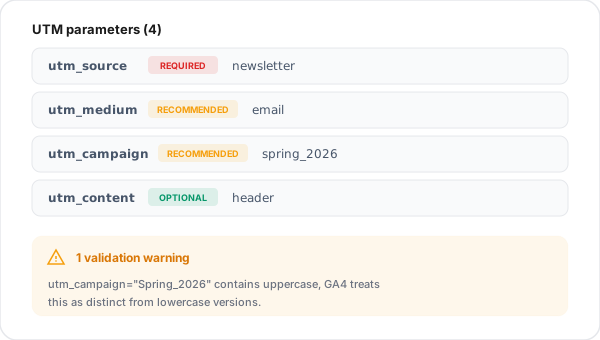
Review extracted parameters
See standard UTMs, GA4 UTMs, and other tracking tags (fbclid, gclid, HubSpot) in separate tables. Validation warnings flag uppercase, spaces, or missing recommended parameters.
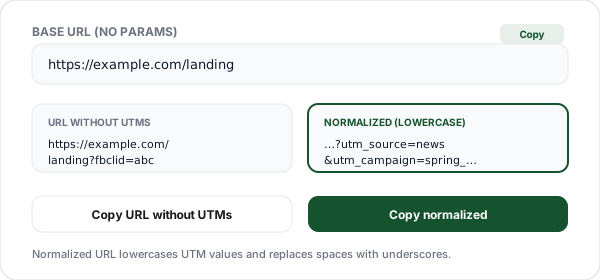
Copy clean URL or individual values
One-click copy for each parameter, the base URL without any UTMs, or a normalized (lowercase, trimmed) version of the URL for consistency across campaigns.
What is a UTM Parser?
A UTM parser reads a URL and extracts all the UTM tracking parameters encoded in its query string. It's the inverse of a UTM Builder: while a builder creates URLs, a parser dissects them. (For what every other part of the address does, see the anatomy of a URL.) Marketing teams use parsers every day to audit campaign links, diagnose analytics attribution issues, and confirm that the UTMs shared with partners actually arrived intact.
The need for a dedicated parser comes from how fragile UTM data is in practice. A single typo, utm_source=Google versus utm_source=google, fragments your reports and shows two separate sources in GA4. Spaces, uppercase letters, punctuation, missing required parameters, and duplicate keys are the four biggest causes of broken campaign tracking. A parser catches all of them before your ad goes live.
This tool supports the full nine-parameter UTM specification: the 5 classic UTMs (source, medium, campaign, term, content) plus the 4 GA4-specific UTMs (id, source_platform, creative_format, marketing_tactic). It also labels non-UTM tracking parameters your URL may carry, Facebook's fbclid, Google Ads' gclid, HubSpot's _hsenc, Mailchimp's mc_cid, so you can distinguish intentional tracking from platform-injected tags.
Everything runs in your browser. Paste a URL, get a parameter breakdown instantly, copy what you need. No sign-up, no data sent anywhere, no rate limits. Pair it with our UTM Builder for a complete campaign URL workflow: build, ship, parse, validate.
The Five UTM Parameters, Explained
Short answer: a UTM-tagged URL adds five parameters. utm_source and utm_medium are required (where and how the traffic arrived); utm_campaign, utm_content, and utm_term are optional.
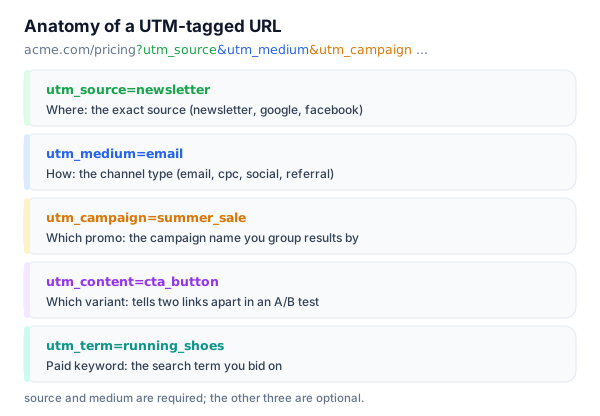
UTM Parameters Reference
The complete list of UTM parameters the parser recognizes, with purpose and real-world examples.
| Parameter | Status | Purpose | Example values |
|---|---|---|---|
| utm_source | Required | Where the traffic came from | google, facebook, newsletter, linkedin |
| utm_medium | Recommended | Marketing channel type | cpc, email, social, paid_social, referral |
| utm_campaign | Recommended | Specific campaign or promotion | spring_sale_2026, black_friday, launch |
| utm_term | Optional | Paid search keywords | link_shortener, url_management |
| utm_content | Optional | Ad variation or link position | header_cta, footer_cta, blue_button |
| utm_id | GA4 | Unique campaign ID (GA4 deduplication) | ad_group_123 |
| utm_source_platform | GA4 | Tool that sent the traffic | ga_ads, manual, dv360 |
| utm_creative_format | GA4 | Creative format | html5_banner, native_video, image |
| utm_marketing_tactic | GA4 | Marketing tactic | remarketing, prospecting, awareness |
Non-UTM Tracking Parameters
Many tracking parameters aren't UTMs, they're auto-added by ad platforms and email providers. The parser labels these separately so you can tell intentional UTMs apart from platform tags.
| Parameter | Source | Purpose |
|---|---|---|
| fbclid | Facebook Click ID, auto-added by Facebook links to track outbound clicks | |
| gclid | Google Ads | Google Click ID, auto-tagging for Google Ads campaigns |
| msclkid | Microsoft Ads | Microsoft/Bing Click ID, Microsoft Ads auto-tagging |
| dclid | DoubleClick | DoubleClick ID, display advertising tracking |
| gbraid / wbraid | iOS-safe attribution IDs (web-to-app and iOS) | |
| _hsenc, _hsmi | HubSpot | Encrypted HubSpot tracking tokens in marketing emails |
| mc_cid, mc_eid | Mailchimp | Mailchimp campaign and email recipient IDs |
| yclid | Yandex | Yandex Click ID, Yandex Direct campaign tracking |
Common UTM Mistakes the Parser Catches
Mixed case across campaigns
utm_source=Google, utm_source=google, and utm_source=GOOGLE appear as three separate sources in GA4. Always normalize to lowercase. Our parser flags mixed-case values.
Spaces instead of underscores
utm_campaign=spring sale encodes as "spring%20sale" and may display oddly in reports. Use underscores or hyphens consistently: spring_sale or spring-sale.
Missing utm_medium
Without utm_medium, GA4 falls back to "(not set)" for channel grouping. Always include medium alongside source, the parser warns when source is present but medium is missing.
Using UTMs on internal links
UTMs on internal links start a new session in analytics and overwrite the real source. The parser cannot detect this on its own, audit your internal links with Link Extractor.
Duplicate parameter keys
A URL with ?utm_source=a&utm_source=b is ambiguous, some tools keep the first, some the last. The parser flags duplicates so you can deduplicate before shipping.
Forgetting to URL-encode special chars
Characters like &, ?, or # break the parser unless encoded. Our tool shows the raw vs decoded value side-by-side so you can spot encoding issues.
Why Use Flyn's UTM Parser?
100% Client-side
Parsing happens in your browser. Your URLs never touch our servers, safe for unreleased campaigns and private landing pages.
Real-time parse
Results appear the instant you paste. No submit button, no round trip, no waiting.
GA4-aware
Recognizes all 9 standard + GA4 parameters plus 8 non-UTM platform tags (fbclid, gclid, HubSpot, Mailchimp).
Naming validation
Flags mixed case, spaces, duplicates, and missing recommended parameters, the four biggest causes of broken tracking.
Frequently Asked Questions
What is a UTM parser?
A UTM parser is a tool that reads a URL and extracts all the UTM (Urchin Tracking Module) parameters from its query string. If you paste a URL like https://example.com?utm_source=newsletter&utm_medium=email&utm_campaign=spring2026, the parser isolates each parameter, decodes URL-encoded characters, and displays them in a readable table. The opposite of a UTM Builder is that a builder creates URLs.
How do I extract UTM parameters from a URL?
Paste the full URL into the input field. Our parser automatically splits the URL on the ? query separator, decodes every parameter (handling percent-encoded characters like %20 for spaces), and categorizes them into standard UTMs, GA4 UTMs, known non-UTM tracking tags (fbclid, gclid, etc.), and everything else. You can copy individual values, copy the clean URL without any UTMs, or copy the URL with only tracking UTMs preserved.
What are the 5 standard UTM parameters?
The five standard UTM parameters defined by Google Analytics Urchin are: utm_source (where the traffic came from, "google", "newsletter"), utm_medium (the marketing channel type, "cpc", "email", "social"), utm_campaign (the specific campaign, "spring_sale_2026"), utm_term (paid keywords), and utm_content (ad variation / link position). Only utm_source is technically required, but using source + medium + campaign together is best practice.
What GA4 UTM parameters does this tool recognize?
Beyond the 5 standard UTMs, Google Analytics 4 introduced four additional parameters: utm_id (unique campaign ID, used for campaign deduplication), utm_source_platform (the tool that sent the traffic, "ga_ads"), utm_creative_format (creative format, "html5_banner"), and utm_marketing_tactic (marketing tactic, "remarketing"). Our parser decodes and labels all nine parameters, flagging any as required / recommended / optional per GA4 best practices.
Are UTM parameters case-sensitive?
Yes, UTM values are case-sensitive in Google Analytics. utm_source=Google, utm_source=google, and utm_source=GOOGLE will appear as three separate sources in your reports, fragmenting your data. Our parser flags uppercase characters in parsed values so you can normalize them. The tool also offers a one-click lowercase conversion for the whole URL.
How do I detect UTM naming inconsistencies?
Our parser runs four validation checks: (1) mixed case (uppercase letters in values), (2) spaces (should be underscores or hyphens), (3) special characters that break tracking, and (4) missing recommended parameters (source, medium, campaign). Each warning links to a fix, either a normalized value you can copy or a guide on the right naming convention.
What's the difference between utm_source and utm_medium?
utm_source identifies the specific referrer (google, facebook, mailchimp) while utm_medium describes the marketing channel type (cpc, social, email). Think of medium as the category and source as the specific entity within it. A Facebook ad would have utm_source=facebook and utm_medium=paid_social. Mixing them up causes the channel grouping in GA4 to misattribute traffic.
Can I parse UTMs from shortened URLs?
Only partially. Shortened URLs (bit.ly/abc123, t.co/xyz) hide the destination. The UTM parameters are on the final URL, not the short link itself. To parse UTMs from a shortened link, first unshorten it using our URL Expander, then paste the expanded URL here. Some shortener services preserve UTM parameters on the short link itself (like Flyn), in which case parsing works directly.
How do I handle URL-encoded UTM values?
URL-encoded values like utm_campaign=spring%20sale (where %20 is a space) are automatically decoded by the parser. The output table shows decoded human-readable values like "spring sale". If you need the raw encoded value for any reason, click the "Show raw" toggle. Our parser handles percent-encoding, plus-signs-as-spaces (legacy form encoding), and Unicode characters correctly.
What non-UTM tracking parameters exist?
Common non-UTM tracking parameters include fbclid (Facebook Click ID, auto-added by Facebook links), gclid (Google Click ID, Google Ads auto-tagging), msclkid (Microsoft Click ID), dclid (DoubleClick ID), gbraid / wbraid (iOS attribution), and HubSpot tags (_hsenc, _hsmi). Our parser recognizes and labels all of these in a separate "Other tracking" section so you can distinguish intentional UTMs from platform-added auto-tracking.
How is a UTM Parser different from a UTM Builder?
A UTM Builder is generative. You fill in fields (source, medium, campaign) and it creates a URL with encoded UTM parameters. A UTM Parser is analytical, you paste a URL and it breaks down the existing parameters. They're exact opposites. Marketing teams use builders to create campaign links and parsers to audit them, diagnose tracking issues, and validate that links shared in emails / ads / social posts carry the correct UTMs before launch.
Does this tool send my URLs to a server?
No. All UTM parsing happens 100% in your browser using native URL and URLSearchParams APIs. Your URLs never leave your device and are never logged or stored on our servers. The optional history feature uses localStorage on your browser only. Safe to use with internal campaign URLs, unreleased landing pages, or anything confidential.
Related Tools
UTM Builder
Build campaign URLs with UTM parameters, the reverse of this parser. Presets for GA4, LinkedIn, Facebook, and more.
URL Cleaner
Strip UTM parameters, fbclid, gclid, and other tracking tags from URLs. Bulk mode supported.
Internal Link Checker
Find orphan pages, check link depth, and audit internal linking across your whole site.
Outbound Link Checker
Audit external links on any page for linkrot risk, rel attributes, and destination quality.
Ready to level up your links?
Parse UTMs to audit, build UTMs to create, and shorten them with Flyn for real click analytics. See which campaigns actually drive traffic, not just which ones got sent.