The Anatomy of a URL: Every Part Explained in Detail
You use fifty of them a day and most explanations still get the parts wrong. Here is the whole address, piece by piece: what the browser reads, what the server never sees, and where campaigns quietly break.

The Whole Address at a Glance
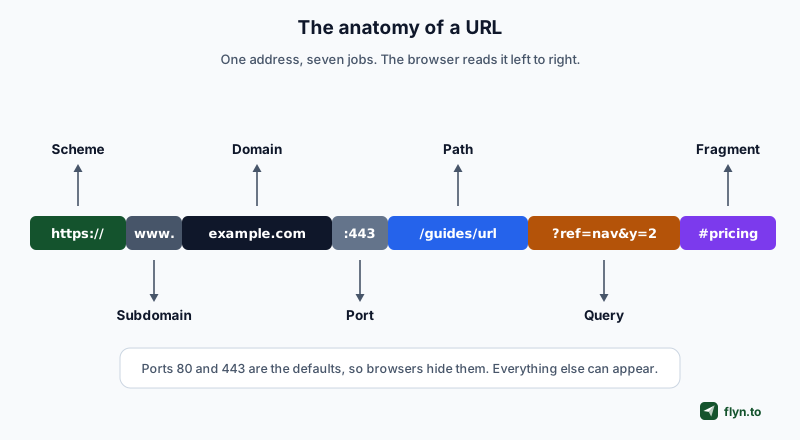
Every URL you have ever clicked is the same machine, arranged left to right. Take one worked example and keep it for the rest of this article:
https://www.example.com:443/guides/url?ref=nav&y=2#pricing
 Tap to enlarge
Reading it the way the browser does: the scheme says how to connect, the host says which machine to ask, the optional port says which door on that machine, the path says which resource, the query string carries extra data for it, and the fragment tells the browser, and only the browser, where to look once the page arrives.
Two terms worth untangling before the details. A URI is the umbrella term for any identifier; a URL is the kind that also tells you where the thing lives and how to fetch it. Every URL is a URI. In practice, and in every specification that matters for the web today, you can say URL and be understood.
The diagram this article opens with exists in a hundred sloppy versions across the internet, several with misspelled labels and a query string joined with hyphens instead of equals signs. The details below follow the actual standards: RFC 3986 and the WHATWG URL specification that browsers implement.
The Scheme: How to Connect
The part before :// names the protocol. For web pages that is http or, almost always now, https, where the s means the connection is encrypted with TLS. The scheme is case-insensitive, and lowercase is the convention.
Schemes beyond the web
The scheme is also how a link opens something other than a browser tab. mailto: opens a compose window, tel: dials on a phone, sms: starts a text, and apps register their own, which is how deep links work. We maintain free generators for the common ones: mailto, tel, sms and WhatsApp, and the odd corners like otpauth: are why a generic shortener API has to be careful about what it accepts.
| Scheme | Opens | Example | Build one |
|---|---|---|---|
https | An encrypted web page | https://example.com | Any link, ideally via a short link |
http | An unencrypted page, now flagged by browsers | http://old.example.com | Avoid publishing these |
mailto | A compose window, no host part | mailto:[email protected] | mailto generator |
tel | The phone dialler | tel:+14155550100 | tel generator |
sms | A prefilled text message | sms:+14155550100 | sms generator |
upi, otpauth, app schemes | Native apps directly | upi://pay?pa=... | the tools index |
The double slash
The // after the colon marks the start of an authority, the host that follows. Schemes without a host skip it, which is why it is mailto:[email protected] and not mailto://.
Why https is not optional any more
Browsers mark plain http pages as not secure, search engines prefer encrypted pages, and modern features from geolocation to clipboard access refuse to run without it. If you connect a custom short domain, certificate provisioning should be automatic; on Flyn it is, and connecting one is a CNAME plus a TXT record.
The Host: Subdomain, Domain and TLD
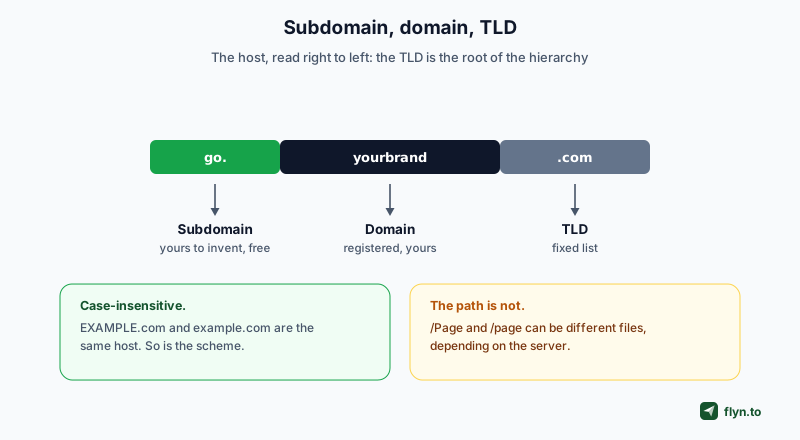
Between the // and the next / lives the host, and it reads most naturally right to left, because that is the actual hierarchy.
 Tap to enlarge
The TLD
The rightmost label, .com, .io, .dev, is the top-level domain, drawn from a fixed list. Some TLDs carry behaviour: everything under .dev and .app is preloaded as HTTPS-only in browsers, the same mechanism flyn.to uses via HSTS preload.
The domain
The label you register and pay for, yourbrand in yourbrand.com. Registering it gives you every possible subdomain and path underneath it for free, which is the economic fact the whole next section rests on.
The subdomain
Anything left of the registered domain: www, blog, go, app. Subdomains cost nothing and can point anywhere, which is exactly how branded short domains work: go.yourbrand.com is a subdomain you point at a link platform with one CNAME record. The www itself is just a convention, a subdomain like any other, and sites choose to serve with or without it.
Case, and characters beyond ASCII
The host is case-insensitive by standard: EXAMPLE.com and example.com are the same machine. Non-Latin domain names exist through Punycode, an encoding that turns international characters into an xn-- prefixed ASCII form, and because visually similar characters can spoof familiar brands, security tooling treats look-alike hosts with suspicion. It is one of the signals a link safety checker weighs.
The Port: The Door You Never See
After the host, a colon and a number select which service on the machine gets the request: example.com:8080. You almost never see one because every scheme has a default, 80 for http and 443 for https, and browsers omit defaults when displaying and when connecting.
When you will meet one
Local development, mostly: localhost:3000, localhost:8443. Occasionally an internal tool or a legacy system on a nonstandard port. If a public marketing URL carries a visible port, something is misconfigured, and it will look broken to users even when it works.
One practical implication
A URL with an explicit non-default port is a different origin from the same URL without it, which matters for cookies and security boundaries. It also tends to trip corporate firewalls, one more reason public links should never need one.
The Path: Where Slugs Live
From the first / after the host up to any ? or #, the path names the resource: /guides/url. It looks like a folder structure and served static sites really did map it to folders; modern applications treat it as a routing pattern, which is why /blog/anatomy-of-a-url works without any folder existing anywhere.
Paths can be case-sensitive
This is the asymmetry that catches people: the host is case-insensitive, the path is whatever the server says it is. On most Linux-served sites /Page and /page are different resources, and one of them is a 404. Lowercase everything and the problem never exists.
The slug
The final human-readable segment, anatomy-of-a-url here, is the slug. Good slugs are short, lowercase, hyphen-separated, and free of dates that make content look stale in two years. Our slug generator applies those rules to any title, and on a short link the slug is the entire path: flyn.to/spring-sale is host plus slug and nothing else, which is the whole trick of a short link.
Trailing slashes
/guides and /guides/ can be treated as the same page or as two pages, and if a site serves both without redirecting one to the other, search engines see duplicates. A canonical URL checker shows which version a page declares as the real one, and a redirect checker shows whether the other is properly forwarded.
The Query String: Where Tracking Lives
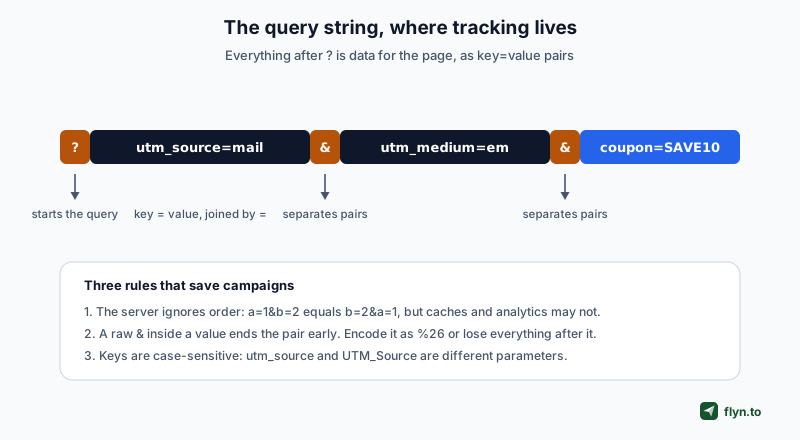
Everything between ? and the end of the URL, or the # if there is one, is the query string: data for the page, written as key=value pairs joined by &.
 Tap to enlarge
What actually rides in there
Search terms, filters, pagination, session state, and above all marketing attribution. The five utm_ parameters your analytics reads are ordinary query parameters with agreed names, nothing more. Our UTM guide covers the naming discipline; the UTM builder assembles them without typos, and the UTM parser decomposes a URL you have been handed.
The three rules from the figure, expanded
Order is not meaningful to the server, a=1&b=2 and b=2&a=1 ask for the same thing, but caches, analytics grouping and reporting can treat them as different URLs, so keep a consistent order when you generate links programmatically.
A raw ampersand inside a value truncates the rest. If a destination URL or a product name containing & goes into a parameter unencoded, everything after it becomes a new, meaningless key. This is the single most common way redirects drop campaign parameters.
Keys are case-sensitive. utm_source and UTM_Source land in different columns of your analytics, permanently splitting one campaign into two rows.
Query strings and short links
A shortener has two relationships with query strings: parameters baked into the destination survive the redirect, while parameters a visitor appends to the short link itself may or may not be forwarded, and most platforms, Flyn included, drop appended parameters on redirect. Bake attribution into the destination at creation time and the question never arises.
The Fragment: The Part the Server Never Sees
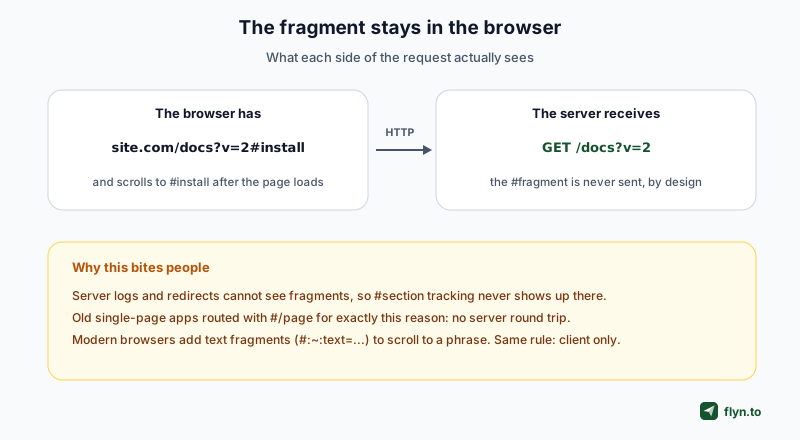
Everything after # is the fragment, and it has the strangest property in the whole address: the browser never sends it. It is not stripped by servers or lost in transit; it is excluded from the HTTP request by design.
 Tap to enlarge
What it is for
Classically, jumping to an anchor: #pricing scrolls to the element with that id, which is how every table of contents on this blog works, including the one on our comparison posts. Modern browsers extend it with text fragments, #:~:text=some%20phrase, which scroll to and highlight a phrase even where no anchor exists.
What follows from "never sent"
Server logs cannot record fragments, so a link tagged only with #campaign is invisible to any server-side analytics. Redirects cannot read them either; browsers reattach the fragment to wherever the redirect lands, which usually works and occasionally surprises. And early single-page applications routed with #/inbox style paths precisely because changing a fragment never triggers a server round trip.
If you need attribution, it belongs in the query string, not the fragment. A #source=newsletter tag reaches no server, no log and no analytics tool that measures at the redirect, ours included. This is the most consequential fact in this article for anyone measuring clicks.
Percent-Encoding: The Escape Hatch
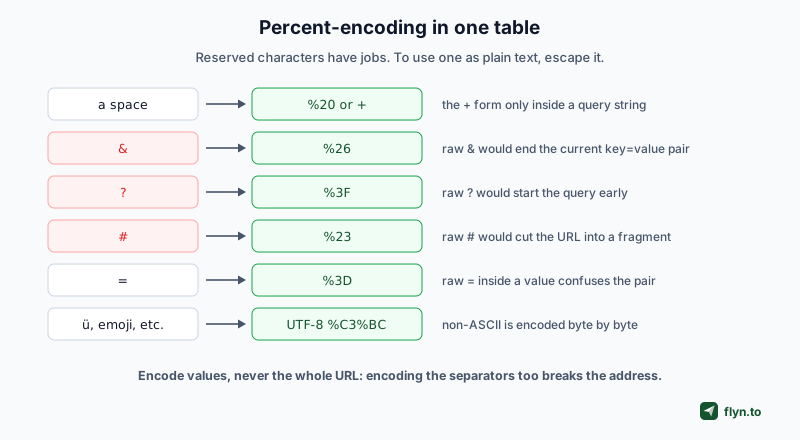
Every character in a URL is either doing a job or is plain data, and the characters with jobs, ?, &, =, #, / and their colleagues, cannot appear as plain data without being escaped. The escape mechanism is percent-encoding: the byte's hex value after a %.
 Tap to enlarge
The rules that matter
A space is %20 anywhere, and historically + inside query strings only, a convention from HTML forms that still trips parsers when used elsewhere. Non-ASCII text, accented characters, other scripts, emoji, is encoded as its UTF-8 bytes, so ü becomes %C3%BC, which is why international URLs look alarming in their raw form while displaying beautifully in the address bar.
Encode values, not URLs
The classic mistake is encoding an entire URL, turning the separators into data and producing an address that no longer parses. The correct discipline is to encode each value before assembling, which is what encodeURIComponent does in JavaScript and what any competent link builder, ours included, does for you. Our URL encoder and decoder handles both directions when you are debugging by hand.
Double-encoding, the sequel
Encoding an already-encoded value turns %20 into %2520, and the page receives a literal %20 as text. If you see %25 in a URL, something in the chain encoded twice. Decode with the same tool to see what the value has actually become.
The Reference Table, and Where a Short Link Fits
The whole article in one table, using the worked example from the top.
| Part | Example | Job | Case-sensitive? | Sent to server? |
|---|---|---|---|---|
| Scheme | https:// | How to connect | No | Implied by the connection |
| Subdomain | www. | Names a service under the domain | No | Yes, as part of the host |
| Domain | example.com | Which registered name | No | Yes, as part of the host |
| Port | :443 | Which service door | n/a | Implied; hidden when default |
| Path | /guides/url | Which resource | Can be | Yes |
| Query | ?ref=nav&y=2 | Data for the resource | Keys, yes | Yes |
| Fragment | #pricing | Position within the page | Yes, to the browser | Never |
Now read a short link with the same eyes
A short link is the same anatomy with almost everything removed: a scheme, a host, and a slug for a path. flyn.to/spring-sale carries no query string and no fragment; the full destination, UTMs and all, is stored server-side and restored by the redirect. That is why a short link survives being read aloud, printed, or typed from a billboard, and why shortening is really a trade: you exchange a self-describing address for a compact alias plus a database entry, with click tracking riding along for free.
And read a suspicious link the same way
Most link deception is anatomy abuse: a familiar brand as a subdomain of an unfamiliar domain (paypal.com.evil.example), userinfo tricks that put a brand before an @, or look-alike Punycode hosts. Reading right to left from the TLD tells you who you are really visiting. When in doubt, a URL expander shows where a link lands without clicking it.
The fastest URL-literacy exercise there is: take any long link from your inbox, paste it into the UTM parser, and identify all seven parts by hand. Two minutes, once, and you will never misread an address again.
Frequently Asked Questions
What are the parts of a URL called?
What is the difference between a URL and a URI?
Is a URL case-sensitive?
What is a query string in a URL?
Why is the fragment not sent to the server?
What is percent-encoding and why does %20 appear in URLs?
What is the maximum length of a URL?
How do short links relate to URL structure?
Free tools for this
Three Flyn tools that pair well with the strategy in this article, all free, no signup needed.
UTM Builder
Build campaign-tracked URLs in seconds.
Broken Link Checker
Scan any page for dead links and 404s.
Open Graph Checker
Preview how URLs unfurl on social.
Keep reading
Three related deep-dives from the Flyn blog.
Postback URL Tracking: How S2S Conversion Tracking Works
17 min read

301 vs 302 Redirect: When to Use Each
14 min read

Bulk Shorten URLs From a Spreadsheet: CSV vs Formulas
17 min read
Ready to try Flyn?
Free plan includes 25 links/month, full analytics, and access to all 30+ free tools above. No credit card required.
Already a member? Log in
Karan Bhakuni is the founder of Flyn. He writes about branded links, click analytics, and the link-management tooling growth teams and creators actually need, drawn from building Flyn and reading a lot of user feedback.
Find these guides useful? Add Flyn as a preferred source so more of them show up in your Google results.