Free URL Encoder / Decoder
Encode or decode URLs with percent encoding in real time. Supports encodeURIComponent, encodeURI, and Base64, runs entirely in your browser.
Quick reference
Need to shorten those long URLs?
Turn encoded URLs into clean, branded short links with Flyn. Get click analytics, QR codes, and A/B testing built in.
How to Encode or Decode a URL in 3 Steps
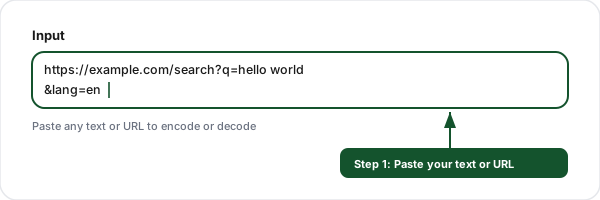
Paste your text or URL
Enter the text you want to encode, or paste an encoded URL you want to decode into the input field.
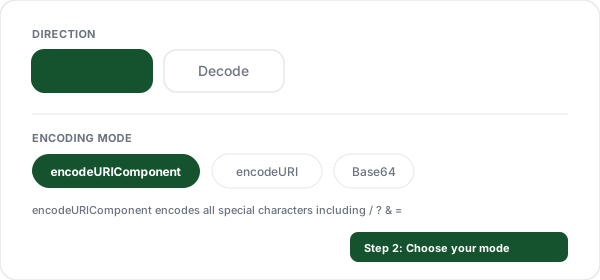
Choose your mode
Select Encode or Decode, then pick encodeURIComponent, encodeURI, or Base64 mode depending on your needs.
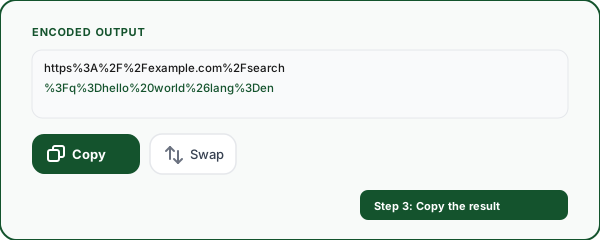
Copy the result
The output updates instantly. Click copy to use it in your code, API calls, or URLs.
Why Use This URL Encoder/Decoder?
A fast, private, developer-friendly tool for encoding and decoding URLs.
Real-time conversion
Results appear as you type, no submit button needed. Instant encoding and decoding with zero delay.
encodeURI vs encodeURIComponent
See both encoding outputs side by side. Understand which one to use for full URLs vs. query parameter values.
100% client-side
All encoding and decoding happens in your browser. Your data never leaves your device, fully private.
Base64 support
Toggle between URL percent encoding and Base64 encoding/decoding. Handles Unicode and multi-byte characters.
Character reference
Quick reference table showing common characters and their percent-encoded equivalents for fast lookup.
Error handling
Graceful handling of malformed encoded strings. Clear error messages when decoding invalid percent sequences or Base64.
What Is URL Encoding and Why Does It Matter?
URLs can only contain a limited set of characters from the ASCII character set. Characters like spaces, ampersands (&), question marks (?), and non-ASCII characters (accented letters, emoji, CJK characters) must be converted to a safe format before being placed in a URL. This process is called percent encoding or URL encoding. For where these characters sit in the bigger picture, our guide to the anatomy of a URL walks through every part of the address.
Percent encoding works by replacing each unsafe character with a percent sign (%) followed by two hexadecimal digits representing the character's byte value in UTF-8. For example, a space becomes %20, an ampersand becomes %26, and the emoji becomes %F0%9F%98%80.
Getting URL encoding wrong can break links, corrupt query parameters, cause API errors, or create security vulnerabilities. This tool helps you encode and decode URLs correctly, showing you both encodeURIComponent and encodeURI outputs so you always use the right one.
Common URL Encoding Reference
Character
Encoded
Description
(space)
%20
Space
!
%21
Exclamation mark
#
%23
Hash / Fragment
$
%24
Dollar sign
&
%26
Ampersand (query separator)
+
%2B
Plus sign
,
%2C
Comma
/
%2F
Forward slash (path separator)
:
%3A
Colon (scheme separator)
=
%3D
Equals (key=value separator)
?
%3F
Question mark (query start)
@
%40
At sign
encodeURI vs encodeURIComponent, Which One to Use?
encodeURIComponent
Use this when encoding a value that will be placed into a URL, like a query parameter value, a path segment, or a fragment. It encodes everything except A-Z a-z 0-9 - _ . ! ~ * ' ( ).
const url = `https://example.com/search?q=${encodeURIComponent(userInput)}`;encodeURI
Use this when encoding a full URL that may contain non-ASCII characters but already has valid URL structure. It preserves : / ? # [ ] @ ! $ & ' ( ) * + , ; = so the URL structure stays intact.
const safeUrl = encodeURI('https://example.com/path/to/file with spaces.html');Frequently Asked Questions
What is URL encoding (percent encoding)?
When should I URL-encode a string?
What is the difference between encodeURI and encodeURIComponent?
Which characters are not encoded by encodeURIComponent?
What is the difference between Base64 encoding and URL encoding?
Why do spaces sometimes appear as %20 and sometimes as +?
How do I encode non-ASCII characters like emoji or accented letters?
Is URL encoding the same as HTML encoding?
Can I decode a URL that has been encoded multiple times?
Is this URL encoder/decoder free? Do I need to sign up?
More Free Tools
Explore other free tools from Flyn to optimize your links and website. Converting international domain names? Try the Punycode converter.
UTM Builder
Build campaign tracking URLs with UTM parameters for analytics.
Text Fragment Link Generator
Build a scroll-to-text link (#:~:text=), with the highlighted text auto-encoded for you.
Mailto Link Generator
Build click-to-email links with pre-filled subject, body, CC, and BCC.
UTM Parser
Extract and decode UTM parameters from any URL with naming validation and GA4 support.
Ready to shorten and track your links?
Combine URL tools with Flyn's link shortener for branded short links, real-time click analytics, QR codes, and A/B testing, all in one platform.