Free Tool
4.9/5

Text Fragment Link Generator

Create a link that scrolls straight to specific text on any web page and highlights it, using URL text fragments (#:~:text=). No edits to the page, no sign-up.

Text fragment links get long. Shorten and track them.

A #:~:text= URL is bulky to share. Wrap it in a Flyn short link for a clean, branded URL with click analytics and QR codes.

Try Flyn free

How to Make a Scroll-to-Text Link in 3 Steps
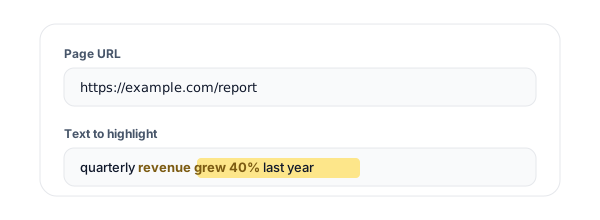
Step 1: Paste the URL and the text (Text Fragment Link Generator)
1

Paste the URL and the text

Enter the page URL and paste the exact words you want to highlight. Everything runs locally in your browser.
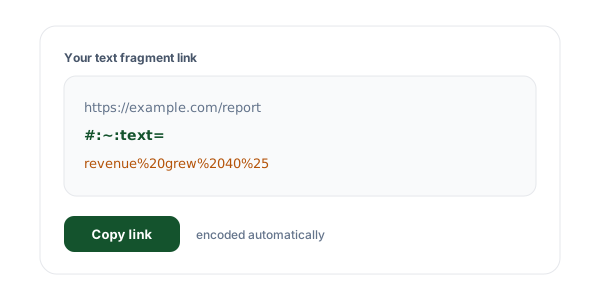
Step 2: Get your text fragment link (Text Fragment Link Generator)
2

Get your text fragment link

The tool adds #:~:text= with your text encoded, producing a ready-to-share scroll-to-text URL.
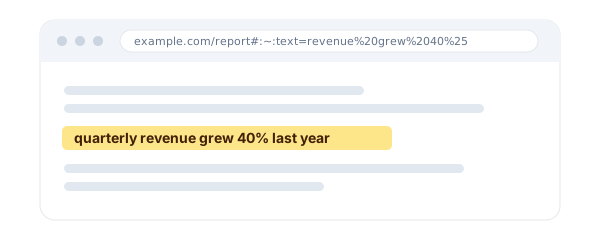
Step 3: Copy or test it (Text Fragment Link Generator)
3

Copy or test it

Copy the link, or open it in a new tab and watch the browser jump straight to your highlighted text.

What Is a Text Fragment Link?

A text fragment link is a normal web address with a small directive on the end, #:~:text= followed by the words you want to point at. When someone opens the link, the browser searches the page for that text, scrolls it into view, and highlights it. It is the modern way to deep-link to specific text on a page without needing the page to have an anchor or ID at that spot.

You have almost certainly seen these already: when Google sends you to the exact sentence that answers your search, it is using a text fragment. This generator lets you build the same kind of scroll-to-text URL for any page, so you can share a link that lands the reader on the precise passage instead of the top of a long article.

Anatomy of the link

https://example.com/article#:~:text=the%20exact%20words%20to%20highlight

The part before #:~:text= is the ordinary URL. Everything after it is your highlighted text, percent-encoded so it survives inside a link.

Why Use Our Text Fragment Generator?

Scrolls and highlights

The reader lands right on your passage, with the words highlighted, not at the top of the page.

No page edits needed

Works on any page, even ones you do not own. No anchors, no IDs, nothing to change on the site.

Encoding handled for you

Hyphens, commas, spaces, and punctuation are percent-encoded automatically so the link never breaks.

Ranges and disambiguation

Highlight a whole paragraph with a start and end, or use prefix and suffix to target repeated text.

100% client-side

The link is built in your browser. Your URL and text are never sent to a server.

One-click test

Open the generated link in a new tab and see the highlight work before you share it.

Text Fragment vs a Regular Anchor Link

What you want

Anchor link (#id)

Text fragment (#:~:text=)

Jump to a marked section

Yes, if the author added the id

Yes

Jump to any arbitrary text

No

Yes

Edit the target page

Required to add anchors

Not needed

Highlight the destination

No

Yes

Works on pages you do not own

Only where anchors exist

Yes

Need a plain clickable link instead? Use the Hyperlink Generator. Pulling links out of a block of text? Try the URL Extractor. Encoding a URL by hand? The URL Encoder/Decoder has you covered.

Frequently Asked Questions

What is a text fragment link?
A text fragment link is a normal URL with a special piece on the end, #:~:text=, that tells the browser to scroll to and highlight a specific passage of text when the page opens. Instead of landing at the top of a long article, the reader is taken straight to the exact words you pointed at, with those words highlighted. It is the same feature Google uses when it links you to the exact answer on a page from search results.
How does the #:~:text= part of the URL work?
Everything after #:~:text= is the text you want the browser to find. The browser searches the rendered page for that text, scrolls it into view, and highlights it. This tool percent-encodes the text for you (spaces, commas, hyphens, and other characters that would otherwise break the URL), so you can paste plain text and get a link that works. You never touch the page itself, the instruction lives entirely in the link.
Which browsers support text fragment links?
Text fragments work in Chrome and Edge (version 80 and up), and in Safari 16.1 and later on iOS and macOS. Firefox does not scroll to or highlight text fragments by default yet. In any browser that does not support them, the link still opens the page normally, it just lands at the top instead of jumping to the highlight, so the link never breaks, it only degrades gracefully.
My highlight is not showing up. Why?
The most common reasons are: the text does not match the page exactly (a typo, a different quote character, or extra whitespace), the browser does not support text fragments (for example Firefox), the passage is inside content that loads after the page (some single-page apps), or the site sends a Document-Policy: force-load-at-top header that disables the feature. Copy the text directly from the page rather than retyping it, and if the same words appear more than once, add a prefix or suffix in the advanced options.
Can I highlight a long passage without pasting the whole thing?
Yes. Open the advanced options and fill in both "text to highlight" (the first few words) and "end of range" (the last few words). The browser highlights everything from the start text to the end text, so you can select a whole paragraph by giving only its beginning and end. This keeps the URL short and is more robust than pasting a very long block of text.
The same words appear several times on the page. How do I target one?
Use the prefix and suffix fields in the advanced options. A prefix is the word or two immediately before your highlight, and a suffix is the word or two immediately after. The browser only highlights the instance of your text that sits between that exact prefix and suffix, so you can pinpoint the right occurrence even when the phrase repeats throughout the page.
Do I need to encode special characters myself?
No, the tool does it for you. Text fragments use hyphens and commas as delimiters in their grammar, so any real hyphens or commas in your text have to be percent-encoded or the browser misreads them. This generator encodes hyphens, commas, ampersands, spaces, and other reserved characters automatically, so you can paste text with punctuation and still get a link that highlights correctly.
Is a text fragment the same as an anchor or #id link?
No. A traditional anchor link (#section-name) only works if the page author added an element with that id, so you can only jump to spots someone deliberately marked. A text fragment works on any text on any page, whether or not the author added anchors, because the browser searches the visible text. You get to deep-link into content you do not control and cannot edit.
Will text fragment links help my SEO?
Not as a direct ranking factor, they do not change how a page ranks. Their value is user experience and engagement: readers land exactly on the relevant passage instead of hunting for it, which is why Google itself generates them for the "jump to" links in search results and featured snippets. Better on-page experience can indirectly support engagement metrics, but treat text fragments as a usability and sharing tool, not a ranking trick.
Is my text or URL sent to your servers?
No. The entire link is built in your browser with client-side JavaScript. Nothing you type, the URL or the highlighted text, is sent to or stored on our servers, so you can safely generate links for private, internal, or unreleased pages. The optional history feature keeps your recent links in your browser localStorage only, and you can clear it any time.
Can I use a URL that already has a #hash anchor?
Yes. If your URL already ends in an anchor like #section, the tool keeps it and adds the text directive after it, producing #section:~:text=... so both the anchor and the highlight work together. If the URL already contains a text fragment, the tool replaces the old one with your new selection instead of stacking them.
What are text fragment links good for?
They shine anywhere you want to point someone at an exact passage: citing a specific line in documentation or a policy, sharing a quote from an article on social media, sending a teammate straight to the relevant clause in a long spec, or building "read this part" links in support replies and newsletters. Anytime "it is on that page somewhere" is not good enough, a text fragment link takes the reader straight to the words that matter.

Share the exact words, on a clean short link

Text fragment URLs are powerful but long. Flyn wraps them in a short, branded link with real-time click analytics, editable destinations, and QR codes.