Free Hyperlink Generator
Turn any URL and link text into a clean HTML anchor tag or Markdown link, or switch to Bulk and convert a whole list of URLs into HTML links at once. No coding, 100% in your browser.
Use descriptive text, "view our pricing" beats "click here" for accessibility and SEO.
rel attributes (for SEO / ad disclosure)
Want to track who clicks your links?
Shorten the destination with Flyn first, then drop it into your hyperlink, and see clicks, locations, and devices in real time.
How to Make a Hyperlink in 3 Steps
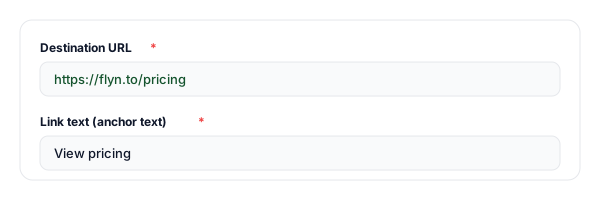
Enter the URL and link text
Paste your destination URL and type the anchor text people will click. The tool escapes special characters for you.
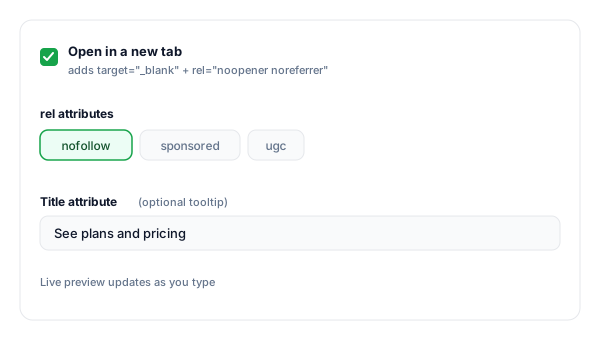
Choose your link options
Open in a new tab (we auto-add rel="noopener noreferrer"), toggle nofollow / sponsored / ugc for SEO, and add an optional title tooltip.
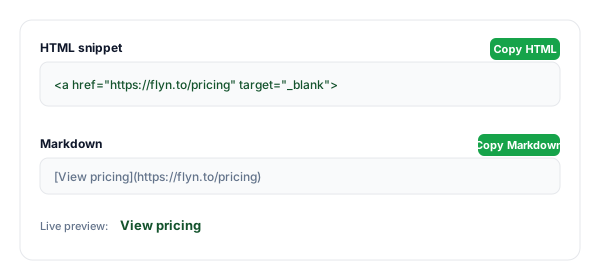
Copy the HTML or Markdown
Copy the finished anchor tag or the Markdown version and paste it into your website, email, README, or docs.
What Is a Hyperlink?
A hyperlink (or just "link") is clickable text or an image that sends you to another page, file, email, or spot on the same page. On the web, links are built with the HTML anchor element, the <a> tag.
The visible, clickable words are the anchor text, and the destination lives in the href attribute. Everything else, opening in a new tab, SEO hints, tooltips, is an optional attribute layered on top.
A complete hyperlink:
<a href="https://flyn.to/pricing" target="_blank" rel="noopener">View pricing</a>HTML Link Attributes Explained
An anchor tag accepts a handful of attributes. Only href is required, the rest fine-tune behaviour, SEO, and security.
| Attribute | Purpose | Example |
|---|---|---|
| href | The destination, a URL, path, mailto:, tel:, or #anchor. The one required attribute. | href="https://example.com" |
| target | Where the link opens. _blank opens a new tab; omit it to open in the same tab. | target="_blank" |
| rel | Relationship hints for SEO and security: nofollow, sponsored, ugc, noopener, noreferrer. | rel="noopener nofollow" |
| title | A tooltip shown on hover. Supplements, never replaces, descriptive link text. | title="See plans" |
When to use each rel value
rel="nofollow"Links you do not editorially vouch for, keeps you from passing ranking signals to untrusted pages.
rel="sponsored"Paid placements and affiliate links. Google requires disclosure of paid links.
rel="ugc"User-generated content, forum posts, comments, profile links.
rel="noopener"Security: stops a new-tab destination from controlling your original page. Auto-added with target="_blank".
HTML vs Markdown vs Rich Text
The same link looks different depending on where you paste it. This generator gives you the two formats that cover almost everything:
- •HTML, for websites, email templates, and any CMS that accepts raw markup:
<a href="…">text</a> - •Markdown, for GitHub READMEs, Notion, Reddit, and docs tools:
[text](url) - •Rich-text editors (Google Docs, Word, Gmail), you usually do not paste code at all: select your text, press
Ctrl/Cmd + K, and paste the URL. Use this tool to build the link you will share, then drop the URL into the editor.
Pro tip
Shorten long or ugly destination URLs with a Flyn short link before you wrap them in a hyperlink. You get a clean, branded URL and real click analytics, something a raw <a> tag can never give you.
Convert a List of URLs to HTML Links
Need more than one link? Switch the tool to Bulk list and paste one entry per line. Each line can be:
- •A bare URL, which becomes its own link text. Entries typed without a scheme, like
www.example.com/docs, get https:// added. - •Link text and URL separated by a vertical bar:
Pricing | https://example.com/pricing - •Two spreadsheet columns copied from Google Sheets or Excel, which paste as tab-separated text. The URL can be in either column. If both cells could be links, the one written out in full (starting with https://, mailto: or /) becomes the link and a bare name like Amazon.com becomes the text; if both are written the same way, the first cell is the link text.
Then pick an HTML list (a <ul> with one <li> per link), plain <a> tags one per line, or a Markdown list, and copy or download the result. In the HTML formats the new-tab and rel options apply to every link, and the link text and URLs are escaped, so an ampersand or a quote in your data cannot break the markup. Lines that are not links, such as plain words or javascript: URLs, are listed separately with the reason instead of being dropped silently.
You paste
Pricing | https://example.com/pricing
https://example.com/docs
You get (HTML list)
<ul>
  <li><a href="https://example.com/pricing">Pricing</a></li>
  <li><a href="https://example.com/docs">https://example.com/docs</a></li>
</ul>
Hyperlink Best Practices
Do
Don't
Write descriptive anchor text ("view pricing")
Use "click here" or a bare URL
Add rel="noopener" to every target="_blank"
Open new tabs without noopener
Use rel="sponsored" on paid / affiliate links
Leave paid links undisclosed
Use https:// destinations
Link to http:// pages that trigger warnings
Keep internal links relative (/pricing)
Hard-code your domain on internal links
Escape special characters in the URL
Paste raw & or spaces into href by hand
Why Use Flyn's Hyperlink Generator?
HTML + Markdown
Copy the anchor tag or the Markdown version, for one link or a whole list at once.
Safe by default
New-tab links auto-include rel="noopener noreferrer" so you never ship the tabnabbing footgun.
SEO rel controls
Toggle nofollow, sponsored, and ugc to disclose paid links and protect your link profile.
Accessible output
Encourages descriptive anchor text and a proper title attribute for screen-reader users.
Frequently Asked Questions
What is a hyperlink?
How do I make a hyperlink in HTML?
What is the HTML code for a link?
How do I convert a list of URLs into HTML links?
Can I turn a spreadsheet of link text and URLs into hyperlinks?
How do I make a link open in a new tab?
What does rel="nofollow" do, and when should I use it?
Do I need rel="noopener" with target="_blank"?
How do I create a hyperlink in Markdown?
What is the difference between an absolute and a relative link?
How do I make an email or phone number into a hyperlink?
Is "click here" bad anchor text?
Can I make a hyperlink without coding?
How do I add a tooltip to a link?
More Free Link Tools
Explore other free tools from Flyn to build, clean, and track your links.
Mailto Link Generator
Build click-to-email links with pre-filled subject, body, CC, and BCC.
URL Encoder / Decoder
Percent-encode or decode URLs so special characters never break your links.
UTM Builder
Add campaign tracking parameters to the URL before you hyperlink it.
Text Fragment Link Generator
Create a link that scrolls to and highlights exact text on any web page.
Make every link trackable
A hyperlink sends people somewhere, a Flyn link tells you who went, from where, and on what device. Shorten your destination first, then hyperlink it.