Free Mailto Link Generator
Build click-to-email links with pre-filled subject, body, CC, BCC, and line breaks. Copy the mailto URL or HTML anchor, 100% in your browser.
Track clicks on your mailto links
Wrap your mailto link in a Flyn short link to count each click, with location and device on Pro, without changing the destination.
How to Create a Mailto Link in 3 Steps
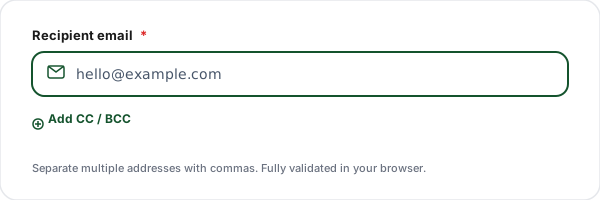
Enter the recipient
Type the recipient email address. Optionally expand to add CC and BCC recipients. Multiple addresses go comma-separated in each field.
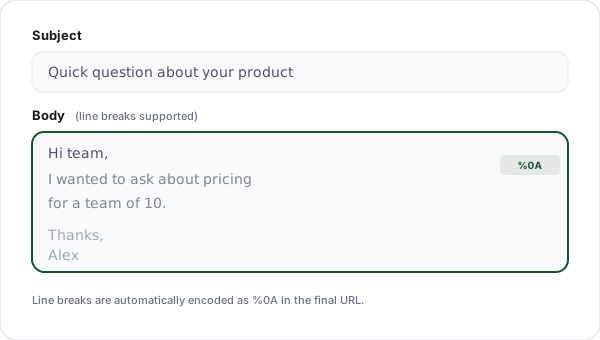
Add subject and body
Type an optional subject line and multi-line message body. Press Enter for line breaks, our tool automatically encodes them as %0A in the final URL.
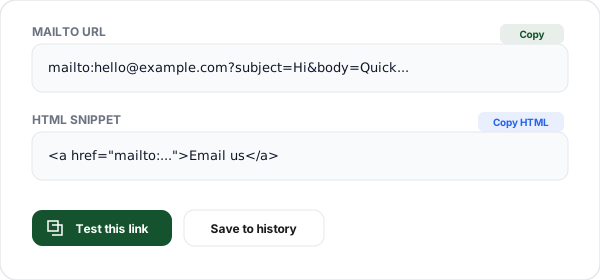
Copy the link or HTML
Copy the generated mailto: URL for plain-text use, the HTML <a> anchor for a webpage, or click Test to open the pre-filled email in your default mail client.
What is a Mailto Link?
A mailto link is a special hyperlink that, instead of opening a webpage, opens the user's default email application with a pre-composed message ready to send. The URL scheme was defined in RFC 6068 and is supported by every browser, email client, and operating system in common use today.
The simplest form is mailto:[email protected], clicking opens a new draft addressed to that person. The power comes from query parameters: ?subject=, ?body=, &cc=, &bcc=. These pre-fill every field of the email so the user only has to review and hit Send.
Mailto links are the fastest possible path from "user sees your button" to "user sends you a message." There's no form to fill out, no reCAPTCHA, no waiting for the page to load. On mobile, a single tap opens the default mail app with a draft ready. That's why they're the right choice for support buttons, escalation flows, and any high-intent contact point where reducing friction matters more than bot protection.
The tradeoff: raw mailto links expose your email address to spam bots that scrape webpages. For public-facing sites, pair mailto with a role-based inbox (support@, hello@, billing@) that's easier to filter, or use JavaScript to assemble the mailto link client-side only after a user interaction. For internal tools, dashboards, and authenticated areas, mailto links are a no-compromise win.
Mailto URL Parameters Reference
Every mailto link can include any combination of these parameters. The first parameter starts with ?; additional parameters are joined with &.
| Parameter | Required | Purpose | Example |
|---|---|---|---|
| to | Required | Recipient email address. Appears after mailto: in the URL. Must be a valid email format. | mailto:[email protected] |
| cc | Optional | Carbon copy recipients. Visible to everyone. Separate multiple addresses with commas. | [email protected],[email protected] |
| bcc | Optional | Blind carbon copy recipients. Hidden from other recipients. Separate multiple with commas. | &[email protected] |
| subject | Optional | Pre-filled subject line. Keep under 70 characters for best display in mobile inboxes. | &subject=Product%20question |
| body | Optional | Pre-filled message body. Use %0A for line breaks. Keep under 1000 characters for compatibility. | &body=Hi%20team%2C%0A%0A... |
Common Mailto Use Cases
Website "Contact us" buttons
Replace "Email us" text links with mailto links that pre-fill your support inbox and a generic subject like "Website inquiry".
Email signature CTAs
Add a mailto link to your email signature with a pre-filled subject that routes replies to the right team (e.g., "Sales inquiry" vs "Support").
Product documentation feedback
Every docs page can include a "Report an issue with this page" mailto link with the page URL pre-filled in the subject.
Event invitations
RSVP links that pre-fill your event inbox with the event name and ticket holder ID in the subject.
Customer escalation flows
Pre-fill escalation emails with the user ID and case number in the body so support can triage faster.
Abandoned checkout recovery
Send customers a mailto link to contact billing, with their order ID already in the subject.
Mailto Link vs Contact Form
Not sure which to use? Mailto links win on friction; contact forms win on spam defense. Most sites benefit from both, mailto for high-intent support, form for everything else.
| Aspect | Mailto Link | Contact Form |
|---|---|---|
| Opens | Default email app | Web form on your site |
| Requires configured client | Yes (usually OK on mobile) | No |
| Pre-fill subject/body | Yes (URL params) | Yes (form fields) |
| Works offline | Yes (writes locally, sends on reconnect) | No |
| Spam-bot exposure | High (scrapable from source) | Lower (protected by reCAPTCHA) |
| User friction | Lowest, one tap | Higher, must fill form |
Why Use Flyn's Mailto Generator?
100% Client-side
All encoding happens in your browser. Your email addresses never touch our servers.
Real-time preview
See the generated mailto URL and HTML snippet update as you type. Test in one click.
HTML + URL output
Copy the raw mailto URL for Markdown, or the full HTML <a> anchor for a webpage.
Unicode & line breaks
Line breaks, emoji, and accented characters encode correctly, no mojibake surprises.
Frequently Asked Questions
What is a mailto link?
A mailto link is a hyperlink that opens the user's default email client with a pre-filled message when clicked. The format is mailto:[email protected]. Tapping or clicking opens Apple Mail, Outlook, Gmail, or whatever email app the user has set as default. You can pre-fill the subject line, body, CC, and BCC fields using URL query parameters like ?subject=, ?body=, ?cc=, ?bcc=.
How do I add a subject line to a mailto link?
Append ?subject= followed by your URL-encoded subject text. For example: mailto:[email protected]?subject=Hello%20from%20the%20web. Spaces become %20 and special characters like & become %26. Our generator handles URL encoding automatically, type your subject naturally and copy the output. Keep subjects under 70 characters for readability in crowded inboxes.
How do I add CC and BCC to a mailto link?
Use &cc= and &bcc= parameters after the initial ? parameter. Separate multiple addresses with commas. Example: mailto:[email protected][email protected],[email protected]&[email protected]. CC reveals recipients to everyone; BCC hides them. All addresses must be URL-encoded, which our tool does automatically.
How do I pre-fill the email body?
Use &body= followed by your URL-encoded message. For example: mailto:[email protected]?body=Hi%20team%2C%0A%0AQuick%20question. Use %0A for line breaks (newlines). Long bodies work, but Outlook truncates mailto URLs around 2000 characters. For compatibility across all clients, keep the body under 1000 characters or use a contact form for longer content.
How do I include line breaks in the body?
Use %0A in the URL-encoded body for each line break. Example: body=Line%201%0ALine%202%0A%0AParagraph%20two. Our generator takes your multi-line body (with normal Enter/Return key presses) and automatically encodes line breaks as %0A. Two line breaks in a row create a blank line, which most email clients render as a paragraph separator.
Do mailto links work on all email clients?
Yes, mailto links are a web standard supported by every major email client: Apple Mail, Microsoft Outlook, Gmail (desktop + mobile), Thunderbird, Spark, Airmail, and built-in mobile apps on iOS and Android. On desktop, the user's default mail client opens. On mobile, the primary mail app opens. If no mail client is configured, the browser prompts the user to pick or install one.
Can I use HTML formatting in a mailto body?
No, the mailto body parameter is plain text only. HTML tags appear as literal text in the email. If you need rich formatting, link users to a webpage with a contact form, or use a transactional email service. The HTML anchor tag our tool generates, <a href="mailto:...">Link text</a>, is the wrapper for the link on your page, not formatting for the email body itself.
How long can a mailto link be?
There's no official spec limit, but practical limits exist. Outlook truncates mailto URLs around 2000 characters. Most browsers support up to ~8000 characters before weird behavior. Gmail's web interface handles longer links better than desktop Outlook. Rule of thumb: keep total mailto content under 1000 characters for universal compatibility, or under 500 for absolute safety.
What happens if the user doesn't have an email client configured?
The browser prompts the user to choose or configure a default email application. On mobile this is rare since email apps are pre-installed. On desktop, users without a configured mail client (common on corporate Windows) may see a "No program associated with this protocol" error. As a fallback, display the plain-text email address next to the mailto button so users without a mail client can copy it manually.
Do mailto links work in mobile apps and in-app browsers?
Mostly yes. On iOS and Android, tapping a mailto link in Safari, Chrome, or any app opens the default mail app. Inside Facebook, Instagram, or TikTok's in-app browser, mailto links usually still work but may prompt the user to open in the system browser first. LinkedIn and Twitter/X handle mailto links natively. If your audience is mobile-heavy, test on both iOS and Android before launching.
How do I handle special characters like &, =, ?, or emoji?
Special characters must be URL-encoded. & becomes %26, ? becomes %3F, = becomes %3D, space becomes %20. Non-ASCII characters including emoji and accented letters encode as their UTF-8 byte sequence percent-encoded (e.g., 👋 becomes %F0%9F%91%8B). Our generator uses encodeURIComponent internally so you can type any character naturally, we produce a correctly encoded mailto link.
Does using a mailto link expose my email address to spammers?
Somewhat, yes. Spam bots scrape pages for mailto: patterns to harvest addresses. Mitigations: obfuscate addresses client-side with JavaScript, use a contact form instead, or render the address as an image. If you must use a raw mailto link, use a role-based inbox (hello@, contact@) that's easier to filter. Our tool generates the link locally in your browser, we never send or store your email address.
Related Tools
SMS Link Generator
Build sms: click-to-text links with pre-filled message and country-code prefix.
Tel / Click-to-Call Link
Build tel: click-to-call links with international E.164 formatting.
WhatsApp Link Generator
Create wa.me click-to-chat links with pre-filled messages and QR codes.
UTM Builder
Build UTM-tagged campaign URLs for email marketing. Pair with mailto links for trackable email CTAs.
Ready to level up your links?
Use our free tools to generate contact links, then wrap them in Flyn short links to get click analytics, see how many times people actually open your mailto, SMS, or WhatsApp links.