Free WhatsApp Link Generator
Create click-to-chat wa.me links with pre-filled messages and QR codes. Share your WhatsApp number anywhere, no contact saving required.
Track every WhatsApp click
Shorten your WhatsApp link with Flyn to get branded short links with real-time click analytics, QR codes, and A/B testing.
How to Create a WhatsApp Link in 3 Steps
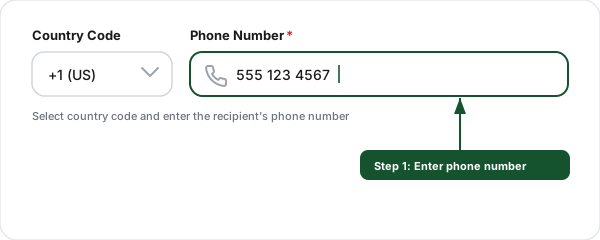
Enter the phone number
Select a country code from the dropdown and type the phone number, no dashes or spaces needed.
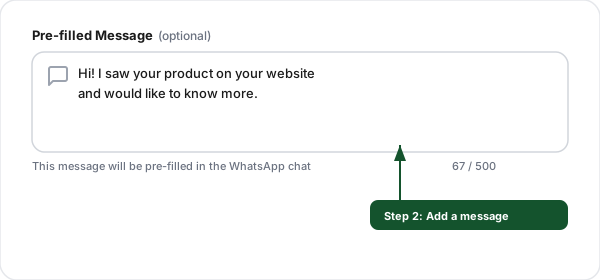
Add a pre-filled message
Write an optional message that auto-fills when the user opens the chat, perfect for support or orders.
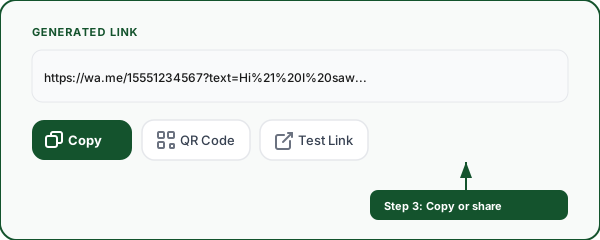
Copy or share
Copy the wa.me link, download the QR code, or test it live. Embed it on your website, email signatures, or ads.
Everything You Need for WhatsApp Links
Generate, customize, and share WhatsApp click-to-chat links in seconds.
100+ country codes
Search and select from a comprehensive list of international dialing codes with flag emojis.
Pre-filled messages
Add a default message that appears ready to send when the chat opens, great for lead capture.
QR code generation
Instantly generate a scannable QR code for your WhatsApp link, perfect for print materials.
Works everywhere
Links open WhatsApp on iOS, Android, desktop, and web. Falls back to download page if not installed.
Track with Flyn
Shorten your WhatsApp link with Flyn to get real-time click analytics, referrers, and locations.
No sign-up required
Generate unlimited WhatsApp links instantly. Save history locally, no account needed.
How WhatsApp Click-to-Chat Links Work
WhatsApp click-to-chat links use the wa.me domain to let anyone start a conversation with you instantly. The link format is simple: https://wa.me/[country code][phone number]. When someone clicks the link, WhatsApp opens with a chat window ready to send a message to your number, no need to save you as a contact first.
You can optionally include a pre-filled message using the ?text= parameter. This is particularly useful for businesses, you can create different links for different purposes (sales inquiries, support requests, order tracking) with context already built into the message, so your team knows exactly what the customer needs.
Example WhatsApp links:
https://wa.me/15551234567
https://wa.me/15551234567?text=Hi%2C%20I%27d%20like%20to%20place%20an%20order
https://api.whatsapp.com/send?phone=15551234567&text=Hello
Where to Use WhatsApp Links
Website contact buttons
Replace generic contact forms with a WhatsApp button. Customers get instant responses instead of waiting for email replies. Add the link to your header, footer, product pages, and checkout flow.
Social media bios
Add your WhatsApp link to Instagram, TikTok, Twitter, and Facebook bios. Followers can message you directly with one tap, no searching for your number.
Email signatures
Include a "Chat on WhatsApp" link in your email signature. Recipients can switch from slow email threads to real-time WhatsApp conversations.
Print materials and packaging
Generate a QR code for your WhatsApp link and add it to business cards, flyers, product packaging, restaurant menus, and event banners.
Google and Meta ads
Use WhatsApp links as your ad destination. Click-to-WhatsApp ads on Facebook and Instagram have some of the highest conversion rates in digital marketing.
Customer support
Create support-specific links with pre-filled messages like "I need help with order #". Route different inquiries to different team members using separate numbers.
Frequently Asked Questions
What is a WhatsApp link and how does it work?
What is the correct wa.me link format?
How do I format international phone numbers for WhatsApp links?
Can I add a pre-filled message to my WhatsApp link?
What is the difference between wa.me and api.whatsapp.com links?
Can I use WhatsApp links for my business?
Do WhatsApp links work on desktop and mobile?
How do I create a WhatsApp QR code?
Can I track clicks on my WhatsApp link?
Is this WhatsApp link generator free?
More Free Tools
Explore other free tools from Flyn to optimize your links and marketing.
Messenger Link Generator
m.me click-to-chat links to your Facebook Page with ref attribution and pre-filled message.
Viber Link Generator
viber://chat click-to-chat links, best where Viber dominates (Eastern Europe, the Philippines).
Signal Link Generator
signal.me private end-to-end encrypted chat, the privacy-first alternative.
FaceTime Link Generator
facetime: video and audio call links for Apple users, iPhone, iPad, Mac.
SMS Link Generator
Build sms: click-to-text links with pre-filled message and international phone numbers.
Tel / Click-to-Call Link
Build tel: click-to-call links with E.164 phone formatting, extensions, and DTMF sequences.
Mailto Link Generator
Build click-to-email links with pre-filled subject, body, CC, and BCC.
LINE Share Link Generator
line.me/R/share, Official Account chat, and add friend links, with UTF-8 text and the LINE ID @ encoded for you.
Ready to track your WhatsApp link clicks?
Shorten your WhatsApp links with Flyn for branded short URLs, real-time click analytics, QR codes, and A/B testing, all in one platform.