Free SMS Link Generator
Build click-to-text links with pre-filled message and international phone numbers. E.164 auto-formatting and SMS segment counter, 100% in your browser.
See how many times people actually tap your SMS link.
Wrap your sms: link in a Flyn short link and count every open by country, device, and campaign: the pre-filled message stays intact. Short links, deep analytics.
How to Create an SMS Link in 3 Steps
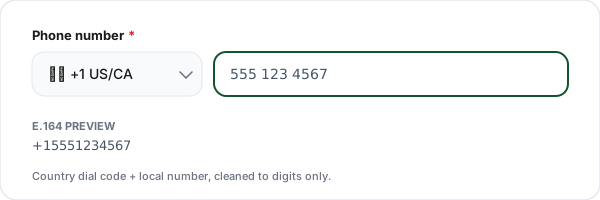
Select country + enter phone
Pick the country from the dropdown (sets the dial code and flag) and type the local phone number. Our tool auto-formats to E.164 international standard with a leading +.
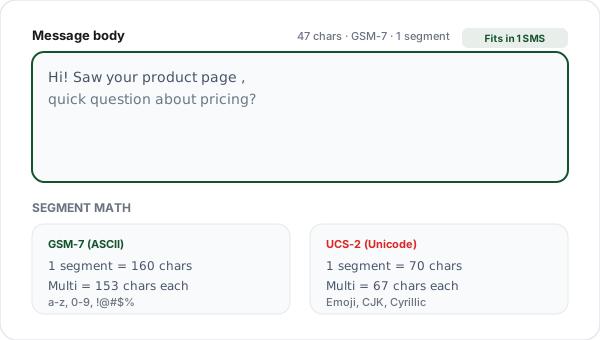
Add a pre-filled message
Type an optional message. Our segment counter shows whether your message fits in one SMS (160 GSM-7 chars or 70 Unicode chars) or splits into multiple billable segments.
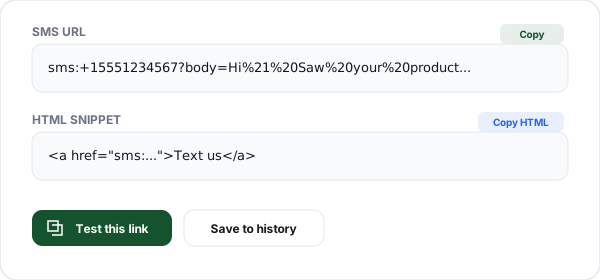
Copy the link or HTML
Copy the generated sms: URL for use in any context, the HTML anchor tag for a webpage, or click Test to open the pre-filled message in your phone's default SMS app.
What is an SMS Link?
An SMS link is a hyperlink that, instead of opening a webpage, opens the user's default messaging app with a pre-composed text message ready to send. The URI scheme was defined in RFC 5724 and is supported by every modern mobile browser and messaging app on iOS, Android, and Windows.
The format is sms:+15551234567 for just a recipient, or sms:+15551234567?body=Hello with a pre-filled message. Clicking on mobile opens iMessage (iOS), Messages (Android), or whatever SMS app the user has set as default. The user still reviews and taps Send, browsers can't send SMS automatically, which is a security feature preventing malicious sites from texting on your behalf.
SMS links are the fastest path from "visitor sees your CTA" to "visitor sends a text." No form to fill, no waiting for a contact form to load, no captcha. For support, appointment reminders, RSVP confirmations, and delivery notifications, a single-tap SMS CTA can dramatically increase response rates compared to "call us" or "email us" links.
The main limitation is character budget. SMS is split into 160-character GSM-7 segments for ASCII text or 70-character UCS-2 segments for Unicode (emoji, CJK, accented letters). Longer messages split into multiple segments, each billed separately by the carrier. Pre-filled message bodies should stay under one segment to avoid surprise billing for the sender. Our segment counter shows this in real time.
SMS Character Limits by Encoding
SMS uses either GSM-7 (standard ASCII + a few accents) or UCS-2 Unicode (everything else). A single emoji anywhere in your message switches the entire message to UCS-2 and cuts your per-segment budget by more than half.
| Encoding | 1 segment | Content types | Multi-segment |
|---|---|---|---|
| GSM-7 | 160 chars | Plain ASCII + a few accents (à, é, ñ) | 153 chars per segment |
| UCS-2 (Unicode) | 70 chars | Emoji, CJK, Cyrillic, Arabic, Thai, special characters | 67 chars per segment |
Common SMS Link Use Cases
Support "Text us" buttons
Replace phone links for users who prefer text over calls. Pre-fill the body with "Support request:" to route faster in your help desk.
Event RSVP confirmations
After purchase, email a "Confirm RSVP" SMS link that pre-fills the event + ticket ID. Attendees confirm with one tap, no login.
Appointment reminders
Reschedule SMS links let users send a canned "need to reschedule" text to your booking team with their appointment ID pre-filled.
Delivery notifications
Include a "Report a delivery issue" SMS link in shipping emails with the tracking number already in the message body.
Customer onboarding
After checkout, SMS links to your success team with the new account email pre-filled speed up the first-week touchpoint.
Emergency escalation
Dashboard "Page on-call" buttons that open SMS with the incident ID in the body. Useful for internal tools where email is too slow.
Why Use Flyn's SMS Link Generator?
100% Client-side
Your phone numbers and messages never leave your browser. Safe for private numbers and internal beta flows.
100+ country codes
Pre-loaded list of country dial codes. Auto-formats your local number to E.164 international standard.
Segment counter
Real-time count showing 1 SMS vs split segments, accounting for GSM-7 vs UCS-2 Unicode encoding.
HTML + URL output
Copy the raw sms: URL for Markdown or apps, or the full HTML <a> anchor for your webpage.
Frequently Asked Questions
What is an SMS link?
An SMS link is a URI that opens the default messaging app with a pre-composed text message when tapped. The format is sms:+15551234567?body=Hello, the sms: scheme, recipient phone in E.164 international format, and an optional body parameter for the message. Tapping opens iMessage (iOS) or Messages (Android) with the draft ready to send. The scheme is defined in RFC 5724 and supported on every modern mobile browser.
How do I make an SMS link?
Type sms: followed by the phone number in E.164 format (with a leading +), then optionally ?body= and your URL-encoded message. Example: sms:+15551234567?body=Hi%20there%21. Spaces become %20 and special characters are percent-encoded. Our generator handles all encoding automatically, type your message naturally and copy the output.
How do I include a pre-filled message?
Append ?body= followed by your URL-encoded message text. Example: sms:+15551234567?body=Hi%2C%20I%27m%20interested%20in%20your%20product. Line breaks work as %0A, but SMS doesn't render them as cleanly as email, prefer short single-line messages. Our tool encodes line breaks and special characters correctly.
What's the format for international phone numbers in SMS links?
Use E.164 format: a leading + followed by the country code, then the full local number without any formatting (no spaces, dashes, or parentheses). Example: US (555) 123-4567 becomes +15551234567; UK 07911 123456 becomes +447911123456 (drop the leading 0, add country code 44). Our generator auto-builds this from your country selection and local number input.
Can SMS links include emoji and Unicode?
Yes, but with a billing catch. SMS messages with any non-GSM-7 character (emoji, accented letters, non-Latin scripts like Cyrillic or CJK) switch to UCS-2 Unicode encoding, which cuts the per-SMS character limit from 160 to 70. Longer messages split into multiple segments, each counting as a separate SMS for carrier billing. Our segment counter shows the exact cost.
Do SMS links work on all phones?
Yes on any smartphone with a messaging app. iOS (Safari, Chrome, in-app browsers): taps open Messages. Android (Chrome, Firefox, any app): opens the default SMS app. iOS also auto-routes Apple-to-Apple conversations through iMessage. The sms: scheme is universally supported on mobile browsers, no jailbreak, rooting, or special configuration needed.
Is there a character limit for SMS bodies?
Yes. One SMS segment = 160 characters in GSM-7 (standard ASCII + a few extras) or 70 characters in UCS-2 (Unicode/emoji). Longer messages are split into multiple segments that the recipient's phone reassembles. Multi-segment messages drop to 153 (GSM-7) or 67 (UCS-2) chars per segment due to the header. Our tool shows segment count in real time so you know the billing impact.
Do SMS links send automatically or just open the app?
They only open the messaging app with a draft, they never send automatically. Browsers and iOS/Android intentionally block automatic sending because otherwise any webpage could send SMS on your behalf. The user must review and tap Send. This is a security feature, not a limitation. Always write messages that make sense even if the user edits them before sending.
What's the difference between sms: and smsto: URI schemes?
Both open the Messages app with a pre-filled number. sms: is the standard per RFC 5724 and works on iOS, Android, and all modern devices. smsto: is a legacy Android variant from Nokia phones that still works on some older Android versions. Our generator uses sms: which has the widest compatibility across every modern device, avoid smsto: unless you specifically target legacy Nokia/Symbian devices.
Can I send to multiple recipients with one SMS link?
Compatibility is spotty. Some clients support comma-separated recipients (sms:+15551234567,+15559876543) but iOS often ignores extra recipients, and Android behavior varies by default SMS app. For reliable multi-recipient flows, use a form on your website that triggers your SMS API (Twilio, MessageBird, Plivo, Bandwidth), the sms: scheme is not designed for bulk messaging.
Do SMS links work on desktop browsers?
Partially. On macOS with an iPhone paired via Continuity, tapping an SMS link in Safari opens Messages. On Windows 11 with Phone Link to an Android, SMS links can open the Phone Link app. Otherwise, desktop users see nothing or an "unable to open" dialog. Always pair SMS links with a visible phone number fallback so desktop visitors can copy the number manually.
Is my phone number stored when I use this tool?
No. All SMS link building happens 100% in your browser using client-side JavaScript. Your phone number and message text never leave your device and are not logged or stored on our servers. The optional history feature uses localStorage (browser-local only). The tool is safe to use with private numbers, internal beta flows, and anything you would not want to send to a third-party.
Related Tools
Running a text campaign? Read our guide to short links in SMS marketing, then check what the link inside a text must look like in each country in Short Links in SMS: What the Law Requires by Country.
WhatsApp Link Generator
Create wa.me click-to-chat links with pre-filled messages and QR codes.
Messenger Link Generator
m.me click-to-chat links to your Facebook Page with ref attribution.
Signal Link Generator
signal.me private end-to-end encrypted chat link, for privacy-conscious clients.
Tel / Click-to-Call Link
Build tel: click-to-call links with international E.164 formatting.
Mailto Link Generator
Build click-to-email links with pre-filled subject, body, CC, and BCC.
Deep Link Tester
Validate iOS Universal Links and Android App Links configuration for any domain.
Ready to level up your links?
Use our free tools to generate contact links, then wrap them in Flyn short links to get click analytics, see how many times people actually tap your SMS, email, or call links.