Free Messenger Link Generator
Turn any Facebook Page into a one-click chat link, m.me with ref attribution and an optional pre-filled message. No coding, 100% in your browser.
Your Facebook Page @username (without the @), or your numeric Page ID. Find it on your Facebook Page under Settings → Page Info.
Adds ?ref= so your Messenger webhook / Page inbox can see which placement initiated the chat.
Want to see which channel actually starts conversations?
Shorten your m.me link with Flyn, get a branded URL (go.yourbrand.com/chat) and per-channel click analytics so you know whether the email, Instagram bio, or GMB profile is doing the work.
How to Make a Messenger Link in 3 Steps
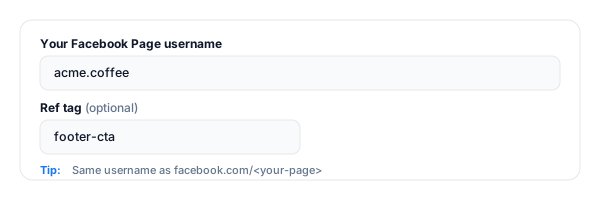
Enter your Facebook Page username
Paste your Page handle (the part after facebook.com/), for example acme.coffee. You can also use your numeric Page ID. Optionally add a ref tag for attribution.
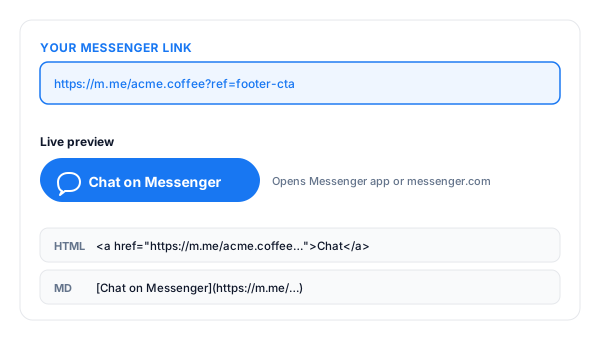
Copy your Messenger link
The tool instantly builds your m.me link, an HTML "Chat on Messenger" button, and a Markdown version, ready to paste anywhere.
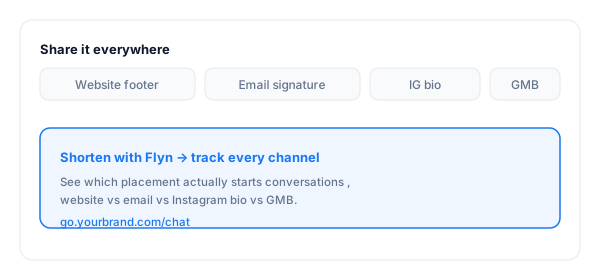
Share it everywhere
Add it to your website footer, email signature, Instagram bio, Google My Business, and QR codes. Shorten it with Flyn for branded URLs and per-channel tracking.
What Is a Messenger (m.me) Link?
A Messenger link is a short URL in the form https://m.me/<your-page> that opens a chat with your Facebook Page, directly in the Messenger app on mobile, or messenger.com on desktop. One tap, conversation started.
The optional ?ref= parameter passes through to your Messenger webhook so you (or your bot) can see which placement started the chat, your homepage hero, the email footer, the printed QR. Without ref tags you cannot attribute a single conversation.
A complete Messenger link:
https://m.me/acme.coffee?ref=footer-cta&text=Hi%21+I%27d+like+to+know+more+about+your+launchWhere to Put Your Messenger Link
The link only starts conversations where customers actually see it. These are the highest-converting placements, and the ones worth tracking separately with a unique ref tag or short link.
| Placement | Why it converts |
|---|---|
| Website header / floating button | The single highest-intent placement, visitors with a question and no obvious answer click here first instead of bouncing. |
| Email signature | Every customer email becomes a passive Messenger CTA. Zero extra effort, compounding reach over months. |
| Instagram bio link | Instagram DMs route to a separate Meta inbox; m.me in bio funnels serious inquiries into your unified Facebook Page Inbox. |
| Google My Business profile | A m.me link in your GMB profile lets local searchers ping you instantly, often faster than a phone call. |
| Printed flyers & business cards (as QR) | Generate a QR pointing at your m.me link, physical visitors scan, chat opens, you are talking inside 5 seconds. |
| Facebook & Instagram ads | Click-to-Messenger ads use m.me natively, passes the ref tag automatically so you can attribute conversations to the exact ad creative. |
Pro tip
Use a different Flyn short link for each placement (one for the footer, one for the email signature, one for the GMB profile, one for the Instagram bio). Same m.me destination, separate click counts. That is the difference between knowing what drives chats and guessing.
Messenger Link Best Practices
Do
Don't
Use a ref tag per placement
Use the bare m.me link everywhere and guess
Set a Page greeting + auto-reply
Leave first-message visitors waiting in silence
Reply within 1 hour to earn the green badge
Let response time slip, Page shows "typically replies in days"
Add m.me to GMB + Instagram bio + email sig
Hide it on a contact page nobody finds
Use a Flyn short link per channel for analytics
Hardcode m.me/yourpage and lose attribution
Test the link in incognito on mobile
Ship a typo and watch the conversations evaporate
Turn Messenger Clicks Into Real Attribution
See what starts chats
Track clicks by channel, website vs email vs Instagram bio, so you know which placement actually drives Messenger conversations.
Branded & memorable
Turn the m.me URL into go.yourbrand.com/chat, clean enough for a printed flyer, an email, or a one-line tweet.
Edit the destination
If you change your Page username or switch to a different chat channel, edit the Flyn link once, every placement keeps working (Pro).
A/B test placements
Split-test "Chat with us" vs "Ask a question" across the website and emails, see which copy actually earns conversations (Pro).
Frequently Asked Questions
What is a Messenger (m.me) link?
What do I put for the "Facebook Page username"?
How does the ref tag work?
Does the pre-filled message work for everyone?
Can I use this for my personal Facebook profile?
Will the link open the Messenger app or the browser?
Why am I getting a "Page not found" error on m.me?
How is m.me different from a Send Message button on my website?
Can I track clicks on my m.me link?
Is there a length limit on the pre-filled message?
Will m.me links work in Facebook and Instagram ads?
Can I use m.me on WhatsApp, Telegram, or other apps?
More Free Chat & Contact Link Tools
Cover every inbound chat channel, same destination team, multiple ways for customers to reach you.
WhatsApp Link Generator
Build click-to-chat wa.me links with pre-filled messages for WhatsApp business inquiries.
SMS Link Generator
Build click-to-text sms: links with phone number and pre-filled message body.
Mailto Link Generator
Pre-fill the inquiry email with subject, body, CC, and BCC. One click to open and send.
Facebook Link Shortener
Turn long Facebook Page, post, and event URLs into clean branded short links with click tracking.
Turn passers-by into real conversations
A Messenger link makes starting a chat one tap. A Flyn link tells you which channel, website, email, Instagram bio, GMB, actually drives the inbound conversation, so you can do more of what works.