Free Tel Link Generator
Build click-to-call links with international phone numbers, extensions, and DTMF sequences. E.164 auto-formatting, 100% in your browser.
Know which campaigns drive the most calls.
Wrap your tel: link in a Flyn short link and count every tap by device, country, and campaign: the dialed number never changes. Short links, deep analytics. That is click tracking, applied to calls instead of pages.
How to Create a Tel Link in 3 Steps
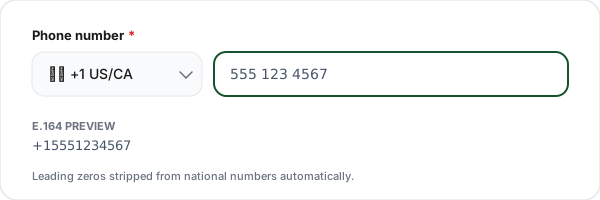
Select country + enter phone
Pick the country from the dropdown (sets the dial code and flag) and type the local phone number. Our tool auto-formats to E.164 with a leading + and country code.
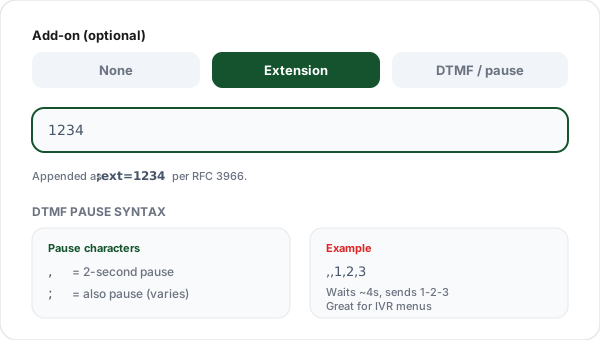
Add extension or DTMF (optional)
Add an extension via ;ext= for post-dial extension-dialing. Or add a DTMF sequence using commas for 2-second pauses, useful for IVR automation.
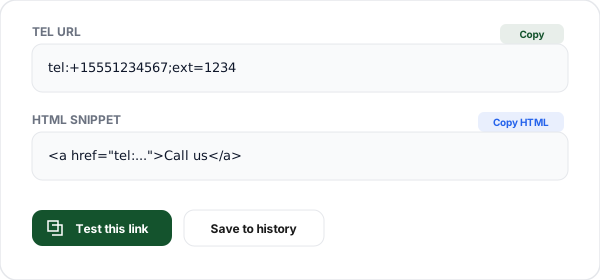
Copy the link or HTML
Copy the generated tel: URL for use anywhere, the HTML anchor tag for a webpage, or click Test to open the dialer on your current device with the number pre-filled.
What is a Tel Link?
A tel link is a hyperlink that, instead of opening a webpage, opens the phone dialer with a specific number pre-filled when tapped or clicked. The URI scheme was defined in RFC 3966 and is universally supported on every smartphone, desktop OS with a paired phone, and most VoIP applications.
The basic form is tel:+15551234567, the tel: scheme followed by a phone number in E.164 international format (leading + and country code). Tapping on mobile opens the Phone app with the number pre-dialed. The user must tap Call to actually initiate, browsers never auto-dial, which is a security feature preventing malicious sites from triggering premium-rate calls.
Tel links shine on mobile. Support pages, real-estate listings, sales bios, and emergency contacts all see significant conversion lift when phone numbers become one-tap call buttons instead of text that requires manual dialing. On desktop, behavior varies, macOS with a paired iPhone calls via Continuity, Windows 11 with Phone Link dials via a paired Android, and VoIP apps like Skype and Google Voice can register as tel: handlers. Always display the number visibly so desktop users without a handler can copy-paste.
The tel: scheme supports two advanced features: extensions via ;ext=1234 to dial a PBX extension after connecting, and DTMF post-dial sequences using commas for pauses (e.g., tel:+15551234567,,1,2,3). Useful for IVR menu automation ("press 2 for support"), but support is inconsistent across devices, test thoroughly on target platforms.
Platform Compatibility
Basic tel: dialing works everywhere. Advanced features (extension, DTMF) vary by default dialer. Always display the number visibly so users without a handler can copy-paste.
| Platform | Basic tel: | Extension (;ext=) | DTMF post-dial |
|---|---|---|---|
| iOS Safari | ✅ | ✅ | ✅ |
| Android Chrome | ✅ | Varies | Varies |
| macOS Safari (paired iPhone) | ✅ | Limited | Limited |
| Windows 11 (Phone Link) | ✅ | Varies | Varies |
| Google Voice web | ✅ | Limited | Limited |
| Skype desktop | ✅ | ❌ | ❌ |
Common Click-to-Call Use Cases
Customer support "Call us" buttons
Replace phone numbers in support pages with tel: CTAs. Mobile visitors tap once to dial, reducing friction for urgent help requests.
Emergency contact in mobile apps
Dashboard "Call on-call engineer" buttons that open the dialer with the on-call number pre-filled. Critical for incident response workflows.
Sales team direct-dial cards
Sales bios on your website with a tap-to-call link to the rep's direct number. Faster than filling out contact forms for high-intent leads.
Appointment reminder emails
Include "Call to reschedule" tel: links in reminder emails with the front-desk number. Works on any mobile email client.
Real estate listing pages
"Call agent" buttons under each listing photo let mobile visitors dial directly, increasing lead conversion vs contact forms.
IVR automation with DTMF
Link to a support hotline that auto-dials the account-number extension: tel:+15551234567,,1234567 routes the caller through the phone tree.
Why Use Flyn's Tel Link Generator?
100% Client-side
Your phone numbers never leave your browser. Safe for internal numbers, VIP contacts, and confidential on-call rotations.
47 country codes
Pre-loaded dial codes. Auto-formats your local number to E.164 international standard with proper leading-zero handling.
Extension + DTMF
Add ;ext= for extensions or DTMF sequences with pauses for IVR automation. Full RFC 3966 compliance.
HTML + URL output
Copy the raw tel: URL for apps and Markdown, or the full HTML <a> anchor tag for a webpage.
Frequently Asked Questions
What is a tel link?
A tel link is a URI that initiates a phone call when clicked or tapped. The format is tel:+15551234567, the tel: scheme followed by the phone number in E.164 international format. On mobile, tapping the link opens the phone dialer with the number pre-filled. On desktop, behavior varies: macOS Safari can call through a paired iPhone via Continuity; Windows 11 with Phone Link routes the call through a connected Android.
How do I create a click-to-call link?
Use the tel: scheme followed by the phone number in E.164 format (leading + and country code). Example: tel:+15551234567 opens the dialer for a US number. The HTML anchor is <a href="tel:+15551234567">Call us</a>. Our generator auto-formats to E.164 from your country selection and local number, then produces both the raw URL and HTML snippet.
What's the correct format for international phone numbers in tel links?
Use E.164 international format: leading +, country code, then full local number with no spaces, dashes, or parentheses. US: (555) 123-4567 → +15551234567. UK: 07911 123456 → +447911123456 (drop the leading 0). India: 98765 43210 → +919876543210. E.164 is defined by ITU-T and ensures every phone number worldwide is uniquely and unambiguously formatted.
How do I add an extension number to a tel link?
Per RFC 3966, use ;ext= for a post-dial extension: tel:+15551234567;ext=1234. This pauses briefly after connecting and then dials the extension via DTMF. Support varies. iOS handles it well; Android depends on the default dialer. For best reliability, include the extension in your visible copy too ("Call us at +1 555-123-4567 ext. 1234") so users can manually dial if automatic extension fails.
What are DTMF post-dial pause and wait characters?
DTMF sequences can be added after the number to send additional key presses once the call connects. Common characters: , (comma) is a 2-second pause; ; (semicolon) is also a pause on some platforms. Example: tel:+15551234567,,1234 dials the number, waits ~4 seconds, then sends 1-2-3-4. Useful for automated IVR menus ("press 2 for billing, then your account number"). Support is inconsistent across devices, test on your target platforms.
Do tel links work on all phones?
Yes on any smartphone. iOS (Safari, Chrome, in-app browsers): taps open the Phone app with the number pre-filled. Android (Chrome, Firefox, every app): opens the default dialer. On both platforms, the user still confirms the call, browsers and apps cannot auto-dial for security reasons. The tel: scheme is defined in RFC 3966 and has universal smartphone support since 2004.
Do tel links work on desktop browsers?
Yes, with caveats. macOS with a paired iPhone via Continuity: Safari opens FaceTime to route the call via phone. Windows 11 with Phone Link to Android: Chrome/Edge can initiate through the paired phone. Google Voice, Skype, and other VoIP apps can register as tel: handlers. Otherwise, desktop users may see an "unable to open" dialog, always display the number in visible text as a fallback so they can copy-paste.
Can I include spaces, dashes, or parentheses in a tel link?
You should strip formatting for best compatibility. tel:+15551234567 works universally. tel:+1-555-123-4567 works on most devices but not all. tel:+1 (555) 123-4567 with spaces requires percent-encoding and is risky. Our generator outputs canonical E.164 format with no separators, the most reliable format across every modern device. Display-format the number in visible text, but use E.164 in the href.
What's the difference between tel: and callto: URI schemes?
tel: is the IETF standard (RFC 3966) supported by every modern device. callto: was a proprietary Skype scheme that triggered Skype-to-Skype calls; Microsoft deprecated it in favor of tel: support. Unless you specifically need legacy Skype desktop behavior, always use tel:, it has universal compatibility across iOS, Android, Windows, macOS, and VoIP applications.
Could someone trick me into calling a premium-rate number via a tel: link?
tel: links only open the dialer, they cannot initiate a call automatically. The user must tap the call button to actually dial. This is a browser security feature preventing malicious sites from racking up charges on premium-rate numbers. That said, always verify the displayed number matches your expectation before calling, especially on unfamiliar sites. Our tool shows the full E.164 number so there are no hidden surprises.
How do I handle short codes like 911, 112, or N11 numbers?
Short codes don't use country codes, they're dialed directly. The tel: scheme supports them without the + prefix: tel:911, tel:112, tel:311. These work only in the country where the short code is valid. Avoid using emergency short codes (911 US, 112 EU, 999 UK, 000 AU) in tel: links unless in critical contexts like an emergency-service app, accidental clicks waste dispatcher time.
Does this tool store my phone numbers?
No. All tel: link building happens 100% in your browser using client-side JavaScript. Your phone number, extensions, and DTMF sequences never leave your device and are never logged or stored on our servers. The optional history feature uses localStorage on your browser only. Safe to use with internal numbers, VIP contacts, or anything confidential.
Related Tools
Doing outbound at scale? See our guide to short links in SMS marketing, and if any of it goes out by text, the country-by-country link rules in Short Links in SMS: What the Law Requires by Country.
FaceTime Link Generator
Build facetime: video or audio call links to a phone number or Apple ID, for Apple-heavy audiences.
SMS Link Generator
Build sms: click-to-text links with pre-filled message and international phone numbers.
WhatsApp Link Generator
Create wa.me click-to-chat links with pre-filled messages and QR codes.
Viber Link Generator
viber://chat click-to-chat links, best where Viber dominates (Eastern Europe, the Philippines).
Mailto Link Generator
Build click-to-email links with pre-filled subject, body, CC, and BCC.
URL Encoder/Decoder
Percent-encode URLs and query parameters. Supports encodeURIComponent and Base64.
Ready to level up your links?
Use our free tools to build contact links, then wrap them in Flyn short links to see how many times people actually tap your call, email, or SMS CTAs.