Free FaceTime Link Generator
Turn any phone number or Apple ID into a one-tap FaceTime video or audio call link, works on every iPhone, iPad, and Mac. No coding, 100% in your browser.
Phone in international format (+14155552671), or the Apple ID email registered with FaceTime, same address you use for iMessage.
Which channel actually drives calls?
Shorten your FaceTime link with Flyn, get a branded URL (go.yourbrand.com/call) and per-channel click analytics so you know whether the email signature, the website, or the business card QR is doing the work.
How to Make a FaceTime Link in 3 Steps
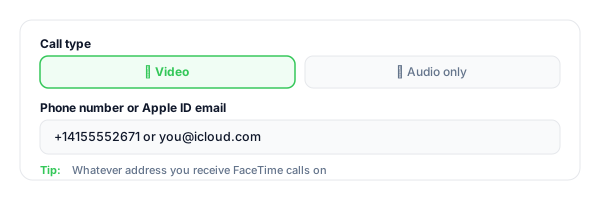
Pick video or audio
Choose whether the link starts a video FaceTime call (facetime:) or audio-only (facetime-audio:). Then enter your phone number or Apple ID email.
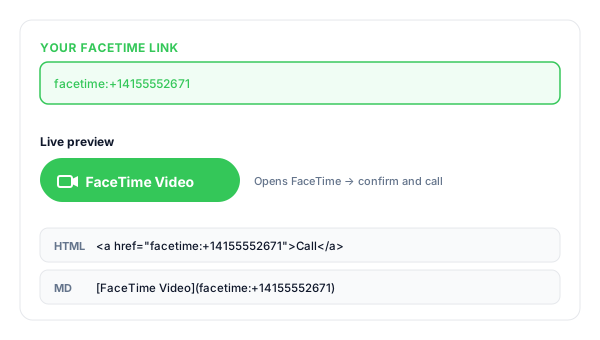
Copy your FaceTime link
The tool instantly builds your facetime: URL, an HTML button, and a Markdown version, ready to paste anywhere.
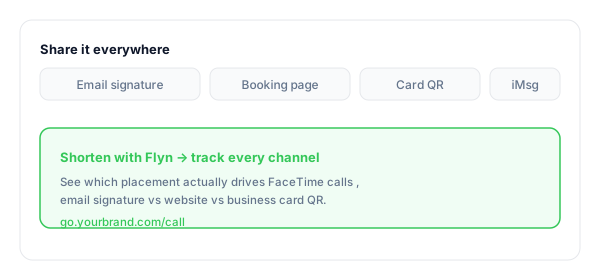
Share with Apple users
Add it to your email signature, website, and business card QR. Pair with a Zoom/Meet fallback for non-Apple clients. Shorten with Flyn for tracking.
What Is a FaceTime Link?
A FaceTime link uses one of Apple's deep-link schemes, facetime:+14155552671 for video, or facetime-audio:+14155552671 for audio. Tapping it on any iPhone, iPad, or Mac opens FaceTime directly into the confirm-and-call interface for that number.
It is the cleanest way to make yourself one-tap-callable on Apple devices, for consultants, agents, healthcare providers, and creative professionals whose clients live in iMessage and FaceTime. Pair it with a Zoom or Google Meet fallback so non-Apple visitors are not stuck.
FaceTime link formats:
facetime:+14155552671 ← video call to phonefacetime:[email protected] ← video call to Apple IDfacetime-audio:+14155552671 ← audio-only callWhere to Put Your FaceTime Link
FaceTime works best where you can predict the audience leans Apple, and where the relationship is already personal enough that an inbound call feels welcome instead of intrusive.
| Placement | Why it converts |
|---|---|
| Email signature (Apple-heavy industries) | Creative agencies, design studios, real estate, healthcare in the US, your clients are on iPhones, FaceTime is one tap. |
| Website "Book a call" page | Pair FaceTime with Zoom / Google Meet, let the visitor pick the platform they already use. Conversion lifts over a single-platform CTA. |
| Business card / packaging QR | Print the FaceTime URL as a QR, physical visitors scan, call starts. Powerful for personal-brand consultants, photographers, agents. |
| iMessage broadcast to existing clients | For an iMessage-native client base, a tappable facetime: in the message ("free to talk? tap here") converts dramatically better than "DM me to schedule". |
| In-app help (iOS apps) | Mobile apps targeting iOS-only audiences can deep-link from their support screen directly into a FaceTime call with the human support team. |
| Calendar invite description | Drop the FaceTime link inside the event description so the attendee can tap once at start time, no app switching, no URL hunting. |
Pro tip
Use a different Flyn short link for each placement (one for the email signature, one for the website, one for the business card QR). Same FaceTime destination, separate click counts, that is the difference between knowing what drives inbound calls and guessing.
FaceTime Link Best Practices
Do
Don't
Pair FaceTime with a Zoom/Meet fallback
Assume every client is on Apple
Use E.164 for phones (+14155552671)
Use national format (415) 555-2671
Offer audio-only for quick consultations
Force every call to be video
Test on iOS, iPadOS, and macOS
Trust web preview behavior alone
Use a Flyn short link per channel
Hardcode facetime:… everywhere and lose attribution
Note "iPhone/Mac users tap here" near the link
Let non-Apple visitors click and get nothing
Turn FaceTime Clicks Into Real Attribution
See what drives calls
Track clicks by channel, email signature vs website vs business card QR, so you know which placement turns interest into a call.
Branded & memorable
Turn the facetime: URL into go.yourbrand.com/call, clean enough for a business card, an email, or a one-line social bio.
Edit the destination
Change Apple ID or switch to a different call channel, edit the Flyn link once, every email signature keeps working (Pro).
A/B test placements
Split-test "Book a call" vs "Tap to FaceTime" across the website and email signature, see which copy earns calls (Pro).
Frequently Asked Questions
What is a FaceTime link?
How is this different from Apple's facetime.apple.com share links?
What can I put in the contact field, phone, email, or Apple ID?
Why use facetime-audio: instead of facetime:?
Will the link work on Android, Windows, or in a browser?
Do I need to be in someone's contacts for them to FaceTime me?
Can I add a custom call name or subject like Zoom does?
Will the link open the camera by mistake on iOS?
How is this different from a tel: or sms: link?
Can I track clicks on my FaceTime link?
Will FaceTime links work in iMessage, email, and SMS?
What about FaceTime group calls?
More Free Chat & Call Link Tools
Cover every way customers might want to reach you, call, chat, text, email, and let them pick.
Tel Link Generator
Build tel: links so any phone (Apple, Android, landline) can tap once to call your business.
SMS Link Generator
Build click-to-text sms: links with phone number and pre-filled message body.
WhatsApp Link Generator
Build click-to-chat wa.me links with phone number and pre-filled message body.
Mailto Link Generator
Pre-fill the inquiry email with subject, body, CC, and BCC. One click to open and send.
One tap, talking face to face
A FaceTime link makes calling you one tap on every Apple device. A Flyn link tells you which channel, signature, website, business card, actually drives the inbound, so you can double down on what works.