Free LINE Share Link Generator
Build all three LINE URL scheme actions: the Share with picker, a chat with your Official Account that already has the first message typed, and an add friend link. Percent encoding and the %40 in your LINE ID are handled for you.
Building a chat link for a different app? Try the WhatsApp Link Generator, Telegram Share Link Generator, or the SMS Link Generator.
Opens the LINE "Share with" picker so the sender chooses a friend, group, or chat.
Any language works. Japanese, Thai, and emoji are encoded as UTF-8 bytes, which is why the finished URL looks nothing like what you typed.
line.me/R/share has no url parameter, so we append your link to the message text and encode the whole thing together.
Want to know which placement starts chats?
A raw line.me URL reports nothing back. Wrap it in a Flyn short link and see total clicks free on every placement. Full country, device, and referrer breakdowns come with Pro.
How to Build a LINE Link in 3 Steps
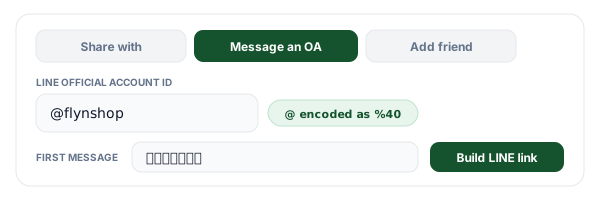
Pick the action and type your message
Three actions, three different URL shapes: the Share with picker, a pre-filled chat with your Official Account, and the add friend profile screen. Enter your LINE ID with the @ still on it and type the message in whatever language your customers use. The tool confirms in writing that the @ became %40 before you copy anything.
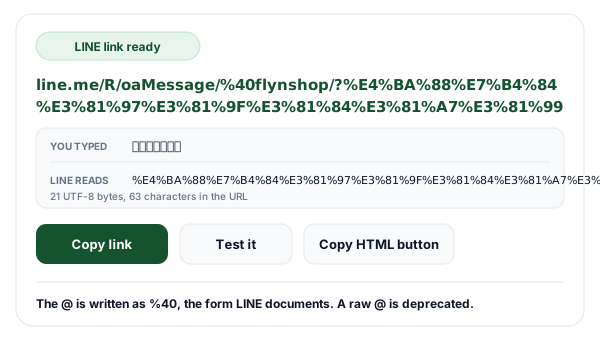
Check the encoded preview, then build
The preview panel shows the exact percent-encoded UTF-8 string LINE receives, plus a live character and byte count, so you can see the moment a stray ampersand or an emoji changes the URL. Build the link and you get the URL, a ready-made HTML anchor for a website button, and a Test button that opens it.
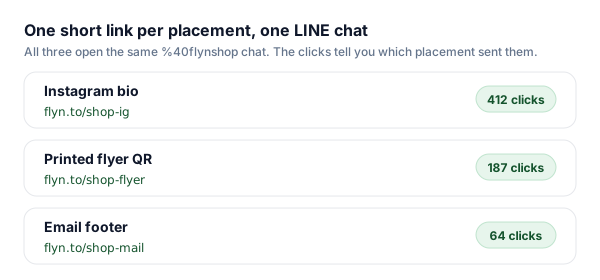
Shorten it once per placement
A line.me URL is long, unreadable, and completely silent about who used it. Wrap it in a Flyn short link and give the flyer, the bio, and the email footer one each. The click counts tell you which placement earns its space, and because short links stay editable, changing your Official Account ID later does not orphan anything already printed.
How the LINE URL Scheme Actually Works
A LINE link is not an API call and needs no bot, token, or app registration. It is an ordinary https URL on the line.me domain that the LINE app claims as a universal link: tap it on a phone with LINE installed and the operating system hands the URL to the app, which reads the path to decide what to open. Everything the app needs is encoded into that one string, which is why the encoding rules matter more here than in almost any other share link.
LINE requires both the account ID and the message text to be percent-encoded UTF-8. That single sentence is the whole reason this tool exists. An Official Account ID starts with @, and percent-encoding turns @ into %40, so @yourshop belongs in the URL as %40yourshop. LINE still resolves an unencoded ID but marks that form as deprecated, and in practice a bare @ is the character most likely to be mangled on the way to the customer: email clients that autolink text, CMS fields that escape aggressively, and QR encoders all treat @ as special. The generator applies %40 automatically and tells you it did.
The message body is worse. Percent-encoded UTF-8 means each byte becomes a three-character escape, so a five-character Japanese greeting turns into a 45-character string and a single emoji costs twelve. If your customers speak Japanese, Thai, or Chinese, the finished URL is literally unreadable and cannot be produced by hand or verified by eye. That is why the tool shows the encoded preview live: you type in your own language, and you watch exactly what LINE receives.
Which LINE Link Does What
Six URL shapes that all look similar and behave differently. The last column is the part people get wrong.
| Action | URL shape | What opens | The trap |
|---|---|---|---|
| Share with pickerBuilt here | line.me/R/share?text={text} | The LINE "Share with" screen, where the sender picks a friend, group, or chat | There is no url parameter. Your link has to live inside the single text value, which is why we combine the sentence and the URL before encoding. |
| Message an Official AccountBuilt here | line.me/R/oaMessage/{%40id}/?{text} | A chat with your Official Account, message box already filled in | The text follows a slash and a bare question mark, with no parameter name. Reaching for ?text= out of WhatsApp habit opens the chat empty. |
| Add friend / OA profileBuilt here | line.me/R/ti/p/{%40id} | The Official Account profile, or the existing chat if they are already a friend | No message can ride along. If you want a first message typed for the visitor, use the oaMessage action instead. |
| Recommend an Official AccountVersion caveat | line.me/R/nv/recommendOA/{%40id} | The Share with screen, pre-loaded with your Official Account to recommend | LINE documents that a percent-encoded ID here does not work on LINE versions earlier than 13.8.0 for Android, the one place where %40 is the risky choice. |
| LINE Share button pluginDifferent product | social-plugins.line.me/lineit/share?url={url}&text={text} | The LINE web share flow, a separate product from the URL scheme | This one does take url and text as separate parameters. The inconsistency between the two products is exactly why hand-written LINE links go wrong. |
| Legacy app schemeDeprecated | line://msg/text/{text} | Nothing you should ship today | LINE deprecated line:// to prevent app takeover attacks and points developers at https://line.me/R/ instead. Old tutorials are full of it. |
What Percent Encoding Does to Your Message
Every one of these conversions happens automatically in the generator. Read the middle column and you will see why hand-typing a LINE link is not realistic.
| You type | Goes into the URL as | Why it matters |
|---|---|---|
| @yourshop | %40yourshop | The form LINE documents for an Official Account ID. A raw @ still resolves but is deprecated, and it is fragile in autolinkers and QR encoders. |
| a space | %20 | A literal space ends a URL in most link parsers, so a two-word message would be cut in half. |
| a line break | %0A | What the "put the link on its own line" checkbox inserts, so the URL lands under your sentence in the message box. |
| & | %26 | An unencoded ampersand reads as the start of a new query parameter and truncates the rest of your message. |
| こんにちは | %E3%81%93%E3%82%93%E3%81%AB%E3%81%A1%E3%81%AF | Five Japanese characters, three UTF-8 bytes each, 45 characters in the URL. Nobody types this by hand. |
| สวัสดี | %E0%B8%AA%E0%B8%A7%E0%B8%B1%E0%B8%AA%E0%B8%94%E0%B8%B5 | Thai is also three bytes per character, and the tone and vowel marks count as separate characters. |
| 👋 | %F0%9F%91%8B | Emoji outside the basic plane are four UTF-8 bytes, so one glyph costs twelve characters of URL. |
The generator runs the browser's own UTF-8 percent encoder over your text, the same function every correct LINE integration uses, so what you see in the preview is byte for byte what the app receives.
Why LINE Links Matter in Japan, Thailand, Taiwan, and Indonesia
LINE is the dominant messenger in Japan, Taiwan, and Thailand, and has a large user base in Indonesia, which changes what a link is for. In markets where WhatsApp or Messenger leads, a business link usually points at a website. In LINE markets the chat is the storefront: customers ask about stock, agree a price, and arrange pickup inside the conversation, and an Official Account is the front door. That makes an oaMessage link with the first message already typed a genuine conversion step rather than a convenience, because it removes the pause where a customer has to work out how to open.
It also raises the stakes on encoding. A campaign written in Japanese or Thai produces a URL made entirely of escape sequences, so a typo is invisible: the link looks equally meaningless whether it is right or wrong, and the only way to know is to tap it. Build the link with a tool, read the plain-language preview rather than the URL, and test once on a phone with LINE installed.
A note on language: this page and the generator interface are in English, but the links they produce are not. Anything you type in the message field, in any script, is encoded correctly as UTF-8, so writing your campaign in Japanese, Thai, Traditional Chinese, or Indonesian works exactly the same way. The tool never translates or alters your text; it only encodes it.
Where a Pre-Filled LINE Link Earns Its Place
Anywhere the next step is a conversation, a link that opens the chat with the first sentence already written beats a link that opens an empty box.
Restaurants and salons taking bookings
An oaMessage link with "I would like to book a table" already typed removes the hardest step: knowing what to say first. Put it behind the QR code on the table tent and in the Instagram bio.
Sellers who close in chat
When the sale closes inside a LINE chat rather than at a checkout page, which is how many small sellers in Thailand and Taiwan work, a product-specific pre-filled message tells you which item the buyer is asking about before they type a word.
Support and after-sales
Print an add friend link on packaging and warranty cards so customers reach the right Official Account instead of a general inbox. Pair it with an oaMessage link that pre-fills the order number field prompt.
Campaigns worth measuring
The same LINE chat can sit behind a flyer, a bio link, and an email footer. Give each one its own short link and the click counts tell you where your chats actually come from.
LINE Links + Flyn: Chats You Can Attribute
The generator is free forever. Add Flyn when you need to know where your conversations come from.
Per-placement analytics
Total clicks free on every link; full country, device, and referrer breakdowns on Pro.
Editable destinations
Change your Official Account ID or the pre-filled message and every posted link follows, with one edit.
QR codes included
Put the chat on a table tent, a receipt, or packaging. Free on every link, and far shorter than a raw line.me URL.
A free plan that lasts
25 links a month with total click counts and QR codes. No trial countdown. Custom domains come with Pro.
Frequently Asked Questions
How do I create a LINE share link?
What is the exact LINE URL scheme for each action?
Why does the @ in a LINE Official Account ID become %40?
Why is the oaMessage text after a bare question mark instead of ?text=?
What is the difference between the LINE URL scheme and the LINE Share button?
How do I make a LINE add friend link?
Does the old line:// scheme still work?
Do LINE links work on a desktop computer?
Where do I find my LINE Official Account ID?
Can I include Japanese, Thai, or emoji in the message?
Can I track how many times people click my LINE link?
Is this tool free, and do you store what I type?
More Free Tools
More free link tools from Flyn, instant, no sign-up required.
WhatsApp Link Generator
Click-to-chat links with the country code and message handled for you.
Telegram Share Link Generator
Build t.me/share/url links with a pre-filled URL and message.
SMS Link Generator
sms: links with the body pre-filled, including the iOS and Android separator quirk.
QR Code Generator
Turn your LINE link into a scannable code for tables, flyers, and packaging.
Ready to open the chat for your customers?
Build LINE links for free, then shorten them with Flyn to see whether the flyer, the bio, or the email footer actually starts conversations. Analytics, QR codes, and editable links included.