Free Telegram Share Link Generator
Build a Telegram share link (t.me/share/url) with a pre-filled URL and message. Copy the link, HTML anchor, or Markdown, 100% in your browser.
Shown above the link in the compose box. Keep it under ~200 characters for the cleanest preview.
Track clicks on your Telegram shares
Shorten the URL you share with a Flyn short link to see who clicked, from where, on what device, without changing the destination.
How to Create a Telegram Share Link in 3 Steps
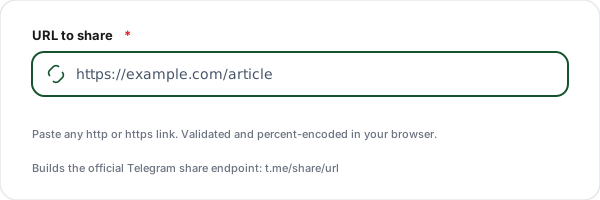
Enter the URL to share
Paste the full http or https link you want people to forward to Telegram. The tool validates it and percent-encodes it for you.
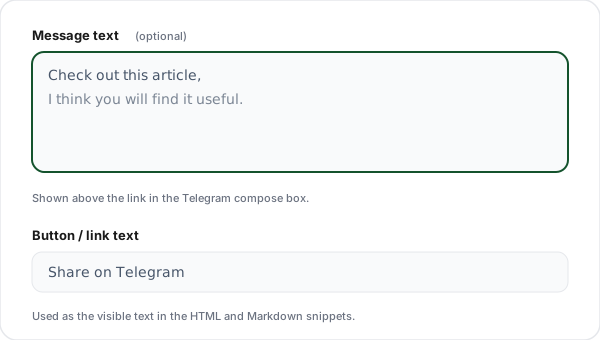
Add an optional message
Type a short message shown above the link in the Telegram compose box, then set the button or link text used in the HTML and Markdown snippets.
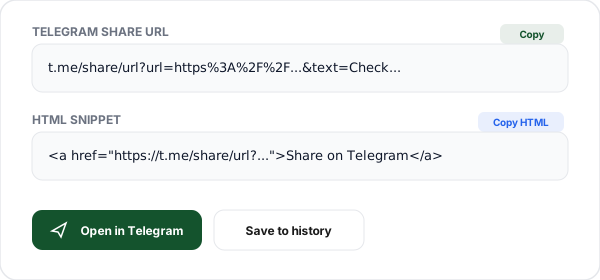
Copy the link, HTML, or Markdown
Copy the generated t.me/share/url link for anywhere, the HTML anchor for a webpage, or the Markdown snippet, or click Open in Telegram to test it.
What is a Telegram Share Link?
A Telegram share link is a web URL that opens Telegram with a message ready to forward. The official format is https://t.me/share/url?url=URL&text=TEXT. When someone clicks it, Telegram opens its share sheet, the user picks a chat, group, or channel, and your URL (plus any text) is already in the compose box.
The url parameter is the link you want shared and is required. The text parameter is an optional message shown above the link. Both values are percent-encoded, our generator runs encodeURIComponent on them so spaces, ampersands, and emoji all survive the trip intact.
This is a genuine, documented Telegram endpoint, not a bot, not the Bot API, and not a private trick. No token, app registration, or authentication is needed. That makes it the simplest possible way to add a real "Share on Telegram" action to a website, email, or social bio: one link, no backend.
On mobile the link launches the native Telegram app; on desktop it opens Telegram Web or hands off to Telegram Desktop. If the user is not logged in, Telegram prompts them first and then continues the share. Because it is an https:// link rather than a tg:// deep link, it degrades gracefully in any browser.
Running a Telegram channel and want to know which post or bio actually fills it? Wrap your invite in a trackable short link per source. Our guide on tracking Telegram invite links by source walks through the exact workflow, with clicks broken down by source, country, and device.
Telegram Share URL Parameters
The share endpoint takes two query parameters. The first starts with ? and additional parameters are joined with &.
| Parameter | Required | Purpose | Example |
|---|---|---|---|
| url | Required | The full link to share. Must be a valid http or https URL. Percent-encoded automatically. | ?url=https%3A%2F%2Fexample.com |
| text | Optional | An optional message shown above the link in the Telegram compose box. Editable by the sender before sending. | &text=Worth%20a%20read |
Telegram Share Link Use Cases
Blog and article share buttons
Add a "Share on Telegram" button to every post so readers can forward your article to chats and channels in one tap.
Channel and group growth
Drop a share link in your newsletter or bio that pre-fills your channel join link plus a short pitch, so subscribers can invite friends.
Product launches
Give early users a ready-made share link with your launch page and a one-line message, so spreading the word takes zero effort.
Documentation and support
Let users forward a docs page or status update straight into a support group with the relevant link already attached.
Affiliate and referral sharing
Hand creators a share link that carries their referral URL plus suggested copy, so they can post to Telegram audiences instantly.
Event and webinar invites
Pre-fill the registration link and a short hook so attendees can invite their network into Telegram chats with one tap.
Share Link vs Telegram Deep Link
The t.me/share/url web link and the native tg:// deep link both open Telegram, but they behave very differently on the open web.
| Aspect | t.me/share/url | tg:// deep link |
|---|---|---|
| Opens | Telegram share sheet | Telegram app only (native) |
| Works in a browser | Yes (falls back to Telegram Web) | No (fails silently) |
| Pre-fills URL | Yes (url parameter) | Limited / inconsistent |
| Pre-fills message | Yes (text parameter) | Limited |
| Needs app installed | No | Yes |
| Best for | Sharing links on the open web | In-app navigation |
Why Use Flyn's Telegram Generator?
100% Client-side
The link is built in your browser. Your URLs and messages never touch our servers.
Real-time preview
The share URL, HTML, and Markdown update as you type, then open it in Telegram in one click.
HTML + Markdown
Copy the raw link, a ready HTML anchor for a webpage, or a Markdown snippet for a blog.
Unicode safe
Emoji, accents, and symbols are percent-encoded correctly, so no broken or garbled links.
Frequently Asked Questions
What is a Telegram share link?
A Telegram share link is a special URL that opens Telegram with a pre-filled message containing a link you want to share. The official format is https://t.me/share/url?url=YOUR_URL&text=YOUR_MESSAGE. When a user clicks it, Telegram opens (the app on mobile, or the web client on desktop) and asks which chat or channel to send it to, with your URL and text already filled in.
What is the exact Telegram share URL format?
The canonical format is https://t.me/share/url?url=URL&text=TEXT. The url parameter is required and must be the full link you want to share. The text parameter is optional and holds an accompanying message shown above the link in the compose box. Both values must be percent-encoded, our generator runs encodeURIComponent on them automatically so special characters and spaces are handled correctly.
Do I need a Telegram bot or API key to use this?
No. The t.me/share/url endpoint is a plain web link, not a bot or Bot API feature. Anyone can create one, and any user can click it without you registering an app, bot, or token. The generator builds the URL entirely in your browser, there is nothing to authenticate or configure.
Does the share link work on both mobile and desktop?
Yes. On a phone with Telegram installed, the link opens the native app and shows the share sheet. On desktop, it opens Telegram Web (or hands off to the installed Telegram Desktop app, depending on the user's settings). If the user is not logged in to Telegram, they are prompted to log in first, then the share continues.
Can I pre-fill a message along with the link?
Yes. Add your message in the message text field and it is passed as the text parameter. Telegram shows this text above the shared URL in the compose box. The user can edit it before sending. Keep it concise: a sentence or two reads best, and very long text can be awkward in the preview.
Why is the URL the required part and text optional?
The Telegram share endpoint is built around sharing a link, so the url parameter is what it expects. The text parameter is supplementary context. If you only supply text without a url, the share behaves inconsistently across clients, so our generator requires a valid http or https URL before producing a link.
How do special characters and emoji get handled?
Every character in the url and text is percent-encoded with encodeURIComponent. Spaces become %20, ampersands become %26, and emoji are encoded as their UTF-8 byte sequences (for example a wave emoji becomes %F0%9F%91%8B). This means you can type any character naturally in the message field and the resulting link stays valid.
Can I add a Telegram share button to my website?
Yes. Copy the HTML snippet our tool produces, which wraps the share URL in an anchor tag with target="_blank" and rel="noopener noreferrer". Paste it into your page and style it as a button. For blogs and Markdown-based sites, use the Markdown snippet instead. The link always opens Telegram's share sheet with your URL pre-filled.
Is there a character limit on the shared message?
Telegram itself allows long messages, but the share preview reads best when the text is short. Because the whole thing travels in a URL, extremely long text produces a very long link that some platforms truncate when pasted. As a rule of thumb keep the message under a few hundred characters, and let the shared URL carry the detail.
How is t.me/share/url different from the Telegram deep link tg://?
The https://t.me/share/url form is a universal web link that works in any browser and gracefully falls back to Telegram Web if the app is not installed. The tg:// scheme is a native deep link that only resolves if the Telegram app is present, and it fails silently in browsers. For sharing on the open web, the t.me/share/url format is the reliable choice.
Does the generator send my data anywhere?
No. The Telegram share link is assembled entirely in your browser using JavaScript. Your URL and message are never sent to or stored on our servers. The only network calls the page makes are anonymous, aggregate usage analytics (which never include your link); the link itself is built locally.
Can I track how many people click my Telegram share link?
The raw t.me/share/url link itself has no analytics. To measure clicks, shorten the link you put in the url parameter with a Flyn short link first, then the share link points at your trackable short link. You will see total clicks, country, device, and referrer for everyone who opens what you shared, without changing the final destination.
Related Tools
WhatsApp Link Generator
Create wa.me click-to-chat links with pre-filled messages and QR codes.
Telegram Link Shortener
Shorten any t.me link into a short, trackable Flyn link with click analytics.
Telegram Bot Link Generator
Build t.me start and startgroup deep links that carry a referral or campaign payload.
UTM Builder
Tag the URL you share with UTM parameters so Telegram traffic shows up in analytics.
Ready to level up your links?
Use our free tools to build share links, then wrap the destination in a Flyn short link to get click analytics, see how many people actually open what you share on Telegram.