Free Telegram Bot Link Generator
Build t.me deep links that hand your bot a referral id, coupon, or campaign name. We validate the username, count your payload against Telegram's 64-character limit, and base64url encode anything the start parameter will not accept.
This tool builds bot deep links. Want a share sheet instead? Use the Telegram Share Link Generator. Just shortening a Telegram URL? Try the Telegram Link Shortener.
Paste @name, a t.me link, or the plain handle. A leading @ is stripped for you, and bot usernames must be 5 to 32 characters and end in "bot".
This is the value your bot receives after /start. Keep one payload per source and you can tell campaigns apart later.
Telegram counts starts. It never counts clicks.
Wrap each bot link in a Flyn short link and you see both numbers. Total clicks are free on every link; country, device, and referrer breakdowns come with Pro.
How to Build a Telegram Bot Link in 3 Steps
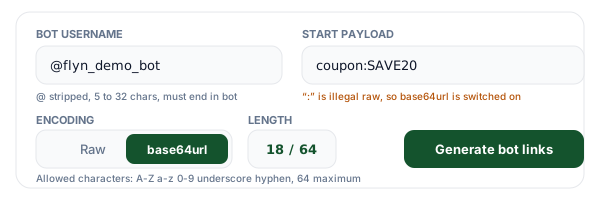
Enter your bot username and the payload
Paste the handle with or without the @, or drop in a whole t.me link and we pull the username out of it. We check it against the Telegram username rules: 5 to 32 characters, letters, digits and underscores only, starting with a letter and ending in "bot". Then type the value your bot should receive.
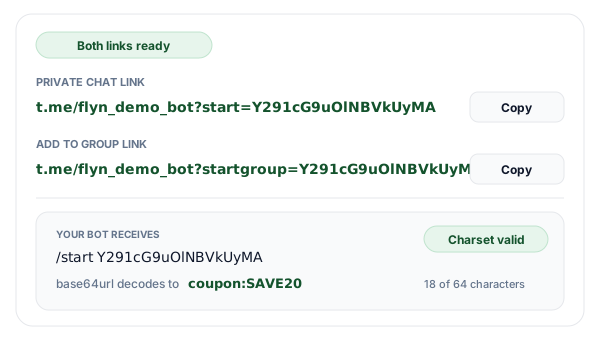
Choose raw or base64url encoding
The counter tracks your payload against the 64-character cap and turns red past it, and the validator names every character Telegram will not accept. Switch to base64url and punctuation, spaces and colons all survive. The decoded value is shown next to the link so you can confirm exactly what your start handler will read.
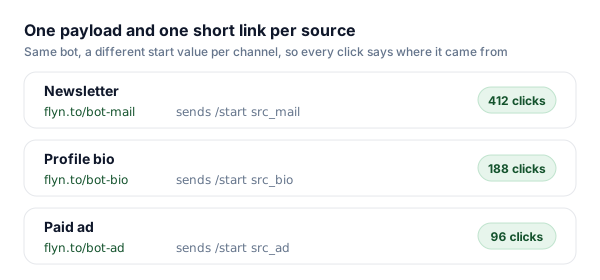
Publish one link per source and count the clicks
Copy the start link for private chats and the startgroup link for adding the bot to a group. Give each placement its own payload, shorten each link with Flyn, and the click count next to the start count tells you how many times people opened Telegram but never pressed START.
How a Telegram Bot Deep Link Actually Works
Every bot has a plain link that opens a chat with it: t.me/your_bot. Add a start parameter and that link carries a value with it. Someone taps t.me/your_bot?start=ref_9f2c, Telegram opens the chat and puts a START button where the message box normally sits, and when the conversation begins your bot receives an ordinary message whose text is the literal string "/start ref_9f2c". Nothing exotic happens on your side: it is the same update your webhook already handles, with one argument after the command.
The startgroup parameter does the same trick for group chats. Instead of opening a private conversation, Telegram asks the person to choose a group and add your bot to it, and the payload travels with the invitation, which is how you can tell which of your onboarding links brought the bot into a given team. Telegram also sends a my_chat_member update whenever your bot's own membership changes, and that update arrives by default, so it makes a reliable backstop for tracking additions even when nobody presses anything.
The part that trips people up is the payload itself. Telegram allows only A-Z, a-z, 0-9, the underscore and the hyphen, with a hard limit of 64 characters. A URL will happily carry a colon, a space, or an ampersand, so a bad link looks completely normal and still opens your bot, which is why the failure is so quiet: the click works, the chat opens, and only the attribution goes missing. Encode anything outside that character set before it ever reaches the link, and the problem disappears.
Which t.me Bot Parameter Does What
Six ways to point a link at a bot, and what each one actually delivers to your code. This tool builds the first two, which are the pair almost every bot needs.
| Parameter | Example | What the click does | What your bot sees |
|---|---|---|---|
| ?start= | t.me/your_bot?start=ref_9f2c | Opens a private chat with your bot and shows a START button in place of the message box. | A normal message update whose text is /start ref_9f2c. |
| ?startgroup= | t.me/your_bot?startgroup=team_a | Asks the person to pick a group, then adds your bot to it. | /start team_a in that group, plus a my_chat_member update for the new membership. |
| ?startchannel | t.me/your_bot?startchannel&admin=post_messages | Asks the person to add your bot to a channel with the admin rights you list. | A my_chat_member update naming the rights granted. Channels have no /start message. |
| ?startapp= | t.me/your_bot?startapp=lvl3 | Opens your bot Mini App instead of the chat. | The value as start_param inside the Mini App init data, not as a /start message. |
| ?startattach= | t.me/your_bot?startattach=note | Opens the attachment menu with your bot selected, for bots allowed in that menu. | The value when the attachment-menu Mini App opens. |
| tg://resolve | tg://resolve?domain=your_bot&start=ref_9f2c | Same as ?start=, but only from an app that handles the tg: scheme. | Identical to ?start=. Use the t.me form on the web. |
Wherever a payload applies, the same rules hold: 64 characters maximum, and only A-Z, a-z, 0-9, underscore and hyphen.
The 64-Character Rule, and Why 48 Bytes Is the Real Budget
base64url is base64 with two substitutions and one deletion: the plus sign becomes a hyphen, the slash becomes an underscore, and the trailing equals padding is dropped. That leaves an alphabet of exactly A-Z, a-z, 0-9, hyphen and underscore, which is precisely the set Telegram allows in a start parameter. It is not a coincidence, it is why Telegram's own documentation recommends base64url for payloads that carry anything more structured than an id.
Encoding is not free. base64 turns every 3 bytes of input into 4 characters of output, so your raw value has to stay at or under 48 bytes to land inside the 64-character cap. Note bytes, not characters: an accented letter costs 2 bytes in UTF-8 and an emoji usually costs 4, so a short-looking string can blow the budget. The counter in the tool above shows the encoded length, which is the number that actually matters.
Percent-encoding is the wrong tool here, and it is the mistake we see most. A space written as %20 is still not a legal start parameter, and if it does survive the trip your handler receives the literal three characters %20 rather than a space. Worse, the /start command splits on whitespace, so a real space in the payload cuts your value in half and you keep only the first word. Encode once, with base64url, and decode once inside the handler.
| What you want to pass | Legal as a raw payload? | What goes in the link | Chars |
|---|---|---|---|
| ref_9f2c | Yes | ref_9f2c | 8 |
| src-newsletter | Yes | src-newsletter | 14 |
| coupon:SAVE20 | No, the colon | Y291cG9uOlNBVkUyMA | 18 |
| campaign=spring sale | No, the equals sign and the space | Y2FtcGFpZ249c3ByaW5nIHNhbGU | 27 |
| ref:[email protected] | No, the colon and the at sign | cmVmOmthcmFuQGV4YW1wbGUuY29t | 28 |
| user_id=90210&src=newsletter | No, the equals sign and the ampersand | dXNlcl9pZD05MDIxMCZzcmM9bmV3c2xldHRlcg | 38 |
Rows marked with a warning are encoded with base64url in the third column. Paste any of them into the generator above to see the same result and its decoded value.
Reading the Payload in Your Bot
There is no special update type for deep links. The payload arrives inside the message you already receive, as the text after the command:
{ "message": { "text": "/start Y291cG9uOlNBVkUyMA", "chat": { "id": 4242 } } }Split that text once on the first space and keep the remainder, or let your framework do it. In grammY the argument is ctx.match, in python-telegram-bot it is context.args, and in most other libraries it is whatever the command handler calls the rest of the line:
// grammY (Node)
bot.command('start', (ctx) => {
  const payload = ctx.match;                                  // "Y291cG9uOlNBVkUyMA"
  const value = Buffer.from(payload, 'base64url').toString(); // "coupon:SAVE20"
});

# python-telegram-bot
async def start(update, context):
    payload = context.args[0] if context.args else None
    pad = "=" * (-len(payload) % 4)          # base64url padding was stripped
    value = base64.urlsafe_b64decode(payload + pad).decode()
Two details worth writing down. Telegram strips the equals padding from base64url, so languages that insist on correct padding need you to add it back, which is what the pad line above does. And inside a group a command can arrive addressed as /start@your_bot, so strip anything after the @ before you compare the command name, or your group onboarding will silently do nothing.
Finally, record the payload only the first time you see a given user id. A returning user who clicks a friend's referral link sends /start again, and if you overwrite on every start you will keep rewriting attribution to whoever shared last. Store it once, then ignore later payloads for that user, or keep them in a separate history table if you want the full trail.
Where Bot Deep Links Earn Their Keep
Any time the bot should already know something before the first message, the payload is how you tell it.
Referral and affiliate programs
Give every referrer a payload of their own, credit the right account inside the /start handler, and never ask a new user to paste a code they will get wrong.
Coupons and gated content
Put the coupon key in the payload so the bot can hand out the reward on the first message, instead of running a conversation just to collect a code.
Support handoffs from your website
Send the ticket or order id along with the click. The bot opens with context already loaded, so nobody has to repeat their order number to a chat window.
Onboarding a bot into a team group
Use the startgroup link with a workspace key, so when someone adds your bot to their group it already knows which account the group belongs to.
Bot Links + Flyn: See the Clicks Telegram Hides
The generator is free forever. Add Flyn when you want to know how many times people reached the START button and stopped there.
Clicks, not just starts
Your bot only sees the people who pressed START. A short link counts every click, so the drop-off becomes visible.
Editable destinations
Renamed your bot or changed the payload scheme? Re-point the short link once and every posted copy follows.
QR codes included
Turn a bot link into a QR code for packaging, posters, or an event badge, free on every link.
A free plan that lasts
25 links a month with total click counts and QR codes. No trial countdown. Custom domains come with Pro.
Frequently Asked Questions
What is a Telegram bot deep link?
What characters are allowed in a Telegram start parameter?
How long can the start payload be?
When do I need base64url encoding for a start payload?
What is the difference between start and startgroup?
How does my bot read the start payload in code?
Why is my start parameter not reaching the bot?
How do I use bot deep links for referral tracking?
Is the start payload secret?
What is startapp, and how is it different from start?
Can I count how many times people click my Telegram bot link?
Is this tool free, and do you store my bot username or payload?
More Free Tools
More free link tools from Flyn, instant, no sign-up required.
Telegram Share Link Generator
Build t.me/share/url links with a pre-filled message.
Telegram Link Shortener
Short, trackable links for channels, groups, and bots.
Deep Link Generator
Open apps directly, with a web fallback when they are missing.
UTM Builder
Tag the web half of the funnel the way the payload tags the bot half.
Ready to ship a bot link that carries its own context?
Generate start and startgroup links for free, then shorten them with Flyn so you can see which bio, newsletter, or ad actually sends people to your bot. Analytics, QR codes, and editable links included.