Telegram Invite Link Tracking: Joins by Source
Your t.me invite is everywhere, but you can't tell which post fills the channel. Here's the per-source short-link workflow that finally answers it.


Why you can't tell which post filled your channel
You dropped your t.me invite link in your Instagram bio, pinned it to a tweet, and mentioned it in your newsletter. A week later 300 people joined your Telegram channel and you have no clue which of the three did the work. That blind spot is exactly what this guide closes. If you run a Telegram channel or group and you paste the same invite everywhere, you are flying blind on source attribution, and you are almost certainly overspending effort on the channel that converts worst. Here is the per-source workflow that fixes it in about ten minutes.
Telegram is not a small stage to guess on. The platform crossed 1 billion monthly active users in March 2025, up from 950 million in mid-2024, with roughly 450 million people opening it daily. When that much attention is in play, "growth went up" is not an answer. You need to know which door people walked through.
The three questions attribution answers
A working setup lets you answer the only questions that change what you do next:
- Which source drives joins? Instagram bio, a specific X post, or the newsletter footer.
- Where are those people? Country and city, so you time posts and pick languages sanely.
- What device do they tap on? Mobile-heavy audiences behave differently from desktop ones.
Guesswork answers none of these. A per-source link setup answers all three, and it stacks neatly on top of Telegram's own tools rather than fighting them.
What Telegram's native invite links actually track
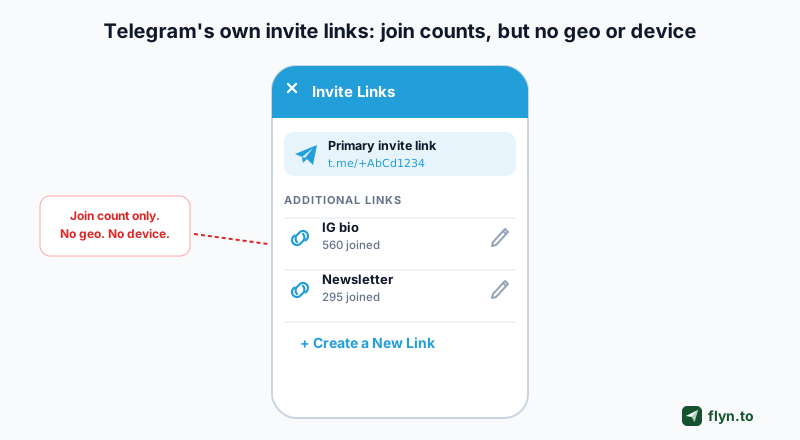
Give Telegram credit first. Its named invite links feature is genuinely useful and you should use it. From channel or group settings you can create multiple invite links, label each one ("IG bio", "newsletter", "paid campaign"), and Telegram keeps a separate join count per link. Rename a link later and the stats are preserved. For a rough "which link got more joins" read, that is real data straight from the source of truth: the membership itself.
 Tap to enlarge
Where the native feature stops
The ceiling shows up fast. Telegram's invite stats give you a number and nothing else. There is no geo breakdown, no device split, no referrer, and no timeline you can slice. Worse for the creator crowd, UTM parameters do not work inside the Telegram app and are not captured in channel analytics, so the tagging trick you use on a website silently does nothing here.
Native named invite links answer "how many joined via this link." They cannot answer "which country, city, or device those people came from." That second layer is where a short-link tracker earns its place.
So the honest framing is this: Telegram tells you joins per named link; it never tells you the shape of the traffic behind those joins. To get that, you add a measurement layer on the click that happens before Telegram ever opens.
The scope-honest truth: clicks in, not joins inside
Read this part slowly, because getting it wrong leads to disappointment. A URL shortener like Flyn tracks the click-through to your channel. When someone taps your source-tagged short link, Flyn records the click, the source, the country and city, the device, and the referrer, then redirects them to your t.me/+ invite. What happens after that redirect, inside Telegram, is invisible to any external tool. Flyn cannot see inside Telegram. It does not know who tapped "Join", who lurked, or who left an hour later.
Flyn measures the doorway, not the room. It tells you which sources send the most qualified traffic to your invite; Telegram's own join count confirms how many of them walked all the way in.
Why the click layer still wins
That limit sounds like a dealbreaker until you use both together. The click data is where all the marketing signal lives, because it carries the dimensions Telegram refuses to expose:
- Source at the link level, so IG-bio traffic never blurs with X traffic.
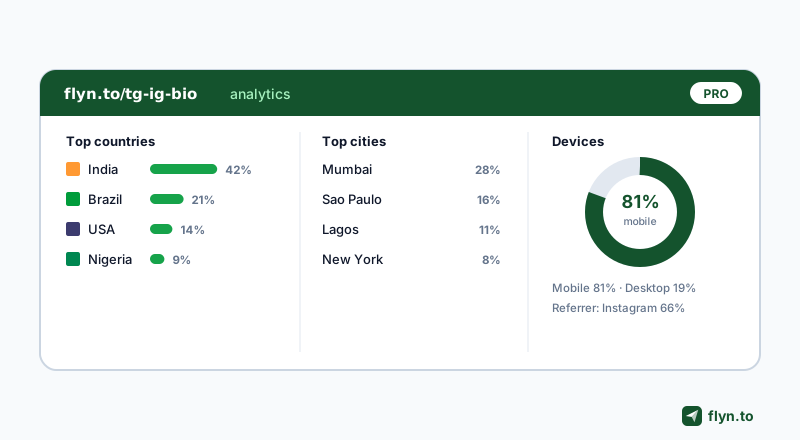
- Geo down to the city on Pro, so you learn a channel is 60% Brazil before you translate a single post.
- Device and browser, so a mobile-first audience gets mobile-first content.
- Referrer, so you can tell an in-app tap from a Google result.
Pair that with Telegram's per-link join count and you get a two-sided view: Flyn tells you the quality and origin of the traffic, Telegram confirms the conversion. Neither claims to do the other's job, which is exactly how honest attribution should work. If you want the deeper theory on this, our guide to how to track clicks on a link covers the mechanics.
The per-source short-link workflow
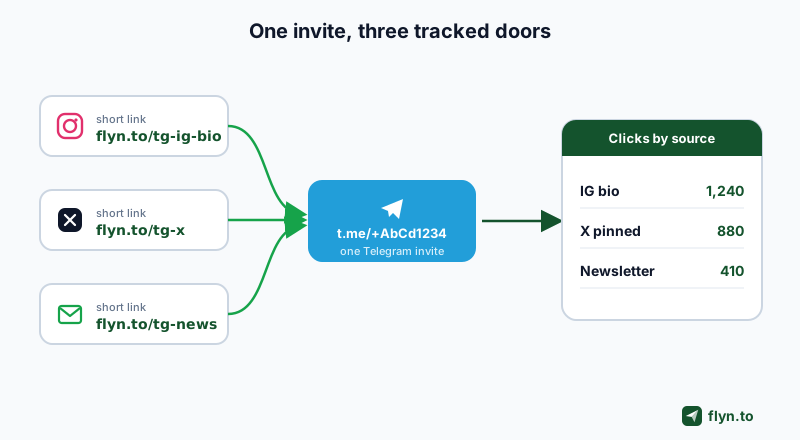
Here is the core move. You keep one invite link and give it many trackable front doors. Every source gets its own Telegram short link that redirects to the identical t.me/+ invite. Same destination, different tracked entrances. Because each short link has its own analytics, the clicks self-sort by source without any manual counting.
 Tap to enlarge
Why not just use the raw t.me link
Three reasons. First, a raw t.me/+AbCd1234 link is ugly and untrusted in a bio; a branded short link on your own domain reads as legitimate and, per our data on why branded links increase CTR, gets tapped more. Second, the raw link gives you zero source separation. Third, you cannot swap the destination later without re-sharing everywhere, whereas a short link lets you rotate the underlying invite (say, when you regenerate an expired one) while the public link stays put.
Make one short link per source, never one per platform-type. "X-bio" and "X-pinned-post" should be two links if you want to know whether your bio or your pin does the work. Granularity is free to create and impossible to add retroactively.
This same pattern powers attribution on every network, not just Telegram. Creators use it for Instagram bio links and it is the backbone of any real link-in-bio strategy for creators. Telegram is just a particularly good fit because its native tooling leaves the geo and device gap wide open.
Step by step: wrap your invite in trackable links
Concrete now. Assume your channel invite is t.me/+AbCd1234EfGh and you promote in four places: Instagram bio, X, a newsletter, and a partner shoutout. Here is the full setup.
 Tap to enlarge
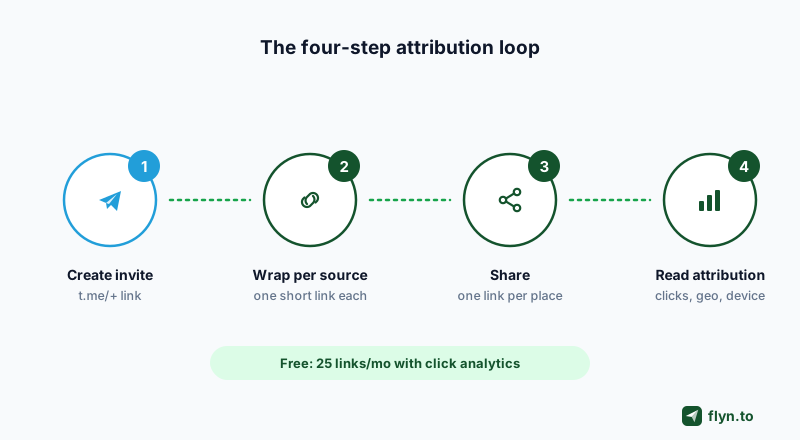
1. Create (or reuse) your Telegram invite
In your channel, open the invite links panel and create a named invite link, or reuse your primary one. If your channel is public with a t.me/yourhandle username, that public link works as the destination too. Copy it.
2. Wrap it, once per source
Paste the invite into the Telegram link shortener and set a custom slug that names the source. You can even shorten without an account and claim the links later. Create these four:
flyn.to/tg-ig-biofor the Instagram bio.flyn.to/tg-xfor X.flyn.to/tg-newsfor the newsletter.flyn.to/tg-partnerfor the partner shoutout.
3. Add UTMs if you also pipe traffic through a site
If a source routes through a landing page before Telegram, append campaign tags with the UTM builder so downstream analytics stay clean. Our guide to UTM parameters explains the five fields; remember UTMs are for your web analytics, not for Telegram's in-app stats, which ignore them.
4. Share each link in exactly one place
Discipline is the whole game. The IG-bio link goes only in the IG bio. Cross-post it into a tweet and your data is instantly polluted. If you need the same destination in two spots, make two links. Prefer a Telegram share link generator when you want a pre-filled "forward to a friend" flow rather than a plain join link.
Reading the data: which source actually drives joins
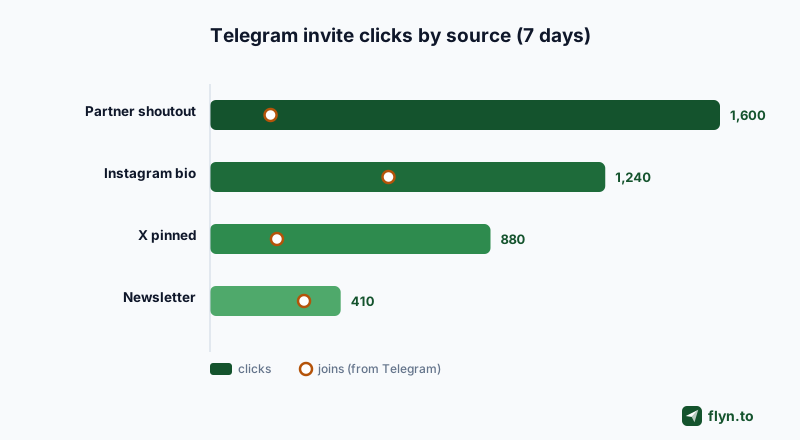
A week later, open your dashboard. Each short link shows its own click count, and side by side they become a ranked source report. This is the moment the whole setup pays off: the vague feeling that "Instagram is probably our best channel" gets replaced by a number that occasionally embarrasses you.
 Tap to enlarge
Line the numbers up against Telegram's per-link join counts and you get conversion context. Here is a worked example:
| Source | Flyn clicks | Telegram joins | Click-to-join |
|---|---|---|---|
| Instagram bio | 1,240 | 560 | 45% |
| X (pinned post) | 880 | 210 | 24% |
| Newsletter footer | 410 | 295 | 72% |
| Partner shoutout | 1,600 | 190 | 12% |
What this table tells you to do
The partner shoutout sent the most clicks and the fewest joins: loud traffic, wrong audience. The newsletter converted best but is small, so it deserves more volume, not less. The read is only possible because Flyn supplied the click denominator that Telegram alone can't. For a deeper treatment of turning taps into decisions, see click-to-X links and mobile conversion.
A high click count with low joins is not always a bad source. It can mean your channel's join screen is weak, or the invite expired mid-week. Check the invite is live and that your channel description sells the join before you kill a source.
Geo, device, and referrer: the layer Telegram won't give you
This is where the short-link layer stops being a nicety and becomes the reason you set it up. Telegram's native stats are a flat number. Flyn's click analytics turn each source into a breakdown you can act on.
 Tap to enlarge
Geo down to the city
On Pro you see city-level geo, not just country. If your "newsletter" link is 70% one city, that is a local community you can serve directly. Our piece on geo-targeting links by country shows how to act on that, and if you later want to send different audiences to different destinations, smart routing and the idea of smart links do exactly that.
Device and referrer
The device split tells you whether to optimize for the mobile tap or the desktop reader. The referrer separates in-app taps from search and other sites. These three dimensions, source plus geo plus device, are the entire gap between Telegram's join count and real marketing intelligence. All of it is GDPR-safe because Flyn's analytics avoid invasive per-person tracking. This same click-analytics stack is what powers attribution on other invite-driven platforms too; the parallel playbook for Discord invite link optimization is worth a read if you run both.
Free vs Pro, and the mistakes that waste your data
You do not need to pay to start. Flyn's free tier gives 25 links a month, basic click analytics, QR codes, custom slugs, and link expiration, which is enough to run a clean four-source test on a new channel. When you outgrow it, Pro at $12 a month, or $9 a month billed annually, lifts the ceilings that matter here.
What Pro unlocks for Telegram tracking
- Unlimited per-source links, so you never ration granularity.
- City-level geo, device, browser, and referrer with unlimited retention.
- Three custom domains with auto-SSL for branded links that get tapped more.
- The UTM builder, bulk CSV import and export, folders, and tags to keep hundreds of links organized.
- Retargeting pixels across 13 ad platforms via pixel attachment, so warm invite-clickers can be re-reached.
Three mistakes that ruin the report
Avoid these and your data stays trustworthy:
- Reusing one link across sources. The single biggest error. One link means zero attribution, full stop.
- Letting the invite expire. If the underlying
t.me/+link dies, clicks keep counting but joins crater. Confirm the invite is live and that your short links are safe and unflagged. - Ignoring the click-to-join gap. Clicks without joins is a signal about your channel, not just your sources.
Start free, wrap your four biggest sources today, and read the ranked report next week. Grab the Telegram shortener, browse the full tool kit, and when you are ready, create a free account to keep your links and history in one place.
Frequently Asked Questions
Can Flyn tell me who actually joined my Telegram channel?
Do UTM parameters work on Telegram invite links?
How many trackable links do I need for one Telegram channel?
Will a short link hurt trust compared to a raw t.me link?
What is the difference between Telegram's named invite links and Flyn?
Can I change the Telegram invite behind a short link later?
Is city-level geo tracking available on the free plan?
Does this workflow work for Telegram groups too, not just channels?
Free tools for this
Three Flyn tools that pair well with the strategy in this article, all free, no signup needed.
UTM Builder
Build campaign-tracked URLs in seconds.
Broken Link Checker
Scan any page for dead links and 404s.
Open Graph Checker
Preview how URLs unfurl on social.
Keep reading
Three related deep-dives from the Flyn blog.
QR Codes for Events: Tickets & Check-In
12 min read

How to Add a Link to Your TikTok Bio
12 min read

Instagram Bio Link: How to Add One and Track Clicks
12 min read
Ready to try Flyn?
Free plan includes 25 links/month, full analytics, and access to all 30+ free tools above. No credit card required.
Already a member? Log in
Karan Bhakuni is the founder of Flyn. He writes about branded links, click analytics, and the link-management tooling growth teams and creators actually need, drawn from building Flyn and reading a lot of user feedback.
Find these guides useful? Add Flyn as a preferred source so more of them show up in your Google results.