Instagram Says Your Link Is Unsafe? Fix It Fast
Instagram just stamped a "this link may be unsafe" warning on your bio link and your sales stalled. Here is why Meta blocks it, how to get unblocked today, and the structural fix that keeps it from happening again.


Your Instagram Link Died and Your Revenue Went With It
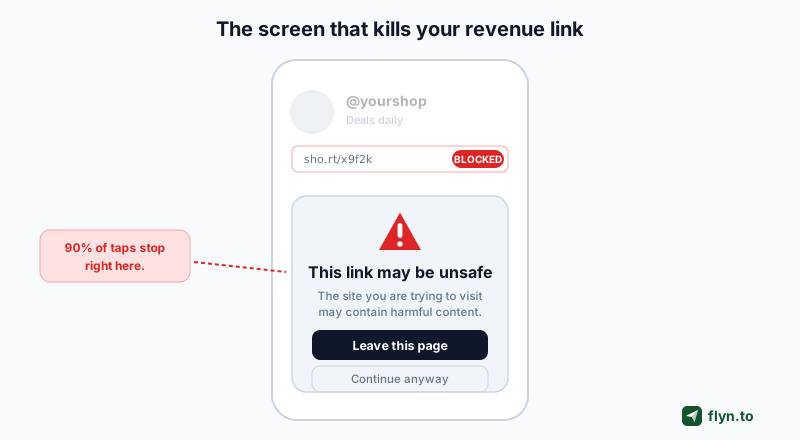
You run a shop or a creator brand, your bio link is effectively the checkout button for everything you sell, and this morning Instagram stamped a gray this link may be unsafe warning across it. Every tap now lands on a scary full-screen interstitial instead of your product page, your DM link refuses to send, and your story link sticker quietly gets rejected. That is money leaking by the hour. This guide gets you unblocked today, then rebuilds your setup so Meta stops treating your link as a threat next week.
First, get clear on exactly what you are seeing, because Instagram serves this block in several places:
- Bio link: tapping it opens a warning screen saying the destination may be unsafe, with a Leave-this-page style button.
- DMs: the message fails to send, or the recipient sees a broken-or-unsafe notice.
- Story link sticker: the sticker is rejected on upload, or viewers get bounced back.
- Comments and captions: the link text is stripped or the reach is quietly throttled.
 Tap to enlarge
It is the link, not your account
Here is the reframe that saves you hours: in most cases your account is fine. The domain inside your link is what tripped the wire. That is good news, because a domain problem has a clean fix, while an account problem does not. If you are wondering whether the shortener itself is the issue, our primer on whether short links are safe explains how these warnings actually get triggered.
What This Link May Be Unsafe Actually Means
Instagram and its parent Meta do not eyeball your link by hand. They run every URL against a stack of automated safe-browsing signals: their own internal reputation systems plus third-party threat databases. If any layer returns a bad verdict, the link gets wrapped in the warning or blocked outright. Being accurate here matters, so do not expect a magic switch that turns the block off.
Meta checks your destination against safety databases
When you paste a link, Meta resolves where it ultimately points and compares that final destination against known-bad lists. If your landing page, your redirect hop, or the shortener domain appears on one, the whole link inherits the flag. This is the same class of check Google runs with Google Safe Browsing, which powers the unsafe-site warnings you see in Chrome.
Third-party blocklists feed the decision
Meta does not build every signal in house. As security researchers note, if your domain or its DNS records show up on spam blacklists like those checked by MXToolbox or the Google Transparency Report, Instagram can block your link even when your actual site is perfectly legitimate. You can be a clean business and still get caught because the neighborhood you are in got flagged. That mechanic is the heart of why short links get flagged as spam.
Why you cannot always appeal instantly
Appeals are real but slow and not guaranteed. Meta pulls from external databases it does not control, so even after you clean everything up, the flag can linger until the upstream list refreshes and Meta re-crawls. Plan for a fix that removes the cause, not one that argues with the symptom.
The 5 Reasons Instagram Blocked Your Link
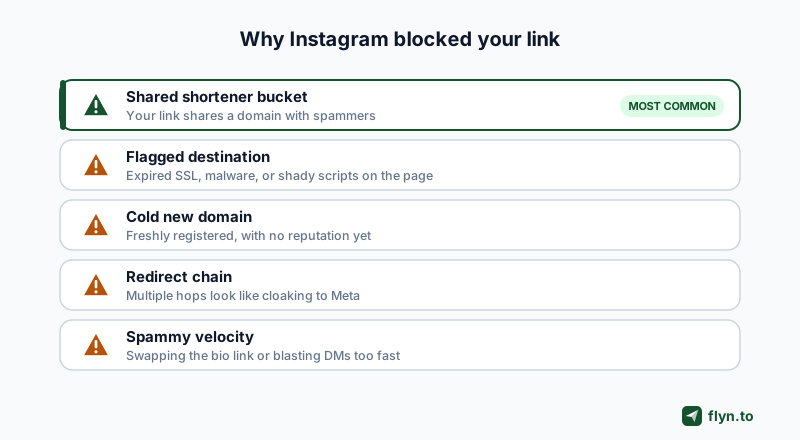
Nearly every unsafe-link block on Instagram traces back to one of five root causes. Run down this checklist and you will usually spot yours in under a minute.
 Tap to enlarge
Cause 1: You are stuck in a shared shortener bucket
If you use a free shared shortener domain (the kind millions of strangers also use), your link shares its reputation with every spammer on that same domain. When enough abuse piles up, the domain lands on a blocklist and all links on it get swept into the block together.
Cause 2: Your destination itself is flagged
Sometimes the shortener is innocent and your landing page is the problem: an expired SSL certificate, malware on a plugin, sketchy ad scripts, or a page that got hijacked. Meta reads the final destination, so a flagged endpoint blocks the short link in front of it.
Cause 3: Your domain is brand new and cold
A freshly registered custom domain with zero history has no trust built up. New domains are statistically riskier, so Meta is quicker to gate them until they earn a reputation. This is normal and temporary.
Cause 4: You built a redirect chain
Stacking redirects (a shortener pointing at another shortener pointing at a tracker) looks exactly like cloaking to a safety scanner. Every extra hop is another chance for one link in the chain to be dirty. Long redirect chains are a top trigger.
Cause 5: You posted too aggressively
Swapping your bio link ten times an hour, blasting the identical URL across dozens of DMs, or automating posts trips Instagram's spam-velocity heuristics. The link can be clean and still get gated because the behavior looks bot-like.
Why a Shared Shortener Domain Gets Everyone Blocked
Cause 1 deserves its own section because it is the single most common reason legitimate sellers get hit, and it is the one with the most durable fix. The mechanics are simple and a little unfair.
 Tap to enlarge
One bad actor, everyone's links
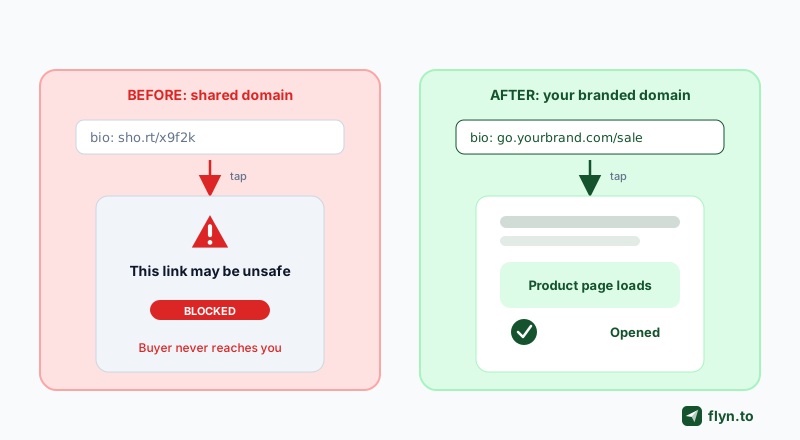
When you use a shared free shortener, your links and a phisher's links live on the exact same domain. Meta and Google score reputation at the domain level, not per individual link. So when a scammer runs a phishing campaign on that domain, the safety database flags the whole domain, and your clean product link goes down as collateral damage. As one deliverability analysis bluntly puts it, your legitimate shares inherit the consequences of every spammer on the same service.
Your link is only as trustworthy as the worst stranger sharing your domain. On a shared shortener, that is a bet you lose eventually.
Your own domain isolates your reputation
Move to a custom branded domain like go.yourbrand.com and the math flips. You are the only one publishing from that domain, so no stranger can drag it onto a blocklist. Your reputation becomes yours to build and yours to protect. This is the structural difference our deep dive on custom domains and branded-link trust walks through in detail, and it is the core reason Instagram blocks free shorteners far more often than branded ones.
First Aid: Unblock Yourself in the Next 10 Minutes
Before the long-term fix, triage the emergency. These steps tell you whether the block is your destination, your domain, or your account, and often restore traffic the same day.
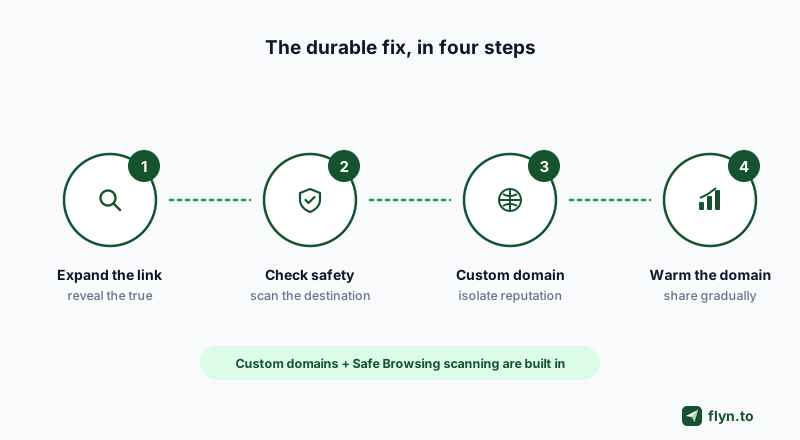
Expand the link to see the true destination
You cannot fix what you cannot see. Paste your short link into our free URL expander to reveal the full redirect path and the real final destination. If it passes through three other shorteners you forgot about, you just found your redirect chain.
Scan the destination for safety flags
Run that final URL through our short-link safety checker to see if the destination is on a Safe Browsing list. If you manage many links, the bulk health checker tests a whole batch at once so you can find the one poisoning your account.
Confirm the block with Facebook's Debugger
Meta runs a public Sharing Debugger tool. Paste your domain in and re-scrape it. If it returns a message that the content does not meet Community Standards, the domain is confirmed blocked at the Meta level, and no bio edit will save it. Only a clean domain will.
While you wait for a blocklist to clear, put a temporary clean link in your bio that points to a simple, unflagged page (your homepage or a fresh landing page on a different domain). Keep the revenue flowing while you rebuild the proper setup underneath.
If the destination is clean and the block is purely velocity-based, ease off: stop swapping the bio link repeatedly and stop pasting the identical URL into dozens of DMs. Give the account 24 to 48 hours to cool down.
The Durable Fix: Move to Your Own Branded Domain
Triage buys you hours. A branded domain buys you permanence. This is the fix that actually addresses the root cause instead of fighting the symptom, and it is why serious sellers stop using free shared shorteners the moment they get burned once.
 Tap to enlarge
Set up a custom domain in minutes
On Flyn Pro you connect up to three custom domains with automatic SSL, then publish branded short links on them. Your Instagram link becomes go.yourbrand.com/sale instead of a generic shared slug. Point your Instagram link shortener at that domain and every future post rides your own clean reputation.
| Factor | Shared free shortener | Your branded domain |
|---|---|---|
| Reputation | Pooled with every stranger | Yours alone |
| One spammer blocks you | Yes, collateral damage | No, isolated |
| Instagram trust | Lower, often gated | Higher, recognized brand |
| Click-through rate | Generic and skippable | Branded and clickable |
| Control if flagged | None, you wait | You clean and re-warm it |
Branded links also lift trust and clicks
The reputation win is not the only payoff. A recognizable domain reassures the tapper that the link is really yours, which is why branded short links increase click-through rate. You fix a crisis and improve conversion in the same move.
A custom domain is a structural fix, not a guaranteed bypass. Instagram and Meta can still block any link if the destination is flagged or you behave spammily. A branded domain removes the shared-reputation risk, but you still have to keep your destinations clean. No shortener, Flyn included, can promise Instagram will never block a link.
Keep Your Domain Clean, Warm, and Off Blocklists
Owning a domain is step one. Keeping it trusted is the ongoing job. Follow this simple flow and your Instagram links stay alive.
 Tap to enlarge
Warm the domain before you blast it
A brand-new domain has no history, so do not point ten thousand followers at it on day one. Share it gradually over a week or two, let real clicks accumulate, and let the domain build trust before your biggest campaigns. Warming is the difference between a smooth launch and a fresh block.
Kill redirect chains
Point your branded link directly at the final destination. One hop, no stacking. If you use tracking, add UTM parameters on that single link rather than chaining through another redirector. Fewer hops means fewer chances to get flagged.
Keep destinations Safe-Browsing clean
Audit your landing pages: valid SSL, no malware, no shady third-party scripts, and no expired plugins. Re-scan periodically with the safety checker so you catch a problem before Meta does. If you ever need to hide a messy affiliate URL, use proper link cloaking on your own domain rather than stacking shorteners, which reads as deception to scanners.
How Flyn Keeps Your Instagram Links Alive
Flyn is built for exactly this failure mode, because Instagram is one of the single biggest sources of traffic our users depend on. Here is how the pieces fit together for a seller who just got blocked.
Built-in Safe Browsing and a kill switch
Every destination you shorten with Flyn is scanned with Google Safe Browsing at creation, and a link that later turns bad can be kill-switched to a safe page so one compromised destination never poisons your whole domain. That is the same discipline that keeps a branded domain trustworthy over time.
Your domain, your analytics, your pixels
On Flyn Pro ($12 a month, or $9 a month billed annually) you get three custom domains with auto-SSL, unlimited links, and real-time click analytics down to city, device, and referrer, so you can prove your Instagram traffic is real. You can also fire retargeting pixels for Meta and eleven other ad platforms, and use smart routing to send mobile and desktop taps to the right place. If you are optimizing the whole funnel, pair this with our link-in-bio strategy for creators.
Start free, upgrade when you need the domain
You can shorten and test on the free plan today, and even shorten an Instagram link without an account first, then claim it. When you are ready to end the shared-domain risk for good, create an account and connect your own domain. For the setup and optimization side (once your link is unblocked), our guide to the Instagram bio link covers placement and conversion. Explore every free helper on the tools page.
Frequently Asked Questions
Why does Instagram say my link may be unsafe when my website is fine?
How do I fix a blocked Instagram bio link today?
Does using bit.ly or a free shortener cause Instagram blocks?
Will a custom domain guarantee Instagram never blocks my link?
How do I check if my domain is on a blocklist?
How long does an Instagram link block last?
Should I warm up a new custom domain before sharing it on Instagram?
Can I track clicks on my Instagram link without getting flagged?
Free tools for this
Three Flyn tools that pair well with the strategy in this article, all free, no signup needed.
UTM Builder
Build campaign-tracked URLs in seconds.
Broken Link Checker
Scan any page for dead links and 404s.
Open Graph Checker
Preview how URLs unfurl on social.
Keep reading
Three related deep-dives from the Flyn blog.

How to Track Which Posts Drive Sales, Not Just Clicks
19 min read

Email Newsletter Click Tracking: Measure Your Real CTR
12 min read

How to Choose a Branded Short Domain for Your Links
13 min read
Ready to try Flyn?
Free plan includes 25 links/month, full analytics, and access to all 30+ free tools above. No credit card required.
Already a member? Log in
Karan Bhakuni is the founder of Flyn. He writes about branded links, click analytics, and the link-management tooling growth teams and creators actually need, drawn from building Flyn and reading a lot of user feedback.
Find these guides useful? Add Flyn as a preferred source so more of them show up in your Google results.