Free Short Link Bulk Health Checker
Paste up to 25 URLs or short links, one per line, to check each HTTP status code, see the status of every redirect hop, and find broken destinations, HTTP pages, and long redirect chains in one run.
Paste one public short link per line. Private and internal URLs are blocked.
Want safer branded short links?
Create Flyn links with click counts, QR codes, and clean one-hop redirect control; custom domains, passwords, and full analytics are on Pro.
How to Use Short Link Bulk Health Checker in 3 Steps
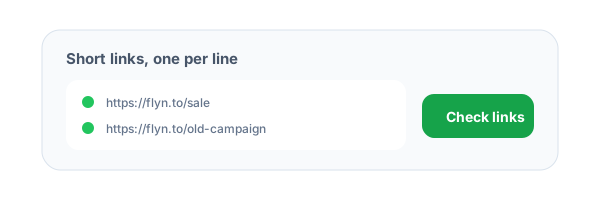
Paste links line by line
Add up to 25 public short links or campaign URLs, one URL per line.
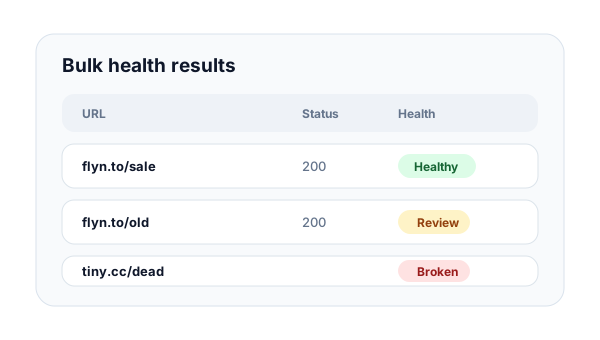
Run the bulk audit
Flyn resolves each URL, records final status, destination, HTTPS state, redirect count, response time, and the status code of every redirect hop.
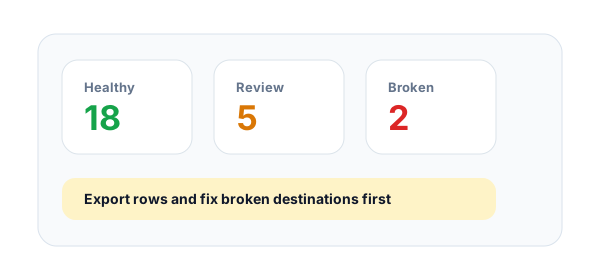
Fix broken links first
Prioritize rows marked broken or review, then rebuild, update, or retire weak short links before users click.
What is short link bulk health checking?
Bulk health checking lets you inspect many short links at once instead of opening them one by one. It is useful for campaign QA, migration reviews, old link cleanup, QR batches, and periodic link maintenance.
When to run a bulk link check
Run a bulk check before major launches, after changing landing pages, before printing QR batches, during link shortener migrations, and when auditing old social or email campaigns that may point to expired pages.
How Flyn classifies link health
A healthy row resolves to a reachable HTTPS destination. Review rows resolved but need attention: the final URL is plain HTTP, or the final response is a 4xx or 5xx status such as 404. Broken rows could not be traced to the end, for example a timeout, an unreachable host, a redirect loop, more than 8 redirects, or a redirect to a private address.
Example links for a bulk health check:
https://flyn.to/sale, https://flyn.to/demo, https://flyn.to/store-qrShort Link Health Signals Explained
final_statusRequiredShows whether each link reaches a working final destination or fails before users arrive.
Examples
200 healthy, 404 review, timeout broken
Pro tip
Treat broken rows as cleanup tasks before a campaign, migration, or QR print run.
https_final_urlChecks whether the final landing page uses HTTPS after every redirect.
Examples
https://yourdomain.com/page, http://yourdomain.com/page
Pro tip
HTTP final destinations should be reviewed even when the page technically loads.
redirect_countCounts how many redirects happen between the short link and final page, and lists the status code of each hop.
Examples
0 direct, 1 shortener hop, 301 > 302 > 200
Pro tip
Long chains slow down clicks and make link problems harder to troubleshoot.
response_timeMeasures server-side response timing so slow destinations are easy to spot in a batch.
Examples
120ms fast, 2500ms slow
Pro tip
Prioritize slow links before large sends where latency affects conversion.
Bulk Short Link Health Best Practices
Do
Do not
Check links before large email sends
Find broken links after subscribers click
Audit migrated short links in batches
Spot-check only one or two old links
Fix broken rows first
Treat every warning as equal priority
Review HTTP final destinations
Assume HTTP is acceptable because it loads
Export or copy rows into cleanup tasks
Leave findings inside a browser tab
Retest after landing-page changes
Assume old links stay healthy forever
Use short branded links for QR batches
Print untested raw URLs
Keep batch size focused
Mix unrelated campaigns in one review
Why Flyn
Built around link workflows, not generic page checks.
Batch input
Paste up to 25 links at once for quick campaign and migration checks.
Final destination visibility
See where every short link actually lands after redirects.
Health classification
Separate healthy links from links that are broken or need review.
CSV-ready results
Copy results as CSV, including each row's hop-by-hop status chain, into a spreadsheet or task tracker.
How to Run a Bulk Link Health Review
Bulk checks work best when they are tied to a specific launch, migration, QR batch, or monthly campaign cleanup.
Collect the exact public links
Paste the short links, campaign URLs, or QR destinations that users will actually click.
Sort by health state
Review broken rows first, then HTTP destinations, slow responses, and long redirect chains.
Create cleanup tasks
Copy the results into a spreadsheet or tracker and retest after each fix.
Bulk QA rule
Do not mix old migrations, live launches, and QR batches in one review unless the same team owns the cleanup.
Common Bulk Link Audit Mistakes to Avoid
Auditing the wrong URL list
Draft URLs and final share URLs can behave differently after shortening, wrapping, or routing.
Ignoring review rows
A link can resolve but still deserve attention because it ends on plain HTTP or returns a 4xx or 5xx status such as 404.
Checking only before launch
Old short links can break months later when landing pages are moved or deleted.
Mixing campaigns without ownership
Bulk results are easier to fix when every row belongs to one owner or one launch checklist.
Not retesting after fixes
A cleanup task is not done until the same public link passes a fresh health check.
Bulk Short Link Health Check Examples
Email send checklist
https://flyn.to/newsletter-hero, https://flyn.to/newsletter-footerCheck every link in the email before the campaign is scheduled.
Shortener migration
https://flyn.to/imported-001, https://flyn.to/imported-002Bulk audits make imported link issues easier to triage after migration.
QR print batch
https://flyn.to/table-qr, https://flyn.to/menu-qr, https://flyn.to/packaging-qrRun a batch before QR files are printed or sent to vendors.
Partner link review
https://flyn.to/partner-a, https://flyn.to/partner-bReview partner destinations before renewing placements or affiliate traffic.
Monthly link cleanup
https://flyn.to/old-launch, https://flyn.to/webinar-replayPeriodic checks find stale destinations before users report them.
Frequently Asked Questions
How many links can I check at once?
Can I check the HTTP status code of many URLs at once?
Does it show every redirect hop and whether it is a 301 or 302?
How do I bulk check 301 redirects after a site migration?
What does Healthy mean?
What does Review mean?
What does Broken mean?
Can I use this for old Flyn or third-party short links?
Will this count as clicks in analytics?
Does the bulk checker crawl pages?
Can I export results?
Why are private URLs blocked?
How should Flyn teams use this?
More Free Link Tools
Explore other free tools from Flyn to audit, clean, and improve your links.
Short Link Safety Checker
Deeply inspect one suspicious or important short link.
QR Destination Audit
Check QR landing destinations before printing or launch.
Bulk URL Opener
Open a list of links in new tabs, in batches, to review the flagged ones by eye.
Redirect Checker
Inspect redirect chains and status codes in detail.
Build safer link campaigns with Flyn
Use free link QA tools first, then create branded short links with analytics, QR codes, and redirect controls.