Free QR Destination Audit
Paste the destination behind a QR code and verify it is secure, reachable, fast, mobile-ready, and clean enough for real-world scans.
Want safer branded short links?
Create Flyn links with click counts, QR codes, and clean one-hop redirect control; custom domains, passwords, and full analytics are on Pro.
How to Use QR Destination Audit in 3 Steps
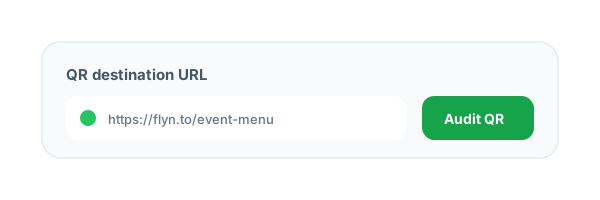
Paste the QR destination
Enter the URL encoded in the QR code or the short link you plan to print.
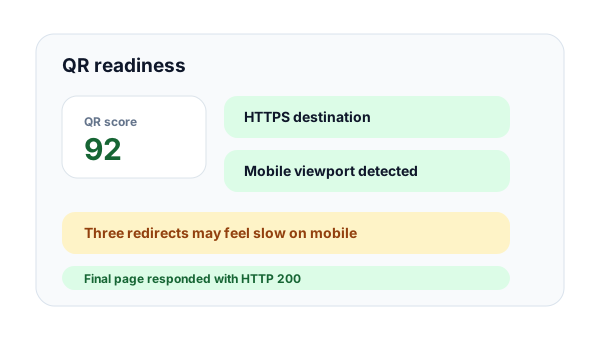
Inspect scan readiness
Flyn checks HTTPS, final status, redirect count, response time, URL length, and mobile viewport markup.
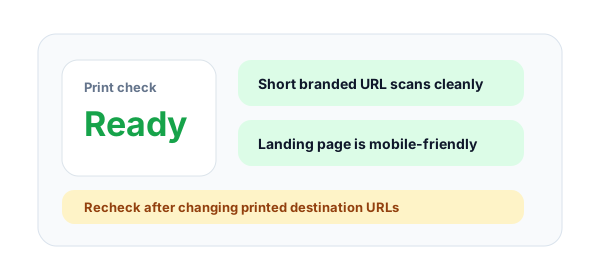
Fix before printing
Resolve slow redirects, insecure pages, broken statuses, or mobile issues before QR codes are printed or shipped.
What is a QR destination audit?
A QR destination audit checks the URL behind a QR code before it is printed, packaged, or distributed. Because printed QR codes are hard to change, teams should verify the destination is secure, reachable, fast, and mobile-friendly first.
Why QR links need a different QA pass
QR scans usually happen on mobile networks, inside scanner apps, and in offline contexts where users have low patience. Long redirect chains, HTTP pages, and non-mobile landing pages can turn a scan into a failed conversion.
How Flyn evaluates QR readiness
The audit resolves public redirects, checks the final HTTP status, verifies HTTPS, measures server-side response time, inspects basic mobile viewport markup, and warns when the encoded URL is too long for clean QR generation.
Example QR destination to audit:
https://flyn.to/store-qrQR Destination Audit Checks Explained
https_statusRequiredConfirms the final QR destination uses HTTPS so scanners do not open a warning-prone page.
Examples
https final URL, valid reachable response
Pro tip
Always use HTTPS for QR campaigns, especially when the page contains forms or payment flows.
redirect_countMeasures how many hops happen before the scanner reaches the landing page.
Examples
0 redirects, 1 short-link redirect, 3+ review hops
Pro tip
Shorter redirect chains usually scan faster and are easier to debug.
mobile_viewportLooks for viewport markup that helps pages render correctly on phones.
Examples
meta name="viewport"
Pro tip
Treat missing viewport markup as a prompt for manual mobile review before print.
encoded_url_lengthFlags long URLs that create dense QR codes and may be harder to scan on small surfaces.
Examples
short branded URL, long raw campaign URL
Pro tip
Use a branded short Flyn link for cleaner QR codes and editable destinations.
QR Destination Audit Best Practices
Do
Do not
Audit the exact URL encoded in the QR code
Only check the landing page after redirects
Use short branded HTTPS links
Print dense raw campaign URLs
Keep redirect chains short
Stack multiple wrappers before the landing page
Test on mobile networks
Only test on office Wi-Fi and desktop browsers
Check before artwork is finalized
Wait until packaging or signage is printed
Use editable destinations for offline campaigns
Hard-code final URLs that may change
Retest after landing-page releases
Assume QR pages stay healthy forever
Track QR campaigns with clean UTMs
Mix QR traffic with generic direct visits
Why Flyn
Built around link workflows, not generic page checks.
Print-safe QA
Catch destination issues before the QR code is placed on packaging, signage, or event materials.
Mobile readiness
Detect viewport markup so you can review landing pages that may not fit phone screens.
Redirect speed checks
Shorter redirect chains create faster scans and less user confusion.
HTTPS verification
Avoid sending QR scanners to insecure or warning-prone destinations.
How to QA QR Links Before Printing
QR destination QA should happen before the print file, packaging, menu, flyer, or event sign is approved.
Create the short QR URL
Use a branded Flyn short link when possible so the QR code stays compact and the destination can be changed later.
Audit scan readiness
Check HTTPS, redirects, response status, response time, mobile viewport markup, and URL length.
Test the printed context
Scan from a phone at the expected size and distance before final production.
QR QA rule
If the audit says review or broken, fix the destination before printing. Offline QR mistakes are expensive to undo.
Common QR Destination Mistakes to Avoid
Printing a long raw URL
Long URLs create denser QR codes that can scan poorly on small labels, flyers, or packaging.
Ignoring mobile layout
Most QR scans happen on phones, so missing viewport markup or desktop-only pages can kill conversions.
Using too many redirects
Each hop adds latency and another failure point for users scanning on mobile networks.
Sending scanners to HTTP
Insecure destinations can trigger browser warnings and reduce trust.
Not retesting after edits
A destination change after print approval can break a campaign that was previously healthy.
QR Destination Audit Examples
Restaurant menu QR
https://flyn.to/menuCheck mobile readiness and HTTPS before printing table tents or menu stickers.
Product packaging
https://flyn.to/product-guidePackaging lives for months, so use a short editable link and audit it before production.
Event booth signage
https://flyn.to/booth-demoEvent scans happen on busy mobile networks, so redirect speed matters.
Direct mail
https://flyn.to/mail-offer?utm_source=direct_mail&utm_medium=qr_code&utm_campaign=q2_offerUse UTMs to separate direct mail QR traffic from other offline campaigns.
Retail display
https://flyn.to/store-displayAudit the exact QR destination before signs are shipped to stores.
Frequently Asked Questions
Why should I audit QR destinations before printing?
Does this tool generate QR codes?
Why does redirect count matter for QR codes?
What is a mobile viewport check?
Why does URL length matter for QR codes?
Can this check dynamic QR destinations?
Does HTTPS matter for offline QR campaigns?
Can I use this for restaurant menus and packaging?
Will the audit crawl my whole site?
How should Flyn users use this?
More Free Link Tools
Explore other free tools from Flyn to audit, clean, and improve your links.
QR Code Generator
Create QR codes for a URL, WiFi, vCard, and more, download PNG or SVG.
QR Code Reader
Decode a QR code from any image or screenshot, right in your browser.
Short Link Safety Checker
Inspect hidden QR destinations and redirect risk.
URL Expander
Reveal the final destination behind short URLs.
Build safer link campaigns with Flyn
Use free link QA tools first, then create branded short links with analytics, QR codes, and redirect controls.