How to Track Which Posts Drive Sales, Not Just Clicks
Your biggest click source is often not your biggest revenue source. This is the method for finding out which post, bio, or comment actually produced sales, and how many clicks you need before the answer means anything.


Six Places, One Link, No Idea Which One Paid
Here is the situation almost every seller and creator ends up in. You have one thing to sell and one URL for it. Over a fortnight that URL goes into your Instagram bio, a pinned comment under a Reel, a YouTube description, an X thread, a Reddit comment, and a partner's newsletter. Sales come in. Your analytics says most of your traffic was social. Your bank says you made some money. Neither one tells you which of those six placements produced the buyers.
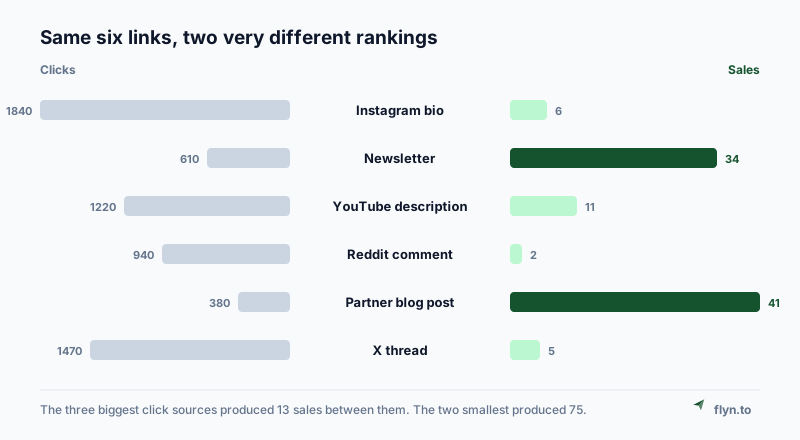
So you guess. Usually you guess with clicks, because clicks are the number you can see. And that guess is very often wrong, because attention and intent are not the same thing.
 Tap to enlarge
That flip is the normal case, not a freak result. A bio link collects idle taps from people browsing your profile. A partner's newsletter reaches people who already trust the person recommending you. One produces traffic, the other produces customers, and a click count cannot tell them apart.
This guide is the method for telling them apart. It is not a tool list. It works whether you sell through Shopify, Gumroad, Stripe, or a booking form, and it works with no ad spend and no CRM. If you want the definition of the underlying idea first, the conversion tracking glossary entry covers that in a couple of minutes. This is the operating manual.
A Short Link and a UTM Are Not Alternatives
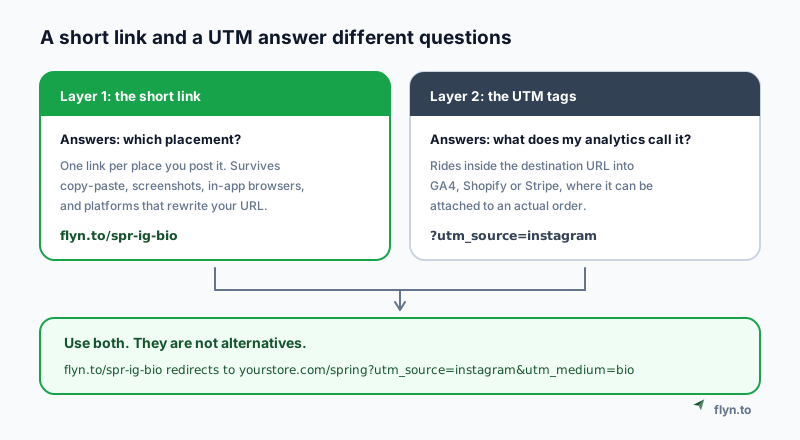
This is the confusion that costs people the most, and almost nothing on the internet clears it up: guides tend to pick a camp and argue for it. They are not competing answers. They answer different questions and they belong on top of each other.
 Tap to enlarge
What the short link is good at
It is short, so it survives being read aloud, screenshotted, or retyped. It stays yours when a platform rewrites or wraps outbound URLs. It works in places where a long tagged URL looks like spam. And it counts the click at the moment it happens, before any of the visitor's browser settings get a vote. On your own branded domain it also tends to earn more clicks than a generic one.
What the UTM is good at
UTM parameters travel into the destination, so Google Analytics, Shopify, or Stripe can attach them to a session and then to an order. That is the half a short link cannot do on its own. Build them without typos with the free UTM builder, check inherited ones with the UTM parser, and use the complete UTM guide for the naming conventions. If you are cleaning up an existing mess, the UTM audit workflow is the faster route.
Layer them
Put the UTMs on the destination URL, then shorten that. Your short link stays clean and memorable, and the tags arrive intact on the other side. Short links carry tracking parameters through the redirect, so nothing is lost in the hop.
Choosing between a short link and a UTM is like choosing between the envelope and the address. You need the envelope to get it carried and the address to get it delivered.
Connect the Click to the Order
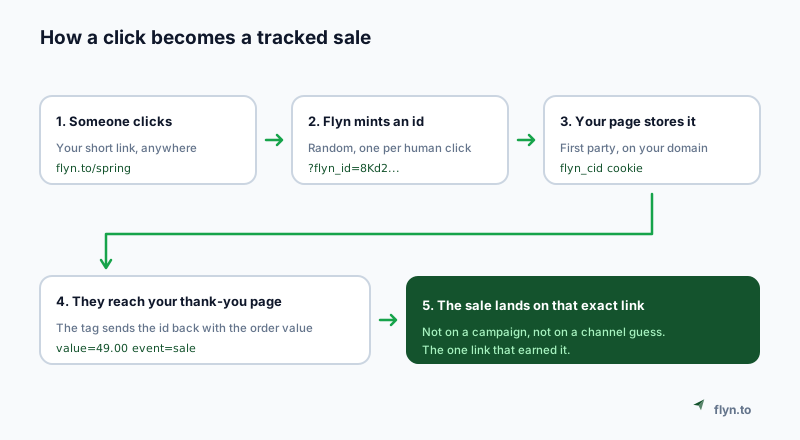
Placements and tags get you to "this many people came from here". The last mile is joining a click to an actual purchase, and that needs one more piece: an identifier that leaves with the click and comes back with the sale.
 Tap to enlarge
How the round trip works
When someone clicks a link with conversion tracking switched on, the redirect appends a random id to your destination URL. A small script on your site remembers it in first-party storage. When that visitor reaches your thank-you or order-complete page, the script reports the id back with the order value, and the sale lands on the exact link that earned it. Setup is two copy-paste lines, and there is a button that copies the full instructions if someone else manages your site.
Why this is not a third-party cookie
Nothing about this identifies a person. The id is meaningless outside your own account, it is stored on your own domain rather than a shared advertising one, and it carries no profile, no email, and no device fingerprint. It answers one question: did that click end in a sale. That is also why it keeps working while third-party cookies are being switched off around it.
The window, and the Safari caveat
A click can convert for 30 days. Safari and iOS cap script-set storage at around seven days, so a Safari visitor who buys three weeks later will show up as an untracked sale. Treat late Safari conversions as a bonus rather than a bug, and never assume your tracked total is your total revenue. It is the attributable share, and it is always a little smaller than the truth.
Five Placement Playbooks
The method is the same everywhere, but what you do with the answer differs a lot by situation. These are the five that come up most.
1. The creator with a link in bio
You have one bio slot and you keep changing what is in it. Give each destination its own link rather than editing one, so you can compare "the course link" against "the merch link" over months instead of losing the history every time you swap. Pair it with a deliberate link-in-bio strategy, and remember that bio traffic is the highest-volume, lowest-intent placement you own. Judge it on sales, or it will always look better than it is.
2. The seller posting the same product six ways
This is the case in the chart at the top. One product, six placements, and your instinct says to keep making more of whatever gets the most clicks. Once you can see revenue per placement, the instruction is usually the opposite: quietly stop doing the thing that gets attention and do more of the thing that got you paid. If two placements look genuinely close, split test them at the redirect layer instead of arguing about it.
3. The affiliate sending traffic to someone else's checkout
You cannot put a script on a merchant's thank-you page, so the browser method is unavailable to you. What you can do is pass an identifier into the network's sub-id field and have the network report the sale back to you server-side when it is approved. That is a different mechanism with its own vocabulary, and it is covered end to end in the postback URL guide. The strategy layer, sub-ids, disclosure, and cloaking, lives in the affiliate link tracking guide.
4. The newsletter and community operator
Your email platform reports clicks per campaign, which dies with the campaign. A short link outlives it, and it keeps counting when a subscriber forwards the issue or pastes your link into a Slack channel. That is exactly the traffic your email platform cannot see. There is a full walkthrough in newsletter click tracking.
5. The placements you simply cannot instrument
Some destinations will never accept a script: a Gumroad or Stripe payment link, a marketplace listing, an app store page, a partner's own site. Do not fake it. Use one of the two honest fallbacks instead. Give each placement its own discount code and read the code breakdown in your payment processor, or point each placement at a page you do control that then forwards to the uninstrumentable destination. Either way, say out loud which placements are measured and which are estimated, so you never quietly compare the two.
Read the Scoreboard Without Fooling Yourself
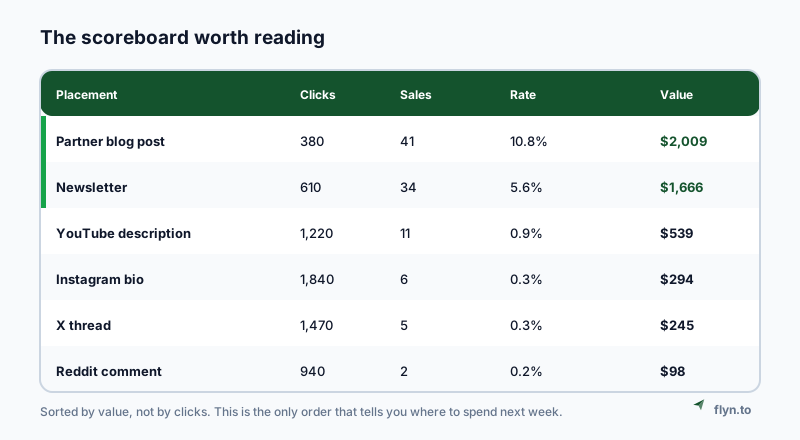
Once the data arrives, the failure mode changes. It stops being "I have no idea" and becomes "I am confidently wrong", which is worse. Three habits prevent most of it.
 Tap to enlarge
Divide by human clicks, not raw clicks
Conversion rate is sales divided by clicks, and the denominator decides whether the number means anything. Automated traffic inflates it: scanners, prefetchers, and preview bots all register as clicks. Flyn separates human clicks from bot clicks on every link for free, and the rate you should quote yourself is the one computed against humans. The click fraud guide goes deeper on what the automated share is made of.
Know how many clicks make a finding
Nobody publishes this and it matters enormously. Comparing two placements on 40 clicks each is reading tea leaves. A rough working rule:
| Human clicks per placement | What you can honestly say |
|---|---|
| Under 100 | Nothing. Keep collecting. |
| 100 to 300 | Only a large gap is real (say 4 percent against 0.5 percent). |
| 300 to 1,000 | A roughly two-to-one difference is probably real. |
| Over 1,000 | Small differences start to mean something. |
If a placement never reaches 100 human clicks, that is itself the finding: it is too small to matter, and no amount of analysis will change that.
Measure your own conversion lag
People rarely buy on the first visit. Look at the gap between click and purchase across your last few dozen sales and find the middle value. If your median lag is six days, then judging a placement 24 hours after posting is guaranteed to be wrong, and slow-burn placements like show notes and YouTube descriptions will always look worse than they are. Set your judging window to at least twice your median lag.
Clicks, Sessions and Orders Will Never Match
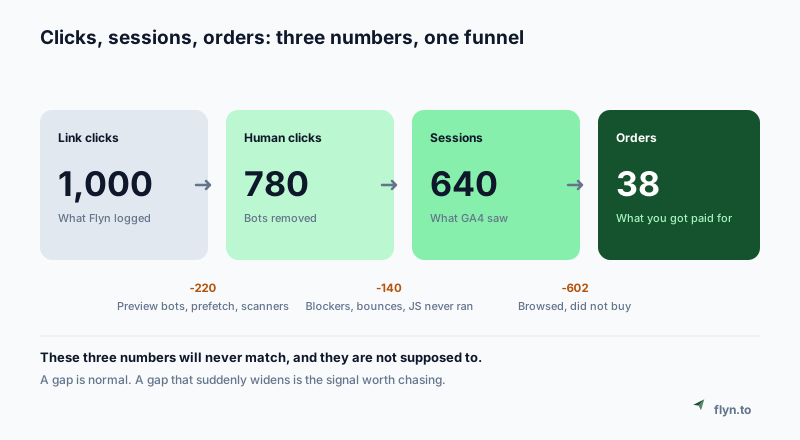
The moment you have three sources of truth you will notice they disagree, and the usual reaction is to assume something is broken. Usually nothing is. Each number counts a different event.
 Tap to enlarge
Why clicks exceed analytics sessions
The big one is link preview bots, and it is the single most common cause of "hundreds of clicks and zero sales". Slack, Discord, iMessage, WhatsApp, Telegram, X, and Facebook all fetch a URL to build the preview card when someone shares it. One paste into a busy Slack workspace can produce a burst of fetches that no human made. Browsers also prefetch links, ad blockers stop analytics scripts from ever running, and some visitors leave before the page finishes loading.
If a placement shows a lot of clicks and no sales, check the human-versus-bot split before you change anything. A link shared into chat apps can look like a hit while producing almost no real visitors. Rewriting your sales page to fix a bot problem is a genuinely expensive mistake.
Why sessions exceed orders
Because most people who visit a page do not buy, which is normal and not a tracking failure. What is worth watching is the shape over time. If sessions hold steady and orders fall, that is a page or pricing problem. If both fall together, it is a traffic problem, and you should be looking at the placement, not the page.
What a healthy gap looks like
There is no universal number, so establish your own baseline over a few weeks and watch for movement instead of chasing a target. A consistent 20 to 30 percent drop from clicks to sessions is unremarkable. A jump to 70 percent in a week says something changed: a new placement in a chat-heavy channel, a broken redirect, or a script that stopped loading. The direction of the change is the signal, not the absolute number.
Reviews of Link Routing Software With Conversion Tracking
Sooner or later you will shop for software to run this method on, and the shelf you land in is the link routing tier: shorteners that do not just redirect but apply rules first, sending iOS somewhere, Android somewhere else, splitting traffic for a test, or rotating destinations. Here is the uncomfortable truth about that shelf: almost every routing tool measures the click and stops. Only a minority can tell you the routed click became a sale. Everything below comes from the vendors' own pricing and feature pages as checked in August 2026, because this tier moves its paywalls around constantly.
| Tool | Routing rules | What it measures after the click | Price to unlock routing (August 2026) |
|---|---|---|---|
| Flyn | iOS, Android, Windows and Mac device routing, per-country geo rules, A/B split testing, click limits with fallback | Sales and revenue per link via first-party click id, 30-day window | Pro, $9/mo |
| Dub | Device and geo targeting on paid tiers | Tracked events (clicks, leads, sales); conversion tracking from Business tier | Pro, about $24/mo |
| Linkly | Country and city geo, device (iOS, Android, Mac, Windows, Linux), rotators | Clicks with bot detection; hands conversions off to GA4 | Pro, $32/mo annual |
| Geniuslink | Country, device and OS, time of click, A/B split | Clicks (bot clicks not billed); sales come from affiliate network reports | $6/mo plus $3.50 per extra 1,000 clicks |
| Bitly | Country and platform on Growth; region and device on Premium | Clicks and scans; 30-day data retention on Core | Growth $29/mo; device rules $199/mo |
| Switchy | Deep-link toggle for supported apps only | Retargeting pixel fires; conversion tracking in private beta | Team, $47/mo |
The two that connect a routed click to an order
Flyn runs the exact loop this guide describes: the click id travels out with the redirect and comes home with the order value, so the same link that chose a destination also reports the sale. Device routing, A/B testing, conversion tracking, and branded domains all sit on one Pro plan at $9/mo, which as of August 2026 is the cheapest conversion-plus-routing bundle in this set by a wide margin. Dub is the other serious answer: it positions itself as a link attribution platform, puts device and geo targeting on every paid tier from about $24/mo, and reserves conversion tracking for its Business tier above that. It is excellent, developer-first software; note that its billing counts clicks, leads, and sales together as tracked events, so a good month consumes quota faster. The full breakdown is in the Dub comparison.
The ones that measure clicks and hand off the rest
Linkly has the broadest rule menu of the tier: country and city geo redirects, a five-way OS split including Linux, and rotators, with rules gated at $32/mo annual on its Pro plan. Its measurement stops at the click: you get bot detection, exports, and a GA4 integration, and conversions become GA4's problem, with the join back to the individual link left to you. Details in the Linkly comparison. Geniuslink is the Amazon affiliate specialist: it localizes links to the buyer's country storefront, routes by device, OS, and time of click, and honorably refuses to bill bot or junk clicks. But an affiliate sale is reported by the network, not the link, and Geniuslink's own commission tracking depth is iTunes-only, so revenue truth arrives the postback way, on the network's schedule. See the Geniuslink comparison for the fine print, including the $50/mo custom domain add-on.
How to pick from this tier honestly
Bitly deserves a line for completeness: country and platform routing starts on its $29/mo Growth plan, region and device rules cost $199/mo on Premium, and its analytics count clicks and scans with 30-day retention on Core, never orders. The Bitly comparison has the tier map. Switchy is pixel-first at $47/mo, with conversion tracking still in private beta as of August 2026; the Switchy comparison covers it. The honest chooser looks like this:
- You need routing plus sales measurement on one bill. Flyn Pro covers iOS, Android, Windows and Mac routing, per-country geo rules, A/B testing, and conversion tracking at $9/mo.
- You need state or city rules. Flyn geo rules stop at country level, so for finer targeting Linkly or a dedicated tool from the geo redirect comparison is the right buy.
- You need developer-grade attribution with an API and webhooks. Flyn Pro includes API access, so your conversion data can be read over the API, plus webhooks for link events; Dub Business is also built for this.
- Your checkout belongs to Amazon. Flyn's click id needs a script on an order page you control, which an Amazon checkout is not, so Geniuslink plus network reporting is the mature setup there.
Whichever tool wins, the method stays the same: one link per placement, a human-filtered denominator, and a judging window longer than your conversion lag. The software is replaceable; the discipline is not.
What To Do With the Answer
Measurement that does not change behaviour is a hobby. Once you can see revenue per placement, three decisions follow, and they are worth making on a schedule rather than a whim.
Cut the ones that only look busy
The placement with lots of clicks and no sales is not free. It costs you the time you spend making content for it. Cut it, or change what it points at: sometimes a high-click, low-sale placement is fine and simply pointed at the wrong destination, and sending it somewhere earlier in your funnel fixes it.
Repeat what actually paid
If a partner newsletter produced 41 sales from 380 clicks, the obvious action is more partner newsletters, not more posts. This is where most of the value of the whole exercise sits, and it is almost always an instruction to do less of something loud and more of something quiet.
Re-test on a schedule
Placements decay. Feeds change, audiences move, and a bio link that carried you last year may be dead now. Re-read the scoreboard monthly rather than continuously, because continuous watching is how you end up reacting to noise. Monthly is often enough to catch a real shift and rare enough that you are looking at meaningful sample sizes.
None of this requires ad spend, a data team, or a new stack. It requires deciding what your placements are, giving each one its own link, connecting the click to the order, and being honest about how much of what you see is real. If you want to run it on Flyn, conversion tracking is included on Pro, click counts and the human-versus-bot split are free on every link, and you can create your first tracked link in under a minute. Creators can start from the creator setup, and stores from the ecommerce setup. If your network reports conversions server to server, test the ping first with the free postback URL tester.
Frequently Asked Questions
How many clicks do I need before I can trust the comparison?
Should I use short links or UTM parameters?
Why does my Instagram or TikTok traffic show up as direct in Google Analytics?
I am getting clicks but no sales. What should I check first?
Can I track sales if my checkout is on Gumroad, Stripe, or a marketplace?
Does conversion tracking need cookie consent?
How long after a click can a sale still be counted?
Do I need a separate link for every single post?
What are the best link routing tools with conversion tracking?
How do link management platforms with analytics dashboards compare?
Free tools for this
Three Flyn tools that pair well with the strategy in this article, all free, no signup needed.
UTM Builder
Build campaign-tracked URLs in seconds.
Broken Link Checker
Scan any page for dead links and 404s.
Open Graph Checker
Preview how URLs unfurl on social.
Keep reading
Three related deep-dives from the Flyn blog.

Email Newsletter Click Tracking: Measure Your Real CTR
12 min read

How to Choose a Branded Short Domain for Your Links
13 min read
Free URL Shorteners Without Ads or Interstitial Pages
15 min read
Ready to try Flyn?
Free plan includes 25 links/month, full analytics, and access to all 30+ free tools above. No credit card required.
Already a member? Log in
Karan Bhakuni is the founder of Flyn. He writes about branded links, click analytics, and the link-management tooling growth teams and creators actually need, drawn from building Flyn and reading a lot of user feedback.
Find these guides useful? Add Flyn as a preferred source so more of them show up in your Google results.