Free Broken Link Checker
Scan any page for dead links and 404 errors. Find broken links that hurt your SEO, waste crawl budget, and frustrate your visitors.
Prevent broken links from the start?
Create reliable Flyn short links that never break, with built-in link monitoring, click analytics, and the ability to update the destination URL anytime.
How to Find Broken Links in 3 Steps
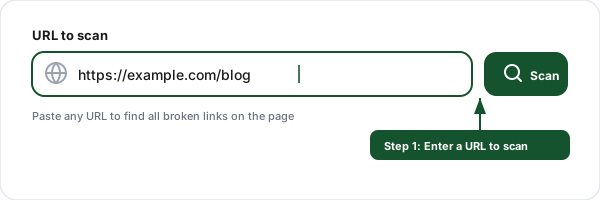
Enter a URL
Paste the URL of any page you want to scan. Our tool crawls the page and extracts every link, internal, external, anchors, and resource links.
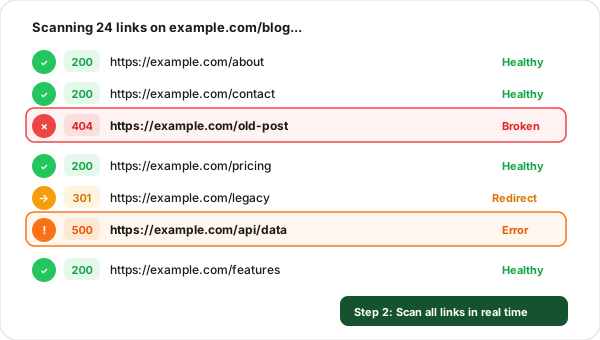
Scan all links
The checker tests every link on the page in real time, checking HTTP status codes, response times, and following redirects to find the final status of each link.
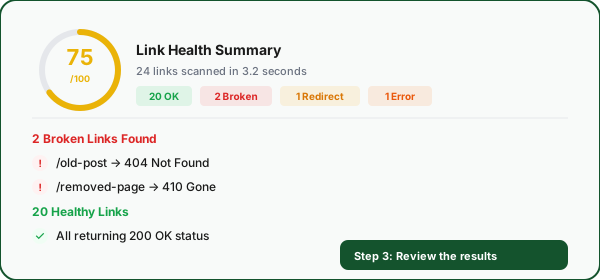
Review results
See a clear breakdown of working links, broken links (404, 410), and server errors (500, 502, 503) with actionable details to fix each issue.
What Are Broken Links and Why Do They Matter?
A broken link is a hyperlink that points to a page or resource that no longer exists or cannot be reached. When a user clicks a broken link, they see an error page (typically a 404 "Not Found") instead of the content they expected. Broken links are also called dead links, link rot, or dangling links. They are one of the most common, and most overlooked, technical SEO issues on the web.
Broken links matter because they create dead ends for both users and search engine crawlers. Every broken link is a missed opportunity: a visitor who bounces, a page that loses link equity, a crawl budget slot wasted on a 404. Studies show that the average website has 5-10% broken links at any given time, and the percentage grows as the site ages. Regular broken link audits are essential for maintaining a healthy, well-ranked website.
Example broken link scenario:
https://example.com/blog/old-post → 404 Not FoundThe page was deleted without a redirect. Any internal or external links pointing to this URL now lead to a dead end, losing all link equity and frustrating visitors.
HTTP Status Codes for Broken Links
404Not FoundThe page does not exist at this URL. This is the most common broken link error. The server understood the request but could not find the resource.
SEO impact
Wastes crawl budget, leaks link equity, and creates a dead end for users. Set up a 301 redirect to the correct page.
410GoneThe page has been permanently removed and will not return. Unlike 404, this explicitly tells search engines to stop checking this URL.
SEO impact
Search engines de-index 410 pages faster than 404s. Use 410 intentionally when you permanently delete content.
500Internal Server ErrorThe server encountered an unexpected error and could not complete the request. This usually indicates a bug in the server-side code or a misconfigured server.
SEO impact
Signals instability to search engines. Frequent 500 errors can cause Google to reduce crawl rate and drop pages from the index.
502Bad GatewayA server acting as a gateway or proxy received an invalid response from the upstream server. Common with load balancers and reverse proxies.
SEO impact
Usually temporary but repeated 502s indicate infrastructure problems. Monitor and fix the upstream server or proxy configuration.
503Service UnavailableThe server is temporarily unable to handle the request, usually due to maintenance or overload. The server may include a Retry-After header.
SEO impact
Google treats 503 as temporary and will re-crawl later. Use 503 for planned maintenance to preserve your rankings.
How Broken Links Hurt Your SEO
Broken links are more than just a bad user experience, they directly impact your search engine rankings. Google's crawlers follow links to discover and index pages. When they encounter broken links, it signals that the site is not well-maintained, wastes valuable crawl resources, and prevents link equity from flowing to the pages that need it most.
Wasted crawl budget
Search engine bots have a limited number of pages they will crawl per visit. Every broken link sends the bot to a dead end, wasting one of those crawls. On large sites, this can prevent important pages from being discovered and indexed.
Poor user experience
Users who click a broken link and land on a 404 page are likely to leave your site immediately. High bounce rates and low engagement signal to search engines that your site is not providing a good experience, which can indirectly hurt rankings.
Lost link equity
When another site links to a page on your site that returns a 404, the link equity (PageRank) that would have boosted your rankings is completely lost. It does not pass through to any other page unless you set up a redirect.
Common Causes of Broken Links
Deleting pages without redirects
When you remove a page from your site, any existing links to that page (internal and external) become broken. Always set up a 301 redirect from the deleted URL to the most relevant alternative page before removing content.
Changing URL slugs
Renaming a page URL without updating internal links or creating a redirect. CMS platforms often let you change slugs freely, but every old link becomes broken. Always create a redirect when changing a URL.
External sites changing their URLs
You linked to an external resource that later moved, was deleted, or the domain expired. This is unavoidable, which is why regular broken link audits are important.
Typos in manually entered URLs
A mistyped URL in your content, email, or social media post creates a broken link from the start. Always verify links work before publishing, and use copy-paste instead of typing URLs manually.
Site migrations and CMS changes
Moving to a new CMS, domain, or URL structure without comprehensive redirect mapping. Large migrations can break hundreds or thousands of links at once if not planned carefully.
Expired or deleted short links
URL shortener services can shut down, or individual short links can expire or be deleted. This is why using a reliable shortener like Flyn with permanent links and link monitoring is critical.
Broken Link Checker + Link Shortener: Why You Need Both
Find broken links with the checker, then prevent them with Flyn short links that you can update anytime without breaking existing links.
Links that never break
Flyn short links let you change the destination URL anytime. If the target page moves, update the short link, no broken links, no lost traffic.
Link health monitoring
Flyn tracks every click on your short links. Spot broken destinations early with real-time analytics and error detection.
Instant redirects
Flyn redirects complete in under 50ms globally. Your users reach the destination instantly with zero broken link risk.
Click analytics included
Every Flyn link counts clicks out of the box, and Pro adds device, location, and referrer breakdowns so you always know how your links perform.
Frequently Asked Questions
What is a broken link?
How do broken links affect SEO?
What is a 404 error?
What is the difference between a 404 and a 410 status code?
How does crawl budget relate to broken links?
How often should I check for broken links?
Can broken links on external sites affect my SEO?
How do I fix broken links on my website?
What causes broken links?
Is this broken link checker free?
More Free Marketing Tools
Explore other free tools from Flyn to grow your campaigns and track performance.
Internal Link Checker
Audit internal link structure, path depth, duplicates, nofollow audits, anchor diversity.
UTM Parser
Paste any URL to extract UTM parameters with naming validation and GA4 support.
Outbound Link Checker
Audit external links for rel attributes, tabnabbing risks, and unique domains, CSV export included.
Robots.txt Tester
Test crawler rules and check if a URL is blocked for Googlebot or AI bots.
Ready to eliminate broken links?
Create reliable Flyn short links that never break. Update destinations anytime, monitor link health, and count every click free, with country and device breakdowns on Pro, all in one platform.