Free Robots.txt Tester
Test any site's robots.txt instantly. Check if a URL is allowed or blocked for Googlebot, Bingbot, GPTBot, and other crawlers, and see exactly which rule matched.
We fetch /robots.txt from the site's origin and parse every directive.
Want to track every link you share?
Create Flyn short links that count every click free; Pro shows from where and on what device. Every link becomes a data point.
How to Test a Robots.txt in 3 Steps
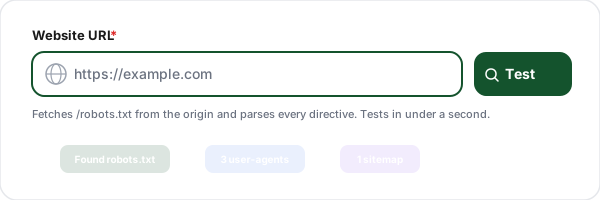
Enter a website URL
Paste the URL of any site. The tool fetches /robots.txt from the origin and parses every directive, User-agent blocks, Disallow rules, Allow rules, Sitemap references, and Crawl-delay.
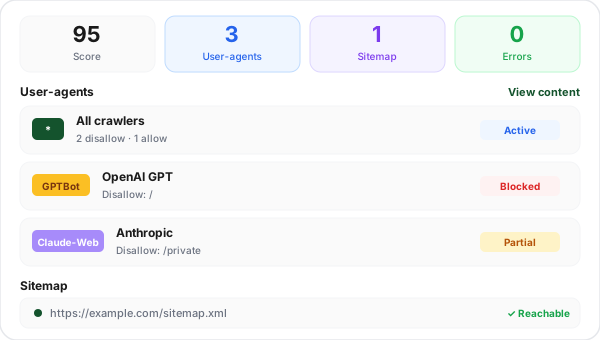
Review parsed rules
See every user-agent block with its rules, all sitemap references, and a syntax-highlighted preview of the raw file. Syntax errors, unknown directives, and risky configurations are flagged.
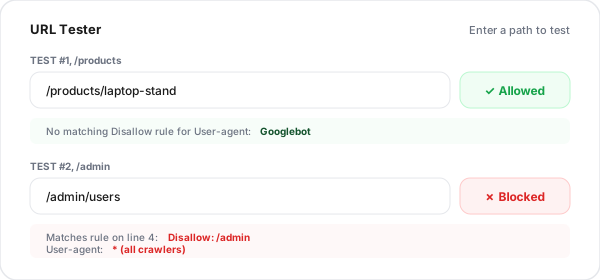
Test a specific URL
Enter any path like /admin/users and pick a user-agent (Googlebot, GPTBot, etc.) to instantly see whether it's allowed or blocked, plus the exact rule that matched.
What Is Robots.txt and Why Does It Matter?
Robots.txt is a plain-text file placed at the root of a website (for example, https://example.com/robots.txt) that tells web crawlers which parts of the site they are allowed to fetch. It's part of the Robots Exclusion Protocol (REP), an informal standard from 1994 that every major search engine honors. Every serious site has one.
Why does it matter for SEO? Because a single line in the wrong place can de-rank your entire site. Disallow: / in your production robots.txt blocks every crawler from every page. More subtle mistakes, blocking CSS, blocking paginated URLs, blocking the same path your sitemap references, quietly erode rankings without any error in Search Console. Robots.txt is also how you point crawlers to your sitemap, control AI training bots like GPTBot and Claude-Web, and set per-bot crawl rates.
Common Robots.txt Directives
Directive
Example
User-agent
User-agent: Googlebot
Disallow
Disallow: /admin/
Allow
Allow: /admin/public.html
Sitemap
Sitemap: https://example.com/sitemap.xml
Crawl-delay
Crawl-delay: 10
Wildcards: * matches any sequence, $ anchors the end (e.g., Disallow: /*.pdf$).
Robots.txt vs Meta Robots vs X-Robots-Tag
These three tools sound similar but do very different things. Pick the right one for each situation.
robots.txt
Blocks crawling. Site-wide file. Cannot prevent indexing of URLs linked from elsewhere.
/robots.txt
Meta robots
Blocks indexing. Per-page. Crawler must be allowed to fetch the page to see it.
<meta name="robots" content="noindex">
X-Robots-Tag
Blocks indexing via HTTP header. Works for non-HTML files like PDFs and images.
X-Robots-Tag: noindex
Robots.txt Best Practices
Always include a Sitemap reference
Add "Sitemap: https://www.example.com/sitemap.xml" to robots.txt. Any crawler will find it, not just the ones you submit to manually via Search Console.
Never block CSS or JavaScript
Google needs to render pages to understand them. Blocking /assets/ or /static/ breaks rendering and hurts rankings. Let Googlebot fetch everything the browser fetches.
Don't rely on robots.txt to hide sensitive pages
Robots.txt is public, anyone can read yours at /robots.txt. Listing /admin/ or /private/ there actually advertises these paths. Use authentication, not robots.txt.
Use noindex, not robots.txt, to remove from search
A page blocked by robots.txt can still appear in search results (Google sees it's linked, just not the content). To truly remove from search, allow crawling and use the noindex meta tag.
Test changes before deploying
A single character can de-rank your site. Validate syntax, test critical paths against Googlebot, and ideally stage the new file on a test environment first.
Block AI training crawlers if needed
To opt out of AI training, add User-agent blocks for GPTBot, Claude-Web, Google-Extended, CCBot, PerplexityBot, and Bytespider with Disallow: /. Not all bots honor this.
Crawler Rules + Link Tracking: Better Together
Test your robots.txt here for free, then use Flyn short links to count every click, with Pro breakdowns showing from where and on what device.
Track every click
Every Flyn short link tallies clicks in real time; Pro adds device, country, referrer, and time-series breakdowns.
Branded links
Use your own domain for short links on Pro. Build trust and increase CTR with branded URLs.
Editable destinations
Change where your short links point anytime. No more broken links when URLs change.
Instant redirects
Flyn redirects complete in under 50ms globally. Your users never notice the redirect.
Frequently Asked Questions
What is a robots.txt file?
Does Google always follow robots.txt?
What's the difference between robots.txt and the noindex meta tag?
How do I block specific bots like GPTBot, Claude-Web, or PerplexityBot?
Can robots.txt hurt my SEO?
How often do search engines re-check robots.txt?
Does robots.txt support wildcards?
What is crawl-delay and does Google honor it?
Is robots.txt case-sensitive?
Should I add my sitemap to robots.txt?
Can I test a robots.txt file before uploading it to production?
What is the difference between Disallow and Allow?
More Free SEO Tools
Explore other free tools from Flyn to audit and improve your site.
Ready to take control of your links?
Test robots.txt for free, then create trackable short links with Flyn: click counts and QR codes free, analytics breakdowns and branded domains on Pro, all in one platform.