Free Security Headers Checker
Audit the HTTP security headers on any URL. See which headers are missing, misconfigured, or well set, with a letter grade and actionable fixes.
Audits 10 HTTP security headers (CSP, HSTS, X-Frame-Options, Permissions-Policy, COOP, CORP, COEP, and more).
Want to track where your links travel?
Create Flyn short links that count every click for free, with device, country, and referrer breakdowns on Pro. Every link becomes a data point you control.
How to Audit Security Headers in 3 Steps
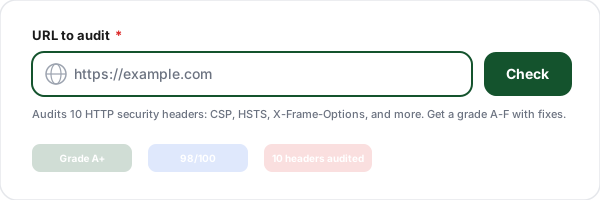
Enter a URL
Paste any page URL. The tool issues a HEAD request (falling back to GET) and inspects every security-relevant response header returned by the server.
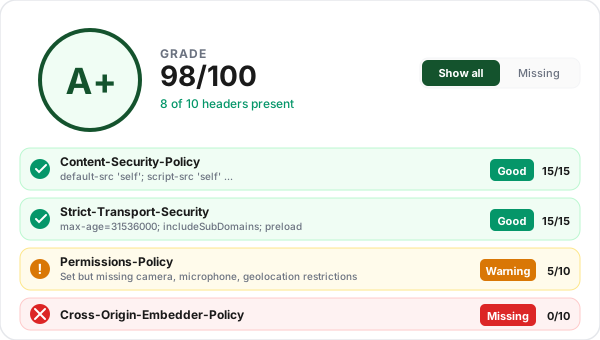
Review your grade
Get a letter grade from A+ to F plus a numeric score out of 100. Each of the 10 headers we check is shown with its current value, a good/warning/missing rating, and points earned.
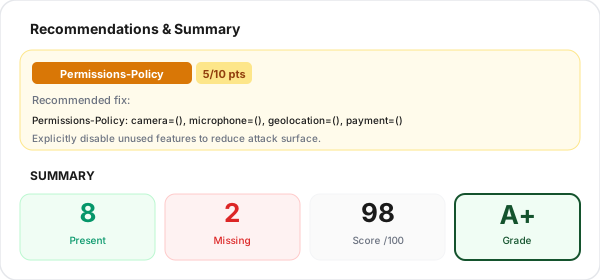
Fix the gaps
Every missing or weak header ships with a concrete recommendation, exact directive values, pitfalls to avoid, and links to the modern replacement where relevant. Copy values in one click.
What Are HTTP Security Headers?
HTTP security headers are response headers your server sends with every page, metadata that tells the browser how to treat your content. They are the browser-side layer of defense against attacks like cross-site scripting, clickjacking, MIME-sniffing confusion, protocol downgrade, and cross-origin data theft. Because they're enforced by the browser (not your app), they protect users even when other defenses fail.
Without security headers, browsers fall back to permissive defaults designed for backward compatibility with 2005-era websites. A modern site with no security headers is essentially opting out of a decade of browser hardening work. The good news: adding them is a few lines of config in your server or CDN, and the impact on performance is negligible. The hard part is building a Content-Security-Policy that fits your site without breaking anything, which is why we recommend starting with report-only mode.
The 10 Most Important Security Headers
The headers we audit and what each one protects against.
Content-Security-Policy (CSP)
The single most powerful security header. Controls which scripts, styles, images, and frames can load on your page. A strict CSP with nonces blocks nearly all injected XSS attacks before they execute.
Strict-Transport-Security (HSTS)
Forces browsers to connect over HTTPS even when the user types http://. Set max-age=31536000; includeSubDomains; preload for the strongest protection against protocol downgrade attacks.
X-Frame-Options
Prevents your site from being embedded in an iframe on another domain, the core defense against clickjacking. Use DENY unless you have a specific reason to allow same-origin framing (SAMEORIGIN).
X-Content-Type-Options
Setting this to "nosniff" stops browsers from trying to guess the content type of a response. Without it, an uploaded text file could be interpreted as JavaScript and executed. One-line fix with zero downsides.
Referrer-Policy
Controls how much URL information is sent in the Referer header when users click outbound links. "strict-origin-when-cross-origin" is the modern default, it shares the origin on same-site, and nothing on cross-origin downgrades.
Permissions-Policy
The successor to Feature-Policy. Explicitly disables browser features your site doesn't need, camera, microphone, geolocation, payment, USB, etc. Even if your code never uses these, a malicious script injected into your page could.
Cross-Origin-Opener-Policy (COOP)
Isolates your browsing context from cross-origin pop-ups. Setting "same-origin" prevents window.opener leaks and mitigates Spectre-class attacks. Required (with COEP) for SharedArrayBuffer access.
Cross-Origin-Resource-Policy (CORP)
Tells browsers which sites are allowed to embed your resources (images, scripts, etc). "same-origin" blocks other sites from hotlinking; "cross-origin" explicitly allows it. Helps mitigate Spectre-style timing attacks.
Cross-Origin-Embedder-Policy (COEP)
Requires every cross-origin resource you load to explicitly opt in (via CORP or CORS). Combined with COOP: same-origin, this enables cross-origin isolation, a prerequisite for powerful APIs like SharedArrayBuffer and high-resolution timers.
X-XSS-Protection
A legacy header honored by older IE/Edge versions. Modern browsers have dropped it in favor of CSP. Set it to "1; mode=block" if you still serve legacy clients, but focus your effort on building a strong CSP instead.
Security Headers and SEO: Does It Matter?
Security headers don't directly appear in ranking algorithms, but their second-order effects on SEO are real. Google has publicly confirmed HTTPS is a ranking factor since 2014, and Strict-Transport-Security is how you cement that HTTPS posture. Without HSTS, a user typing http://yourdomain.com still makes a plain HTTP request before being redirected; with HSTS (especially preload), the browser never makes that insecure request at all, protecting against downgrade attacks that could otherwise hijack sessions and inject malware.
Core Web Vitals are also at stake. A missing or weak Content-Security-Policy leaves your page open to injected ads and crypto miners, both of which wreck Largest Contentful Paint and Interaction to Next Paint. Sites compromised by these injections routinely see ranking drops even before Google marks them as insecure. Finally, browser warnings like "Not secure" in the address bar crush click-through rates from SERPs; strong headers keep those warnings away and maintain the trust signals modern users expect from any legitimate site.
Security Headers Best Practices
Lessons learned from deploying security headers on production SaaS apps.
Start with Content-Security-Policy-Report-Only
Never deploy a new CSP in enforce mode on production. Use the report-only variant with a report-uri or report-to endpoint, collect violations for a week, fix the false positives, then switch to the enforcing header.
Avoid unsafe-inline and unsafe-eval
These directives defeat most of CSP's XSS protection. Use per-request nonces for inline scripts, or refactor to external JS files. For eval(), replace with JSON.parse or trusted-types policies.
Set HSTS preload correctly
Start with max-age=300 while testing. Once you're confident HTTPS works everywhere (including every subdomain), bump to max-age=31536000; includeSubDomains; preload and submit at hstspreload.org.
Use DENY for X-Frame-Options
Unless you run a same-origin iframe embed pattern, default to DENY rather than SAMEORIGIN. If you need more granularity, use CSP frame-ancestors instead, it supports multiple origins and wildcards.
Disable unused browser features
Set Permissions-Policy to explicitly deny every feature you don't use: camera=(), microphone=(), geolocation=(), payment=(), usb=(). This blocks injected scripts from silently accessing sensitive APIs.
Test across environments before shipping
Your staging and production environments may load different scripts (analytics, payment widgets, error tracking). Audit each environment separately and keep your CSP directive list in version control, never edit it live.
Secure Headers + Secure Links: Better Together
Audit your security headers with the checker, then use Flyn to share branded, trackable short links that inherit those same security guarantees on every click.
HTTPS-only redirects
Every Flyn short link serves over HTTPS with HSTS. No downgrade paths, no mixed content.
Click analytics
Every click counted the moment it lands, with device, country, and referrer breakdowns on Pro, know exactly how your links are used.
Branded domains
Bring your own domain on Pro, with automatic TLS. Custom security headers on your branded short links.
Sub-50ms redirects
Global edge delivery means redirects feel instant, your security posture never costs latency.
Frequently Asked Questions
What are HTTP security headers?
Do security headers affect SEO?
What HSTS max-age should I use?
What is HSTS preload and should I enable it?
Should I use unsafe-inline in my CSP?
What's the difference between X-Frame-Options and CSP frame-ancestors?
Do security headers apply to subdomains?
What security grade should I aim for?
How do I set security headers on Vercel, Netlify, or Cloudflare?
Will security headers slow down my site?
Can I test headers without breaking my live site?
Does this tool store or track the URLs I check?
More Free SEO Tools
Explore more technical SEO tools from Flyn, free, instant, no sign-up required.
Ready to harden your site?
Audit your headers for free, then use Flyn to share short links that carry your security posture to every click. Free click counts and QR codes, with analytics breakdowns and custom domains on Pro, all in one platform.