Free Subdomain Finder
Discover all subdomains of any domain via Certificate Transparency logs. Auto-categorized (api, mail, dev, cdn, admin), CSV export, built for SEO + competitor audits.
Queries Certificate Transparency logs via crt.sh, typically returns in 1-5 seconds.
Track which subdomain links convert
Wrap subdomain CTAs in Flyn short links to see traffic, geo, and device breakdowns per subdomain, discover which infrastructure actually drives revenue.
How to Find Subdomains in 3 Steps
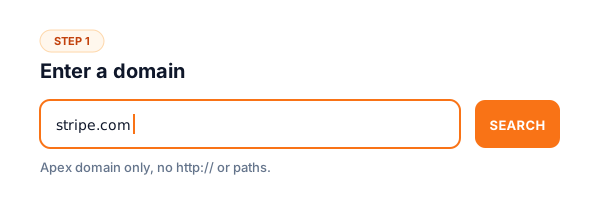
Enter a domain
Type the domain you want to scan (e.g., example.com, no http:// or www. needed). The tool queries Certificate Transparency logs server-side.
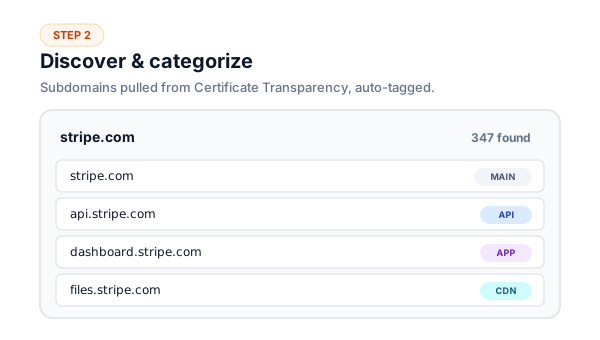
Review categorized subdomains
See every discovered subdomain auto-tagged by purpose (api, mail, dev, cdn, admin, content). Summary cards show total count, category breakdown, and most-common type at a glance.
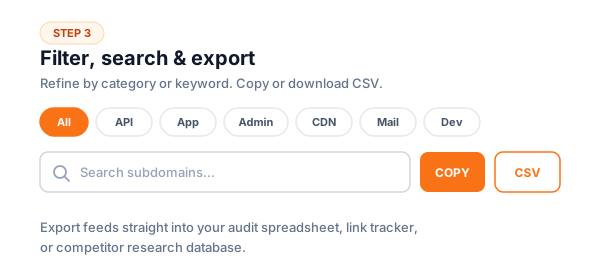
Filter, search, or export
Filter by category (e.g., find all dev/staging subdomains in one click), search by name, copy the full list, or export to CSV for spreadsheet analysis.
How Certificate Transparency Reveals Subdomains
Certificate Transparency (CT) is a Google-led standard that requires every SSL/TLS certificate issued by trusted Certificate Authorities (Let's Encrypt, DigiCert, Sectigo, GlobalSign, etc.) to be logged in public, append-only, tamper-proof logs. CT was created in 2013 to detect mis-issued certificates, situations where a CA accidentally or maliciously issues a certificate for a domain to the wrong party.
The side effect that makes CT useful for subdomain discovery: every subdomain that ever obtained a public HTTPS certificate becomes permanently visible in CT logs. Browsers refuse to trust certificates that aren't logged in CT, so any modern HTTPS subdomain shows up. There's no opt-out; CT logging is mandatory for trusted certificates since April 2018.
This tool queries crt.sh, a free public search interface to CT logs operated by Sectigo. We send a domain query, parse the certificate records, extract every subdomain hostname found in certificate Subject Alternative Names (SANs), deduplicate, and categorize. The whole process takes 1-5 seconds for typical domains.
CT discovers significantly more subdomains than DNS brute-forcing because it captures historical data, certificates issued years ago for subdomains that have since been decommissioned. This is invaluable for SEO audits (find forgotten subdomains hurting your domain authority), competitive intelligence (see all infrastructure a competitor has ever exposed), and security assessments (map the historical attack surface).
Subdomain Category Reference
The 12 categories this tool auto-classifies subdomains into, based on common naming conventions across the web.
| Category | What it means | Common examples |
|---|---|---|
| main | Main / www subdomain, the canonical site root | www.example.com, example.com |
| api | API endpoints, REST, GraphQL, or RPC backends | api.example.com, gql.example.com, v2.api.example.com |
| app | Application interfaces, customer-facing web apps | app.example.com, dashboard.example.com |
| admin | Admin / management interfaces (often access-controlled) | admin.example.com, manage.example.com, control.example.com |
| auth | Authentication / SSO / login services | auth.example.com, sso.example.com, login.example.com |
| Mail servers and email-related infrastructure | mail.example.com, smtp.example.com, mx.example.com | |
| cdn | Content delivery / static assets / media | cdn.example.com, static.example.com, assets.example.com |
| content | Blog, news, marketing content | blog.example.com, news.example.com, marketing.example.com |
| support | Documentation, help center, knowledge base | docs.example.com, help.example.com, support.example.com |
| dev | Development / staging / test environments | dev.example.com, staging.example.com, beta.example.com, test.example.com |
| transfer | File transfer protocols | ftp.example.com, sftp.example.com |
| other | Uncategorized, usually product names, regions, or campaign-specific subdomains | us.example.com, uk.example.com, project-x.example.com |
Common Subdomain Audit Use Cases
Competitor infrastructure audit
Discover competitor product lines, regional sites, partner integrations, and internal tools, all from public CT data. No login or scraping required.
Find your own forgotten subdomains
Old marketing campaigns, abandoned A/B tests, retired internal tools, old subdomains accumulate forever in CT logs. Audit and clean up to consolidate domain authority.
Pre-acquisition due diligence
Before acquiring a company, audit their full subdomain footprint to spot hidden infrastructure, security risks, and brand sprawl that would carry over post-deal.
SEO sitemap completeness check
Compare CT-discovered subdomains against your XML sitemaps to ensure every active subdomain is properly indexed and optimized.
Phishing / lookalike domain monitoring
Discover sub-subdomains using your brand (paypal-secure-login.malicious.com pattern) by scanning suspicious parent domains.
Bug bounty / penetration testing scope
Map the attack surface of an authorized target. CT-based discovery is the gold standard for passive subdomain enumeration in security assessments.
Why Use Flyn's Subdomain Finder?
CT-based discovery
Queries Certificate Transparency logs, finds 99% of public-facing subdomains, including historical ones.
12-category auto-tagging
Every subdomain classified as api / mail / dev / cdn / admin / content / etc. for instant overview.
Stateless + private
Domain queries hit crt.sh directly, nothing is logged or persisted on our servers.
CSV export
Full audit data with category tags for spreadsheet analysis, client reports, or further tooling.
Frequently Asked Questions
What is a subdomain finder?
A subdomain finder is a tool that discovers all subdomains belonging to a domain. For example, given example.com, it finds api.example.com, mail.example.com, blog.example.com, dev.example.com, every named subdomain that has been used publicly. SEO teams use subdomain finders to audit competitor infrastructure, find their own forgotten subdomains, and discover content opportunities. Security teams use them to map attack surfaces.
How does this tool find subdomains?
We query Certificate Transparency (CT) logs via crt.sh. CT is a public, append-only log of every SSL/TLS certificate ever issued by trusted certificate authorities. When a site issues an HTTPS certificate for a subdomain (which every modern site does), that subdomain becomes publicly discoverable in CT logs forever. This method finds significantly more subdomains than DNS brute-forcing because it captures certificates issued years ago, even if the subdomain is no longer active.
What is Certificate Transparency and why does it expose subdomains?
Certificate Transparency (CT) is a Google-led standard that requires every SSL/TLS certificate issued by trusted CAs (Let's Encrypt, DigiCert, Sectigo, etc.) to be logged in public, tamper-proof logs. CT was created to detect mis-issued certificates. A side effect: every subdomain that ever obtained a certificate is permanently visible in CT logs. There's no way to opt out, if you want HTTPS, your subdomain shows up. This is why CT is the most reliable subdomain discovery method.
Does this tool find ALL subdomains of a domain?
Almost all that have used HTTPS publicly. CT logs cover every certificate issued by trusted CAs since 2018 (mandatory) and most before that. Subdomains that never obtained a public SSL cert (internal-only, IP-based, self-signed) won't appear. For internal subdomains, you'd need DNS brute-forcing or zone transfers. For 99% of public-facing subdomains, CT log scanning catches them.
Can I find subdomains of competitors' domains?
Yes, this is one of the highest-value use cases. Competitor subdomain audits reveal: hidden product lines (app.competitor.com), staging/dev environments accidentally exposed (staging.competitor.com), regional domains (uk.competitor.com), partner integrations (partners.competitor.com), and internal tools (admin.competitor.com). All public information from CT logs, no hacking, no privacy violations. Just public certificate data.
Why are subdomains important for SEO?
Subdomains are treated as separate sites by Google for ranking purposes, each accumulates its own link equity, page authority, and topical relevance. Multi-subdomain strategies can dilute your domain's overall authority (PageRank gets split). For SEO audits: identify orphan subdomains (no incoming links), redirect dead subdomains to consolidate authority, ensure each active subdomain has its own sitemap.xml and robots.txt. Subdomain hygiene is foundational technical SEO.
What's the difference between subdomains and subdirectories?
A subdomain (blog.example.com) is technically a separate hostname, treated by search engines as a distinct site. A subdirectory (example.com/blog) lives within the main domain and inherits its authority. Generally, subdirectories are better for SEO because all link equity consolidates under one domain. Use subdomains when content is genuinely separate (different language sites, internal apps, distinct products), not for blog/docs that should benefit from main domain authority.
Are subdomains visible to Google by default?
Yes, if Google can find them. Google discovers subdomains via: links from other indexed pages, sitemap submissions in Search Console, public DNS records (less reliable), and Certificate Transparency logs (Google operates several CT logs). To prevent indexing of a subdomain, use robots.txt or noindex meta tags. To verify what Google has indexed for a subdomain, use the site:subdomain.example.com search operator.
How do I find orphan or forgotten subdomains on my own site?
Run this tool against your domain. Compare the result against your active subdomain list. Anything in the CT-discovered list that you don't recognize is a forgotten subdomain, common sources: old marketing campaigns (campaign-2022.example.com), retired internal tools (legacy-admin.example.com), abandoned A/B tests (test1.example.com). Decide whether to: (1) reactivate if useful, (2) 301 redirect to the main site, or (3) take down the DNS record entirely to remove from CT.
Can hackers use subdomain finders for malicious purposes?
Yes, subdomain enumeration is a standard reconnaissance technique in penetration testing and bug bounties. Public subdomain data is available to attackers regardless of whether you use this tool. The defensive answer: assume your subdomains are discoverable, and harden each one. Audit publicly-exposed subdomains for forgotten dev/staging environments, default credentials, and outdated software. The same tool security pros use, defenders should use first.
Why does the tool sometimes show subdomains that don't exist anymore?
Certificate Transparency logs are append-only and historical, once a certificate is issued for a subdomain, it stays in CT logs forever, even after the subdomain is decommissioned. That's why you may see subdomains like old-2019-campaign.example.com that no longer resolve. This is actually useful: it shows the historical infrastructure of a domain, helping audit what was once exposed. To verify if a subdomain is currently active, do a DNS lookup or HTTP check after discovery.
Does this tool store the domains I check?
No. Domain queries are forwarded to the public Certificate Transparency database (crt.sh) and the result is returned to you, nothing is logged or persisted on our servers. The optional history feature uses your browser's localStorage only. Safe to audit competitor domains, client domains, or your own staging infrastructure without any data retention concerns.
Related Tools
URL to Domain Extractor
Reduce a list of URLs to root domains or full hostnames, using the Public Suffix List.
Canonical URL Checker
Verify canonical tags across subdomains to prevent duplicate content issues.
XML Sitemap Validator
Validate sitemap.xml for each subdomain. Check URL structure, lastmod, priority.
Broken Link Checker
Scan any subdomain for dead links, 404 errors, and server issues that hurt SEO.
Ready to level up your links?
Audit subdomain infrastructure, then track which subdomain CTAs actually convert with Flyn short links, turn discovery into measurable insight.