Free Canonical URL Checker
Verify rel=canonical tags, detect mismatches with og:url, check hreflang consistency, and prevent duplicate content issues that hurt your rankings.
Need clean, canonical-friendly short links?
Flyn short links resolve with proper canonical handling, one clean redirect to the final destination, no duplicate content issues.
How to Check Canonical Tags in 3 Steps
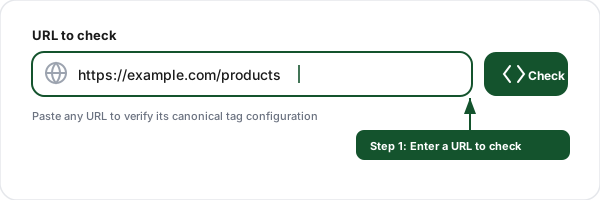
Enter a URL
Paste any page URL you want to verify. The tool fetches the page and extracts canonical, og:url, and hreflang tags from the HTML head.
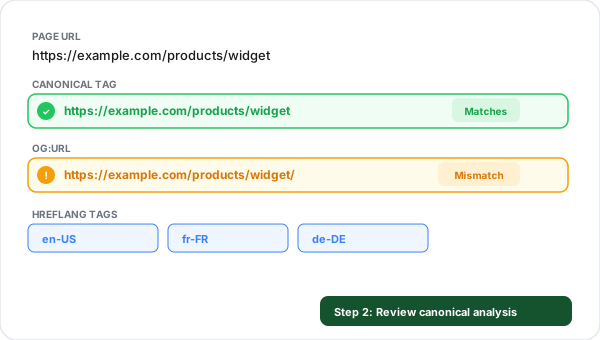
Review canonical analysis
See whether the canonical tag exists, matches the page URL, aligns with og:url, and whether hreflang tags are configured correctly.
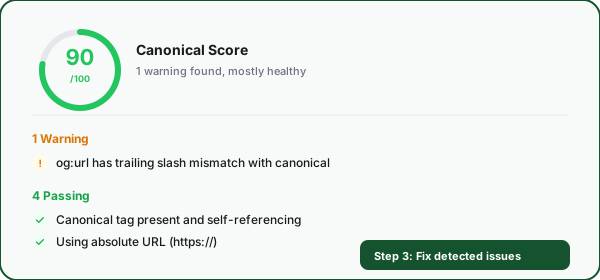
Fix issues
Get a score from 0 to 100 with color-coded issues, errors (red), warnings (amber), and info (blue), plus actionable advice on how to fix each one.
What Are Canonical Tags and Why Do They Matter?
A canonical tag is an HTML element that tells search engines which version of a URL is the preferred one to index. It lives in the <head> section of your page as <link rel="canonical" href="https://example.com/page">. When search engines encounter this tag, they understand that this URL is the "master" copy of the content.
Canonical tags solve the duplicate content problem. In practice, the same page can be accessible via dozens of URLs, with and without www, HTTP and HTTPS, with tracking parameters, with session IDs, with different sort orders. Without canonical tags, Google splits your ranking power across all these duplicates instead of consolidating it on one URL.
Example:
<link rel="canonical" href="https://example.com/products/widget" />This tells Google: "Even if you find this content at /products/widget?sort=price or /products/widget?ref=email, the version at /products/widget is the one to index."
Canonical Issues Explained
ErrorMissing Canonical TagThe page has no rel=canonical tag. Without it, Google must guess which URL version to index. This often leads to duplicate content issues, especially if the page is accessible via multiple URLs (www/non-www, HTTP/HTTPS, with/without trailing slash).
ErrorCanonical MismatchThe canonical tag points to a different URL than the page URL. This can de-index the page if the mismatch is unintentional. Verify whether the canonical correctly points to the preferred version or if it was set incorrectly.
WarningHTTP/HTTPS MismatchThe canonical uses HTTP while the page is served over HTTPS (or vice versa). This creates a mixed signal, the page is secure but the canonical points to an insecure version. Always use HTTPS in canonical tags.
WarningTrailing Slash InconsistencyThe canonical URL has a trailing slash but the page URL does not (or vice versa). While Google usually handles this, it creates an inconsistent signal. Pick one format (with or without trailing slash) and use it consistently.
Warningog:url MismatchThe og:url meta tag points to a different URL than the canonical tag. This means social platforms will use a different URL than search engines. Align og:url with canonical to consolidate engagement and ranking signals.
WarningRelative Canonical URLThe canonical tag uses a relative URL (e.g., /page) instead of an absolute URL (https://example.com/page). Google recommends absolute URLs to avoid ambiguity with protocols, subdomains, and base URLs.
Canonical vs og:url vs Hreflang: What is the Difference?
These three tags serve different purposes but must work together. The canonical tag tells search engines which URL to index. The og:url tag tells social platforms which URL to use for sharing. Hreflang tags tell search engines which language/region a page targets. When any of these conflict, you create mixed signals that can hurt both your search rankings and social media engagement.
Feature
Canonical
og:url
Hreflang
Purpose
Search indexing
Social sharing URL
Language targeting
Affects
Google, Bing
Facebook, LinkedIn
Google, Yandex
Required?
Recommended
Recommended
Only for multilingual
Self-referencing
Yes, best practice
Yes
Yes, required
Must be absolute URL
Yes
Yes
Yes
Common Canonical Tag Mistakes to Avoid
Canonical pointing to the homepage on every page
A common CMS misconfiguration where every page has its canonical set to the homepage URL. This tells Google that every page is a duplicate of the homepage, effectively de-indexing your entire site except the homepage.
Forgetting canonical after a site migration
After moving to a new domain or changing URL structure, canonical tags often still point to the old URLs. This creates a conflict, the page is on the new domain but canonical points to the old one, confusing search engines.
Setting canonical on paginated pages incorrectly
For paginated content (page 1, page 2, page 3), each page should have a self-referencing canonical, not all pointing to page 1. Pointing all pages to page 1 tells Google to ignore all content after the first page.
Multiple CMS plugins adding canonical tags
When you have multiple SEO plugins (e.g., Yoast + RankMath, or a theme that adds its own canonical), each may inject its own canonical tag, creating conflicting signals. Audit your HTML <head> for duplicate canonical tags.
Using canonical instead of redirects
Canonical tags are hints, not directives, Google may choose to ignore them. If you want to permanently redirect users and search engines from an old URL to a new one, use a 301 redirect instead of relying on canonical alone.
Not including canonical on JavaScript-rendered pages
Single-page apps (SPAs) that render content with JavaScript often forget to include canonical tags in the server-side HTML. If Google cannot see the canonical during the initial HTML parse, it may index the wrong URL version.
Canonical Checker + Link Shortener: Better Together
Verify your canonical tags, then create clean Flyn short links that redirect properly without creating duplicate content issues.
Clean 301 redirects
Flyn short links use a single 301 redirect to the final URL. No intermediate pages, no duplicate content signals.
No canonical conflicts
Short links redirect, they do not render HTML. No competing canonical tags, no duplicate content risk.
Full click analytics
Every click through Flyn is tracked with device, country, referrer, and time-series analytics, without affecting canonical signals.
Custom domains
Use your own branded domain for short links. Consistent branding with zero canonical tag issues.
Frequently Asked Questions
What is a canonical URL?
Why are canonical tags important for SEO?
What happens if my canonical tag is wrong?
Should canonical URLs be absolute or relative?
What is the difference between canonical and og:url?
Can I have multiple canonical tags on one page?
What are hreflang tags and how do they relate to canonical?
How do I fix canonical tag issues?
Do self-referencing canonical tags matter?
How do I check a canonical tag manually, and what if Google picks a different one?
Is this canonical checker free?
More Free SEO Tools
Explore other free tools from Flyn to audit and improve your site.
Broken Link Checker
Scan any page for broken links, 404s, and dead URLs.
Redirect Checker
Trace redirect chains and detect 301/302 issues.
Hreflang Tag Generator
Build hreflang tags, they work alongside canonical for international SEO.
Internal Link Checker
Audit internal link structure on any page, path depth, duplicates, anchor diversity.
Ready to fix your canonical tags?
Check canonical tags for free, then create clean short links with Flyn. One redirect, full analytics, branded domains, all in one platform.