Free Robots.txt Generator
Build a valid robots.txt file from a friendly form. Pick presets, add User-agent rules, set Crawl-delay, and point crawlers at your sitemap, with a live preview as you type.
Quick presets
Pick a preset to start, then customize. Existing rules will be replaced.
User-agent rules
1Honored by Bing, Yandex, Yahoo, Baidu. Ignored by Google.
Sitemap URLs
(absolute URL, one per line)robots.txt (live preview)
User-agent: *
Disallow:
https://yourdomain.com/robots.txt.Need branded short links for your sitemap and bot traps?
Track which crawlers (and which humans) hit your links with Flyn short URLs: free click counts, instant QR codes, and analytics breakdowns plus custom domains on Pro.
How to Generate Robots.txt in 3 Steps
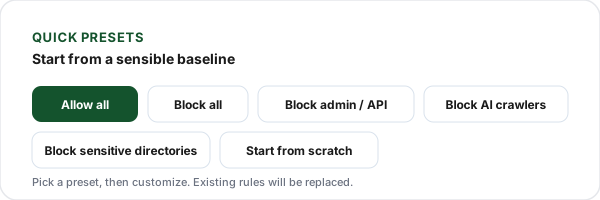
Pick a starting preset
Start from one of our presets, "Allow all", "Block all", "Block admin and API paths", or "Block sensitive directories", or build from scratch. Each preset is a sensible baseline you can edit.
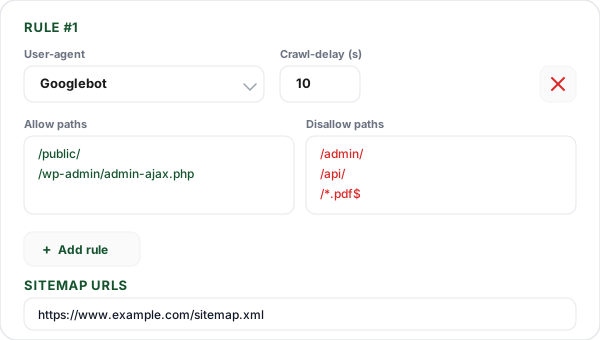
Add User-agent rules and sitemaps
Add one row per crawler you want to target, Googlebot, Bingbot, AI bots like GPTBot, or the wildcard "*". Set Allow paths, Disallow paths, and an optional Crawl-delay. Add a Sitemap URL on its own line.
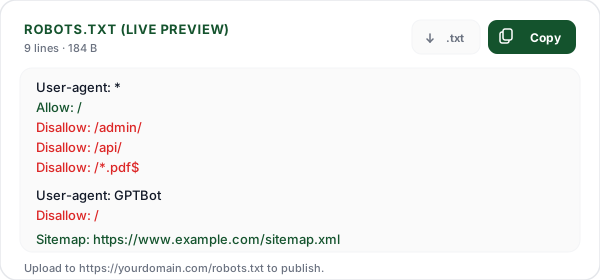
Copy and upload to /robots.txt
Copy the pretty-printed file with one click. Upload it to the root of your domain so it is served at https://yourdomain.com/robots.txt. Validate the live file with the Flyn Robots.txt Tester.
What Is a Robots.txt File?
Robots.txt is a plain-text file that lives at the root of your domain, for example, https://www.example.com/robots.txt , and tells web crawlers which parts of your site they may fetch. It is the front door of the Robots Exclusion Protocol (REP), an informal standard first proposed in 1994 and finally codified as RFC 9309 in 2022.
Crawlers fetch your robots.txt before they fetch any page on your site. If the file is missing or returns a 404, well-behaved bots assume nothing is off-limits. If it returns a 5xx server error, Google will pause crawling until the file is reachable again, which means a broken robots.txt can quietly stall your entire index. Getting it right matters: a single misplaced Disallow: / line will de-rank your whole site overnight.
This generator produces a syntactically valid robots.txt from a friendly form so you don't have to hand-roll the directives. It supports User-agent groups, Allow and Disallow patterns, wildcards and $ anchors, Crawl-delay, and one or more Sitemap URLs. The output renders live as you type, and you can copy the final file to your clipboard in one click.
Robots.txt Directives: The Quick Reference
The six directives you'll ever need, what each one does and which crawlers honor it.
User-agent
Names the crawler this rule group applies to. "User-agent: *" targets every bot; "User-agent: Googlebot" targets only Google's main crawler. You can list multiple User-agent lines before a single group of Allow/Disallow rules to apply the same rules to multiple bots.
Disallow
Blocks a path or pattern from being crawled by the user-agent above. "Disallow: /admin/" blocks every URL under /admin/. An empty "Disallow:" (no value) means "block nothing", useful for overriding wildcard rules. Paths are case-sensitive and must begin with a leading slash.
Allow
Explicitly permits crawling of a path, typically used to carve an exception out of a broader Disallow rule. "Disallow: /private/" plus "Allow: /private/public.html" blocks the whole directory except for one file. Allow is supported by Google, Bing, Yahoo, and most modern crawlers as an REP extension.
Crawl-delay
Asks the crawler to wait N seconds between successive requests. Honored by Bing, Yandex, Yahoo (Slurp), and Baidu, ignored by Google. Use it only if your server cannot keep up with normal crawl rates, and prefer a value of 1-10 seconds to avoid silently shrinking your index coverage.
Sitemap
Points crawlers at one or more XML sitemap files. Must use an absolute URL (https://www.example.com/sitemap.xml). Sitemap lines live at the file level, outside any User-agent group, and are read by every crawler that supports the directive. Adding it is a near-zero-effort SEO win.
Host (deprecated)
Originally a Yandex-only directive that named the canonical hostname. Yandex officially deprecated it in 2021 in favor of HTTP 301 redirects and rel=canonical. You can safely leave it out of every modern robots.txt, no major crawler still relies on it.
Common User-agents: Search Engines and AI Bots
The crawlers you'll most often want to target in your robots.txt.
Googlebot
Google's main web crawler. Also serves as a parent token: Googlebot-Image, Googlebot-News, and Googlebot-Video inherit rules from Googlebot unless they have their own group. Google-Extended is a separate opt-out for AI training (Bard, Vertex AI).
Bingbot
Microsoft Bing's crawler, also powering DuckDuckGo and Yahoo (in the US). Bingbot honors Crawl-delay, unlike Googlebot. Microsoft also runs MSNBot (legacy) and AdIdxBot (Bing Ads landing-page validation).
Slurp (Yahoo)
Yahoo's historic crawler. In most markets Yahoo Search results are now powered by Bing, so Slurp activity is regional (notably Japan). Honors Crawl-delay and the Allow directive.
DuckDuckBot
DuckDuckGo's own crawler, used to index a small share of results alongside Bing data. Lightweight traffic on most sites; blocking it usually has negligible SEO impact.
Baiduspider
Baidu's crawler, the dominant search engine in mainland China. Has its own quirks, including limited support for Allow and a stricter interpretation of Disallow patterns.
YandexBot
Yandex's crawler, the largest search engine in Russia and several CIS countries. Supports Allow, wildcards, $, Crawl-delay, and historically the now-deprecated Host directive.
GPTBot, Claude-Web, PerplexityBot
AI-training and answer-engine crawlers. Each one accepts a standard User-agent block. Many publishers block these to prevent unattributed content reuse in chatbots. Note that not every AI bot respects robots.txt, robots.txt is a polite request, not enforcement.
CCBot (Common Crawl)
Common Crawl powers the bulk training datasets behind many AI models. Blocking CCBot removes your site from those datasets going forward but does not retroactively scrub it from existing crawls.
Robots.txt vs Meta Robots vs X-Robots-Tag
These three controls do related but different things. Robots.txt controls crawling, whether the bot is allowed to fetch a URL. The <meta name="robots"> tag and the X-Robots-Tag HTTP header control indexing, whether the URL can appear in search results once it has been crawled.
These two layers are independent. A page can be crawled but noindex'd (Google fetches it, reads the tag, and silently drops it from the index). A page can also be blocked in robots.txt and still appear in search results as a bare URL if other sites link to it, because Google knows the URL exists but isn't allowed to fetch the actual page to see a noindex directive. To reliably remove a page from search, allow it in robots.txt and add noindex.
The choice between meta robots and X-Robots-Tag is mostly a delivery question. Meta tags live in HTML <head> and only work for HTML responses. The X-Robots-Tag HTTP header works on any response, PDFs, images, JSON endpoints, making it the right tool for non-HTML assets.
Robots.txt Best Practices
What we've learned from auditing thousands of production robots.txt files.
Don't block CSS, JS, or image files
Google needs to render your pages to score them for Core Web Vitals and mobile-friendliness. Blocking /assets/, /static/, or /*.css will hurt rankings. Always allow your build output and CDN paths.
Use one wildcard "*" group for the common case
Most sites need only a single "User-agent: *" group with a handful of Disallow rules. Add bot-specific groups only when you want to give a particular crawler narrower or broader access than the default.
Anchor file-extension rules with $
Use "Disallow: /*.pdf$" rather than "/*.pdf" to avoid accidentally blocking directories that contain ".pdf" in their name. The dollar anchors the pattern to the end of the URL.
Always include a Sitemap directive
Even if you submit your sitemap manually to Google and Bing, listing it in robots.txt helps every other crawler, AI bots, niche search engines, and verification tools, discover it without manual setup.
Never put sensitive paths in Disallow
Anyone can read your robots.txt. Listing /private-data/ or /api/internal/ in Disallow advertises those paths to attackers. Use authentication for real privacy.
Test before you deploy
A single "Disallow: /" left in production de-ranks your entire site. Run the file through the Flyn Robots.txt Tester (or Google Search Console's robots report) before pushing it live.
Crawl Rules + Branded Links: Better Together
Generate a clean robots.txt with the form above, then use Flyn to share trackable short links with every click counted free; Pro adds analytics breakdowns and custom domains so campaign URLs route through a domain you control.
Live preview
See the exact robots.txt update in real time as you add rules, no submit button, no surprises at copy time.
Sensible presets
One click to start from "Allow all", "Block all", or "Block admin and API paths", the patterns most sites need on day one.
Live in your browser
Everything runs client-side. We never see your draft rules, your paths, or your sitemap URLs.
Pairs with the tester
Generate here, then drop the file on your server and validate it with the free Flyn Robots.txt Tester in seconds.
Frequently Asked Questions
What is a robots.txt file and where does it go?
What is the basic syntax of robots.txt (User-agent, Allow, Disallow)?
How do wildcards (*) work in robots.txt?
What does the dollar sign ($) do in robots.txt?
What is Crawl-delay and which bots actually respect it?
How do I point crawlers to my sitemap from robots.txt?
What's the difference between robots.txt and the noindex meta tag?
Should I use robots.txt to hide sensitive or private data?
How do I validate my robots.txt file before publishing it?
How does Google actually read and apply robots.txt rules?
What are the most common robots.txt mistakes that hurt SEO?
Is robots.txt case-sensitive?
More Free SEO Tools
Pair this generator with our other technical SEO tools, free, instant, no sign-up required.
Robots.txt Tester
Validate the robots.txt you just built, fetch the live file and test any URL against any user-agent.
XML Sitemap Validator
Validate the sitemap you point to from robots.txt, structure, URLs, and lastmod fields.
Canonical URL Checker
Audit canonical tags on any URL, find duplicates and missing rel=canonical.
Meta Tag Generator
Generate SEO meta tags, Open Graph, and Twitter Cards with a live Google preview.
Ready to ship your robots.txt?
Build it here in seconds, upload it to your domain root, then validate it with the Flyn Robots.txt Tester. Pair it with Flyn short links that count every click across every campaign, with country and device breakdowns on Pro.