Free Open Graph Checker
Check your OG meta tags and preview how your links appear on Twitter/X, Facebook, LinkedIn, Discord, Slack, and WhatsApp. Instant social share score included.
Need custom OG tags on your links?
With Flyn, set custom og:title, og:description, and og:image on every short link. Control exactly how your links appear when shared on social media.
How to Check Open Graph Tags in 3 Steps
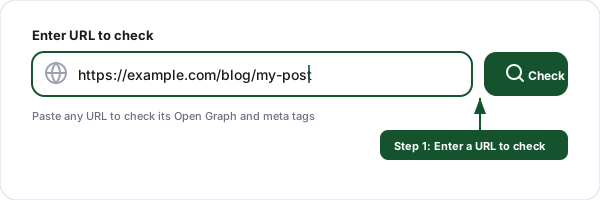
Enter a URL
Paste any URL you want to check. Our tool fetches the page server-side and extracts every Open Graph, Twitter Card, and standard meta tag from the HTML.
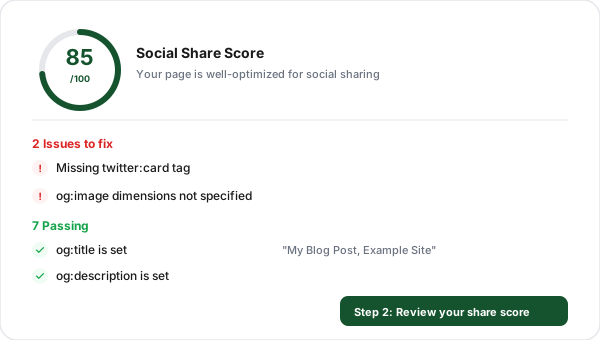
Review your social share score
Get a score from 0 to 100 based on how well your meta tags are configured. See a clear breakdown of issues to fix and what you are doing right.
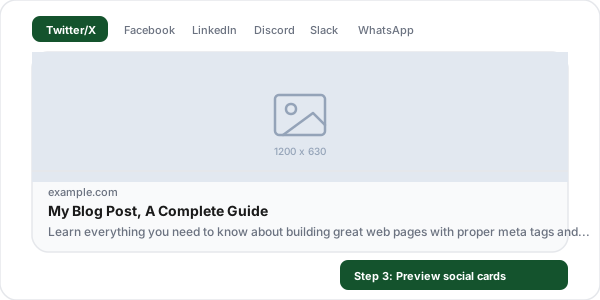
Preview social media cards
See pixel-perfect previews of how your link will appear on Twitter/X, Facebook, LinkedIn, Discord, Slack, and WhatsApp, before you share it.
What Are Open Graph Meta Tags?
Open Graph (OG) meta tags are snippets of HTML code that control how your web pages appear when shared on social media platforms. Created by Facebook in 2010, the Open Graph protocol has become the universal standard for social media previews. When someone shares your URL on Facebook, Twitter/X, LinkedIn, Discord, Slack, or WhatsApp, these platforms read your OG tags to generate a rich preview card with a title, description, and image.
Without Open Graph tags, social media platforms attempt to guess what to display, often pulling the wrong image, a truncated title, or no description at all. This results in unappealing link previews that get fewer clicks and shares. An Open Graph checker like this tool lets you verify your tags are correct before sharing, ensuring every link you post looks professional and drives maximum engagement.
Example Open Graph tags:
<meta property="og:title" content="Your Page Title" />
<meta property="og:description" content="A brief page summary" />
<meta property="og:image" content="https://example.com/image.jpg" />
<meta property="og:url" content="https://example.com/page" />
All Open Graph Tags Explained
og:titleRecommendedThe title of your page as it should appear in social media previews. Keep it concise and compelling, this is the headline people see when your link is shared.
Pro tip
Keep under 60 characters to avoid truncation on most platforms.
og:descriptionA brief summary of your page content. This appears below the title in social media cards and should entice users to click.
Pro tip
Aim for 55-200 characters. Front-load important keywords.
og:imageRecommendedThe preview image URL shown in social media cards. This is the most visually impactful tag, a good image dramatically increases click-through rates.
Pro tip
Use 1200x630px (1.91:1 ratio). Always use an absolute URL starting with https://.
og:urlRecommendedThe canonical URL of your page. This tells social platforms which URL to use as the permanent link, even if the page is accessed via a different URL.
Pro tip
Use the same URL as your <link rel="canonical"> tag.
og:typeRecommendedThe type of content on the page. Common values are "website" for homepages and "article" for blog posts. This helps platforms categorize your content.
Pro tip
Use "website" for landing pages, "article" for blog posts, "product" for e-commerce.
og:site_nameThe name of your website or brand. This appears above the title in some social previews (like Facebook) and helps users identify the source.
Pro tip
Use your brand name, not your domain.
og:localeThe language and region of your content in the format language_TERRITORY (e.g., en_US). Helps platforms serve the right language version.
Pro tip
Default is en_US if not specified. Use for multilingual sites.
og:image:widthThe width of the og:image in pixels. Specifying dimensions helps platforms render your image faster without needing to download it first.
Pro tip
Set to 1200 for the recommended 1200x630 image size.
og:image:heightThe height of the og:image in pixels. Combined with og:image:width, this prevents layout shift when the preview card loads.
Pro tip
Set to 630 for the recommended 1200x630 image size.
Twitter Card Tags Explained
Twitter Card tags control how your links appear specifically on Twitter/X. When both OG tags and Twitter Card tags are present, Twitter uses the Twitter-specific tags. When only OG tags exist, Twitter falls back to those.
twitter:cardControls the card type: "summary" (small square image) or "summary_large_image" (large landscape image). This is the most important Twitter-specific tag.
Pro tip
Use "summary_large_image" for most pages, the larger image gets significantly more engagement.
twitter:titleThe title shown in the Twitter/X card. Overrides og:title when present. Twitter truncates titles longer than about 70 characters.
Pro tip
If your og:title works well, you can skip this tag, Twitter will use og:title as fallback.
twitter:descriptionThe description shown in the Twitter/X card. Overrides og:description when present.
Pro tip
Keep under 200 characters. Twitter may truncate longer descriptions.
twitter:imageThe image shown in the Twitter/X card. Overrides og:image when present. Must be an absolute URL.
Pro tip
Minimum 144x144 for summary, 300x157 for summary_large_image. Max 5MB.
twitter:siteThe @username of the website or brand that the content belongs to. Appears in the card footer.
Pro tip
Include the @ symbol. Example: @flyn_to
twitter:creatorThe @username of the content author. Useful for articles and blog posts to credit the writer.
Pro tip
Use for blog posts and articles where the author has a Twitter/X account.
Open Graph Image Size Guide by Platform
Each social media platform has different image requirements. Use these recommended sizes to ensure your preview looks perfect everywhere.
Platform
Recommended Size
Aspect Ratio
Max File Size
1200 x 630
1.91:1
8 MB
Twitter/X (large)
1200 x 630
1.91:1
5 MB
Twitter/X (summary)
144 x 144
1:1
5 MB
1200 x 627
1.91:1
5 MB
Discord
1200 x 630
1.91:1
8 MB
1200 x 630
1.91:1
5 MB
Slack
1200 x 630
1.91:1
5 MB
Common Open Graph Mistakes to Avoid
Missing og:image tag
Without an og:image, social platforms display a generic placeholder or try to extract a random image from your page. This dramatically reduces click-through rates. Always include a high-quality, relevant preview image.
Using relative image URLs
Open Graph image URLs must be absolute (starting with https://). Relative paths like "/images/preview.jpg" will not work. Social media crawlers cannot resolve relative URLs since they do not know your domain.
Image too small or wrong aspect ratio
Images smaller than 200x200 pixels may be ignored by Facebook. The recommended size is 1200x630 pixels (1.91:1 ratio). Using square images when summary_large_image is set results in awkward cropping.
Not setting twitter:card
Without a twitter:card meta tag, Twitter/X defaults to a basic link with no image preview. Set twitter:card to "summary_large_image" for the best visual impact in the Twitter/X feed.
Duplicate or conflicting tags
Having multiple og:title or og:description tags confuses crawlers, they may pick the wrong one. Ensure each OG tag appears exactly once in your HTML <head>. Check for duplicate tags from CMS plugins.
Forgetting to clear social media cache
Social platforms cache your OG data for hours or days. After updating tags, use Facebook Sharing Debugger, Twitter Card Validator, or LinkedIn Post Inspector to force a re-scrape and see your changes.
Custom OG Tags + Link Shortener: Why You Need Both
Checking your OG tags is the first step. With Flyn, you can override OG tags on any short link, even if the destination page has poor or missing tags.
Custom preview images
Set a custom og:image on your short link. Perfect for affiliate links, landing pages, or sites you do not control.
Custom titles & descriptions
Override og:title and og:description for each link. Tailor social previews for different audiences and campaigns.
Preview before sharing
See exactly how your customized link will appear on social media before you post it. No more broken previews.
Track social clicks
Get real-time analytics on every click from social media. See which platforms drive the most traffic to your links.
Frequently Asked Questions
What are Open Graph tags?
What is the difference between Open Graph tags and Twitter Cards?
What is the ideal Open Graph image size?
Why is my Open Graph image not showing on Facebook?
What Open Graph tags are required?
How do I add Open Graph tags to my website?
How do I debug Open Graph tags?
Do Open Graph tags affect SEO?
How often should I check my Open Graph tags?
What is a social share score?
Is this Open Graph checker free?
More Free Marketing Tools
Explore other free tools from Flyn to grow your campaigns and track performance.
UTM Builder
Build campaign tracking URLs with UTM parameters for Google Analytics.
Meta Tag Generator
Generate SEO meta tags, Open Graph, and Twitter Cards with a live Google preview.
SERP Snippet Preview
Preview your title and meta description as a Google result on desktop and mobile, with pixel-width checks.
UTM Parser
Extract and decode UTM parameters from any URL with naming validation and GA4 support.
Ready to perfect your social media previews?
Combine the Open Graph checker with Flyn's link shortener for custom OG tags, branded short links, real-time click analytics, and QR codes, all in one platform.